一个可自定义的服务端标签页列表,支持动态标题与页脚、角色前缀、玩家状态以及实时服务器统计信息。
仅安装在服务器上。 玩家使用原版客户端即可加入。LuckPerms、FTB Ranks 和 spark 为可选依赖。
亮点
|
|
| 🎨 颜色与渐变 |
支持 & 代码、&#RRGGBB 十六进制颜色以及两种渐变语法,同时保持粗体、斜体等其他格式不变。 |
| 🎞️ 动态标题与页脚 |
任意数量的帧自动循环播放,速度由你决定。 |
| 🏷️ 丰富的玩家名称 |
每个名称旁边显示维度符号、含吸收值的生命值、延迟、游戏模式和 AFK 状态。 |
| 👑 角色等级 |
可选的 LuckPerms 前缀、后缀和分组,或 FTB Ranks,并支持按角色权重排序。 |
| 📈 实时服务器统计 |
带颜色编码的 TPS、MSPT 和 CPU、内存及运行时间;若安装了 spark,则提供滚动平均值和百分位数。 |
| 💤 AFK 检测 |
玩家在配置的空闲时间后名称变灰并显示 #AFK。 |
| ⚡ 轻量级 |
仅在内容变化时发送数据包,且所有玩家的指标在每次更新时仅采样一次。 |
| 🔁 热重载 |
编辑 config/tablist.toml 并运行 /tablist reload,无需重启服务器。 |
支持版本
| Minecraft |
Fabric |
NeoForge |
Java |
| 26.1 – 26.3 (26.1, 26.1.1, 26.1.2, 26.2, 26.3) |
✅ |
✅ |
25 |
| 1.21 – 1.21.11 (所有版本) |
✅ |
✅ |
21 |
每个 Minecraft 发布版本都有对应加载器的独立 JAR 文件。请选择与你的服务器确切 Minecraft 版本匹配的文件。
安装
- 下载 适用于你的服务器 Minecraft 版本和加载器 的 JAR 文件。
- 将其放入服务器的
mods/ 文件夹中。Fabric 服务器还需要 Fabric API。
- 启动服务器一次以生成
config/tablist.toml。
- 设置
server_name,然后自定义标题、页脚和玩家名称,或者从 示例 开始。
- 作为操作员(权限等级 2)运行
/tablist reload,或者重启服务器。
示例
每个示例都是完整且即插即用的配置。将其复制到 config/tablist.toml 并运行 /tablist reload。所有截图均来自真实的 Minecraft 26.3 服务器。
渐变展示
粗体渐变标题、个性化欢迎语和紧凑的状态页脚。
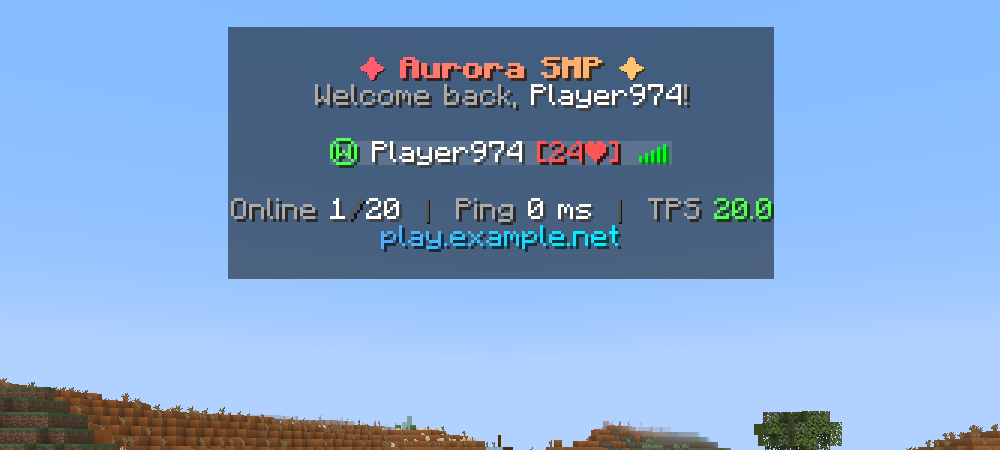
显示配置 · gradient-showcase.toml
[appearance]
server_name = "Aurora SMP"
header = [
    "#N<gradient:#FF5F6D:#FFC371>&l✦ #SERVERNAME ✦</gradient>&r#N&7Welcome back, &f#PLAYERNAME&7!#N"
]
footer = [
    "#N&7Online &f#PLAYERCOUNT&8/&f#MAXPLAYERS  &8┃  &7Ping &f#PING ms  &8┃  &7TPS #CTPS#N<gradient:#4FACFE:#00F2FE>play.example.net</gradient>#N"
]
name_formatting_provider = "NONE"
display_name_format = "{dimension} &f{name} {health} &7#AFK"

[sorting]
sort_mode = "ALPHABETICAL"
性能仪表盘
面向管理员和整合包服务器的实时、彩色编码服务器健康状况。安装 spark 并设置 metrics_provider = "SPARK" 以获取滚动的 TPS 和 MSPT 百分位数。
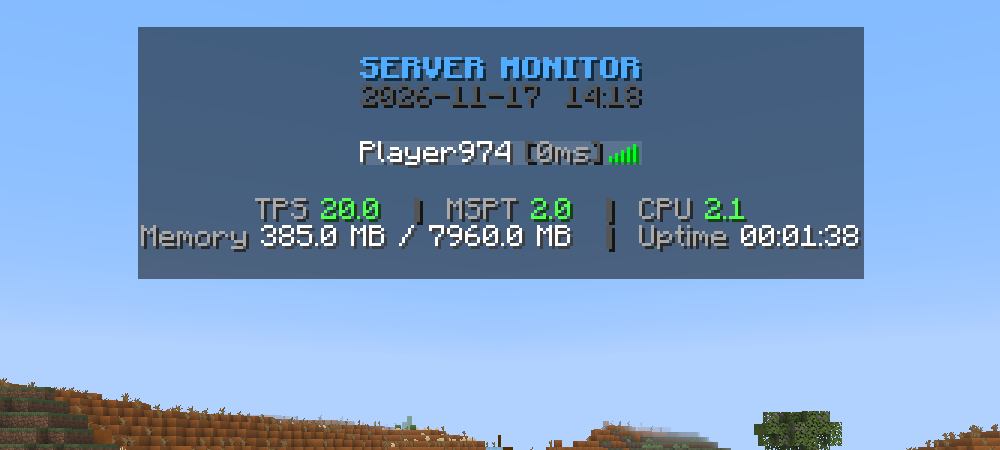
显示配置 · performance-dashboard.toml
[appearance]
server_name = "Aurora SMP"
header = [
"#NFACFE&lSERVER MONITOR#N&8#DATE #TIME#N"
]
footer = [
"#N&7TPS #CTPS &8│ &7MSPT #CMSPT &8│ &7CPU #CCPU#N&7Memory &f#MEMORY &8│ &7Uptime &f#UPTIME#N"
]
name_formatting_provider = "NONE"
display_name_format = "&f{name} &8[&7{ping}ms&8]"
update_interval = 1000
[performance]
metrics_provider = "VANILLA"
生存模式状态
每个名称一目了然地显示玩家的维度、生命值、延迟和游戏模式。
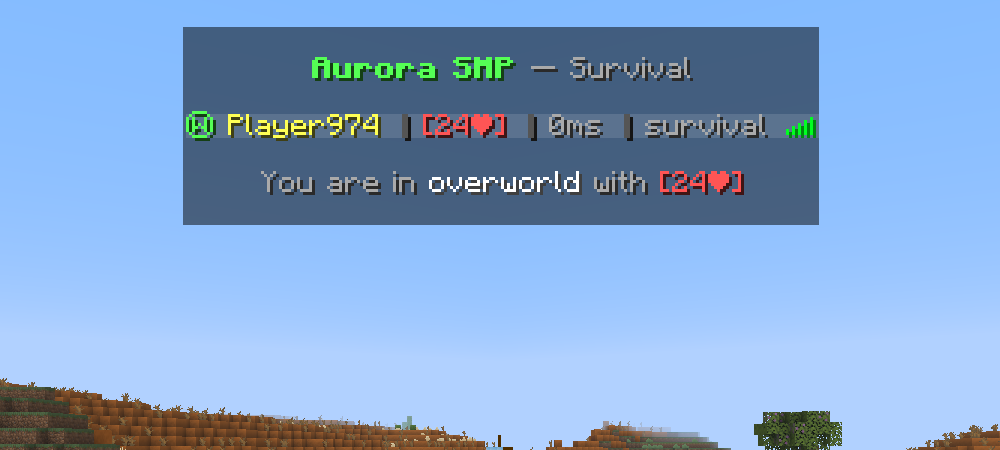
显示配置 · survival-status.toml
[appearance]
server_name = "Aurora SMP"
header = [
    "#N&a&l#SERVERNAME &r&7— Survival#N"
]
footer = [
    "#N&7You are in &f#WORLD &7with #HEALTH#N"
]
name_formatting_provider = "NONE"
display_name_format = "{dimension} &e{name} &8│ {health} &8│ &7{ping}ms &8│ &7{gamemode} &7#AFK"

[afk]
afk_enabled = true
afk_timeout = 300
动态与极简
三个每约 2 秒切换一次的标题帧,除此之外别无其他。
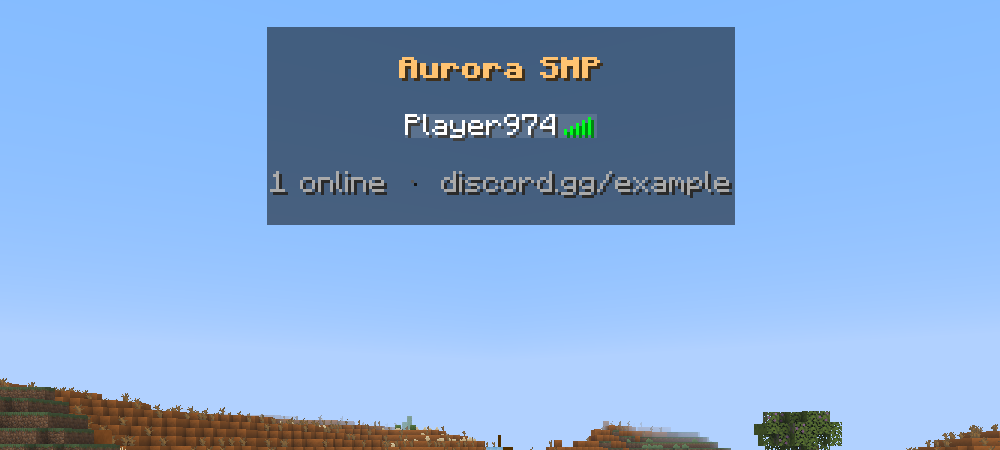
显示配置 · animated-minimal.toml
[appearance]
server_name = "Aurora SMP"
header = [
    "#N&f&l#SERVERNAME#N",
    "#N&#FFC371&l#SERVERNAME#N",
    "#N&#FF5F6D&l#SERVERNAME#N"
]
footer = [
    "#N&7#PLAYERCOUNT online  &8·  &7discord.gg/example#N"
]
name_formatting_provider = "NONE"
display_name_format = "&f{name}"
update_interval = 500
animation_interval = 4
配置
所有设置均位于 config/tablist.toml 中。文本值请保留引号,开关项使用未加引号的 true / false,并编辑现有部分,而不是添加第二个 [appearance]。
| 区块 |
控制内容 |
[appearance] |
服务器名称、页眉/页脚帧、玩家名称格式、排名提供者、刷新间隔 |
[sorting] |
玩家排序方式:NONE(无)、ALPHABETICAL(按字母)或 RANK(按排名) |
[afk] |
AFK 检测及其超时时间,单位为秒(300 = 5 分钟) |
[performance] |
性能指标来源:VANILLA(原版)或 SPARK |
现有配置保持兼容。你的名称和格式设置会被保留,当缺少 name_formatting_provider 时,旧的 ftbranks.enable_ftbranks_formatting 设置将用于选择提供者。
页眉与页脚
每个引号内的项代表一个动画帧。在帧内使用 #N 换行。
- 一项: 静态文本。两项或以上: 动画效果。
[]: 隐藏页眉或页脚。
update_interval = 500 每 500 毫秒刷新一次。animation_interval = 4 每 4 次刷新切换一次帧,在默认刷新率下约为 2 秒。
玩家名称
在 [appearance] 中设置 name_formatting_provider 和 display_name_format:
| 设置 |
name_formatting_provider |
display_name_format |
| 纯文本名称 |
"NONE" |
"{name} &7#AFK" |
| 维度与健康值 |
"NONE" |
"{dimension} {name} {health} &7#AFK" |
| LuckPerms |
"LP" |
"{prefix}{name}{suffix}&r &7#AFK" |
| FTB Ranks |
"FTB" |
"[{rank}] {name} &7#AFK" |
在使用 FTB Ranks 时,玩家的 ftbranks.name_format 权限设置优先级高于你的自定义格式。选择 NONE 可始终使用配置文件中的格式。为了兼容性,默认提供者为 FTB,即使未安装任何排名模组,该模组也能正常运行。
排序与 Spark
[sorting]
sort_mode = "RANK" # NONE, ALPHABETICAL 或 RANK

[performance]
metrics_provider = "SPARK" # VANILLA 或 SPARK
RANK 排序依据是继承的 LuckPerms 组权重最高值或 FTB 排名强度,若相同则按字母顺序排列。已加入其他记分板队伍的玩家将保留在原队伍中。滚动 TPS 和 MSPT 百分位数需要安装 spark。若未安装,TPS/MSPT/CPU 使用将依赖内置测量值,且滚动统计数据显示为 N/A。
占位符
涉及玩家的特定值指的是查看标签页列表的玩家。这些占位符可在页眉、页脚和 display_name_format 中使用。
服务器与玩家占位符
| 占位符 |
描述 |
#N |
换行 |
#SERVERNAME |
配置文件中的服务器名称 |
#PLAYERCOUNT / #MAXPLAYERS |
在线玩家数 / 最大玩家槽位数 |
#PLAYERNAME |
当前查看者的玩家名称 |
#PING |
玩家延迟(毫秒) |
#RANK |
来自选定提供者的 FTB 排名或 LuckPerms 主组 |
#AFK |
玩家处于 AFK 状态时显示 AFK,否则为空 |
#WORLD |
玩家当前所在维度 |
#DIMENSION |
带颜色的维度符号(Ⓦ / Ⓝ / Ⓔ),或自定义维度名称 |
#HEALTH |
生命值 + 吸收值,例如 [20❤](20 点生命值 = 10 颗心) |
#DATE / #TIME |
实际日期 (yyyy-MM-dd) / 时间 (HH:mm) |
性能占位符
| 占位符 |
描述 |
#TPS / #CTPS |
预估 TPS(原版)或 1 分钟平均 TPS(Spark),普通颜色 / 彩色 |
#MSPT / #CMSPT |
每刻毫秒数,普通颜色 / 彩色 |
#CPU / #CCPU |
服务器进程 CPU 占用率,普通颜色 / 彩色 |
#TPS_1M / #CTPS_1M |
1 分钟平均 TPS,普通颜色 / 彩色(需 Spark) |
#TPS_5M / #CTPS_5M |
5 分钟平均 TPS,普通颜色 / 彩色(需 Spark) |
#MSPT_P95 / #CMSPT_P95 |
1 分钟 MSPT 的第 95 百分位数,普通颜色 / 彩色(需 Spark) |
#MEMORY |
内存使用情况(已用 / 最大) |
#UPTIME |
服务器运行时长 |
颜色根据阈值变化:TPS ≥18 / ≥15 / <15,MSPT ≤40 / ≤50 / >50,CPU ≤60% / ≤85% / >85%。原版 TPS 基于平均 tick 时间估算。不支持的测量值显示为 N/A。
玩家名称占位符
| 占位符 |
描述 |
{name} |
玩家名称 |
{rank} |
FTB 排名或 LuckPerms 主组 |
{prefix}, {suffix} |
玩家当前上下文中的 LuckPerms 前缀 / 后缀 |
{primary_group} |
LuckPerms 主组 |
{dimension} |
带颜色的维度符号,或自定义维度名称 |
{health} |
带颜色的生命值 + 吸收指示器 |
{world}, {ping}, {gamemode} |
维度名称、延迟(毫秒)和游戏模式 |
{prefix}、{suffix} 和 {primary_group} 需要启用 LP 提供者。无法获取的集成值为空。AFK 检测通过观察移动、转向和聊天行为来实现。
颜色代码
| 语法 |
示例 |
| 标准代码 |
&a 绿色,&c 红色,&l 加粗,&o 斜体,&r 重置 |
| 十六进制颜色 |
&#FF5555 |
| 渐变(MiniMessage 风格,2+ 种颜色) |
<gradient:#FF0000:#FFAA00:#0000FF>text</gradient> |
| 渐变(TAB 风格) |
<#FF0000>text</#0000FF> |
初始配置文件
完整的初始配置文件
仅适用于全新设置。对于现有设置,请编辑相应的设置项,而不是替换整个配置文件。
[appearance]
server_name = "My Server"
header = [
    "#N&a&l#SERVERNAME&r#N&7Welcome, #PLAYERNAME!#N"
]
footer = [
    "#N&fOnline: &e#PLAYERCOUNT&7/&e#MAXPLAYERS#N&7TPS: #CTPS &7| MSPT: #CMSPT#N"
]
name_formatting_provider = "NONE"
display_name_format = "{name} &7#AFK"
update_interval = 500
animation_interval = 4

[sorting]
sort_mode = "NONE"

[afk]
afk_enabled = true
afk_timeout = 300

[performance]
metrics_provider = "VANILLA"
常见问题
我的 LuckPerms 前缀缺失。
请选择 LP,在你的格式中包含 {prefix},并检查玩家在其当前的 LuckPerms 上下文中是否确实设置了前缀。
在使用 FTB Ranks 时,我的配置文件名称格式未生效。
请检查 ftbranks.name_format 权限。如果存在该权限,它将具有更高优先级。若要始终使用配置文件中的格式,请选择 NONE。
额外的头部项目不会显示为额外的行。
每个项目都是一个动画帧。使用 #N 在一个帧内添加换行。
我在 Spark 统计信息中看到了 N/A。
选择 SPARK 并检查 Spark 是否已安装并准备就绪。不支持的统计信息将显示 N/A。
如何应用更改?
以操作员身份运行 /tablist reload,或者重启服务器。在重新加载之前,必须修复无效的 TOML 配置,例如缺少引号或重复的部分。
玩家是否需要安装任何东西?
不需要。Better TabList 仅在服务器上运行,并与原版客户端兼容。
需要帮助?提交 Issue,并提供你的 Minecraft 版本、加载器以及相关的配置设置。
贡献者
灵感来源于 Tab List。
A customizable, server-side tab list with animated headers and footers, rank prefixes, player status, and live server statistics.
Install it on the server only. Players join with a normal vanilla client. LuckPerms, FTB Ranks and spark are optional.
Highlights
|
|
| 🎨 Colors & gradients |
& codes, &#RRGGBB hex colors and two gradient syntaxes, with bold, italic and other formatting kept intact. |
| 🎞️ Animated header & footer |
Any number of frames that cycle automatically, at a speed you choose. |
| 🏷️ Rich player names |
Dimension symbol, health with absorption, ping, game mode and AFK status next to each name. |
| 👑 Ranks |
Optional LuckPerms prefixes, suffixes and groups, or FTB Ranks, plus sorting by rank weight. |
| 📈 Live server stats |
Color-coded TPS, MSPT and CPU, memory and uptime, with spark rolling averages and percentiles when installed. |
| 💤 AFK detection |
Names turn grey and #AFK appears after a configurable idle time. |
| ⚡ Lightweight |
Packets are only sent when content changes, and metrics are sampled once per update for all players. |
| 🔁 Hot reload |
Edit config/tablist.toml and run /tablist reload, no restart needed. |
Supported versions
| Minecraft |
Fabric |
NeoForge |
Java |
| 26.1 – 26.3 (26.1, 26.1.1, 26.1.2, 26.2, 26.3) |
✅ |
✅ |
25 |
| 1.21 – 1.21.11 (every release) |
✅ |
✅ |
21 |
Every Minecraft release has its own JAR per loader. Pick the file that matches your server's exact Minecraft version.
Installation
- Download the JAR for your server's Minecraft version and loader.
- Put it in the server's
mods/ folder. Fabric servers also need Fabric API.
- Start the server once to generate
config/tablist.toml.
- Set
server_name, then customize the header, footer and player names, or start from one of the examples.
- Run
/tablist reload as an operator (permission level 2), or restart the server.
Examples
Each example is a complete, ready-to-use config. Copy it into config/tablist.toml and run /tablist reload. All screenshots are from a real Minecraft 26.3 server.
Gradient showcase
A bold gradient title, a personal welcome line and a compact status footer.
Show config · gradient-showcase.toml
[appearance]
server_name = "Aurora SMP"
header = [
    "#N<gradient:#FF5F6D:#FFC371>&l✦ #SERVERNAME ✦</gradient>&r#N&7Welcome back, &f#PLAYERNAME&7!#N"
]
footer = [
    "#N&7Online &f#PLAYERCOUNT&8/&f#MAXPLAYERS  &8┃  &7Ping &f#PING ms  &8┃  &7TPS #CTPS#N<gradient:#4FACFE:#00F2FE>play.example.net</gradient>#N"
]
name_formatting_provider = "NONE"
display_name_format = "{dimension} &f{name} {health} &7#AFK"

[sorting]
sort_mode = "ALPHABETICAL"
Performance dashboard
Live, color-coded server health for admins and modpack servers. Install spark and set metrics_provider = "SPARK" for rolling TPS and MSPT percentiles.
Show config · performance-dashboard.toml
[appearance]
server_name = "Aurora SMP"
header = [
"#NFACFE&lSERVER MONITOR#N&8#DATE #TIME#N"
]
footer = [
"#N&7TPS #CTPS &8│ &7MSPT #CMSPT &8│ &7CPU #CCPU#N&7Memory &f#MEMORY &8│ &7Uptime &f#UPTIME#N"
]
name_formatting_provider = "NONE"
display_name_format = "&f{name} &8[&7{ping}ms&8]"
update_interval = 1000
[performance]
metrics_provider = "VANILLA"
Survival status
Every name shows the player's dimension, health, ping and game mode at a glance.
Show config · survival-status.toml
[appearance]
server_name = "Aurora SMP"
header = [
    "#N&a&l#SERVERNAME &r&7— Survival#N"
]
footer = [
    "#N&7You are in &f#WORLD &7with #HEALTH#N"
]
name_formatting_provider = "NONE"
display_name_format = "{dimension} &e{name} &8│ {health} &8│ &7{ping}ms &8│ &7{gamemode} &7#AFK"

[afk]
afk_enabled = true
afk_timeout = 300
Animated & minimal
Three header frames that cycle every ~2 seconds, and nothing more.
Show config · animated-minimal.toml
[appearance]
server_name = "Aurora SMP"
header = [
    "#N&f&l#SERVERNAME#N",
    "#N&#FFC371&l#SERVERNAME#N",
    "#N&#FF5F6D&l#SERVERNAME#N"
]
footer = [
    "#N&7#PLAYERCOUNT online  &8·  &7discord.gg/example#N"
]
name_formatting_provider = "NONE"
display_name_format = "&f{name}"
update_interval = 500
animation_interval = 4
Configuration
All settings live in config/tablist.toml. Keep text values in quotes, use unquoted true / false for switches, and edit the existing sections rather than adding a second [appearance].
| Section |
What it controls |
[appearance] |
Server name, header/footer frames, player-name format, rank provider, refresh timing |
[sorting] |
Player order: NONE, ALPHABETICAL or RANK |
[afk] |
AFK detection and its timeout in seconds (300 = 5 minutes) |
[performance] |
Metrics source: VANILLA or SPARK |
Existing configs remain compatible. Your names and formats are kept, and the old ftbranks.enable_ftbranks_formatting setting chooses a provider when name_formatting_provider is missing.
Header & footer
Each quoted item is one animation frame. Use #N for a new line inside a frame.
- One item: static text. Two or more: animated.
[]: hide the header or footer.
update_interval = 500 refreshes every 500 milliseconds.animation_interval = 4 switches frames every 4 refreshes, about 2 seconds at the default refresh rate.
Player names
Set name_formatting_provider and display_name_format in [appearance]:
| Setup |
name_formatting_provider |
display_name_format |
| Plain names |
"NONE" |
"{name} &7#AFK" |
| Dimension and health |
"NONE" |
"{dimension} {name} {health} &7#AFK" |
| LuckPerms |
"LP" |
"{prefix}{name}{suffix}&r &7#AFK" |
| FTB Ranks |
"FTB" |
"[{rank}] {name} &7#AFK" |
With FTB Ranks, a player's ftbranks.name_format permission takes precedence over your format. Choose NONE to always use the config format. The default provider is FTB for compatibility, and the mod works fine without any rank mod installed.
Sorting and spark
[sorting]
sort_mode = "RANK" # NONE, ALPHABETICAL or RANK

[performance]
metrics_provider = "SPARK" # VANILLA or SPARK
RANK sorts by the highest inherited LuckPerms group weight or FTB rank power, then alphabetically. Players already on another scoreboard team stay on that team. Rolling TPS and MSPT percentiles require spark. Without it, TPS/MSPT/CPU use built-in measurements and rolling statistics show N/A.
Placeholders
Player-specific values refer to the player viewing the tab list. These placeholders work in headers, footers and display_name_format.
Server & player placeholders
| Placeholder |
Description |
#N |
New line |
#SERVERNAME |
Server name from the config |
#PLAYERCOUNT / #MAXPLAYERS |
Online players / maximum player slots |
#PLAYERNAME |
Viewing player's name |
#PING |
Player ping in ms |
#RANK |
FTB rank or LuckPerms primary group, from the selected provider |
#AFK |
AFK while the player is AFK, empty otherwise |
#WORLD |
Player's current dimension |
#DIMENSION |
Colored dimension symbol (Ⓦ / Ⓝ / Ⓔ), or a custom dimension name |
#HEALTH |
Health + absorption, e.g. [20❤] (20 health points = 10 hearts) |
#DATE / #TIME |
Real date (yyyy-MM-dd) / time (HH:mm) |
Performance placeholders
| Placeholder |
Description |
#TPS / #CTPS |
Estimated TPS (vanilla) or 1-minute TPS (spark), plain / colored |
#MSPT / #CMSPT |
Milliseconds per tick, plain / colored |
#CPU / #CCPU |
Server process CPU usage, plain / colored |
#TPS_1M / #CTPS_1M |
1-minute TPS, plain / colored (spark) |
#TPS_5M / #CTPS_5M |
5-minute TPS, plain / colored (spark) |
#MSPT_P95 / #CMSPT_P95 |
1-minute MSPT 95th percentile, plain / colored (spark) |
#MEMORY |
Memory usage (used / max) |
#UPTIME |
Server uptime |
Colors use green / yellow / red thresholds: TPS ≥18 / ≥15 / <15, MSPT ≤40 / ≤50 / >50, CPU ≤60% / ≤85% / >85%. Vanilla TPS is estimated from the average tick time. Unsupported measurements show N/A.
Player-name placeholders
| Placeholder |
Description |
{name} |
Player name |
{rank} |
FTB rank or LuckPerms primary group |
{prefix}, {suffix} |
LuckPerms prefix / suffix in the player's current context |
{primary_group} |
LuckPerms primary group |
{dimension} |
Colored dimension symbol, or custom dimension name |
{health} |
Colored health + absorption indicator |
{world}, {ping}, {gamemode} |
Dimension name, ping in ms and game mode |
{prefix}, {suffix} and {primary_group} require the LP provider. Unavailable integration values are empty. AFK detection watches movement, turning and chat.
Colors
| Syntax |
Example |
| Standard codes |
&a green, &c red, &l bold, &o italic, &r reset |
| Hex colors |
&#FF5555 |
| Gradient (MiniMessage style, 2+ colors) |
<gradient:#FF0000:#FFAA00:#0000FF>text</gradient> |
| Gradient (TAB style) |
<#FF0000>text</#0000FF> |
Starter config
Complete starter config
For a new setup only. For an existing setup, edit the matching settings instead of replacing your config.
[appearance]
server_name = "My Server"
header = [
    "#N&a&l#SERVERNAME&r#N&7Welcome, #PLAYERNAME!#N"
]
footer = [
    "#N&fOnline: &e#PLAYERCOUNT&7/&e#MAXPLAYERS#N&7TPS: #CTPS &7| MSPT: #CMSPT#N"
]
name_formatting_provider = "NONE"
display_name_format = "{name} &7#AFK"
update_interval = 500
animation_interval = 4

[sorting]
sort_mode = "NONE"

[afk]
afk_enabled = true
afk_timeout = 300

[performance]
metrics_provider = "VANILLA"
FAQ
My LuckPerms prefix is missing.
Select LP, include {prefix} in your format, and check that the player has a prefix in their current LuckPerms context.
My config name format does not apply with FTB Ranks.
Check the ftbranks.name_format permission. When it is present, it takes precedence. Select NONE to always use your config format.
Extra header items do not show up as extra lines.
Each item is an animation frame. Use #N to add lines inside one frame.
I see N/A in spark statistics.
Select SPARK and check that spark is installed and ready. Statistics that are not supported show N/A.
How do I apply changes?
Run /tablist reload as an operator, or restart. Invalid TOML, such as a missing quote or a duplicate section, must be fixed before reloading.
Do players need to install anything?
No. Better TabList only runs on the server and works with vanilla clients.
Need help? Open an issue with your Minecraft version, loader and the relevant config settings.
Contributors
- sennecools and NeofastFTL — Better TabList
- MihailDenisov — original LuckPerms integration, dimension/health display, rank-weight caching and performance-metric ideas/code from the LPintegration branch, adapted for all supported targets (issue #13).
Inspired by Tab List.


 模组

 模组
 模组

 模组
 模组

 模组

评论 0
登录后参与评分
还没有评论,来抢沙发吧