
看清真正重要的东西。
Better X-Ray 使石头、深板岩和泥土等常见地形方块变得透明,同时保持矿石和选定方块的完全可见。周围的地形仍然以微弱透明度可见(可配置为 0% 到 80%),这样你在地下永远都不会迷失方向。
使用内置的配置菜单,精确选择你想看到的方块。搜索方块注册表,添加或移除方块或整个方块标签组,调整地形透明度,并控制水和岩浆的可见性。
该模组还包含一个高亮模式,带有指向高亮方块的可配置追踪线。相邻的矿石可以分组为矿脉,每个方块都可以拥有自己的颜色。
此外,生物 ESP、玩家 ESP 和 物品 ESP 帮助你透过地形发现实体,并提供丰富的自定义选项。
使用洞穴查找轻松找到洞穴,并使用结构查找器定位村庄、神殿、要塞等(仅限单人游戏)。
更喜欢打字?所有重要设置也可以通过客户端命令 /betterxray 进行更改。
Better X-Ray 完全基于客户端,支持 Fabric、NeoForge 和 Forge,兼容原版渲染器、Sodium 和 Embeddium,并且也能与大多数模组方块配合使用。
功能:
- 3 种不同、可配置且可重命名的 X 光预设
- 支持方块标签:例如输入
#c:ores 即可选中所有矿石,包括模组添加的矿石
- 可配置的地形透明度(0% 到 80%)
- 显示或隐藏水和岩浆
- 全亮度(Fullbright)
- 洞穴查找
- 高亮模式,具备追踪线、矿脉分组、按方块着色及可调范围
- 高度可配置的生物 ESP、玩家 ESP(名称和健康值)以及物体/物品 ESP
- ESP 追踪线
- 结构查找器(仅限单人游戏)
- 客户端命令(
/betterxray 或 /bxray)
- 支持最常用的光影!(仅 Fabric 26.3 版本支持)
- 更新检查器(可关闭)
- 导入和导出预设
- 线框模式
默认按键绑定:
| 按键 |
操作 |
| X |
切换 X 光 |
| L |
切换全亮度 |
| G |
打开配置菜单 |
| J |
切换生物/玩家 ESP |
| K |
切换 ESP 追踪线 |
| H |
切换高亮显示 |
| U |
切换洞穴发现 |
| 未绑定 |
切换高亮显示-追踪线 |
| 未绑定 |
将注视的方块添加到 X 射线预设 |
| 未绑定 |
循环切换 X 射线预设 |
| 未绑定 |
线框模式 |
所有按键绑定均可通过 Minecraft 的控制菜单(分类“Better X-Ray”)进行修改。
功能详解:
X 射线透视:
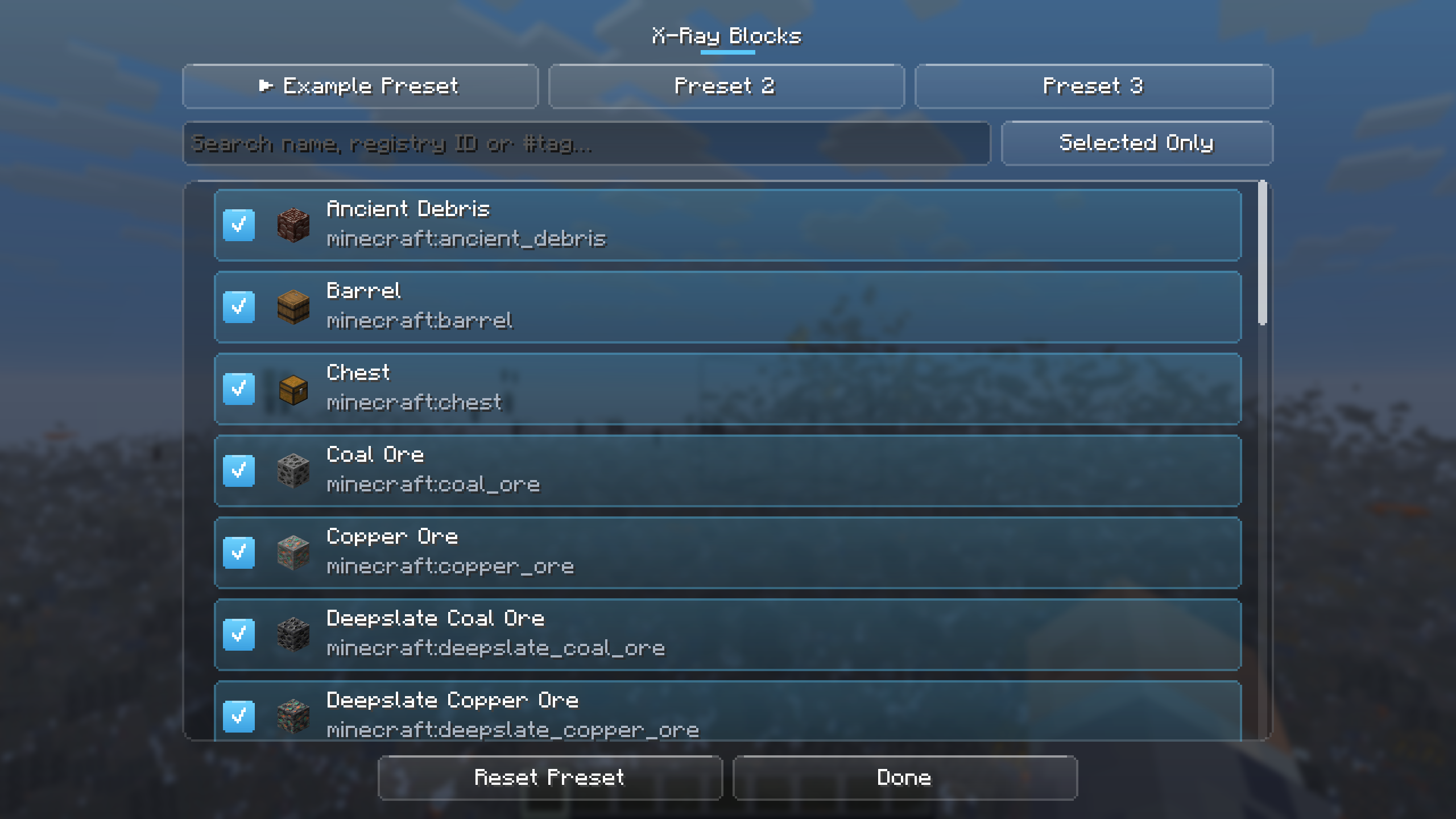
使用热键(默认:G)打开 X 射线菜单。从 3 个预设中选择一个。预设 1 已预配置了最重要的方块(所有主要矿石、刷怪笼、试炼刷怪笼、宝库、箱子和木桶)。你可以使用菜单中的按钮重置或重命名所有 3 个预设。你还可以在主菜单中将地形不透明度设置为 0% 到 80%,并选择在使用 X 射线时是否显示或隐藏水和岩浆。点击“X 射线方块”按钮可查看可用方块的列表。使用搜索栏搜索方块,然后点击某个方块即可将其添加或移除出预设。所有选定的方块在使用 X 射线时都会可见。
你还可以将方块标签添加到预设中。例如 #c:ores 这样的标签涵盖其列出的所有方块,包括其他模组的方块,因此一个条目即可选中整合包中的所有矿石。搜索“ore”也会显示匹配的标签,而以 # 开头的搜索仅列出标签。被选定标签覆盖的方块会显示“via #tag”。
使用“将注视的方块添加到 X 射线预设”按键绑定,你可以在不打开菜单的情况下将当前注视的方块添加到活动预设中。“循环切换 X 射线预设”可在 3 个预设之间切换。
全亮度:
全亮度使所有内容完全照亮,无论 X 射线是开启还是关闭状态。按 L 或在 X 射线菜单中切换它。
洞穴发现:
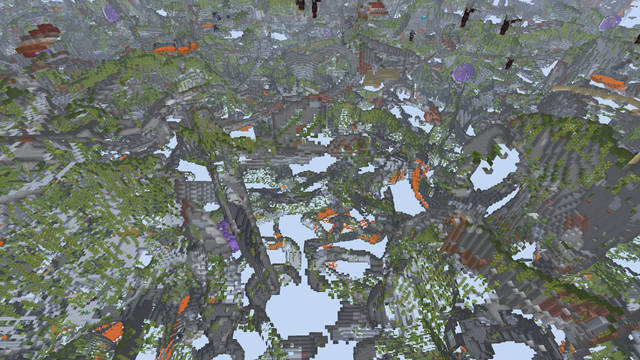
按 U 或使用 X 射线菜单中的“洞穴发现”按钮。每个与地下空气相邻的方块面保持实心且完全照亮,因此洞穴、峡谷和隐藏房间会以空心形状透过地形显示出来。所有其他地形遵循地形不透明度设置(将其设置为 0% 以仅查看洞穴)。单独启用洞穴发现仅显示洞穴。同时开启 X 射线可以看到你的预设方块与洞穴一起显示。充满水或岩浆的洞穴不会被标记。
实体与玩家透视:
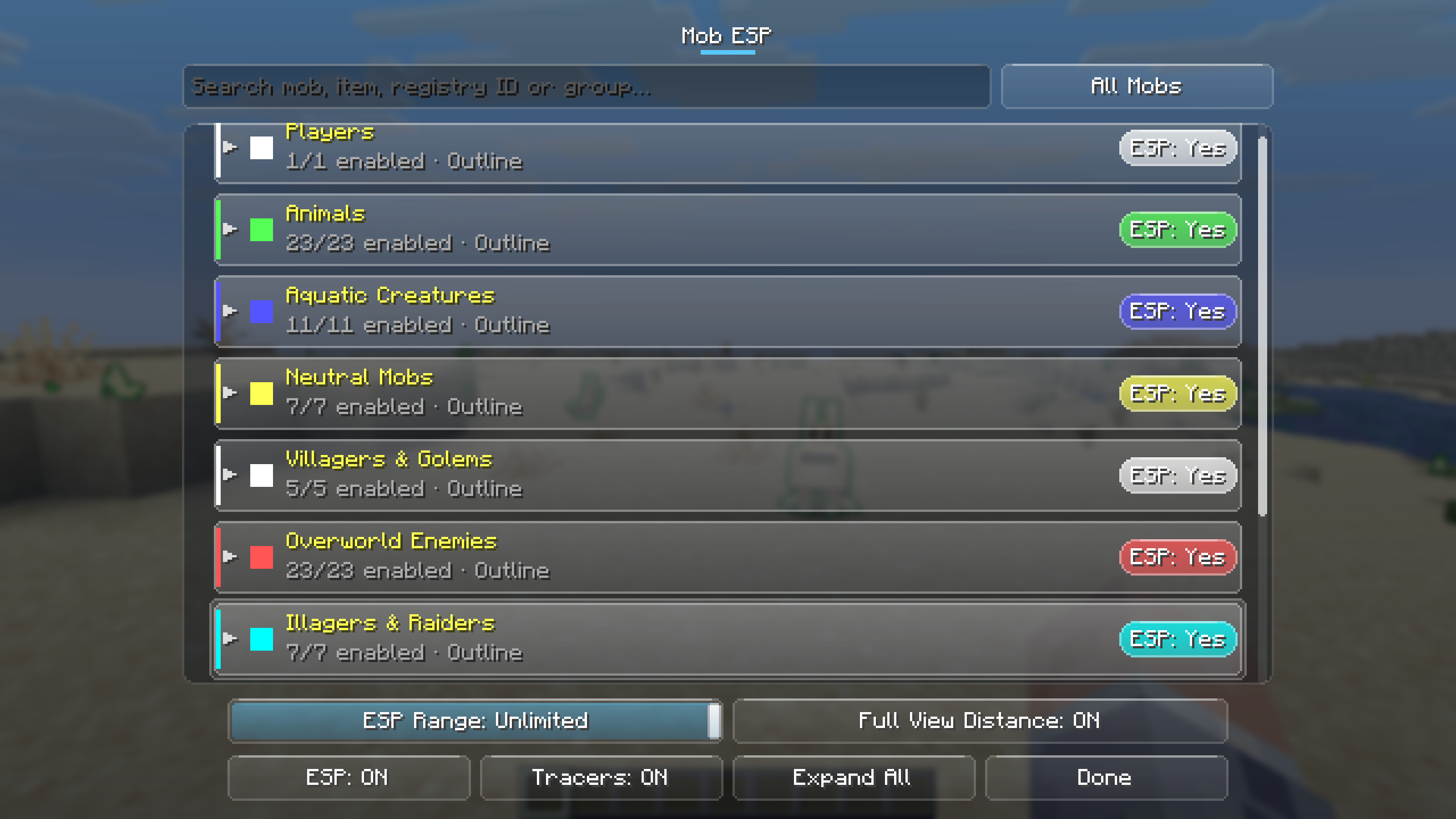
在 X-ray 菜单中,点击 “Mob ESP”。你可以使用底部的按钮展开或折叠 ESP 组。在该按钮上方,你可以选择 ESP 的范围(8 到 512 格或无限制)。在列表中,你可以通过点击右侧的 “ESP: Yes” 或 “ESP: No” 按钮来启用或禁用整个组的 ESP。点击某个组将弹出一个菜单,用于为该组选择通用颜色和 ESP 样式。在此处,你还可以选择是否为该组生物启用追踪线(仅限模组版本 1.2.0+)。对于样式,你可以在轮廓和方框之间进行选择。当点击组前面的小箭头时,该组将展开或折叠,你可以配置特定组中每个单独条目的 ESP。你可以为单个条目设置自定义颜色,或者仅为该特定类型的生物启用或禁用 ESP。“Reset Mob Overrides” 将使该组的所有生物重新遵循组的设置。
这些组包括:Players、Animals、Aquatic Creatures、Neutral Mobs、Villagers & Golems、Overworld Enemies、Illagers & Raiders、Nether Enemies、End Mobs、Other Mobs (modded mobs) 和 Objects (armor stands, minecarts, boats, dropped items, item frames, TNT, projectiles and more)。
当点击 “Players” 组时,你可以选择 Player ESP 是否显示玩家名称和健康状况,以及是否为玩家启用追踪线。对于健康状况,你可以选择 Bar、Numbers & Bar、Numbers 和 Off。
“ESP: ON/OFF” 和 “Tracers: ON/OFF” 按钮(或 J 和 K)可以关闭并重新开启所有 ESP 或所有 ESP 追踪线,而不会更改你的组和生物设置。
在单人游戏中,你可以通过选择 “Full View Distance” 选择在原版实体渲染距离之外渲染 ESP。
Item ESP:
在 “Objects” 组中,点击 “Item” 行的箭头(或在 Item 设置中点击 “Pick Items…”)以打开 Item ESP 列表。它拥有自己的搜索功能和已启用物品的过滤器。每个物品都可以单独启用,并获得与生物相同的设置。例如:要仅看到地面上的钻石和绿宝石,请启用 Objects,禁用 Item 行,然后仅启用这两个物品。你也可以为每个物品选择特定的设置。
Highlight Blocks:
Highlight Blocks 独立于 X-ray 工作,本质上是对某些区块的 ESP。你可以选择在下方的列表中突出显示哪些区块(或区块标签)。你还可以为高亮显示的区块启用或禁用追踪线,并设置高亮范围(从 8 格到你的渲染距离)。你可以通过在 Highlight 菜单中按下 “Add from Preset” 按钮,将当前选定的 X-ray 预设中的所有区块导入到高亮显示的区块中。
- Group Veins: 相邻的同种区块被合并为一个矿脉,具有一个方框和一个追踪线。深板岩矿石被视为其对应的石头变体。可以关闭此功能。
- Block colors: RGB 滑块设置全局颜色。点击区块行末尾的颜色方块,可以为该区块赋予其自己的颜色。“Use Global Color” 和 “Reset Block Colors” 可撤销此操作。
Structure Finder (Singleplayer only):
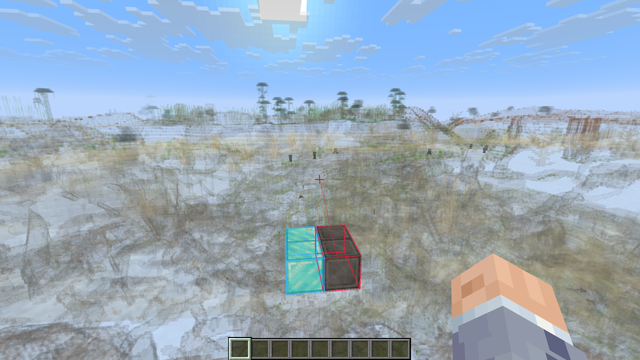
在 X-ray 菜单中点击 “Structure Finder”。选择你要寻找的结构(villages, temples, mineshafts, strongholds, ancient cities, trial chambers, Nether fortresses, bastions, end cities, modded structures and many more)。在每个加载的区块中,每个选定的结构周围都会绘制一个方框,可选地在其中心添加一条追踪线。每个结构都可以有自己的颜色。结构位置仅存在于服务器上,因此这仅在单人游戏(以及在向 LAN 开放的世界中)有效。
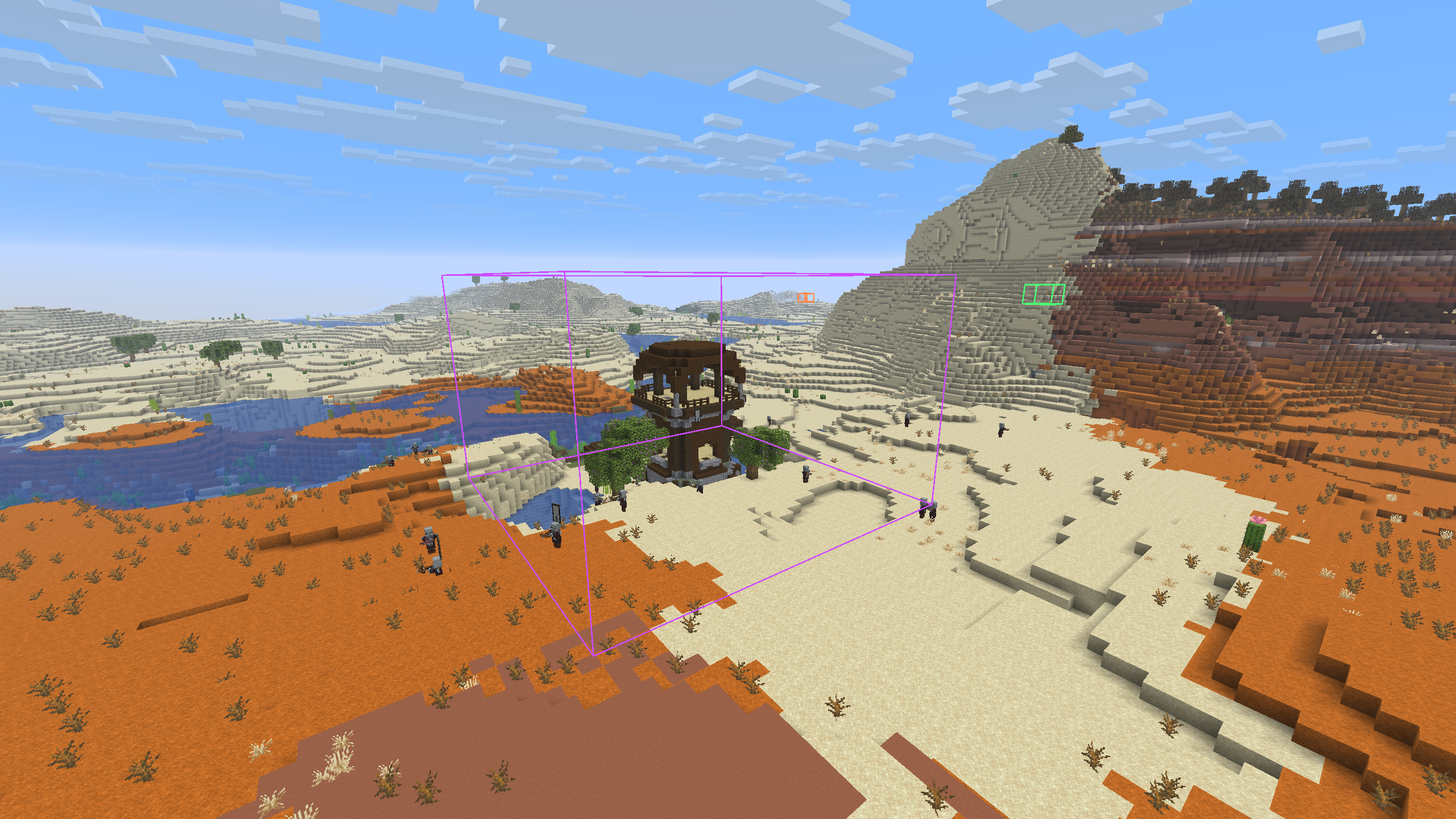
Importing and exporting presets:
你可以使用 X-ray 菜单中的 “Export” 和 “Import” 按钮导出或导入当前选定的 X-ray 预设。点击 “Export” 会将当前预设复制到剪贴板。使用 “Import” 可从当前剪贴板导入预设。
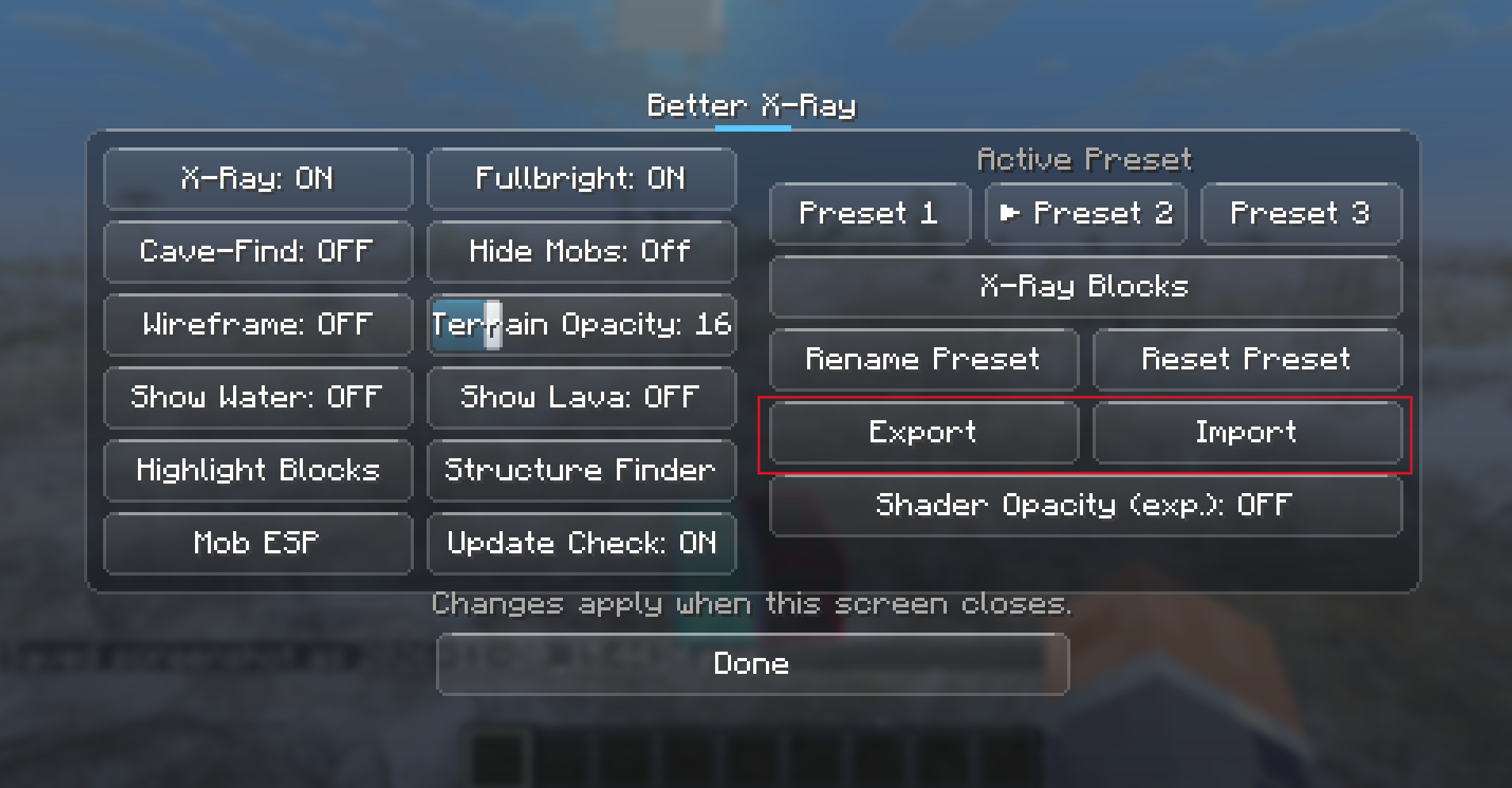
Commands:
/betterxray(或短别名 /bxray)可在不打开菜单的情况下更改设置。命令仅在客户端运行,永远不会发送到服务器。所有回复仅出现在你自己的聊天窗口中。支持 Tab 补全。
请参阅 Github 仓库以获取所有可能的命令。
Shaders (Fabric 26.3 only):
Fabric 上针对 Minecraft 26.3 的版本支持 Iris 的光影。在其他版本中,当光影包激活时,X-ray 效果会暂停,并在你关闭光影包后恢复。
本模组已测试以下光影。某些功能可能存在错误。其他光影可能有效也可能无效。
- BSL_v10.1.8
- ComplementaryReimagined_r5.9.3
- ComplementaryUnbound_r5.9.3
- MakeUp-UltraFast-9.5g
- Sildur's Vibrant Shaders v2.02 Extreme
- Solas Shader V3.8
Complementary 和 BSL 忽略地形透明度,因此在使用这些光影包时(如设置为 0%),微弱的地形会被隐藏。X-ray 菜单中的实验性 “Shader Opacity” 开关可修补这些光影包,使其仍能显示微弱地形。
Notes
Fabric 版本需要 Fabric API。Sodium (Fabric 和 NeoForge) 和 Embeddium (Forge 1.20.1) 是可选的。使用 Mod Menu 时,也可以从模组列表中打开配置菜单。
此模组旨在用于单人游戏。仅在获得明确许可的服务器上使用。
该模组包含一个更新检查器,当有适用于您当前 MC 版本的更新时会通知您。此功能可以在菜单中关闭。
See what really matters.
Better X-Ray makes common terrain blocks like stone, deepslate and dirt transparent while keeping ores and selected blocks fully visible. The surrounding terrain remains faintly visible (configurable 0 % to 80 % opacity), so you never lose your orientation underground.
Choose exactly which blocks you want to see using the built-in configuration menu. Search the block registry, add or remove blocks or whole block tags, adjust terrain opacity, and control water and lava visibility.
The mod also includes a Highlight Mode with configurable tracers pointing directly to highlighted blocks. Adjacent ores can be grouped into veins, and every block can get its own color.
On top of that, Mob ESP, Player ESP and Item ESP help you spot entities through terrain, with plenty of customization options.
Easily find caves with Cave-Find, and locate villages, temples, strongholds and more with the Structure Finder (singleplayer only).
Prefer typing? All important settings can also be changed with the client-side /betterxray command.
Better X-Ray is fully client-side, is available for Fabric, NeoForge and Forge, supports the vanilla renderer, Sodium and Embeddium, and also works with most modded blocks.
Features:
- 3 different, configurable and renamable X-ray Presets
- Block tag support: one entry like
#c:ores selects every ore, including modded ones
- Configurable terrain opacity (0 % to 80 %)
- Show or hide water and lava
- Fullbright
- Cave-Find
- Highlight Mode with Tracers, vein grouping, per-block colors and adjustable range
- Highly configurable Mob ESP, Player ESP (name and health) and Object/Item ESP
- ESP Tracers
- Structure Finder (singleplayer only)
- Client commands (
/betterxray or /bxray)
- Support for the most used shaders! (Fabric 26.3 only)
- Update checker (can be turned off)
- Import and export presets
- Wireframe mode
Default keybinds:
| Key |
Action |
| X |
Toggle X-ray |
| L |
Toggle Fullbright |
| G |
Open config menu |
| J |
Toggle Mob/Player ESP |
| K |
Toggle ESP-Tracers |
| H |
Toggle Highlight |
| U |
Toggle Cave-Find |
| Unbound |
Toggle Highlight-Tracers |
| Unbound |
Add Looked-at-Block to X-ray Preset |
| Unbound |
Cycle X-ray Preset |
| Unboun |
Wireframe mode |
All keybinds can be changed through Minecraft's Controls menu (category "Better X-Ray").
Features explained:
X-ray:
Open the X-ray menu with the Hotkey (Default: G). Choose one of the 3 Presets. Preset 1 comes pre configured with the most important blocks (all major ores, spawners, trial spawners, vaults, chests and barrels). You can reset or rename all 3 presets with the buttons in the menu. You can also choose the Terrain opacity from 0 % to 80 % as well as select whether to show or hide water and lava when using X-ray from the main menu. Click on the "X-Ray Blocks" Button to see a list of all available blocks. Search for blocks with the search bar and click on a block, to add or remove it from the Preset. All selected blocks will be visible when using X-ray.
You can also add block tags to a preset. A tag like #c:ores covers every block it lists, including blocks of other mods, so one entry selects all ores of a modpack. Searching for "ore" also shows matching tags, and a search starting with # lists only tags. Blocks that are covered by a selected tag show "via #tag".
With the "Add Looked-at-Block to X-ray Preset" keybind, you can add the block you are looking at to the active preset without opening the menu. "Cycle X-ray Preset" switches between the 3 presets.
Fullbright:
Fullbright makes everything fully lit, no matter if X-ray is on or off. Toggle it with L or in the X-ray menu.
Cave-Find:
Press U or use the "Cave-Find" button in the X-ray menu. Every block face that borders underground air stays solid and fully lit, so caves, ravines and hidden rooms show up as hollow shapes through the terrain. All other terrain follows the terrain opacity (set it to 0 % to see only the caves). Cave-Find on its own shows only caves. Turn X-ray on as well to see your preset blocks together with the caves. Caves filled with water or lava are not marked.
Mob and Player ESP:
In the X-ray menu, click on "Mob ESP". You can expand or collapse the ESP groups with the button at the bottom. Above the button, you can choose the range for the ESP (8 to 512 blocks or unlimited). In the list, you can enable or disable the ESP for a whole group by clicking on the Button "ESP: Yes" or "ESP: No" on the right side. Clicking on a group will bring up a menu to choose a general colour and ESP style for this group. Here, you can also choose whether or not to enable tracers for this group of mobs (Mod version 1.2.0+ only). For style, you can choose between outline and box. When clicking on the small arrow at the front of a group, the group will expand or collapse and you can configure the ESP for each single entry in the specific group. You can set custom colours or enable and disable ESP just for that specific type of mob. "Reset Mob Overrides" makes all mobs of a group follow the group settings again.
The groups are: Players, Animals, Aquatic Creatures, Neutral Mobs, Villagers & Golems, Overworld Enemies, Illagers & Raiders, Nether Enemies, End Mobs, Other Mobs (modded mobs) and Objects (armor stands, minecarts, boats, dropped items, item frames, TNT, projectiles and more).
When clicking on the "Players" group, you can choose whether or not Player ESP should show the name of the player and the health as well as tracers for players. For health, you can choose between Bar, Numbers & Bar, Numbers and Off.
The "ESP: ON/OFF" and "Tracers: ON/OFF" buttons (or J and K) turn all ESP or all ESP-Tracers off and on again without changing your group and mob settings.
In Singleplayer, you can choose to render the ESP beyond the vanilla entity render distance by selecting "Full View Distance".
Item ESP:
In the "Objects" group, click on the arrow of the "Item" row (or "Pick Items…" in the Item settings) to open the Item ESP list. It has its own search and a filter for enabled items. Each item can be enabled individually and gets the same settings as a mob. Example: to see only diamonds and emeralds on the ground, enable Objects, disable the Item row and enable just those two items. You can also choose specific settings for each item.
Highlight Blocks:
Highlight Blocks works independently of X-ray and is basically an ESP for certain blocks. You can choose which blocks (or block tags) should be highlighted in the list below. You can also enable or disable tracers for the highlighted blocks and set the highlight range (8 blocks up to your render distance). You can import all blocks from the currently selected X-ray preset to the highlighted blocks by pressing the "Add from Preset" button in the Highlight menu.
- Group Veins: adjacent blocks of the same kind are merged into one vein with one box and one tracer. Deepslate ores count as their stone variant. Can be turned off.
- Block colors: the RGB sliders set the global color. Click the color square at the end of a block row to give that block its own color. "Use Global Color" and "Reset Block Colors" undo this.
Structure Finder (Singleplayer only):
Click on "Structure Finder" in the X-ray menu. Select the structures you want to find (villages, temples, mineshafts, strongholds, ancient cities, trial chambers, Nether fortresses, bastions, end cities, modded structures and many more). A box is drawn around every selected structure in the loaded chunks, optionally with a tracer to its center. Each structure can have its own color. Structure positions only exist on the server, so this only works in singleplayer (and in worlds opened to LAN).
Importing and exporting presets:
You can export or import your currently selected X-ray preset by using the "Export" and "Import" buttons in the X-ray menu. Clicking on "Export" will copy the current preset to your clipboard. Use "Import" to import a preset from your current clipboard.
Commands:
/betterxray (or the short alias /bxray) changes the settings without opening the menu. The commands run on your client only and are never sent to the server. All answers appear only in your own chat. Tab completion is supported.
See the Github repo for all possible commands.
Shaders (Fabric 26.3 only):
Shader support is available on Fabric for Minecraft 26.3 with Iris. On other versions, the X-ray effect pauses while a shader pack is active and comes back when you turn the pack off.
The mod has been tested with the following shaders. Some features may be buggy. Other shaders may or may not work.
- BSL_v10.1.8
- ComplementaryReimagined_r5.9.3
- ComplementaryUnbound_r5.9.3
- MakeUp-UltraFast-9.5g
- Sildur's Vibrant Shaders v2.02 Extreme
- Solas Shader V3.8
Complementary and BSL ignore the terrain opacity, so faint terrain is hidden with these packs (like at 0 %). The experimental "Shader Opacity" switch in the X-ray menu patches these packs to show faint terrain anyway.
Notes
The Fabric version requires Fabric API. Sodium (Fabric and NeoForge) and Embeddium (Forge 1.20.1) are optional. With Mod Menu, the config menu can also be opened from the mod list.
This mod is intended for Singleplayer. Only use it on servers where you have explicit permission.
The mod includes an update checker that will notify you if an update for your current MC version is available. This can be turned off in the menu.

 模组

 模组
 模组

 模组
 模组
 模组
评论 0
登录后参与评分
还没有评论,来抢沙发吧