
Better Chunk Borders
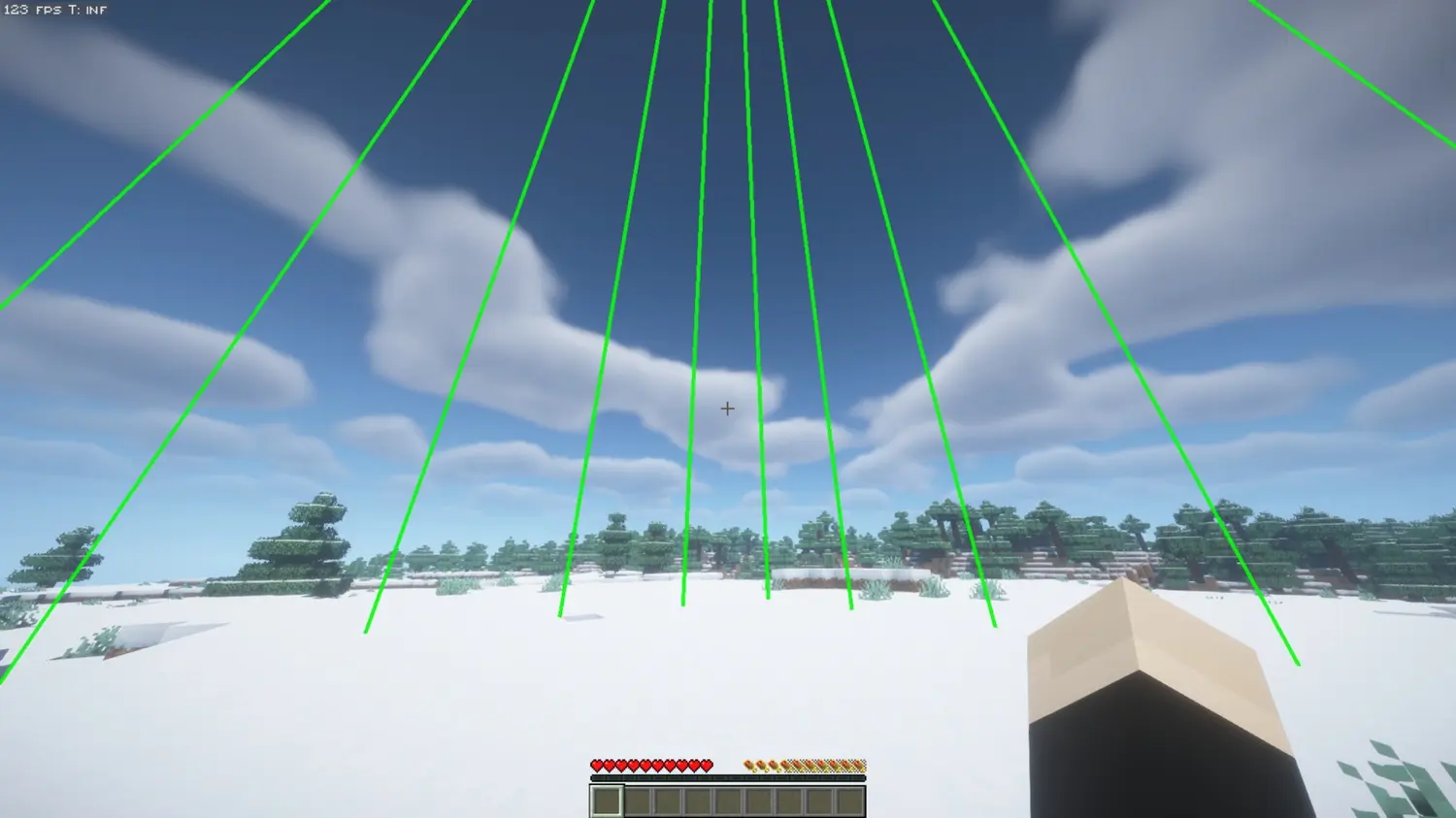
Better Chunk Borders 是一款轻量级的客户端模组,提供可完全自定义的网格线来显示区块边界。无论你是规划复杂的建筑、寻找史莱姆区块,还是制作红石装置和机械结构,此模组都能让你一目了然地精确掌握区块信息,且视觉效果美观。
功能特性
简洁的自定义 GUI 与便捷按键
- 按下 B(默认)即可立即打开直观设计的自定义设置面板。
- 直接从菜单中切换区块边界的开启与关闭。
- 所有设置均会自动保存至配置文件。
灵活的网格间距
- 以垂直网格线的形式显示区块边界,范围在你当前位置上方和下方各延伸 64 格。
- 可调行距:沿区块墙壁循环调整网格密度,每 16、8、4、2 或 1 格显示一条线。
- 保持区块内部清晰,同时完美勾勒外围轮廓。
丰富的自定义选项
- 无限色彩:通过自定义的红、绿、蓝 (RGB) 滑块精准调节你偏好的颜色。
- 线条粗细:调整边框粗细,从纤细低调到粗犷醒目皆可。
- 透明度控制:微调透明度以减少视觉干扰。
- Y 轴交替颜色:启用一种模式,使 Y 轴方向上每隔一个方块交替反转边框颜色,从而轻松计数方块并判断深度。
性能优化
- 得益于高效的渲染机制,对帧率影响极小。
- 仅渲染视野内的内容。
使用场景
- 建筑规划:将结构完美对齐区块边界,实现最佳布局。
- 史莱姆区块搜寻:快速识别区块边界,定位史莱姆生成区块。
- 农场与红石优化:确保技术型建筑正确跨越区块,以实现最高效率。
- 导航定位:随时一眼看清自己所在的区块。
入门指南
- 按 B 打开设置菜单。
- 点击 Borders: OFF(边界:关闭)将其切换为 ON(开启)。
- 根据你的喜好自定义 RGB 颜色、透明度、线条粗细和网格间距。
- 点击 Done(完成)应用新设置。
兼容性
- Minecraft 版本:完全兼容 1.21.x 和 26.x
- 服务器兼容性:可在任何服务器上运行,无需特殊权限、插件或额外配置。
- 仅限客户端:请仅在客户端安装。
Better Chunk Borders
Better Chunk Borders is a lightweight, client sided utility mod that brings chunk boundaries with fully customizable grid lines. Whether you are planning intricate builds, hunting slime chunks, or making redstone stuff and contraptions, this mod gives you precise chunk awareness at a glance without looking ugly.
Features
Sleek Custom GUI & Easy Keybinds
- Press B (default) to instantly open the intuitive, custom-designed settings panel.
- Toggle chunk borders on and off directly from the menu.
- All settings are automatically saved to your configuration file.
Flexible Grid Spacing
- Display chunk borders as vertical grid lines extending 64 blocks above and below your position.
- Adjustable Line Spacing: Cycle the grid density along the chunk walls to show lines every 16, 8, 4, 2, or 1 block.
- Keeps the inside of your chunks clear while perfectly outlining the perimeter.
Extensive Customization
- Infinite Colors: Dial in your exact preference using the custom Red, Green, and Blue (RGB) sliders.
- Line Thickness: Adjust the thickness of the borders from thin and subtle to thick and bold.
- Opacity Control: Fine tune transparency to reduce visual clutter.
- Alternate Y Colors: Toggle a mode that inverts the border colors every alternating block along the Y axis, making it incredibly easy to count blocks and gauge depth.
Performance-Optimized
- Minimal impact on frame rates thanks to efficient rendering.
- Only renders what you see.
Use Cases
- Build Planning: Align structures perfectly with chunk boundaries for optimal organization.
- Slime Chunk Hunting: Quickly identify chunk borders to locate slime gen chunks.
- Farm + Redstone Optimization: Ensure technical builds span chunks correctly for maximum efficiency.
- Navigation: Always know which chunk you are in at a glance.
Getting Started
- Press B to open the settings menu.
- Click Borders: OFF to toggle them ON.
- Customize your RGB color, opacity, line thickness, and grid spacing to your preference.
- Click Done and apply your new settings.
Compatibility
- Minecraft Versions: Fully compatible with 1.21.x and 26.x
- Server Compatibility: Works on any server without the need for special permissions, plugins, or setup.
- Client-Side Only: Install strictly on your client.

下载 BetterChunkBorders
下载 BetterChunkBorders
下载 BetterChunkBorders
下载 BetterChunkBorders
下载 BetterChunkBorders
下载 BetterChunkBorders
需要联机服务器吗?
稳定流畅、一键部署,几分钟即可和朋友联机开服
最低仅需 8 元/月 即可畅快联机
下载 BetterChunkBorders
下载 BetterChunkBorders
下载 BetterChunkBorders
下载 BetterChunkBorders
菜单更新并迁移至 Mojang 映射。同时增加了更多版本支持!
关于这个资源的讨论、问题反馈与使用心得
还没有讨论,来发第一帖吧
你是这个资源的作者?登录后可认领此资源。
相似资源
 模组

显示你正在注视的方块的信息。(适用于 Minecraft 1.16+ 的 Hwyla/Waila 分支)
 模组

原版世界生成优化模组
 模组
使用 JavaScript 编辑配方、添加自定义物品、编写世界事件!
 模组

查看物品与配方
 模组
在游戏画面角落显示附近世界地形、玩家、生物和实体的地图。可创建路径点,帮助你找到标记过的位置。
 模组
AE2:一款流行的自动化与存储模组
评论 0
登录后参与评分
还没有评论,来抢沙发吧