
厌倦了为了到达长命令的中间位置而一直按住方向键,结果却越过目标,又花了半个永恒的时间回溯?是否希望无需将其复制到外部软件再复制回来,就能以更结构化的格式一览全貌?
这款**客户端**模组旨在通过彻底重构命令方块界面来解决这些问题及其他痛点。
当前功能:
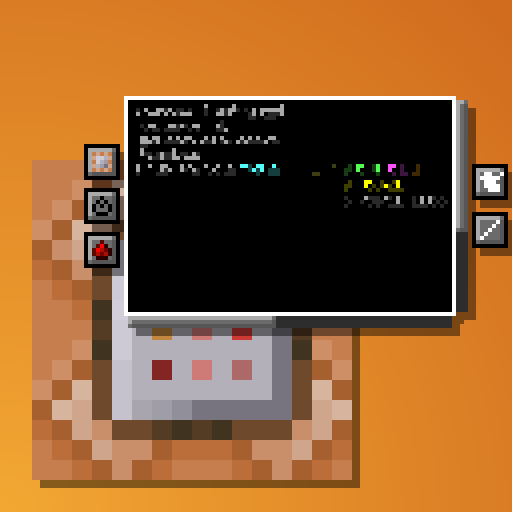
- 多行命令文本框
- 基于括号的自动缩进
- 嵌套 NBT 数据的颜色编码
- 自动换行
- 水平与垂直滚动
- 改进的选择与删除功能
- 点击拖拽选择
- 双击单词选择
- Ctrl+退格仅删除实际单词而非所有 NBT 数据
- 适配 UI 缩放比例和窗口尺寸
- 现有按钮的重新布局
- 命令方块状态按钮(类型、条件性、红石模式、输出追踪)简化为带提示的图标
- 新增用于在查看命令和输出之间切换的按钮
- 命令方块链导航
- 提供按钮可在不离开界面的情况下沿链条前后移动
- 如果有多个方块指向当前方块,它们将全部列出,并附带指示方向的工具提示。与当前方块“在同一条线上”的方块将排在首位
- 使用 UI 按钮或 CTRL + S 即可保存,无需离开界面
- 工具窗口
- 旋转选择器,输出弧度值
- 颜色选择器,输出整数和十六进制代码
- 区域选择快捷键
- 按下
;键可选择体积的两个对角顶点(类似 WorldEdit),模组会将相应的区域选择器(x=..,y=..,z=..,dx=..,dy=..,dz=..)放入你的剪贴板
- 按下
- 配置选项
- 完全可配置的缩进行为
- 可选的关闭屏幕或沿链条移动时自动保存
- 支持 ModMenu
- 兼容 NBT Autocomplete、Component Utils、Better Suggestions 和 Better Highlighting
如上所述,该模组完全是客户端的。它接收来自服务器的命令,并将其以多行形式显示并添加缩进,但不会实际向命令中添加任何换行符。
Tired of holding down your arrow keys to get to the middle of a long command, only to overshoot and spend another half an eternity backtracking? Wishing you could just see the whole thing in a more structured format without needing to copy it into external software and back again?
This clientside mod intends to address these issues and more by completely overhauling the Command Block UI.
Current features:
- Multi-line command text field
- Automatic indentation based on parentheses
- Colorcoding of nested NBT data
- Line wraparound
- Horizontal and vertical scrolling
- Improved selection & erasing
- Click-and-drag selection
- Double click word selection
- Ctrl-erasing only erases actual words instead of all NBT
- Adapts to UI scale and window dimensions
- Reorganization of existing buttons
- Command block state buttons (Type, conditionality, power mode, output tracking) reduced to simple icons with tooltips
- New button to switch between viewing the command and output
- Command block chain navigation
- Buttons to move backwards and forwards through the chain without leaving the UI
- If multiple blocks point into current one, all of them are listed with the direction they're in as a tooltip. The one "in line" with the current block will be listed first
- UI Button and CTRL + S to save without leaving the UI
- Tools window
- Rotation selector, outputs radians
- Color selector, outputs integer and hex code
- Area selector keybind
- Press ; to select two opposite corners of a volume (akin to WorldEdit), and the mod will put the corresponding area selector (x=..,y=..,z=..,dx=..,dy=..,dz=..) in your clipboard
- Config options
- Fully configurable indentation behaviour
- Optional auto-saving when closing the screen or moving along chain
- ModMenu support
- Compatible with NBT Autocomplete, Component Utils, Better Suggestions, and Better Highlighting
As mentioned, the mod is entirely clientside. It takes in the command as received from the server and just displays it across multiple lines and with indentation, but doesn't actually add any line breaks to it.
下载 Better Command Block UI
下载 Better Command Block UI
下载 Better Command Block UI
下载 Better Command Block UI
下载 Better Command Block UI
下载 Better Command Block UI
下载 Better Command Block UI
下载 Better Command Block UI
下载 Better Command Block UI
下载 Better Command Block UI
- 修复简体中文语言文件
关于这个资源的讨论、问题反馈与使用心得
还没有讨论,来发第一帖吧
你是这个资源的作者?登录后可认领此资源。
相似资源
 模组

一个用于收集生物掉落物的多区块模组。
 模组

显示你正在注视的方块的信息。(适用于 Minecraft 1.16+ 的 Hwyla/Waila 分支)
 模组

查看物品与配方
 模组
在游戏画面角落显示附近世界地形、玩家、生物和实体的地图。可创建路径点,帮助你找到标记过的位置。
 模组
使用 JavaScript 编辑配方、添加自定义物品、编写世界事件!
 模组
添加区块认领和玩家组队功能,并与 Xaero's Minimap 和 World Map 集成
评论 0
登录后参与评分
还没有评论,来抢沙发吧