
BetterHP
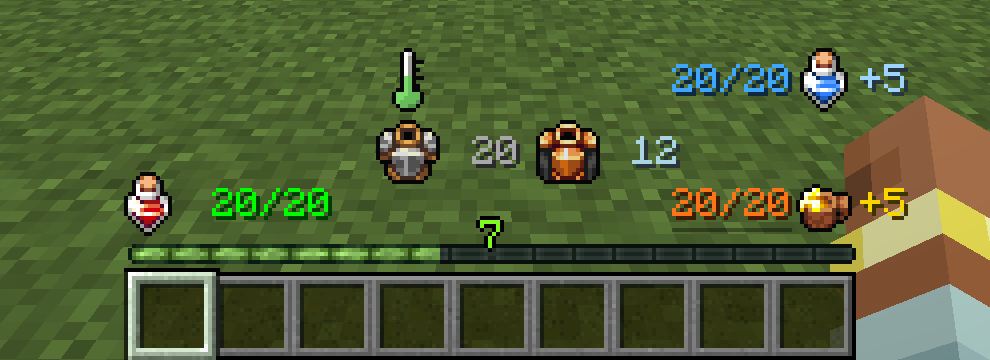
更简洁、更智能的 HUD。 BetterHP 用清晰的数字和图标替换了原版的心形、护甲条和气泡行,让你始终清楚自己的状态。
无需安装溢出修复模组:20 点以上的生命值和护甲会正确显示并与玩家保持同步。
加入我们的社区:Pixel Dream Studios(官方合作伙伴)· Bandit's Discord
功能特性
- 数值化生命值,根据受伤程度变色(绿色 → 黄色 → 红色),在危急时会有脉冲和震动效果。极限模式世界拥有独立的图标。
- 状态图标: 当处于中毒(绿色)、凋零(深色)或冻结(冰霜)状态时,药水瓶图标会发生变化,类似于原版的心形类型变化。
- 吸收伤害以
+N的形式显示在生命值之后。 - 护甲值与护甲韧性在发生变化时会带有轻微的“弹出”动画效果。
- 饥饿值与饱和度以数值形式显示。
- 水下氧气值以及骑乘生物的生命值。
- 完全可配置: 移动每个元素、缩放图标和文本、切换回原有的原版进度条、更改颜色。可在游戏内进行编辑(NeoForge 配置界面,或在 Fabric 上使用 Mod Menu)。
- 仅客户端: 在任何允许客户端模组的服务器上均可运行。服务器端无需安装。
模组兼容性
安装其他模组后,所有兼容项会自动生效,且每项兼容均可在配置文件中关闭。
AppleSkin 兼容在所有版本中均提供。Eidolon: Repraised、Legendary Survival Overhaul 和 Iron's Spells 支持 Forge 1.20.1 和 NeoForge 1.21.1(即这些模组发布的版本)。
❄️ Eidolon: Repraised
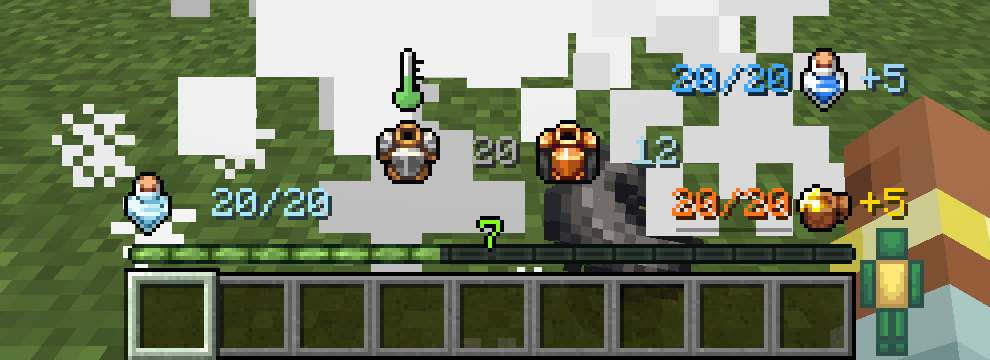
- 被幽灵(或骨寒法杖、冰霜法术等)击中后,你会进入受冻状态:你的药水瓶结冰,数字变为冰蓝色。受冻状态还会阻止治疗,现在你可以直观地看到这一效果。
- 以太(灵魂)生命值以紫色的
+N显示在你的生命值之后。
🍎 AppleSkin
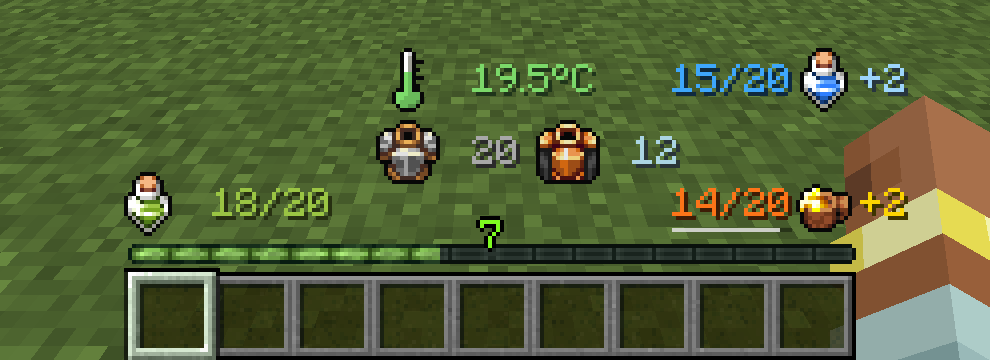
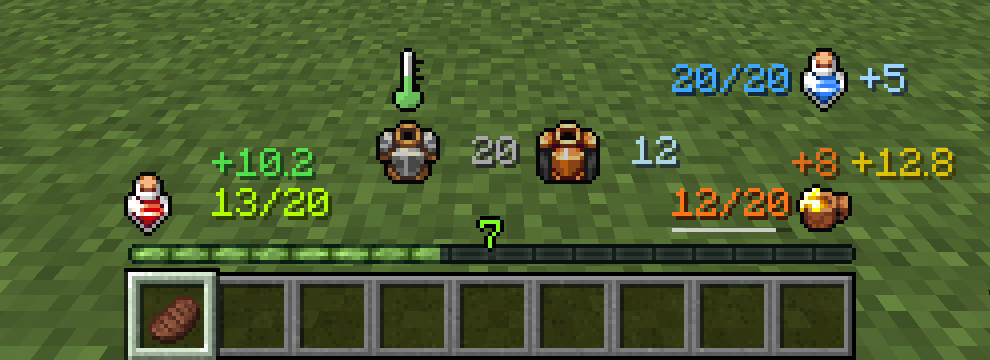
- 手持食物时,可以预览其恢复的效果:饥饿值、饱和度以及将恢复的生命值。
- 饥饿值下方有一条细的疲惫值条。
- 遵循 AppleSkin 自身的设置,并隐藏 AppleSkin 的进度条覆盖层,避免在空白区域浮显多余内容。
🌡️ Legendary Survival Overhaul
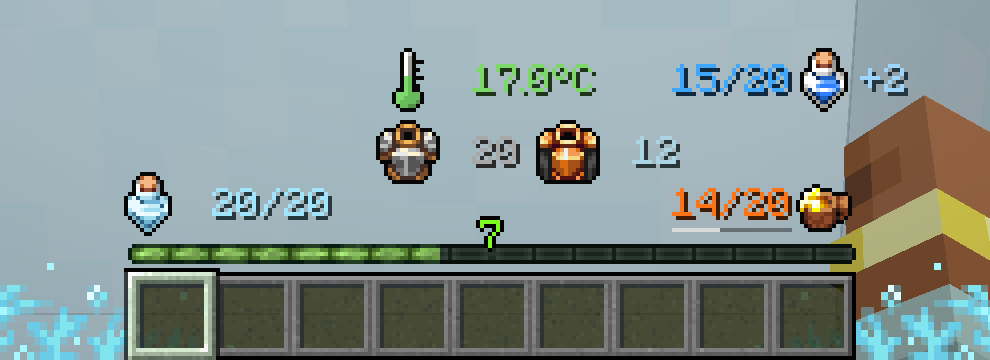
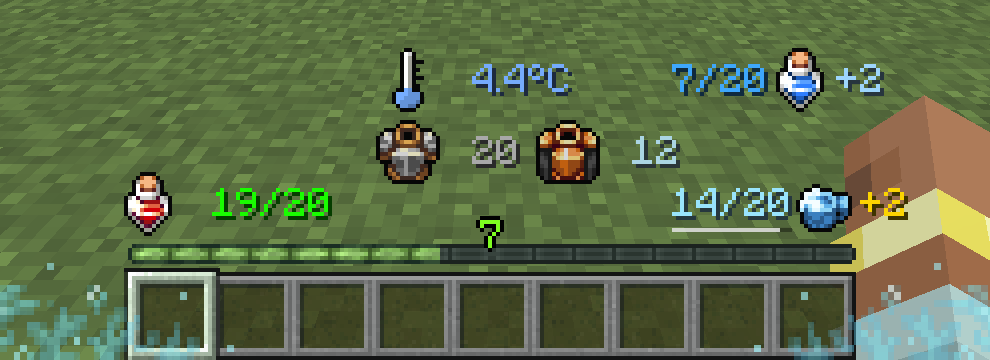
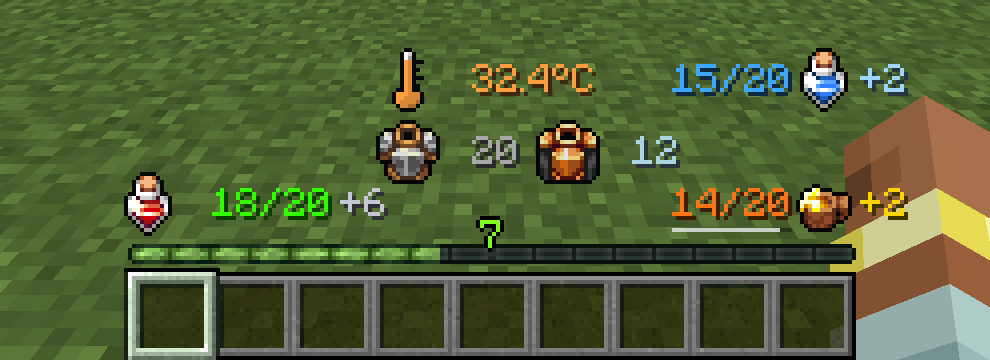
- 口渴值带有一个水瓶图标(以及口渴饱和度)。
- 体温通过温度计显示,随着温度升高填充并变色(冻伤 → 寒冷 → 正常 → 炎热 → 中暑)。装备 LSO 的温度计即可像 LSO 本身一样看到精确的 °C/°F 数值。
- 寒冷饥饿会将你的饥饿图标变为冰霜样式。
- 盾牌生命值和破碎心显示在你的生命值之后。
🔮 Iron's Spells 'n Spellbooks
- 采用 BetterHP 风格显示法力值。当 BetterHP 显示法力值时,Iron 原有的法力条会被隐藏,经验条保持可见。Iron 的法术栏、施法条和重施法条不受影响。
支持版本
| Minecraft | Loader | Compat |
|---|---|---|
| 26.1.x | NeoForge, Fabric | AppleSkin |
| 1.21.11 | NeoForge, Fabric | AppleSkin |
| 1.21.10 | NeoForge, Fabric | AppleSkin |
| 1.21.1 | NeoForge | AppleSkin, Eidolon: Repraised, LSO, Iron's Spells |
| 1.21.1 | Fabric | AppleSkin |
| 1.20.1 | Forge | AppleSkin, Eidolon: Repraised, LSO, Iron's Spells |
| 1.20.1 | Fabric | AppleSkin |
所有兼容性的源代码及游戏内截图:GitHub
常见问题
它是否与其他模组兼容? 是的。BetterHP 仅更改客户端 HUD。添加自定义 HUD 进度条的其他模组仍可正常工作,上述列出的模组已获得专用支持。
我可以调整位置吗?
可以。每个元素都有 X/Y 坐标以及图标和文本的缩放比例。在游戏内打开配置文件,或编辑 config/better_hp-client.toml。
我能找回原版的心形/饥饿值/护甲吗?
可以。每个原版进度条都有独立的开关,或者关闭 enableCustomHUD 即可恢复整个原版 HUD。
它会影响服务器性能吗? 不会。它是纯客户端模组。
BetterHP
A cleaner, smarter HUD. BetterHP replaces the vanilla rows of hearts, shanks, armor and bubbles with crisp numbers and icons, so you always know exactly where you stand.
No overflow mods needed: health and armor above 20 display correctly and stay in sync with the player.
Join our community: Pixel Dream Studios (official partner) · Bandit's Discord
Features
- Numeric health, coloured by how hurt you are (green → yellow → red), with a pulse and shake when you're critical. Hardcore worlds get their own icon.
- Status icons: the health bottle changes when you're Poisoned (green), Withered (dark) or Frozen (ice), just like vanilla's heart types.
- Absorption shown as
+Nright after your health. - Armor and armor toughness with a little "pop" animation whenever they change.
- Hunger and saturation as numbers.
- Oxygen while underwater, and mount health while riding.
- Fully configurable: move every element, scale icons and text, toggle each vanilla bar back on, change colours. Edit it in-game (NeoForge config screen, or Mod Menu on Fabric).
- Client-side only: works on any server that allows client mods. Servers don't need it.
Mod compatibility
All compat is automatic when the other mod is installed, and each one can be switched off in the config.
AppleSkin compat is available on every version. Eidolon: Repraised, Legendary Survival Overhaul and Iron's Spells are supported on Forge 1.20.1 and NeoForge 1.21.1 (the versions those mods are released for).
❄️ Eidolon: Repraised
- Get hit by a Wraith (or the Bonechill wand, frost spells…) and you're Chilled: your health bottle freezes over and the number turns icy blue. Chilled also blocks healing, so now you can see it.
- Ethereal (soul) health is shown as a purple
+Nafter your health.
🍎 AppleSkin
- Hold food to see a flashing preview of what it restores: hunger, saturation, and the health it will regenerate.
- A thin exhaustion bar under your hunger value.
- Follows AppleSkin's own settings, and hides AppleSkin's bar overlays so nothing floats over empty space.
🌡️ Legendary Survival Overhaul
- Thirst as a value with a water-bottle icon (plus thirst saturation).
- Body temperature as a thermometer that fills and changes colour (frostbite → cold → normal → hot → heat stroke). Equip LSO's thermometer to see the exact °C/°F, just like LSO itself.
- Cold Hunger turns your hunger icon to ice.
- Shield health and broken hearts shown after your health.
🔮 Iron's Spells 'n Spellbooks
- Mana in the BetterHP style. Iron's own mana bar is hidden while BetterHP shows it, and the XP bar stays visible. Iron's spell bar, cast bar and recast bar are untouched.
Supported versions
| Minecraft | Loader | Compat |
|---|---|---|
| 26.1.x | NeoForge, Fabric | AppleSkin |
| 1.21.11 | NeoForge, Fabric | AppleSkin |
| 1.21.10 | NeoForge, Fabric | AppleSkin |
| 1.21.1 | NeoForge | AppleSkin, Eidolon: Repraised, LSO, Iron's Spells |
| 1.21.1 | Fabric | AppleSkin |
| 1.20.1 | Forge | AppleSkin, Eidolon: Repraised, LSO, Iron's Spells |
| 1.20.1 | Fabric | AppleSkin |
Source code and in-game screenshots of every compat: GitHub
FAQ
Does it work with other mods? Yes. BetterHP only changes the client HUD. Mods that add their own HUD bars keep working, and the mods listed above get dedicated support.
Can I move things around?
Yes. Every element has X/Y positions plus icon and text scale. Open the config in-game or edit config/better_hp-client.toml.
Can I bring back the vanilla hearts/hunger/armor?
Yes. Each vanilla bar has its own toggle, or turn off enableCustomHUD to restore the whole vanilla HUD.
Does it affect server performance? No. It's client-only.

下载 BetterHP
下载 BetterHP
下载 BetterHP
需要联机服务器吗?
稳定流畅、一键部署,几分钟即可和朋友联机开服
最低仅需 8 元/月 即可畅快联机
下载 BetterHP
需要联机服务器吗?
稳定流畅、一键部署,几分钟即可和朋友联机开服
最低仅需 8 元/月 即可畅快联机
下载 BetterHP
下载 BetterHP
下载 BetterHP
下载 BetterHP
下载 BetterHP
下载 BetterHP
需要联机服务器吗?
稳定流畅、一键部署,几分钟即可和朋友联机开服
最低仅需 8 元/月 即可畅快联机
BetterHP 2.3.1 (NeoForge 1.21.1)
修复
- HUD 数字消失: 在安装了某些 HUD/覆盖层模组的情况下,生命值、饥饿值、护甲值及其他数值可能会消失,而图标仍然可见。Better HP 现在会设置自己的渲染状态,而不是继承上一个覆盖层遗留的状态,并以不进行深度测试的方式绘制文本,从而防止其他模组的残留内容将其隐藏。
BetterHP 1.1.0 (Fabric 26.1.x)
新增
- AppleSkin 兼容(可选):按住食物可预览其恢复的饥饿度、饱和度和生命值,并在饥饿值下方显示一个疲劳条
- 中毒 / 凋零 / 冰冻状态的生命值图标(冰冻 = 粉末雪)
- Mod Menu 配置界面中的「状态与兼容」页面
修复
- 配置界面仅保存了第一个更改的选项(通过引入 500 毫秒的保存冷却时间来解决其余选项未保存的问题)
- 「显示韧性图标」开关错误地显示了护甲设置
- 客户端代码从通用入口点/通用 mixin 列表运行,这可能导致拥有该 jar 文件的专用服务器崩溃;现在该模组已标记为仅客户端模组
- 护甲/韧性“弹出”动画按帧执行(高 FPS 下过快),且在加入游戏时发生弹跳
- 溺水时氧气可能显示负值
- 在深色背景下,凋零状态下的生命值颜色几乎不可见
BetterHP 2.3.0 (NeoForge 1.21.1)
新增模组兼容
- Eidolon: Repraised: 获得“寒冷”状态(幽魂攻击、骨寒法杖、霜冻法术)时,会冻结你的生命瓶并将数字变为冰蓝色。灵界(灵魂)生命值以紫色
+N显示。 - AppleSkin: 按住食物可预览其恢复的饥饿值、饱和度和生命值,并在饥饿值下方显示疲惫值条。当 BetterHP 替换原版血条时,AppleSkin 的叠加条将被隐藏。
- Legendary Survival Overhaul: 口渴值(水瓶图标)、体温(变色温度计;装备 LSO 的温度计时显示精确的 °C/°F)、“寒冷饥饿”期间的冰冻饥饿图标,以及生命值后的护盾/破碎心形图标。
新增功能
- 中毒、凋零和冰冻状态的生命值图标(包含粉末雪)。
- 游戏内配置界面:Mods → BetterHP → Config。
- BetterHP 现在标记为仅客户端模组,因此服务器是否安装它已不再重要。
修复
- Iron's:BetterHP 不再隐藏 Iron's 的法术栏、施法栏和重施法栏,仅隐藏法力值条。同时也不再重写 Iron's 自身的配置文件。
enableCustomHUD = false现在确实能恢复原版 HUD。- 创意模式下手持物品名称的位置偏移问题已修复。
- 生命值在 0.5 HP 时显示为
0;饱和度低于 1 时被隐藏;氧气值可能显示为-1/15。 - 护甲/韧性弹跳动画现在在任何 FPS 下均以相同速度运行。
- 聊天窗口和 F3 调试屏幕现在绘制在 HUD 之上而非之下。
- 饥饿值和法力值图标在数字被隐藏时不再留有间隙。
- 各种崩溃安全与性能修复。
已更新以兼容所有 26.1 版本
关于这个资源的讨论、问题反馈与使用心得
还没有讨论,来发第一帖吧
你是这个资源的作者?登录后可认领此资源。
相似资源
 模组

显示你正在注视的方块的信息。(适用于 Minecraft 1.16+ 的 Hwyla/Waila 分支)
 模组
使用 JavaScript 编辑配方、添加自定义物品、编写世界事件!
 模组

查看物品与配方
 模组
在游戏画面角落显示附近世界地形、玩家、生物和实体的地图。可创建路径点,帮助你找到标记过的位置。
 模组
AE2:一款流行的自动化与存储模组
 模组
那是什么?一个 Waila/Hwyla 的分支。
评论 0
登录后参与评分
还没有评论,来抢沙发吧