
为什么选择 Bkups?
- 内置图形用户界面(GUI),辅助你使用整个模组
- 四种不同类型的备份
- 增量备份
- 仅恢复所需内容
- 在固定时间进行每日备份,或每隔 X 分钟备份一次
- 排除你不需要的文件和文件夹
- Whopper 系统(在游戏中切换世界)
- 多种保护世界或服务器的方法
- 丰富的自定义选项
- 设置菜单
- 无需作弊指令
- 安装即可游玩!
两种界面
Bkups 提供两种界面,你可以随时切换它们,而不会丢失任何备份或设置。


|
经典界面 |
新界面 |
| 导航 |
独立屏幕 |
主页、备份、世界和设置位于顶部栏中 |
| 备份列表 |
树状结构 |
主屏幕、时间线和过滤器 |
| 版本 |
每个版本 |
26.x |
切换: 设置 → 高级 → 界面(新)或在设置菜单中点击“新界面”按钮(经典)
备份管理器(GUI)

Bkups Lite

经典界面


备份类型

- 手动: 由玩家手动创建的备份
- 自动: 根据你的设置自动创建的备份(每隔 X 分钟或每天在固定时间)
- 退出: 当你离开世界或服务器停止时创建的备份
- 传统: 使用原版 Minecraft “制作备份” 按钮创建的备份
增量备份
所有备份默认均为增量备份:它们仅保存自上次完整备份以来发生更改的文件,因此体积更小且速度更快

- 每创建 10 个备份(或当更改过大时)会创建一个完整备份
- 手动、自动和退出备份各自拥有独立的模式和各自的完整备份
- 使用
/bk full [name] 强制进行手动完整备份
- 增量备份在备份管理器中显示为 增量 标签
- 增量备份需要其对应的完整备份才能恢复,因此 Bkups 始终将它们保持在一起(删除、回收站、收藏和存储限制)
- 如果你更喜欢仅使用完整备份,请使用
/bkup advanced mode all full
经典界面

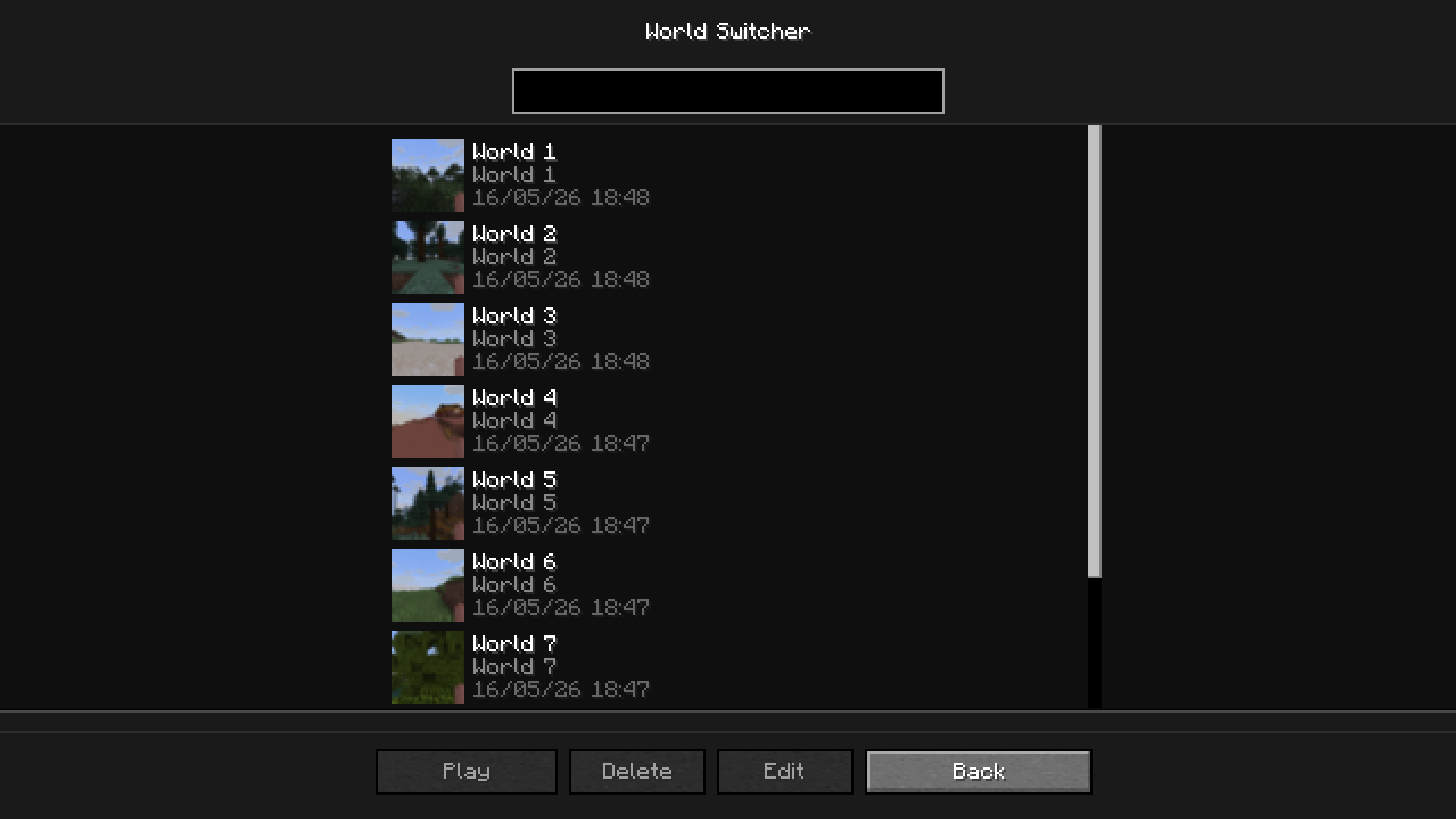
Whopper 系统
此系统允许你在不返回主菜单的情况下切换世界

经典界面
回收站
要访问回收站,请点击备份管理器中的回收站按钮。如果你已启用回收站功能(/bkup advanced trash on),所有已删除的备份都将显示在此处
 通过回收站,你可以 永久删除 备份或 恢复 它
经典界面

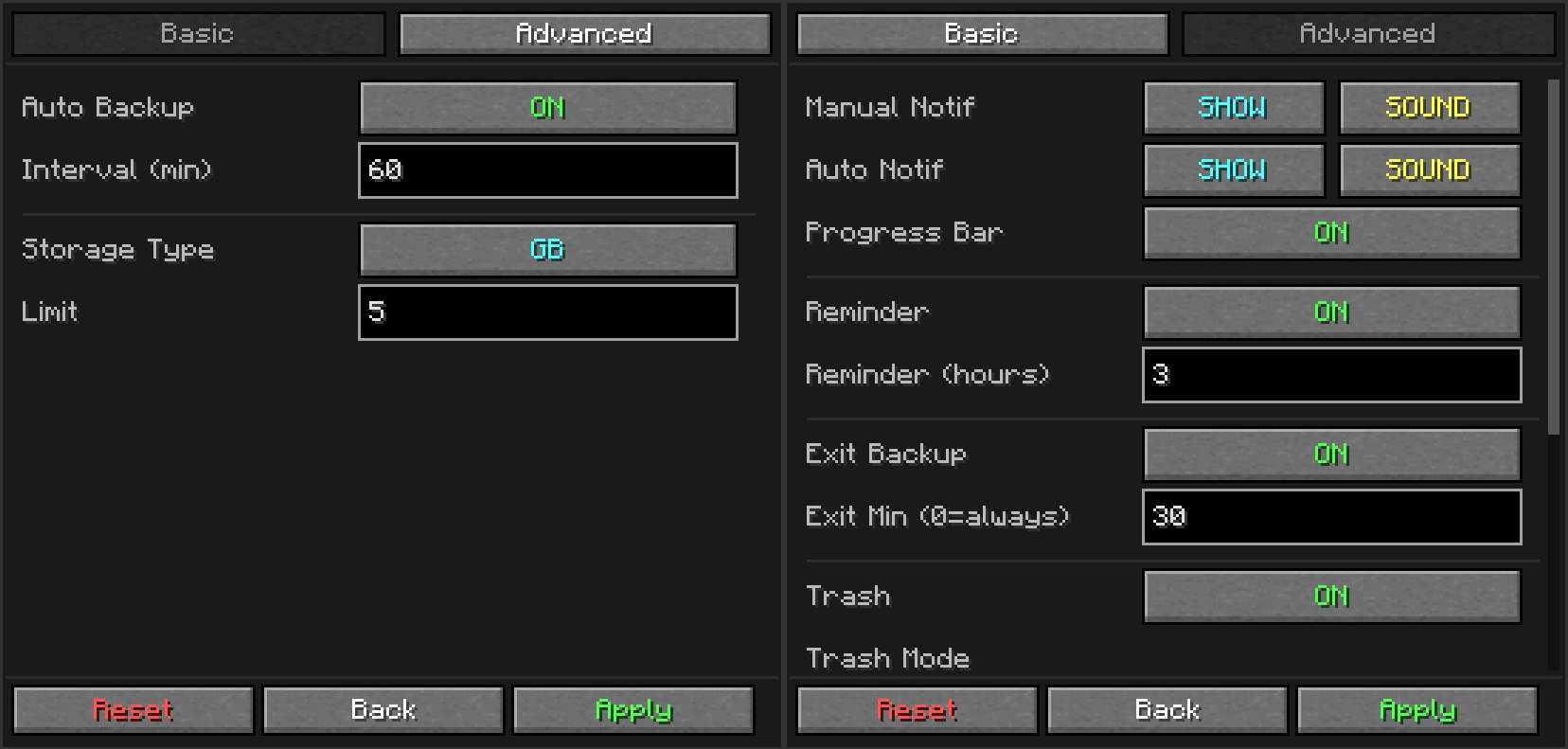
设置菜单
 一个设置菜单,让你无需使用命令
经典界面
详细备份信息
要访问此屏幕,请在备份管理器中双击某个备份

- 查看世界信息:最后游玩时间、游戏时长、难度、版本和种子
- 为备份编写 备注(列表中会出现一个 ✎ 图标)
- 查看日志: 打开保存在该备份中的
latest.log,以查看备份前的情况
- 文件: 仅恢复或提取备份的一部分
经典界面

仅恢复备份的一部分
从备份详情中的 文件 按钮(或通过命令)你可以:
- 恢复 玩家(物品栏、进度和统计数据)
- 恢复 维度 或任何文件夹或文件
- 从备份中 提取 某些内容,而不影响你的世界
不会丢失任何数据:所有被替换的内容都会移动到 bkups\replaced 文件夹中
收藏夹
你可以将备份添加到收藏夹。优点如下:
命令
/bk [custom_name] 如果你想进行手动备份([custom_name] 用于命名备份)/bkup <subcommand> 用于其他所有选项和自定义,详见下文
子命令
| 命令 |
描述 |
/bkup auto <on/off> |
切换自动备份功能 |
/bkup auto at <HH:mm> |
在固定时间进行每日备份(at remove、at list、warn) |
/bkup storage <lim> <type> |
按 gb 或 backups 设置保留数量限制 |
/bkup storage age <days/off> |
删除超过 <days> 天的备份 |
/bkup delete <file> |
删除备份(如果启用了回收站,则移至回收站) |
/bkup note <file> [text] |
为备份添加或删除备注 |
/bkup restore <file> |
恢复备份(整个世界、某个 player 或特定 file) |
/bkup status |
显示当前设置和磁盘使用情况 |
/bkup help [command] |
在游戏中显示命令列表 |
/bkup advanced exit <on/off> |
切换在停止服务器或离开世界时是否进行备份 |
/bkup advanced trash <options> |
管理回收站系统(on、off、clear、recover) |
/bkup advanced compression <mode> |
设置压缩模式为 fast(体积较大)或 heavy(体积较小) |
/bkup advanced mode <type> <mode> |
将 manual、auto、exit 或 all 类型的备份设置为 full(完全)或 differential(差异) |
/bkup advanced exclude <options> |
从备份中排除文件或文件夹(add、remove、list) |
/bkup advanced extract <file> <path> |
在不影响世界的情况下,从备份中提取部分内容 |
/bkup advanced diskcheck <on/off> |
在每次备份前检查可用磁盘空间 |
/bkup advanced path [path] |
显示或更改备份文件夹的位置 |
/bkup advanced config <options> |
切换聊天通知、声音、进度条和日志记录 |
/bkup advanced admin <player> |
为非 OP 玩家授予备份权限 |
/bkup advanced unadmin <player> |
移除非 OP 玩家的备份权限 |
详细
| 命令 |
描述 |
| 手动备份 |
|
/bk |
使用世界文件夹名称创建即时备份。 |
/bk [自定义名称] |
创建具有特定名称的备份(例如 /bk BossFight)。 |
/bk full [自定义名称] |
创建完整备份,即使手动备份为增量备份。 |
| 帮助 |
|
/bkup help |
显示主帮助菜单。 |
| /bkup help <command> | 显示特定主题的详细帮助:bk、auto、storage、status、delete、restore、note、extract、advanced、exclude、mode、log、diskcheck。 |
| 存储限制 | |
| /bkup storage <num> gb | 按大小设置限制(例如 5 gb)。当存储空间满时,会删除最旧的文件。 |
| /bkup storage <num> backups | 按数量设置上限(例如 20 backups)。 |
| /bkup storage age <days> | 删除超过 <days> 天的备份。收藏的备份和最新的备份永远不会被删除。 |
| /bkup storage age off | 禁用按年龄删除。 |
| 删除 | |
| /bkup delete <file> | 删除一个备份。如果启用了回收站,则将其移至回收站。 |
| 备注 | |
| /bkup note "<file>" <text> | 为备份添加备注(最多 100 个字符)。 |
| /bkup note "<file>" | 移除备注。 |
| 信息 | |
| /bkup status | 在聊天栏中打印当前配置、磁盘使用情况和统计信息。 |
| 自动化 | |
| /bkup auto on | 启用每 60 分钟自动备份。 |
| /bkup auto on <min> | 启用自定义间隔的自动备份(例如 30)。 |
/bkup auto off |
完全禁用自动备份。 |
/bkup auto at <HH:mm> |
每天在该时间(实际时钟)进行一次备份。 |
/bkup auto at remove <HH:mm> |
移除一个每日备份时间点。 |
/bkup auto at list |
列出所有每日备份时间点。 |
/bkup auto warn <min> |
在每日备份前 <min> 分钟向玩家发出警告。 |
/bkup auto warn off |
禁用警告功能。 |
/bkup advanced exit on |
启用服务器停止时自动备份(始终生效)。 |
/bkup advanced exit on <min> |
仅当会话时长超过 <min> 分钟时,才在服务器停止时执行备份。 |
/bkup advanced exit off |
禁用服务器停止时的备份功能。 |
| 恢复 |
|
/bkup restore "<file>" |
在服务器停止时恢复整个世界(仅限专用服务器)。 |
/bkup restore cancel |
取消待处理的恢复操作。 |
/bkup restore "<file>" player <name> |
立即恢复指定玩家的数据(该玩家必须处于离线状态)。 |
/bkup restore "<file>" file <path> |
在服务器停止时(或你离开当前世界时)恢复某个文件夹或文件。 |
/bkup advanced extract "<file>" <path> |
从备份中将某个文件夹或文件复制到 bkups/extracted。 |
/bkup advanced extract clear |
清空 bkups/extracted 目录。 |
/bkup advanced replaced clear |
清空 bkups/replaced 目录(需确认操作)。 |
| 回收站系统 |
|
/bkup advanced trash on |
启用回收站功能。被删除的文件会保留 24 小时。 |
| /bkup advanced trash on <num> 小时 | 自定义回收站:文件在 <num> 小时后过期。 |
/bkup advanced trash on <num> backups |
自定义回收站:保留 <num> 个已删除文件的批次。 |
/bkup advanced trash on <num> backups accumulated |
自定义回收站:滚动缓冲池,保留 <num> 个已删除文件。 |
/bkup advanced trash off |
禁用回收站。文件将被永久删除。 |
/bkup advanced trash clear |
立即清空回收站文件夹。 |
/bkup advanced trash recover <file> |
从回收站恢复已删除的文件到其原始文件夹。 |
| 技术设置 |
|
/bkup advanced compression fast |
等级 1:最快的备份速度,生成的文件大小较大。 |
/bkup advanced compression heavy |
等级 9:最佳压缩率,生成的文件大小较小(速度较慢)。 |
/bkup advanced mode <manual|auto|exit|all> differential [num] |
此类备份仅保存发生更改的内容。每创建 <num> 次备份会生成一次完整备份(默认为 10)。 |
/bkup advanced mode <manual|auto|exit|all> full |
此类备份始终为完整备份。 |
/bkup advanced exclude add <path> |
排除某个文件夹、文件或匹配模式(例如 DIM-1、**/*.mca)。 |
/bkup advanced exclude remove <path> |
移除某项排除规则。 |
/bkup advanced exclude list |
列出当前的排除规则。 |
/bkup advanced diskcheck <on/off> |
如果可用空间不足则取消备份(默认开启)。 |
/bkup advanced path |
显示当前备份文件夹路径(点击可复制)。 |
/bkup advanced path <path> |
更改备份文件夹位置(例如 D:/Backups)。 |
/bkup advanced path reset |
将存储文件夹重置为默认路径(/bkups)。 |
| 通知与界面 |
|
/bkup advanced config noti on |
如果超过 3 小时未进行备份,会提醒你进行备份。 |
/bkup advanced config noti on <hours> |
设置自定义提醒间隔时间。 |
/bkup advanced config noti off |
禁用“长时间会话”警告。 |
/bkup advanced config progress show |
在屏幕顶部显示进度条 Boss Bar。 |
/bkup advanced config progress hide |
隐藏进度条。 |
/bkup advanced config log <on/off> |
在每个备份中保存 latest.log 日志文件(默认开启)。 |
/bkup advanced config <all|manual|auto> <hide|show> <sound|mute> |
设置特定备份类别的聊天可见性和声音提示。all 同时适用于手动和自动备份。 |
| 管理员 |
|
/bkup advanced admin <player> |
允许指定玩家在没有 OP(管理员权限)的情况下使用备份命令。 |
/bkup advanced unadmin <player> |
撤销该玩家的备份特权。 |
Bkups 是如何工作的?
文件夹的创建方式
当进行第一次备份时,Bkups 会在 .minecraft\bkups 中创建一个文件夹(Legacy 备份除外,它们存储在 .minecraft\backups,即原版 Minecraft 文件夹中)。
在其中,每种类型都有自己对应的文件夹(Manual、Auto、Exit),并且只有在该类型的备份被创建时,才会生成相应的文件夹。
Bkups 是一个本地备份系统:所有备份都保留在你的电脑(或服务器)上。
在线模式下它是如何工作的?
当两个或更多安装了 Bkups 的玩家连接到你的服务器时:
如果玩家不是管理员:
- 当备份完成后,聊天栏中会显示提示信息,但路径不会显示
- 他们也无法使用暂停菜单中出现的命令或按钮
如果玩家是管理员(/bkup advanced admin <player>):
- 他们将能够查看路径
- 可以使用所有命令和快速备份按钮
- 如果他们创建备份,该备份将存储在服务器所有者本地的文件夹中
在专用服务器上,备份保存在服务器文件夹内的 bkups 文件夹中。Backup Manager 仅在你的个人电脑上显示备份,因此在服务器上此功能被禁用:请改用 /bkup status、/bkup delete 和 /bkup restore 命令。
世界备份
创建备份时,Bkups 会将世界压缩为 .zip 文件,恢复时再将其解压。
完整备份是你世界的完整压缩副本,因此不会丢失任何数据。差异备份仅包含发生变化的部分,并且需要与其对应的完整备份一起进行恢复。
在每次备份之前,Bkups 会检查是否有足够的可用空间,而游戏会在压缩备份的同时继续保存数据。
命令 /bkup advanced compression <mode> 可以更改 .zip 文件的压缩方式。
每个备份还会保存当时生成的 latest.log 日志文件。在服务器上,该日志包含聊天内容和玩家 IP 地址,如果你与他人共享备份,请使用 /bkup advanced config log off 关闭日志记录。
Bkups Lite
想要只保留核心功能?
Bkups Lite 专为希望确保数据安全而不愿进行额外配置的玩家设计。

为什么选择 Bkups Lite?
随着我们不断更新 Bkups 的新版本,我们发现大多数新增功能并非所有人都需要。因此我们推出了 Bkups Lite:它仅提供核心功能(手动、自动及退出时的备份、差异备份、存储限制以及简单的恢复列表),同时保持与完整版 Bkups 相同的安全性。两者使用相同的备份文件夹,因此你可以随时切换版本而不会丢失任何内容。
路线图
- 持续更新模组,加入独特且实用的新功能
- Bkups Server:即将推出,让你在游戏中管理服务器的备份。
- 修复已知问题
鸣谢
- Blanq_Ky:模组及版本开发,项目负责人
- TrasTick:负责 CurseForge 和 Modrinth 页面描述
Why Bkups?
- Comes with a GUI that will help you throughout the mod
- Four different types of backups
- Differential backups
- Restore only what you need
- Daily backups at fixed times, or every X minutes
- Exclude the files and folders you don't need
- Whopper System (switch between worlds in-game)
- Many ways to protect your world or server
- Lots of options to make it your own
- Settings Menu
- No cheats on needed
- Install and Play!
Two Interfaces
Bkups comes with two interfaces and you can switch between them at any time, without losing your backups or settings.
|
Classic Interface |
New Interface |
| Navigation |
Separate screens |
Home, Backups, Worlds and Settings in one top bar |
| Backups list |
Tree structure |
Home screen, timeline and filters |
| Versions |
Every version |
26.x |
Switch: Settings → Advanced → Interface (new) or "New interface" button in the Settings Menu (classic)
Backup Manager (GUI)
Bkups Lite
Classic Interface
Types of Backups
- Manual: this backup is made by the player manually
- Auto: this backup is made automatically according to your settings (every X minutes or every day at fixed times)
- Exit: this backup is made whenever you leave the world or the server stops
- Legacy: these are the backups created with the vanilla Minecraft "Make Backup" button
Differential Backups
All backups are differential by default: they only save the files that changed since the last full backup, so they are much smaller and faster
- A full backup is made every 10 backups (or when the changes are too big)
- Manual, Auto and Exit backups each have their own mode and their own full backups
- Use
/bk full [name] to force a full manual backup
- Differential backups show a differential tag in the Backup Manager
- A differential needs its full backup to be restored, so Bkups always keeps them together (delete, trash, favorites and storage limits)
- Use
/bkup advanced mode all full if you prefer only full backups
Classic Interface
Whopper System
This system lets you switch worlds without having to go back to the main menu
Classic Interface
The Trash
To access the trash, click on the trash button in Backup Manager. All your deleted backups will appear here if you have the trash enabled (/bkup advanced trash on)
With the trash, you can permanently delete the backup or recover it
Classic Interface
Settings Menu
A settings menu so you don't have to use commands
Classic Interface
Detailed Backup
To access this screen, double-click on a backup in the backup manager
- See the world info: last played, play time, difficulty, version and seed
- Write a note on the backup (a ✎ appears in the list)
- View log: open the
latest.log saved in that backup to see what happened right before it
- Files: restore or extract only a part of the backup
Classic Interface
Restore only a part of a backup
From the Files button in the backup details (or with commands) you can:
- Restore a player (inventory, advancements and stats)
- Restore a dimension or any folder or file
- Extract something from a backup without touching your world
Nothing is lost: everything that is replaced is moved to bkups\replaced
Favorites
You can add your backups to your favorites. The advantages are:
- Your backup will not be deleted by auto-cleanup
- Better visibility of your backups
Commands
/bk [custom_name] If you want to make a manual backup ([custom_name] is used to name the backup)/bkup <subcommand> For all the other options and customization, more about it below
Subcommands
| Command |
Description |
/bkup auto <on/off> |
Toggles automatic backups |
/bkup auto at <HH:mm> |
Daily backups at fixed times (at remove, at list, warn) |
/bkup storage <lim> <type> |
Sets retention limit by gb or backups |
/bkup storage age <days/off> |
Deletes backups older than <days> |
/bkup delete <file> |
Deletes a backup (or moves to trash if enabled) |
/bkup note <file> [text] |
Adds or removes a note on a backup |
/bkup restore <file> |
Restores a backup (whole world, a player or a file) |
/bkup status |
Shows current settings and disk usage |
/bkup help [command] |
Displays the command list in-game |
/bkup advanced exit <on/off> |
Toggles backup when stopping the server or leaving the world |
/bkup advanced trash <options> |
Manages trash system (on, off, clear, recover) |
/bkup advanced compression <mode> |
Sets compression to fast (larger) or heavy (smaller) |
/bkup advanced mode <type> <mode> |
Sets manual, auto, exit or all backups to full or differential |
/bkup advanced exclude <options> |
Excludes files or folders from backups (add, remove, list) |
/bkup advanced extract <file> <path> |
Copies a part of a backup without touching the world |
/bkup advanced diskcheck <on/off> |
Checks free disk space before each backup |
/bkup advanced path [path] |
Shows or changes the backup folder location |
/bkup advanced config <options> |
Toggles chat notifications, sounds, progress bar and log |
/bkup advanced admin <player> |
Grants backup permissions to non-OP players |
/bkup advanced unadmin <player> |
Removes backup permissions from non-OP players |
Detailed
| Command |
Description |
| Manual Backups |
|
/bk |
Creates an instant backup with the world folder name. |
/bk [custom_name] |
Creates a backup with a specific name (e.g., /bk BossFight). |
/bk full [custom_name] |
Creates a full backup, even if manual backups are differential. |
| Help |
|
/bkup help |
Shows the main help menu. |
/bkup help <command> |
Shows detailed help for a topic: bk, auto, storage, status, delete, restore, note, extract, advanced, exclude, mode, log, diskcheck. |
| Storage Limits |
|
/bkup storage <num> gb |
Sets limit by size (e.g., 5 gb). Deletes oldest files when full. |
/bkup storage <num> backups |
Sets limit by quantity (e.g., 20 backups). |
/bkup storage age <days> |
Deletes backups older than <days> days. Favorites and the newest backup are never deleted. |
/bkup storage age off |
Disables deleting by age. |
| Delete |
|
/bkup delete <file> |
Deletes a backup. Moves it to Trash if enabled. |
| Notes |
|
/bkup note "<file>" <text> |
Adds a note to a backup (up to 100 characters). |
/bkup note "<file>" |
Removes the note. |
| Info |
|
/bkup status |
Prints current config, disk usage, and stats to chat. |
| Automation |
|
/bkup auto on |
Enables auto-backups every 60 minutes. |
/bkup auto on <min> |
Enables auto-backups with a custom interval (e.g., 30). |
/bkup auto off |
Disables automatic backups completely. |
/bkup auto at <HH:mm> |
Makes a backup every day at that time (real clock). |
/bkup auto at remove <HH:mm> |
Removes a daily time. |
/bkup auto at list |
Lists the daily times. |
/bkup auto warn <min> |
Warns players <min> minutes before a daily backup. |
/bkup auto warn off |
Disables the warning. |
/bkup advanced exit on |
Enables backup when stopping the server (always). |
/bkup advanced exit on <min> |
Enables exit backup only if session > <min> minutes. |
/bkup advanced exit off |
Disables backups on server stop. |
| Restore |
|
/bkup restore "<file>" |
Restores the whole world when the server stops (dedicated server). |
/bkup restore cancel |
Cancels a pending restore. |
/bkup restore "<file>" player <name> |
Restores a player's data now (the player must be offline). |
/bkup restore "<file>" file <path> |
Restores a folder or file when the server stops (or when you leave the world). |
/bkup advanced extract "<file>" <path> |
Copies a folder or file from a backup to bkups/extracted. |
/bkup advanced extract clear |
Empties bkups/extracted. |
/bkup advanced replaced clear |
Empties bkups/replaced (asks for confirm). |
| Trash System |
|
/bkup advanced trash on |
Enables Trash. Deleted files stay for 24 hours. |
/bkup advanced trash on <num> hours |
Custom Trash: Files expire after <num> hours. |
/bkup advanced trash on <num> backups |
Custom Trash: Keeps a batch of <num> deleted files. |
/bkup advanced trash on <num> backups accumulated |
Custom Trash: Rolling buffer of <num> deleted files. |
/bkup advanced trash off |
Disables Trash. Files are deleted permanently. |
/bkup advanced trash clear |
Instantly empties the trash folder. |
/bkup advanced trash recover <file> |
Restores a deleted file from Trash to its original folder. |
| Technical Settings |
|
/bkup advanced compression fast |
Level 1: Fastest backup speed, larger file size. |
/bkup advanced compression heavy |
Level 9: Best compression, smaller file size (slower). |
/bkup advanced mode <manual|auto|exit|all> differential [num] |
Those backups only save what changed. A full backup is made every <num> (default 10). |
/bkup advanced mode <manual|auto|exit|all> full |
Those backups are always full. |
/bkup advanced exclude add <path> |
Excludes a folder, file or pattern (e.g., DIM-1, **/*.mca). |
/bkup advanced exclude remove <path> |
Removes an exclusion. |
/bkup advanced exclude list |
Lists the exclusions. |
/bkup advanced diskcheck <on/off> |
Cancels the backup if there isn't enough free space (on by default). |
/bkup advanced path |
Shows the current backup folder (click to copy). |
/bkup advanced path <path> |
Changes backup folder location (e.g., D:/Backups). |
/bkup advanced path reset |
Resets storage folder to default (/bkups). |
| Notifications & UI |
|
/bkup advanced config noti on |
Reminds you to backup if you haven't in 3 hours. |
/bkup advanced config noti on <hours> |
Sets custom reminder interval. |
/bkup advanced config noti off |
Disables "long session" warnings. |
/bkup advanced config progress show |
Shows the boss-bar progress on top of screen. |
/bkup advanced config progress hide |
Hides the progress bar. |
/bkup advanced config log <on/off> |
Saves latest.log inside each backup (on by default). |
/bkup advanced config <all|manual|auto> <hide|show> <sound|mute> |
Sets chat visibility and sound for a backup category. all applies to both manual and auto. |
| Admin |
|
/bkup advanced admin <player> |
Allows a player to use backup commands without OP. |
/bkup advanced unadmin <player> |
Revokes backup privileges. |
How does Bkups work?
How are folders created
Bkups creates a folder in .minecraft\bkups when the first backup is made (except Legacy backups, which are stored in .minecraft\backups, the vanilla Minecraft folder)
Inside it, each type has its own folder (Manual, Auto, Exit), and a folder is only created when a backup of that type is made
Bkups is a local backup system: all your backups stay on your PC (or on your server)
How does it work online?
When two or more people are connected to your server with Bkups installed:
If a player is not an admin:
- When a backup is done, the message will appear in the chat, but the path will not
- They will also not be able to use the commands or buttons that appear in the pause menu
If a player is an admin (/bkup advanced admin <player>):
- They will be able to see the path
- Use all the commands and the quick backup button
- If they make a backup, it will be stored in the local folder of the server owner
On a dedicated server, backups are saved in the bkups folder inside the server folder. The Backup Manager only shows the backups on your own PC, so on a server it is disabled: use /bkup status, /bkup delete and /bkup restore instead
Backups to World
When a backup is created, Bkups compresses the world into a .zip, which is extracted again when you restore it
Full backups are complete compressed copies of your world, so no data is lost. Differential backups only contain what changed, and are restored together with their full backup
Before every backup Bkups checks that there is enough free space, and the game keeps saving while the backup is compressed
The command /bkup advanced compression <mode> changes how the .zip files are compressed
Each backup also saves the latest.log of that moment. On servers this log contains the chat and player IPs, so turn it off with /bkup advanced config log off if you share your backups
Bkups Lite
Want only the essentials?
Bkups Lite is designed for people who just want to keep their data safe without having to do any extra configuration.
Why Bkups Lite?
As we create new versions of Bkups, we have realized that most of the changes we make are extra features that not everyone needs. That’s why we made Bkups Lite: only the essentials (manual, auto and exit backups, differential backups, a storage limit and a simple restore list), with the same safety as Bkups. Both use the same backup folder, so you can switch between them anytime without losing anything.
Road Map
- Continue updating the mod with unique and useful ideas
- Bkups Server: coming soon, manage your server’s backups from the game.
- Fix known bugs
Credits
- Blanq_Ky: Mod and versions development, project lead
- TrasTick: Responsible for descriptions on CurseForge and Modrinth pages


 模组

 模组

 模组
 模组
 模组
 模组
评论 0
登录后参与评分
还没有评论,来抢沙发吧