Blabby World
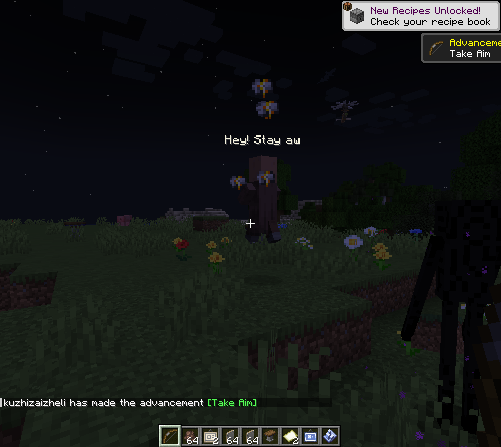
Blabby World 为 Minecraft 中的生物提供了可配置的语音功能,以及基于战斗状态、时间、天气和附近实体排序的 A/B 对话。它专为整合包作者设计,并包含一个游戏内可视化编辑器,因此用户无需手动输入实体 ID 或编辑 JSON 文件。
使用可视化编辑器(按 B 键)
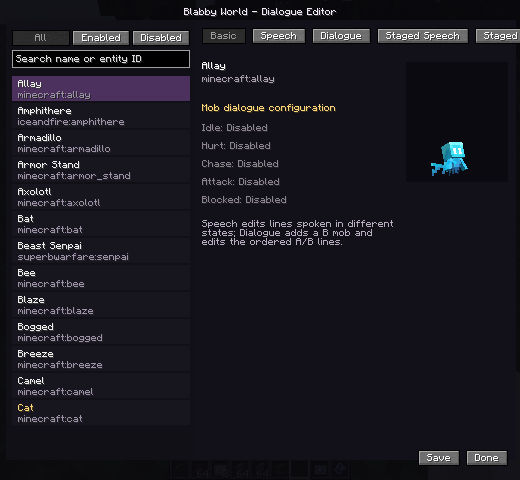 左侧面板列出已注册的血肉类型,并支持通过显示名称或实体 ID 进行搜索。右侧面板包含五个页面:
- 基础 (Basic):显示所选生物及其配置了哪些语音触发器。
- 语音 (Speech):编辑单只生物在空闲、受伤、追逐、攻击和受阻状态下的台词。
- 对话 (Dialogue):为选定的 A 生物添加一个 B 生物,并编辑有序的 A/B 对话。
- 阶段语音 (Staged Speech):编辑单只生物在白天、夜晚、下雨、下雪和打雷状态下的台词。
- 阶段对话 (Staged Dialogue):编辑特定环境下的 A/B 对话。
- 添加和编辑台词
- 在左侧列表中选择一只生物。
- 打开“语音”、“对话”、“阶段语音”或“阶段对话”。
- 在适用的情况下选择触发器、阶段和 B 生物。
- 按下文本编辑器旁边的 + 按钮以添加一行台词。
- 选中该行并在输入框中对其进行编辑。
- 在对话页面上,使用 A/B 控件选择说话者。
- 右键单击某行以设置其重复频率:
- 快速 (Fast):约 1 秒后可再次触发
- 中等 (Medium):约 5 秒后
- 缓慢 (Slow):约 10 秒后
- 按下保存 (Save)。服务器会立即写入并重载规则。
使用 /blabby reload 命令从磁盘重载规则。
触发器
空闲 (Idle):该生物没有敌对目标。
受伤 (Hurt):该生物实际失去了生命值。
追逐 (Chase):该生物有可见的攻击目标。
攻击 (Attack):该生物正在攻击某个目标。
受阻 (Blocked):该生物憎恨某个目标,但无法看到或攻击它。
对话/相遇 (Dialogue / Meet):A 靠近配置的 B 生物;双方均不处于敌对状态,且未参与其他对话。
在 A/B 对话期间,两只生物都会停止导航,互相注视,并播放当前说话者的环境音。在一行台词结束后,另一位说话者会在随机 0.5–1 秒的暂停后开始说话。
文本优先级
默认触发顺序如下:
受伤 (Hurt)
攻击 (Attack)
受阻 (Blocked)
追逐 (Chase)
A/B 对话
空闲 (Idle)
环境特异性及规则自身的优先级会在此基础上叠加。天气和时间并非互斥:在白天下雨时,若存在雨天规则,则雨天规则优先,而白天规则仍作为有效的后备选项。
高优先级的文本可能会打断低优先级的文本。低优先级的数据包无法替换当前更重要的文本。
内置本地化对话
模组自带了一组示例台词,适用于村民、僵尸、骷髅、苦力怕、铁傀儡、狼、猫、牛、猪和羊,以及少量 A/B 对话。
内置文本存储在以下位置:
assets/blabby_world/lang/en_us.json
assets/blabby_world/lang/zh_cn.json
它会自动跟随每个客户端的语言设置。内置规则不会写入用户的规则文件,也不会使可视化编辑器显得杂乱。
在通用配置中将 enableDefaultDialogues=false 设置为 false,即可通过一个选项禁用并隐藏所有内置台词。
配置
通用配置:
enableDefaultDialogues:内置本地化台词的主开关。
debugLogging:触发器和数据包的诊断日志;默认禁用。
conversationDistance:A/B 对话可以开始的距离。
playMobSounds:播放说话生物的环境音。
客户端配置:
textDistance:文本渲染的最大距离。
maxVisibleMobs:具有可见文本的生物的最大数量。
textScale:基础文本缩放比例;碰撞箱缩放仍然适用。
animationSpeed:全局打字机效果和淡入淡出速度。
自定义规则存储在 config/blabby_world/conversations.json 中。建议使用游戏内编辑器进行修改。
许可与贡献
Blabby World 根据 GNU General Public License v3.0 获得许可。修改后的发行版必须符合 GPL-3.0 的源代码和许可要求。
github
Blabby World
Blabby World gives Minecraft mobs configurable speech and ordered A/B conversations based on combat state, time, weather, and nearby entities. It is designed for modpack authors and includes an in-game visual editor, so users do not need to type entity IDs or edit JSON manually.
Using the visual editor(Press B)
The left panel lists registered mob types and supports searching by display name or entity ID. The right panel contains five pages:
- Basic: shows the selected mob and which speech triggers are configured.
- Speech: edits single-mob lines for idle, hurt, chase, attack, and blocked states.
- Dialogue: adds a B mob for the selected A mob and edits an ordered A/B exchange.
- Staged Speech: edits single-mob lines for day, night, rain, snow, and thunder.
- Staged Dialogue: edits environment-specific A/B conversations.
- Adding and editing lines
- Select a mob in the left list.
- Open Speech, Dialogue, Staged Speech, or Staged Dialogue.
- Select a trigger, stage, and B mob where applicable.
- Press + beside the text editor to add a line.
- Select the line and edit it in the input box.
- On dialogue pages, use the A/B control to choose the speaker.
- Right-click a line to set its repeat frequency:
- Fast: eligible again after about 1 second
- Medium: about 5 seconds
- Slow: about 10 seconds
- Press Save. The server writes and reloads the rules immediately.
Use /blabby reload to reload rules from disk.
Triggers
Idle: the mob has no hostile target.
Hurt: the mob actually loses health.
Chase: the mob has a visible attack target.
Attack: the mob attacks a target.
Blocked: the mob hates a target but remains unable to see or attack it.
Dialogue / Meet: A is close to the configured B mob; neither participant is hostile or already in another conversation.
During an A/B conversation, both mobs stop navigation, look at each other, and play the current speaker's ambient sound. After a line finishes, the other speaker starts after a random 0.5–1 second pause.
Text priority
The default trigger order is:
Hurt
Attack
Blocked
Chase
A/B dialogue
Idle
Environment specificity and the rule's own priority are added to this base score. Weather and time are not mutually exclusive: during daytime rain, a rain rule wins when present, while a day rule remains a valid fallback.
Higher-priority text may interrupt lower-priority text. Lower-priority packets cannot replace text that is currently more important.
Built-in localized dialogue
The mod includes a small set of example lines for villagers, zombies, skeletons, creepers, iron golems, wolves, cats, cows, pigs, and sheep, plus a few A/B exchanges.
Built-in text is stored in:
assets/blabby_world/lang/en_us.json
assets/blabby_world/lang/zh_cn.json
It automatically follows each client's language. Built-in rules are not written to the user's rule file and do not clutter the visual editor.
Set enableDefaultDialogues=false in the common config to disable and hide every built-in line with one option.
Configuration
Common configuration:
enableDefaultDialogues: master switch for built-in localized lines.
debugLogging: trigger and packet diagnostics; disabled by default.
conversationDistance: distance at which A/B conversations may begin.
playMobSounds: plays the speaking mob's ambient sound.
Client configuration:
textDistance: maximum text rendering distance.
maxVisibleMobs: maximum number of mobs with visible text.
textScale: base text scale; collision-box scaling is still applied.
animationSpeed: global typewriter and fade speed.
Custom rules are stored in config/blabby_world/conversations.json. The in-game editor is the recommended way to modify them.
License and contributions
Blabby World is licensed under the GNU General Public License v3.0. Modified distributions must comply with GPL-3.0 source and license requirements.
github


 模组

 模组
 模组

 模组
 模组
 模组
评论 0
登录后参与评分
还没有评论,来抢沙发吧