Block Variant Swapper
一款轻量级模组,让你可以在不打开工作台或切石机的情况下,随时将手中持有的方块在其变体之间进行切换——例如从木板切换到楼梯、台阶、栅栏、门等。
功能说明
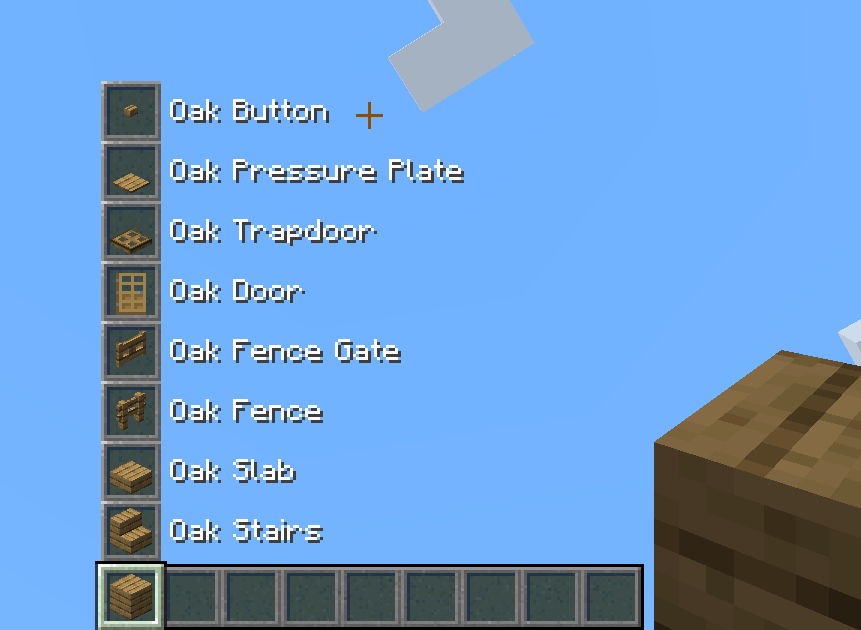
在快捷栏中选中一个方块,按住切换键(默认为左 Alt 键),然后滚动鼠标滚轮。你手中的方块会在其配置的变体组中循环切换。快捷栏上方会出现预览,显示其他变体及其名称,让你在放置之前就能清楚知道自己要切换成什么。
核心理念是:一整“族”的方块(例如所有橡木建筑方块)表现得像是一件你可以随身携带并根据需要重塑的物品。例如,你的物品栏里只保留一组橡木木板,但你 instantly 拥有 9 组橡木变体的即时可用性(完整方块、楼梯、台阶、栅栏、栅栏门、门、陷阱门、压力板和按钮)。
设计目的
众所周知,物品管理是这个游戏中的一个大问题。导致这一问题的最大因素之一是为所有建筑方块添加的各种方块变体,以及随后对这些方块进行物品管理和存储的需求。通过此模组,方块变体仅存在于快捷栏中,其他地方均不存在;它们始终会还原为原始基础方块。这简化了物品管理、存储和过滤,并消除了在不同堆叠的方块变体之间不断切换以及在 crafting table 或 stonecutter 中制作它们的需要。
工作原理
- 切换: 按住切换键(默认为左 Alt 键,可重新绑定),同时手持属于某个变体组的方块时滚动鼠标滚轮。持有物变为下一个/上一个变体。滚动会在组内循环。
- 预览: 当按住切换键时,快捷栏上方的一列“幽灵”槽位会显示组中的其他变体,并标注名称。预览时会隐藏干扰性的 HUD 元素。
- 非破坏性掉落: 破坏已放置的变体会掉落其基础方块,而不是该变体本身。这使得整个“家族”成为一种可互换的资源——放置楼梯,破坏它,拿回木板。
- 变体仅存在于快捷栏: 变体仅存在于你的快捷栏和副手栏中。如果将其移入主物品栏、箱子、潜影盒或丢弃在地上,它将自动还原为基础方块。这防止了变体物品 cluttering 存储空间。
- 智能拾取: 当你手持某变体并拾取其基础方块时,它会合并到该堆叠中,而不是占用新槽位。堆叠仍显示为变体;数量只是增加。(重命名或其他自定义的堆叠保持独立。)

疑虑与常见问题
这会导致建造时需要更多的方块!
其实不然。平均而言,方块变体的制作操作是有损耗的,实际上只有台阶会让你获得的方块比原来多:
| 变体 |
制作比例 |
原版中的方块损失 |
| 楼梯 |
6 换 4 |
33% |
| 台阶 |
3 换 6 |
0% (你得到双倍) |
| 栅栏 * |
5 换 3 |
40% |
| 栅栏门 * |
4 换 1 |
75% |
| 墙 |
6 换 6 |
0% |
| 门 |
6 换 3 |
50% |
| 陷阱门 |
6 换 2 |
67% |
| 压力板 |
2 换 1 |
50% |
| 按钮 |
1 换 1 |
0% |
| 格栅 |
4 换 4 |
0% |
* 栅栏和栅栏门还需要消耗木棍,此处按木板当量计算(2 块木板 = 4 根木棍)。
此模组始终是 1 进 1 出,且完全可逆。因此,与原版制作相比,除了台阶之外的所有变体实际上消耗的更少基础方块——台阶是唯一一种原版 2 换 1 产量占优的情况。对于石头类方块,你也可以使用切石机,大多数形状都是 1:1,所以两者大致相当,而模组只是帮你省去了那一步。
这个想法是改变对变体制作比例的思考方式,并彻底停止将变体视为独立的方块。通过此模组,变体仅在快捷栏中存在,你始终只是在交换你想要的基础方块形状。
为什么方块 X 不属于变体家族?
通常是有充分理由的——技术限制、游戏平衡(正常合成配方中所需输入方块的种类差异巨大,或者合成配方除了基础方块外还需要其他材料),或方块分类(模组仅尝试将创意模式「建筑方块」标签页中的方块归为家族)。以下是一些原版物品及其原因的例子:
- 木质告示牌:基础告示牌仅由木板和木棍合成,这使它们符合我们的标准,因为我们同样允许栅栏和栅栏门。然而,告示牌携带额外的组件数据,且堆叠上限为 16 而非 64,这导致它们与其他可互换方块不一致并引发堆叠问题。我不想陷入复杂的物品堆叠组件比较或修改最大堆叠数量的复杂逻辑中,这不是本模组的目的。
- 功能性方块(箱子、堆肥桶、 barrels、熔炉等):出于游戏平衡考虑,即使它们仅由一种材料制成,其成本也远高于单一木板/圆石。
- 梯子:仅由木棍合成,因此如果将其分配给橡木木板家族,例如,就会禁止使用其他木材类型进行合成。
- 玻璃块/玻璃板与地毯/层状物:同样是出于游戏平衡考虑,合成产出的物品数量远多于基础方块。
- 彩色方块、铜灯、悬挂式告示牌:出于游戏平衡考虑,需要其他合成材料(染料、烈焰棒、链条等)。
- 铁/金方块(门、活板门、配重压力板):由锭制成,而非方块;若由方块制成,其成本会显著增加。
为什么完整的方块变体不能互换?
本模组旨在允许在不同方块形状变体之间进行互换,而不是完全不同的完整方块之间的互换。这就是为什么你不能在石头和圆石、深板岩和深板岩圆石之间互换,也不能在雕刻版/柱状变体之间互换。此外,许多此类方块往往拥有大量自身的形状变体(例如所有深板岩方块,圆石/抛光/砖/瓦片各自拥有自己的楼梯、台阶和墙),将它们全部归入一个变体家族是不切实际的。唯一偏离此规则的例外是铜格栅,它有点像一个完整方块,但在我看来并非如此,你可以像楼梯或台阶那样对其进行水浸处理。
这是客户端还是服务端模组?
两者皆是。互换、掉落回退以及 confinement(禁锢/锁定)功能均通过服务端 Mixin 和网络通信运行,而互换快捷键 + 滚轮触发和幽灵预览则属于客户端功能。因此,为了完整功能,需要在服务端和客户端都安装该模组。
在已有世界中添加/卸载安全吗?
非常安全。该模组不触碰世界中已放置的方块,只处理背包中的物品。安装/卸载永远不会损坏世界存档。安装后,任何不在玩家快捷栏/副手槽中(而是存储在储物方块如箱子中,或在玩家内部背包中)的方块变体都会回退为基础方块。卸载后,每个方块在背包中的位置保持不变——基础方块仍为基础方块,快捷栏中的变体仍保持为原版方块变体。
该模组不会添加或删除任何物品堆栈,也不会改变物品堆栈的数量,更不会覆盖世界中已放置的方块。它所做的仅仅是将玩家快捷栏/副手槽之外的方块变体物品堆栈回退为基础方块物品堆栈。仅此而已。
关于使用方块变体的合成配方怎么办?
幸运的是,这类配方很少(主要是由台阶合成的雕刻版/柱状方块,但也包括堆肥桶或盔甲架等),并且在尝试保持合成材料平衡的同时都已得到处理(例如,雕刻版/柱状方块由两个完整方块而非两个台阶合成,但产出两个方块而非一个,这与原版石英柱的合成配方一致)。
创意模式的 Pick Block / 创意库存如何工作?
对已放置的变体按鼠标中键会获得该变体物品(掉落逻辑不适用于创意模式的 Pick Block),随后在快捷栏中正常工作。
生存模式的 Pick Block 如何工作?
Pick Block 完全感知变体。无论方块是否在您的背包中且来自相同的方块变体家族,按鼠标中键都会给您相应的物品堆栈。因此,如果您 Pick 一个完整方块,而快捷栏中当前有一个楼梯变体,它会 Pick 该物品堆栈并自动为您互换。如果您 Pick 一个变体方块,而快捷栏甚至玩家背包中有一堆基础方块,它也会将其取出并自动为您互换。
边缘情况下的物品持有者(物品展示框、装饰陶罐)如何处理?
如果将变体放入物品展示框,它们仍然可以显示方块变体,因此与原版无异。只有当从物品展示框中击出时,物品才会回退为基础方块。装饰陶罐也可以持有变体,但当陶罐被破坏或用漏斗移除时会回退。任何通过漏斗/发射器移动的操作都会回退为基础方块。
工具附魔是否仍能正确生效?
是的,没有任何变化。方块回退是在游戏计算掉落后处理的,因此精准采集/fortune 仍然适用,然后掉落结果会转换为基础方块(如果适用)。
这会导致任何延迟或性能问题吗?
不会。方块回退检查基于刻(tick),但扫描只是廉价的哈希表查找,并且仅在打开背包界面时运行。影响微乎其微。由于移除了数百个针对方块变体的合成和切石机配方,游戏加载速度略微加快。
关于切石机呢?
切石机并未被移除;仅移除了方块变体的配方。该方块仍在游戏中,保留了完整方块的配方(非方块形状变体),并可用于装饰或本模组未涵盖的其他模组化场景中的其他配方。
是否支持/将支持模组 X?
支持的模组列表如下。如需添加新模组,可以提交 GitHub Issue 进行请求,或者通过自定义 JSON 配置文件自行添加(说明见下文)。
支持的模组
我们的目标是尽可能为更多热门模组集成变体切换器支持(前提是有人感兴趣)。该模组已内置对特定组模组的兼容性,具体取决于版本和加载器的组合。
你可以在这里找到跨版本的当前支持模组列表。
没看到你喜欢的带有方块形状变体的模组?请提交 GitHub Issue 进行请求,或者将你自己的配置(说明见下文)放入游戏中。
配置
该模组为上述每个受支持的模组都提供了内置的默认值,并且每次更新时会自动保持最新——除非你想要自定义内容,否则无需维护任何配置文件。
这些默认值存储在模组内部,永远不会写入磁盘,因此模组更新时总会带来最新的设置,而无需你删除或重新生成任何内容。对于未安装的模组,其相关家族会被直接跳过。
自定义
若要更改或添加变体组,请将你的 JSON 文件放入 config/blockvariantswapper/ 目录中(该文件夹会为你自动创建为空文件夹)。任何以 _block_variants.json 结尾的文件(例如 minecraft_block_variants.json)都会在默认值之上加载。每个文件将基础方块映射到它循环经过的方块列表:
{
  "minecraft:oak_planks": [
    "minecraft:oak_planks",
    "minecraft:oak_stairs",
    "minecraft:oak_slab",
    "minecraft:oak_fence",
    "minecraft:oak_fence_gate",
    "minecraft:oak_door",
    "minecraft:oak_trapdoor",
    "minecraft:oak_pressure_plate",
    "minecraft:oak_button"
  ]
}
注意事项:
- 自定义配置由你负责维护并确保其正常工作。
- 模组的方块家族配置仅完全支持常规建筑方块。其他类型的方块,特别是包含组件数据的方块(如功能性方块,告示牌、熔炉等),或无法堆叠至标准 64 个物品数量的方块,将无法正常工作并可能导致意外行为。我不会接受针对这些问题提交的 Issue。
你的文件与默认值的交互方式:
- 覆盖: 如果你定义了一个已存在于内置默认值中的基础方块(例如
minecraft:oak_planks),你的组将完全替换默认组,因此你需要列出所有想要保留的变体,因为该方块的默认组将被丢弃。(这就是移除你不喜欢的变体的方法:在不包含它的情况下重新定义该家族。)
- 添加: 定义一个不在默认值中的基础方块,以添加全新的家族;这样你可以为尚未捆绑的模组添加支持。
- 组中的第一项是万物回归的基础方块。
- 每个基础方块在每个文件中只能出现一次——如果 JSON 文件中有重复的键,则不会加载。
- 在当前游戏实例中不存在的物品 ID 会被静默跳过,因此即使未安装该模组,引用可选模组的文件也可以安全保留。
- 如果你的两个文件定义了相同的基础方块,最后一个文件(按文件名顺序)生效。
- 在游戏中运行
/reload 即可应用配置更改,无需重启。
许可证
根据 LGPL-3.0-only 许可证授权。
Block Variant Swapper
A lightweight mod that lets you swap a held block between its variants - planks
to stairs, slabs, fences, doors, etc. - on the fly, without opening a crafting
table or stonecutter.
What it does
Select a block on your hotbar, hold the swap key (Left Alt by default), and scroll. The block in
your hand cycles through its configured variant group. A preview appears above your hotbar showing the
other variants and their names, so you can see what you're switching to before you place it.
The core idea is that a whole "family" of blocks (for example every oak building block) behaves
like a single item you carry around and reshape as needed. For example you keep just one stack of oak planks
in your inventory, but you have 9 stacks of oak variants instantly available (full block, stair, slab, fence, fence gate,
door, trapdoor, pressure plate and button).
Purpose
It's no secret inventory management is a huge problem in this game. One of the biggest contributors
to this problem are all the block variants that have to be added to the game for all the building blocks,
and then managing your inventory and storage of all of these blocks. With this mod block variants only
exist in the hotbar, and nowhere else; they always revert just to their original base block. This simplifies
inventory management, storage, and filtering, and eliminates the need for constantly swapping between stacks
of block variants, and crafting them in the crafting table or stonecutter.
How it works
- Swap: Hold the swap key (Left Alt by default, rebindable) and scroll
the mouse wheel while holding a block that belongs to a variant group. The held item changes to the
next/previous variant. Scrolling wraps around the group.
- Preview: While the swap key is held, a column of "ghost" slots above your hotbar shows the other
variants in the group, labelled by name. Distracting HUD elements are hidden while previewing.
- Non-destructive drops: Breaking a placed variant drops its base block, not the variant.
This keeps the whole family as one interchangeable resource - place stairs, break them, get
planks back.
- Variants stay in the hotbar: Variants only exist in your hotbar and offhand. Move one into
your main inventory, a chest, a shulker, or drop it on the ground and it automatically reverts to
its base block. This prevents variant items from cluttering storage.
- Smart pickup: When you pick up a base block while holding one of its variants, it merges into
that stack instead of taking up a new slot. The stack keeps showing the variant; the count just
goes up. (Renamed or otherwise customised stacks are kept separate.)
Concerns and FAQs
This causes more blocks being needed for building!
Not really. On average block variant crafting operations are lossy and really only with slabs you get
more blocks than original:
| Variant |
Crafting ratio |
Block loss in vanilla |
| Stairs |
6 for 4 |
33% |
| Slab |
3 for 6 |
0% (you get double) |
| Fence * |
5 for 3 |
40% |
| Fence gate * |
4 for 1 |
75% |
| Wall |
6 for 6 |
0% |
| Door |
6 for 3 |
50% |
| Trapdoor |
6 for 2 |
67% |
| Pressure plate |
2 for 1 |
50% |
| Button |
1 for 1 |
0% |
| Grate |
4 for 4 |
0% |
* Fence and fence gate also cost sticks, counted here as plank-equivalents (2 planks = 4 sticks).
This mod is always 1 block in, 1 block out, and fully reversible. So compared to vanilla crafting,
every variant except the slab actually costs fewer base blocks - the slab is the only case where
vanilla's 2-for-1 yield comes out ahead. For stone families you can also use the stonecutter, which
is 1:1 for most shapes, so there the two are roughly even and the mod just saves you the step.
The idea is to change the thinking about block ratios when making variants, and to stop thinking
about variants as separate blocks entirely. With this mod, variants don't exist outside of the hotbar, it's
always just the base block you're swapping to your desired shape.
Why isn't block X in a variant family?
Usually for a good reason - technical issues, game balance (vast difference in number of input blocks in the normal crafting
recipe, or uses other items in the crafting recipe than just the source block), or block categorisation (the mod tries to
family up only blocks in the Creative menu Building Blocks tab). Here are some examples of vanilla items and reasons:
- Wood signs: basic signs are only made with planks and sticks, which would make them fit as we also allow fences and
fence gates. However, signs carry extra component data and only stack to 16 and not 64, which made them inconsistent
with the other swappable blocks and caused stacking issues. I didn't want to get into complicated item stack component
comparisons or changing max item stack sizes, that's not the purpose of this mod.
- Functional blocks (chests, composters, barrels, furnaces...): game balance, even if they are made only from one type
of material, they're significantly more expensive than just one plank/cobblestone.
- Ladders: only made from sticks, so if assigned to the oak planks family for example, it would disallow crafting from other
wood types.
- Glass block/pane and carpet/layers: game balance again, crafting outputs significantly more items than the base block.
- Coloured blocks, copper bulbs, hanging signs: game balance, require other crafting items (dyes, blaze rods, chains...)
- Iron/gold blocks (doors, trapdoors, weighted pressure plates): made from ingots, not blocks; if made from blocks they
would be significantly more expensive.
Why aren't full block variants swappable?
This mod aims to allow swapping between different block shape variants, not different full blocks entirely. That's why you
can't swap between stone and cobblestone, deepslate and cobbled deepslate, or the chiseled/pillar variants. In addition,
many such blocks tend to have a lot of their own shape variants (e.g. all the deepslate blocks, cobbled/polished/bricks/tiles
all have their own stairs, slabs and walls) so putting them all in one variant family would be impractical. The only sort
of deviation from this rule are copper grates, which are kinda a full block but not really in my opinion, you can waterlog
them like stairs or slabs for example.
Is this client-side or server-side?
Both. The swap, drop-revert, and confinement all run through server-side mixins and networking,
while the swap-key + scroll trigger and ghost preview are client-side. So it needs to be installed both
on the server and the client for full function.
Is it safe to add/remove from an existing world?
Very safe. The mod doesn't touch blocks placed in the world, just items in inventories.
Installing/uninstalling never corrupts a world. After installing, any block variants that are not in the player's
hotbar/offhand (but stored in storage blocks like chests, or in the internal player inventory) are reverted to the
base block. After uninstalling, every block stays where it is in the inventory - base blocks stay as base blocks,
variants in your hotbar stay as the vanilla block variants.
The mod doesn't add or remove any item stacks or changes item stack counts, nor does it overwrite blocks placed
in the world. The only thing it does is revert block variant item stacks outside the player hotbar/offhand into the
base block item stacks. That's it.
What about crafting recipes that use block variants?
Thankfully there's only a small amount of them (mainly chiseled/pillar blocks from slabs, but also things like the composter
or armour stand), and all were addressed while trying to keep crafting material balance (e.g. chiseled/pillar blocks are made
from two full blocks instead of two slabs but produce two blocks instead of one, consistent with the vanilla quartz pillar
recipe).
How does Creative pick-block / creative inventory work?
Middle-clicking a placed variant gives you the variant item (drops logic doesn't apply to creative pick), which then
works normally in the hotbar.
How does Survival pick-block work?
Pick block is fully variant-aware. Middle-clicking a block will give you the item stack no matter what if it's in your
inventory and from the same block variant family. So if you pick a full block and you have a stairs variant currently
sitting on your hotbar, it will pick that item stack and auto-swap it for you. If you pick a variant block and you have
a stack of the base block in your hotbar or even inside your player inventory, it will pull it and auto-swap it as well.
How are edge case item holders (item frames, decorated pots) handled?
Item frames can still display block variants if you place them into one, so no change from vanilla. The item will revert
to the base block only when punched out of the item frame. Decorated pots can also hold the variant but it will revert
when the pot is broken or removed with a hopper. Any hopper/dropper movement reverts to base block.
Do tool enchantments still work correctly?
Yes, with no changes. The block reversal is handled after the game computes drops, so Silk Touch/Fortune still apply,
and then the drop results are converted to base blocks if applicable.
Does this cause any lag or performance issues?
No. Block reversal check is tick-based but the scan is a cheap hashmap lookup, and only runs when an inventory UI is opened.
Impact is negligible. Game loading is microscopically faster because hundreds of crafting and stonecutting recipes for block
variants were removed.
What about the stonecutter?
The stonecutter was not removed; only the recipes for block variants were removed. The block is still in the game,
retains the full block recipes (not block shape variants) and can be used for decoration or other recipes in modded
scenarios that this mod doesn't cover.
Does/will this support mod X?
The list of supported mods is below. New ones can be requested by opening a GitHub issue, or added
yourself with a custom JSON config file (explanation below).
Supported mods
The goal is to integrate variant swapper support for as many popular mods as possible, if there is interest.
The mod ships with built-in compatibility for a specific group of mods already, depending on the version and modloader combination.
You can find the current list of supported mods across versions here.
Don't see your favorite mod with block shape variants? Open a GitHub issue to request it, or drop in your own config
(instructions below) into your game.
Configuration
The mod ships with built-in defaults for every supported mod above, and they stay current with each
update automatically - there are no config files to maintain unless you want to customize things.
These defaults live inside the mod and are never written to disk, so mod updates always bring the
latest set without you having to delete or regenerate anything. Families for a mod you don't have
installed are simply skipped.
Customizing
To change or add variant groups, drop your own JSON file into config/blockvariantswapper/ (the
folder is created empty for you). Any file ending in _block_variants.json (e.g. minecraft_block_variants.json) is loaded on top of the
defaults. Each file maps a base block to the list of blocks it cycles through:
{
  "minecraft:oak_planks": [
    "minecraft:oak_planks",
    "minecraft:oak_stairs",
    "minecraft:oak_slab",
    "minecraft:oak_fence",
    "minecraft:oak_fence_gate",
    "minecraft:oak_door",
    "minecraft:oak_trapdoor",
    "minecraft:oak_pressure_plate",
    "minecraft:oak_button"
  ]
}
Things to keep in mind:
- Custom configs are your responsibility to maintain and make sure they work correctly.
- The mod fully supports only regular building blocks in its block family configs. Other block types, especially blocks
that contain component data (e.g. functional blocks like signs, furnaces, etc.), or don't stack to standard 64 item stacks,
will not work properly and may cause unintended behaviour. I will not accept issues raised on these.
How your files interact with the defaults:
- Override: if you define a base block that already exists in the built-in defaults (e.g.
minecraft:oak_planks), your group replaces the default one entirely, so list every variant you
want to keep, since the default group is discarded for that block. (This is how you remove a variant
you don't like: redefine the family without it.)
- Add: define a base block that isn't in the defaults to add a brand-new family; this way you can add support for
a mod that isn't bundled yet.
- The first entry in a group is the base block that everything reverts to.
- Each base block must appear only once per file - a JSON file with the same key twice won't load.
- Item IDs that don't exist in the current game instance are skipped silently, so a file that
references an optional mod is safe to keep even when that mod isn't installed.
- If two of your files define the same base block, the last one (by filename order) wins.
- Run
/reload in-game to apply config changes without restarting.
License
Licensed under the LGPL-3.0-only license.


 模组

 模组
 模组

 模组
 模组
 模组
评论 0
登录后参与评分
还没有评论,来抢沙发吧