Blockgame+
将你对 Blockgame 的一切期望,整合进一个客户端模组。 实时队伍地图、高品质物品属性提示、队伍血条、拍卖行、好友与论坛社区中心、表情动作、排行榜、新手教程、挂机小游戏,以及一堆 HUD 工具——自行安装即可,无需服务器端支持。
专为 Blockgame Minecraft 服务器 (mc.blockgame.info) 打造 —— Fabric,Minecraft 1.21.4。
访问网站:bgplus.ca
仅限客户端。 将其放入你的 mods 文件夹即可游玩——大多数功能可独立运行。队伍地图、队伍同步、社区中心和排行榜使用可选的自建后端(详见下文)。
? Discord 聊天桥接
将社区的 Discord 桥接到游戏内聊天——消息双向流动,Discord 端显示玩家头像。这是一个由你自行添加的机器人,无需托管:
- 将 Blockgame+ 机器人添加到你的 Discord 服务器,然后服务器管理员在要桥接的频道中运行
/setup。
- 玩家绑定他们的 Minecraft 账号(在 Discord 中使用
/link,然后在游戏中使用 /bgplus discord link <code>),以便每条桥接消息都显示已验证的名字——未绑定的消息会温和地提示先进行绑定。
- 一个共享的机器人可为任何邀请它的社区服务,因此除了
/setup 之外,无需托管或配置任何东西。
在游戏中通过 设置 → 社区 开启此功能。
? 社区中心
为你的社区账号提供内置的社会化层——使用 /bgplus social 打开:
- 好友和私聊、带有帖子、反应和图片的社区论坛,以及用于公告的管理员公告板。
- 所有运行该模组的玩家的在线状态,带有加入/离开提示。
- 所有内容均为可选,并受限于你的社区账号。
? 表情动作与聊天媒体
- 身体表情动作——可绑定的表情轮盘在你的角色上播放全身动画,拥有社区可发布和管理的共享库,以及内置的关键帧动画编辑器(
/bgplus anim)供你制作自己的表情动作。
- 聊天中的 GIF 和图像表情——粘贴 GIF 链接或输入
:name:,即可直接在聊天中渲染,无需浏览器。
?️ 真正的游戏内地图(和小地图)
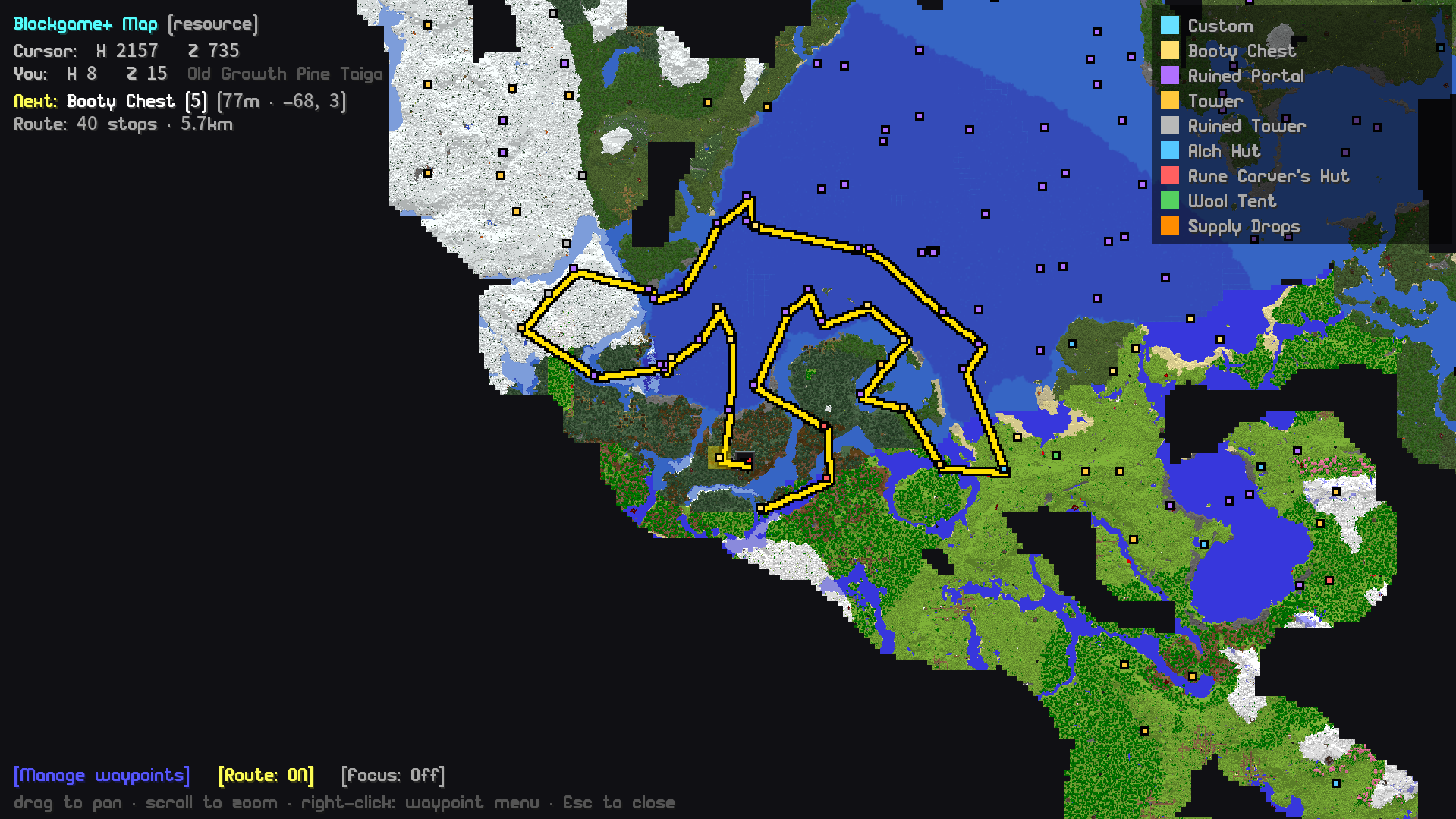
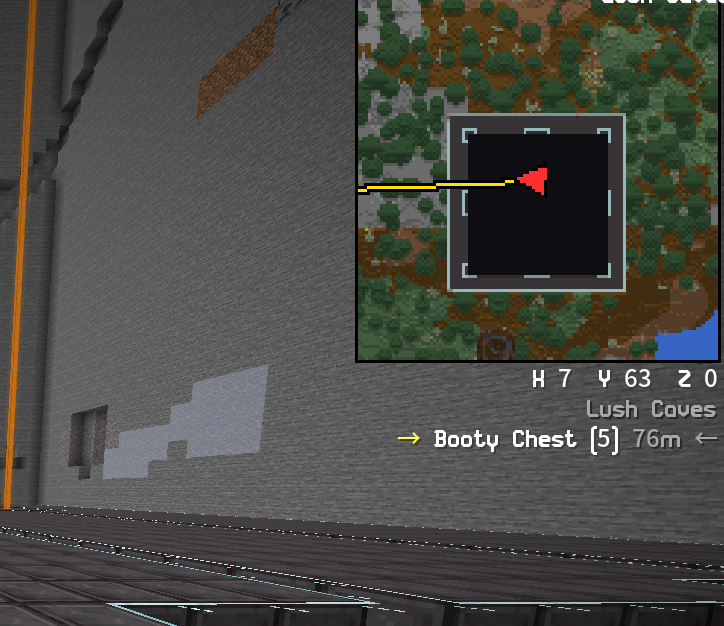
再也不用 Alt+Tab 切换了。Blockgame+ 渲染自己的全屏地图和角落小地图,随着探索实时更新世界——结构、宝藏箱和补给空投均显示为实时航点。得益于服务器构建的全局概览瓦片,你可以缩小到整个世界,或者右键单击任意位置放置航点或旅行目的地。
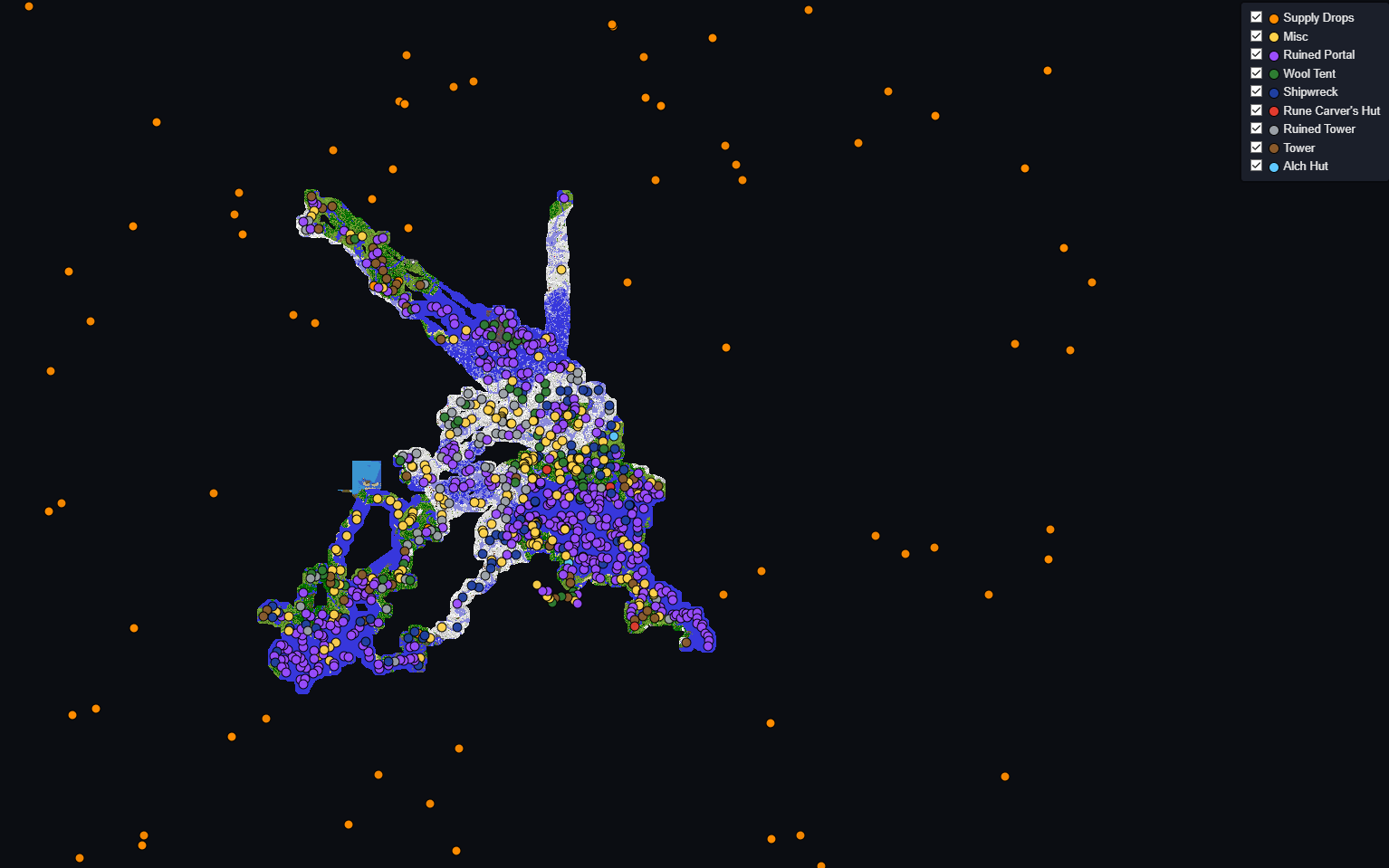
每位玩家的探索数据也会合并成一个累积式社区地图——一张不断增长的、共享的社区足迹网络地图,并在 bgplus.ca 提供深色模式查看器。
? 航点与探索路线
- 自定义航点,通过右键菜单管理——命名地点、标记为旅行目的地,或显示为无需打开地图即可奔跑前往的世界内浮动标记。
- 探索路线在地图和小地图上绘制,带有世界内的“下一个目的地”标记、下一站读数,以及聚焦于选定类别(例如补给空投)的专注模式。
- 宝藏追踪自动将附近的宝箱聚类为结构并标注名称,按结构类型过滤,并隐藏已拾取的宝箱。全部在原生命图上完成——无需 Xaero(偏好 Xaero?一条命令即可将所有内容导出至其中)。
?️ 物品属性提示
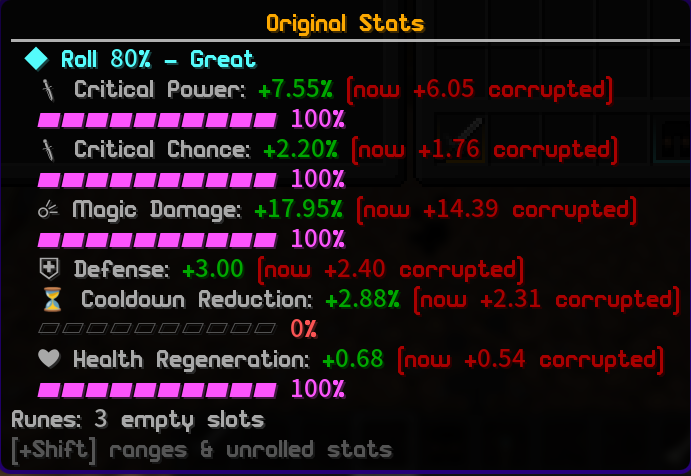
Blockgame 的物品将真实属性掷骰结果隐藏在物品数据中——描述仅显示四舍五入后的数值。Blockgame+ 揭示这些细节:
- 每个属性右侧显示彩色的掷骰品质
[%]。
- 按住 Ctrl 查看详细分解:精确数值、掷骰品质条,以及总体评价“此物品掷出了 84% - 优秀”。
- 原型感知评分——根据各项属性对该特定装备的重要性进行权重计算(例如战士剑上的武器伤害、弓上的投射物),因此糟糕的专业属性掷骰不会拉低好武器的评分。
- 符文感知与腐化感知——它单独显示物品的真实基础掷骰结果,并分别列出符文加成和腐化影响,让你始终清楚装备的实际掷骰情况。
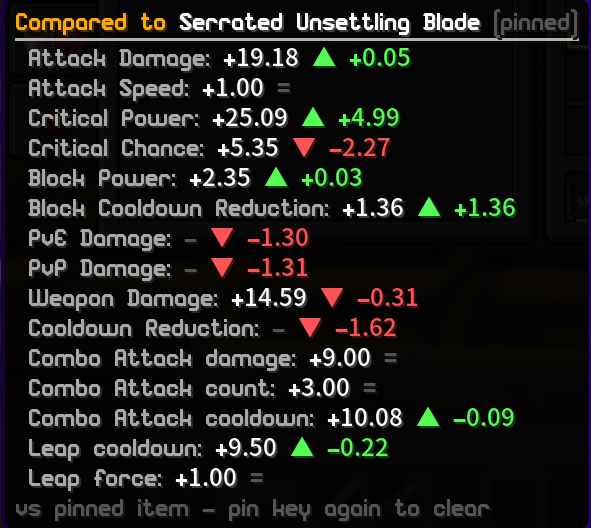
- 按住 Alt 进行比较——可将任何物品与你当前装备的进行对比,显示每项属性的绿色/红色差值。固定某个物品以比较任意两件装备。
- 范围数据从商店目录内置生成,并随社区所见物品进一步细化。
?️ 自定义菜单与拍卖行
Blockgame+ 将服务器的朴素箱子网格菜单替换为整洁的家园风格界面:
- 拍卖行——具备真实的浏览/出售界面,支持搜索、排序、分页、物品提示、实时过期时间、你的活跃列表、已购买/已过期/历史标签页,以及分阶段的批量出售功能。
- 选项卡式角色资料、包含完整未来等级价格表的等级商店,以及专用的队伍管理界面。
- 一个主自定义菜单开关——随时关闭它以回退到原版服务器界面。
⚔️ 天赋构建管理器
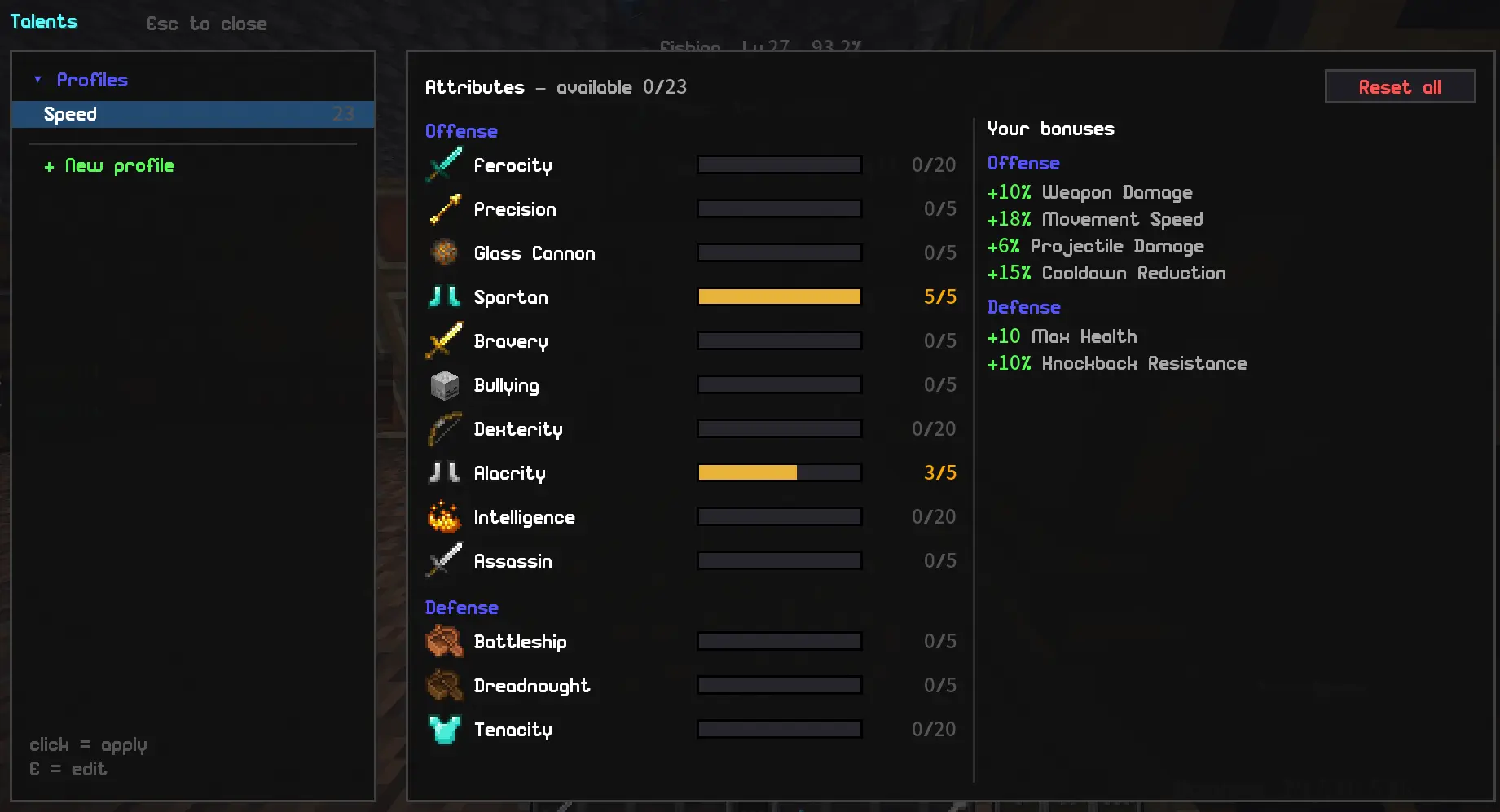
天赋界面变为完整的人物构建管理器:
- 保存无限数量的属性构建,并通过一键点击在不同构建之间切换——重置与重新分配由系统自动处理。
- 在客户端预览构建,实时观察聚合加成效果的变化,然后保存。
- 一个小巧的小部件(HUD widget)显示你当前运行的构建。随时按下 V 键打开天赋界面。
? 属性与追踪器
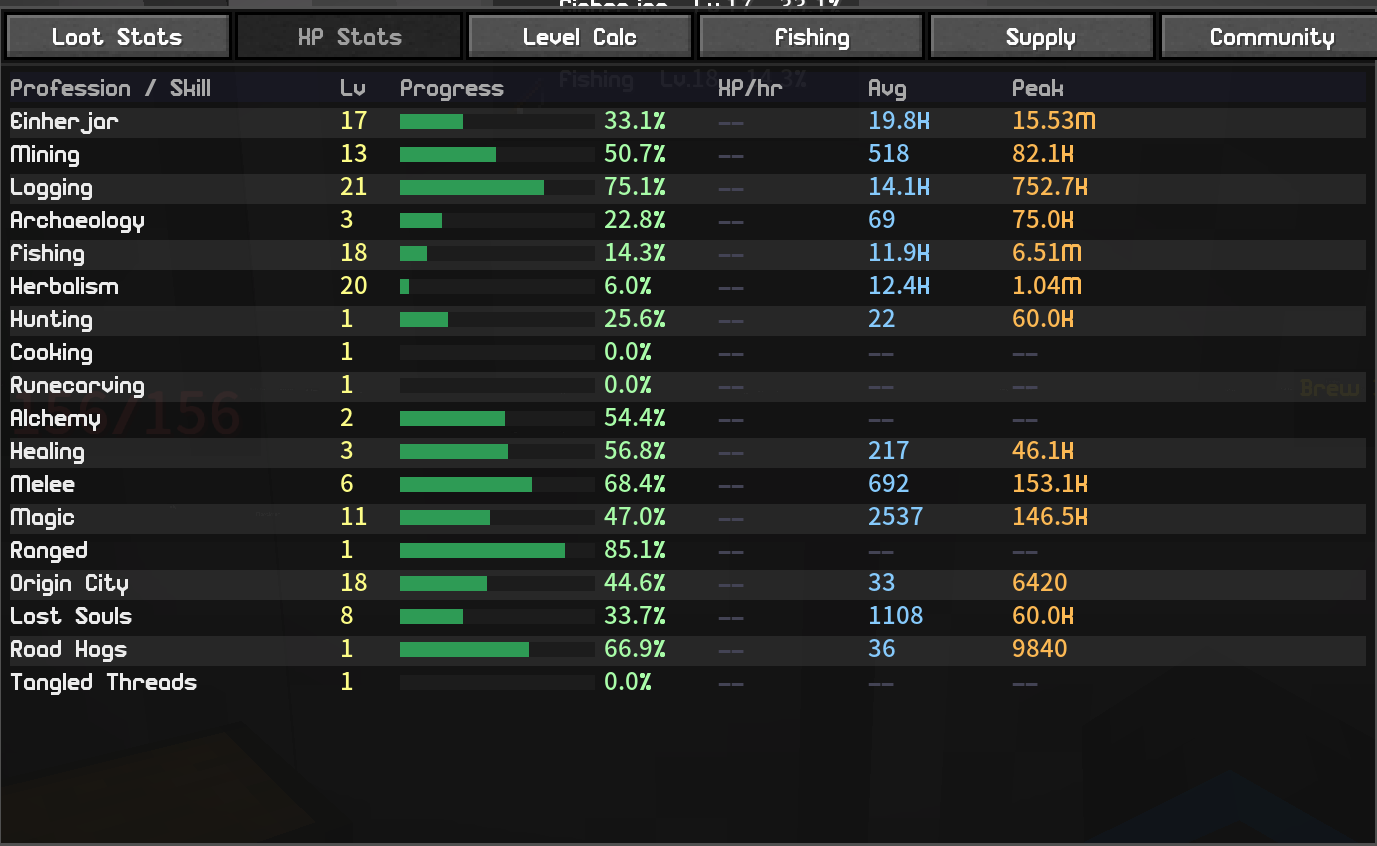
- 战利品统计 (Loot Stats) - 记录你打开的每一个箱子,并按维度与时间窗口进行聚合统计。
- 钓鱼追踪器 (Fishing Tracker) - 记录捕获数量、尺寸、个人最佳记录标志,以及排行榜。
- 经验值追踪器 (XP Tracker) - 实时显示职业/熟练度/声望/等级,附带可移动的小部件和经验获取速率显示。
- 金币计数器 (Coin Counter) - 动态余额小部件,支出追踪,以及每小时金币获取速率。
- 会话摘要 (
/bgplus session) - 显示你本次游戏会话中的金币、经验值、鱼和箱子的统计数据。
? 小部件 (HUD widgets)
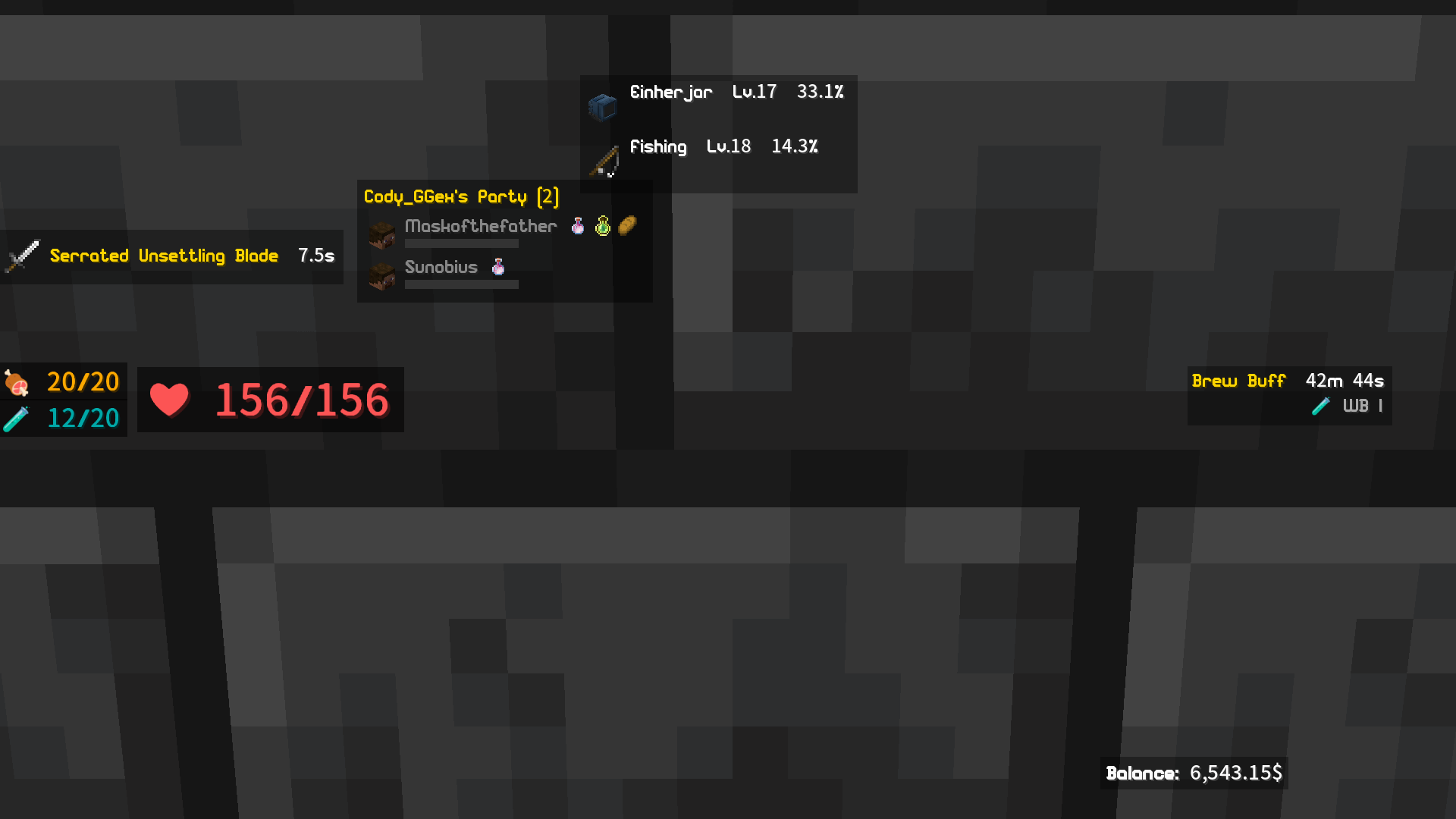
每个小部件均可在布局编辑器中拖拽和调整大小:冷却计时器、角色增益计时器、战利品/补给计数器、空气/溺水条、可移动的快捷栏、最近拾取追踪器,以及聊天频道小部件。
? 战利品与背包工具
- 每个箱子旁都有全数拾取 / 部分拾取 / 全部存入 / 存入匹配按钮,支持按物品忽略列表设置,让你一键即可搬运成组物品,无需逐个拖拽。这些按钮均支持单独移动和调整大小。
- 槽位锁定 (Slot Locker) - 锁定背包槽位,使“存入”按钮跳过这些槽位,“全数拾取”也不会将战利品堆叠进去;每个锁会记住其中的物品(或该槽位应保持为空),因此当你从刷怪区返回时,可以快速恢复快捷栏布局。
? 组队工具
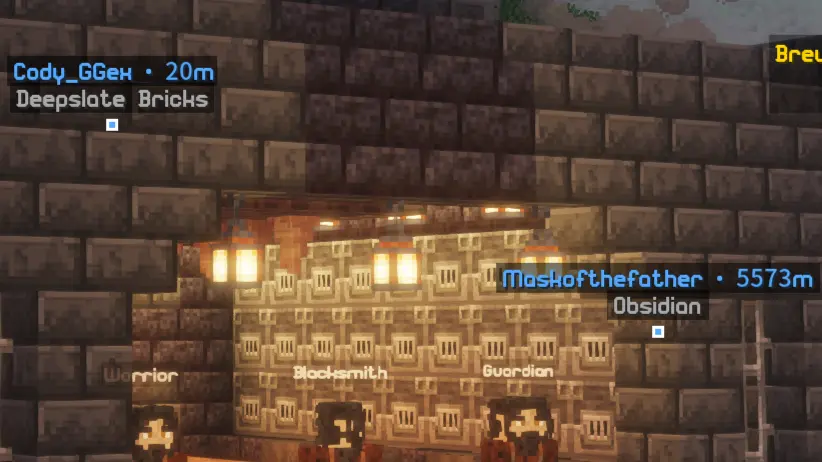
队友的实时生命值条(治疗者的梦想)、低血量声音警报、增益图标、用于识别队友的客户端侧发光效果,以及世界内信标标记 (in-world pings)。
? 哥布林宝库 (挂机小游戏)
一个完全沙盒化的挂机/增量游戏,与 Blockgame 并行运行 —— /bgplus goblins。拥有独立的货币体系(掠夺物 Plunder),不会与你现有的金币、物品或世界数据产生冲突:
- 雇佣哥布林,购买升级,并触发狂热爆发以加快挖掘速度。
- 执行远征任务,收集分布在五种稀有度下的 51 个哥布林角色,追求套装加成。
- 通过转生进入分支式的宝石网 (Gem Web) 获得永久升级,随后无尽深渊 (Abyss) 将排名你到达的最深层级,并在公共排行榜上展示。
- 默认开启 —— 如果不感兴趣,可在设置中关闭。
? 符文库与商店
- 符文库 (Rune Vault) - 在一个小型祭坛房间内置墙壁,在一屏内搜索数百种符文,提供针对当前物品的最佳匹配排名,并支持从捆绑包中单独提取单个符文。
- 符文商店 (Rune Shops) - 将你闲置的符文发布到关联的祭坛出售;顾客浏览并预留符文,你则根据游戏内的订单列表完成交付。
?️ 对话 NPC
任务给予者 NPC 配备了带有动画木偶、打字机式文字效果和回复选项的对话框 —— 相比纯文本服务器菜单更加友好,其中包含了装备供应商和每日任务 NPC 的对话内容。
? 外观与拍照模式
仅限客户端的渲染美化工具,用于制作干净截图:一键启动拍照模式(同时隐藏 HUD、手持物品和名称标签)、独立的隐藏玩家 / 生物 / 名称标签功能、雾效控制,以及强制更改时间 / 天气 / 天空 / 生物群系视觉效果。
? 内置自定义物品纹理
Blockgame+ 直接读取 Blockgame 的物品数据,因此现代格式的服务器或社区资源包可以为自定义物品以及穿戴的盔甲重新着色,无需额外安装“Resourcepacks Helper”模组。只需添加资源包即可。
♿ 无障碍功能
- 施法循环器 (Spell Cycler) - 施放法术书后自动切换到下一个,具备基于冷却时间的智能跳过功能(轻点或长按)。
- 自定义声音警报 - 适用于钓鱼咬钩、低水分、战利品提示音和队伍低血量等情况 —— 只需放入你自己的
.ogg 或 .wav 文件即可。
? 社区与排行榜
可选的共享排行榜系统 —— 涵盖职业、专业、熟练度、声望、金币、钓鱼、累计金币,以及哥布林深渊深度榜 —— 此外还有补给空投和战利品分享功能。你可以在游戏中浏览,或在公共网站 bgplus.ca/leaderboard 查看(无需账号即可查看)。

? 新手教程
第一次游玩 Blockgame?Blockgame+ 会在服务器自带的教程任务之上叠加一层友好的引导 (Guide) —— 对话框解释每一步操作,路标指引你前往容易迷失的地方(比如那个大家都会找不到的 Forge)。一旦你完成教程,它会自动关闭。

? 传送点
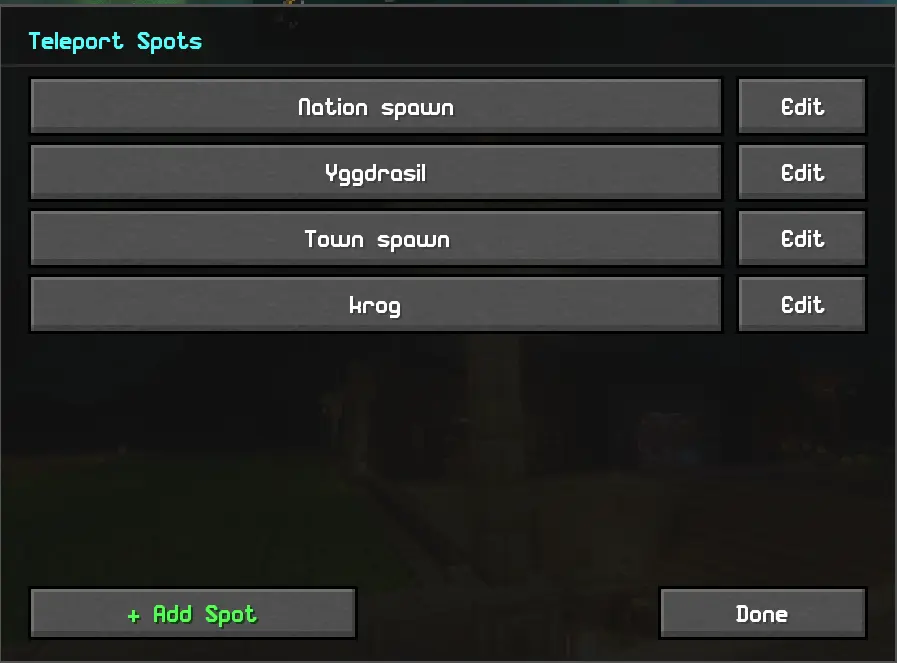
创建你自己的命令按钮 —— 例如,“国家出生点”按钮可执行 /n spawn 命令。
?️ 在主菜单中游玩
标题界面上的 Blockgame+ 按钮会打开一个中心枢纽,包含社区标签页、哥布林游戏、排行榜和实时地图 —— 即使游戏服务器宕机,你也能保持连接并继续游玩。
⚙️ 设置
- 安装 Fabric 加载器、Fabric API、Cloth Config 和 Mod Menu。
- 将 Blockgame+ 放入
mods 文件夹。
- 所有快捷键默认未绑定——请在 选项 → 控制 → Blockgame+ 中自行设置。
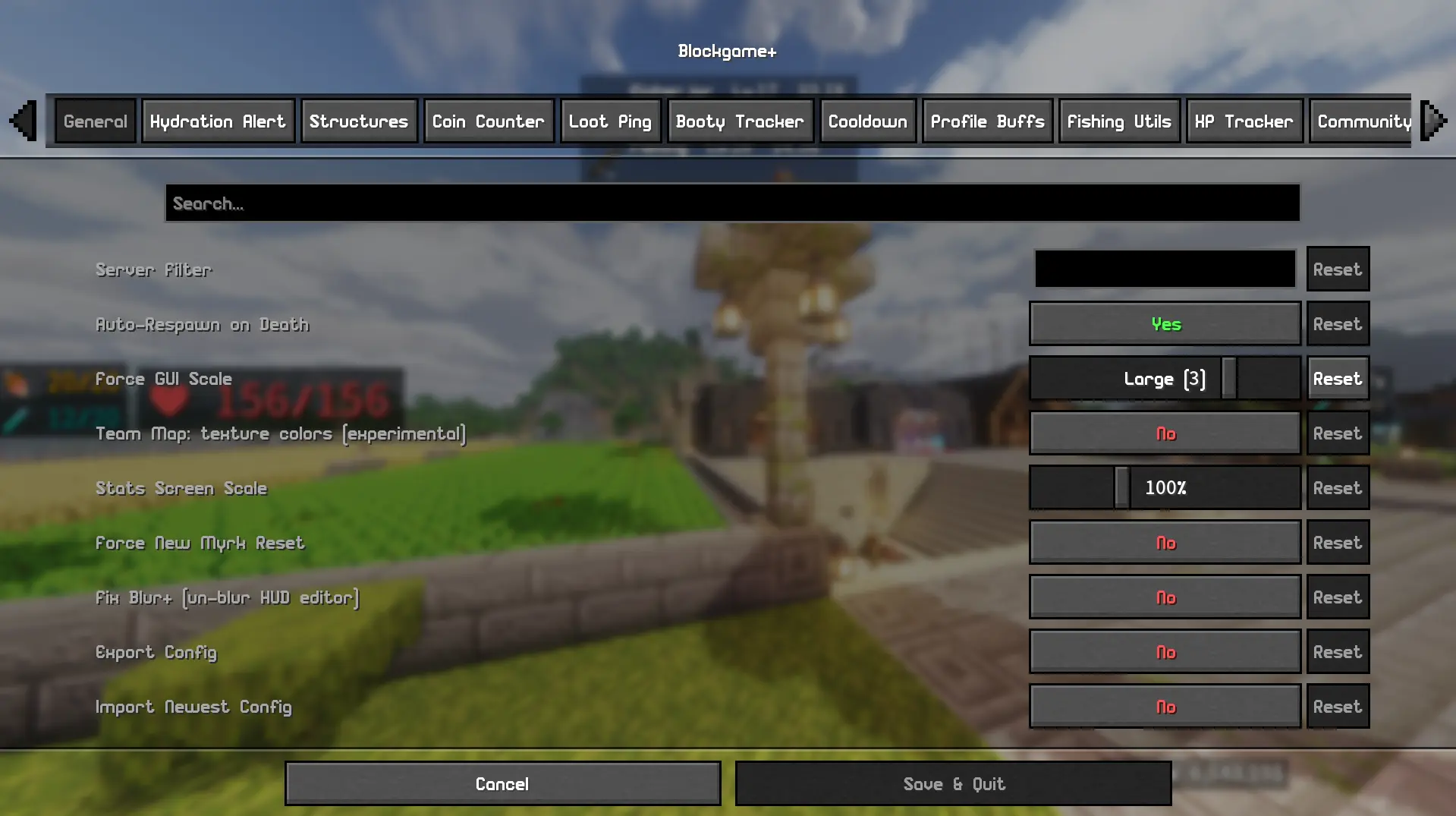
- 在 Mod Menu → Blockgame+ 中配置所有内容,并通过
/bgplus guide 浏览内置指南。
⚠️ 注意事项
- 专为 Blockgame 设计;功能默认受服务器限制。
- 团队地图、实时队伍同步、社区中心和排行榜使用 自托管后端(目前由模组作者本人提供)。其余模组功能无需依赖这些服务,但你需要申请加入社区以便管理员审批通过。
- 已知问题: 队伍 HUD 头像当前显示的是默认皮肤。
- 本模组借助 AI 开发。如果你不支持这一点,请勿下载!或者下载也行……我不在乎。
发现 Bug? 在 Discord 上联系我:codyggex,或在 bgplus.ca 提交报告。
Blockgame+
Everything you wish Blockgame had, in one client-side mod. A live team map, roll-quality item tooltips, party health bars, an Auction House, a friends-and-forums community hub, emotes, leaderboards, a new-player tutorial, an idle minigame, and a pile of HUD tools - install it yourself, no server access needed.
Built for the Blockgame Minecraft server (mc.blockgame.info) - Fabric, Minecraft 1.21.4.
Visit the site at bgplus.ca
Client-side only. Drop it in your mods folder and play - most features work standalone. The team map, party sync, community hub, and leaderboards use an optional self-hosted backend (more on that below).
? Discord chat bridge
Bridge your community's Discord to in-game chat - messages flow both ways, with player heads on the Discord side. It's a bot you add yourself, no hosting required:
- Add the Blockgame+ bot to your Discord server, then a server admin runs
/setup in the channel you want bridged.
- Players link their Minecraft account (
/link in Discord, then /bgplus discord link <code> in game) so every bridged message shows a verified name - unlinked messages are gently nudged to link first.
- One shared bot serves any community that invites it, so there's nothing to host or configure beyond
/setup.
Turn it on under Settings → Community in-game.
? Community hub
A built-in social layer over your community account - open it with /bgplus social:
- Friends and direct messages, community forums with threads, reactions, and image posts, plus an admin bulletin board for announcements.
- Who's online across everyone running the mod, with join/leave toasts.
- Everything is opt-in and gated behind your community account.
? Emotes & chat media
- Body emotes - a bindable emote wheel plays full-body animations on your character, with a shared library the community can publish to and moderate, plus a built-in keyframe animation editor (
/bgplus anim) to make your own.
- GIFs and image emotes in chat - paste a GIF link or type
:name: and it renders right in chat, no browser needed.
?️ A real in-game map (and minimap)
No more alt-tabbing. Blockgame+ renders its own fullscreen map and corner minimap, drawn from the world as you explore - structures, booty chests, and supply drops all show as live waypoints. Zoom all the way out to the whole world thanks to server-built overview tiles, or right-click anywhere to drop a waypoint or a travel destination.
Every player's exploration also merges into one compounding community map - a growing, shared web map of everywhere the community has been, with a dark-mode viewer at bgplus.ca.
? Waypoints & exploration routes
- Custom waypoints with a right-click menu - name a spot, mark it as your travel destination, or show it as a floating in-world marker you can run toward with no map open.
- Exploration routes that draw on the map and minimap, with an in-world "go here next" marker, a next-stop readout, and a Focus mode that beelines for a chosen category (e.g. Supply Drops).
- Booty tracking auto-clusters nearby chests into structures and labels them, filters by structure type, and hides ones you've already looted. All on the native map - no Xaero required (prefer Xaero? One command exports everything to it).
?️ Item stat tooltips
Blockgame items hide their true stat rolls in the item data - the lore only shows rounded numbers. Blockgame+ reveals them:
- A colored roll-quality
[%] on each stat, right on the item.
- Hold Ctrl for the full breakdown: exact values, roll-quality bars, and an overall "this item rolled 84% - Great" verdict.
- Archetype-aware scoring - the verdict weights stats by how much they matter to that piece (weapon damage on a warrior sword, projectile on a bow), so a junk profession roll doesn't drag a good weapon's score down.
- Rune-aware and corruption-aware - it shows the item's true base roll with rune bonuses and corruption broken out separately, so you always know what the gear actually rolled.
- Hold Alt to compare any item against what you've got equipped, with green/red per-stat deltas. Pin an item to compare two arbitrary pieces.
- Ranges ship built-in from the shop catalog and sharpen further from every item the community sees.
?️ Custom menus & Auction House
Blockgame+ swaps the server's plain chest-grid menus for clean, house-style screens:
- Auction House - a real Browse / Sell interface with search, sort, pagination, item tooltips, live expiry, your active listings, Purchased + Expired + History tabs, and staged bulk selling.
- Tabbed character profile, a Ranks shop with the full future-tier price list, and dedicated party management screens.
- One master Custom Menus toggle - turn it off any time to fall back to the vanilla server screens.
⚔️ Talent build manager
The Talents screen becomes a full build manager:
- Save unlimited stat builds and switch between them with one click - reset and reallocation handled automatically.
- Preview a build client-side, watch your aggregated bonuses update live, then save.
- A small HUD widget shows which build you're running. Press V to open Talents any time.
? Stats & trackers
- Loot Stats - every chest you open, logged and aggregated by dimension and time window.
- Fishing Tracker - catches, sizes, personal-best flags, and a leaderboard.
- XP Tracker - live profession / proficiency / reputation / class levels with a movable HUD widget and XP-rate display.
- Coin Counter - animated balance HUD, spend tracking, and a coins-per-hour rate.
- Session summary (
/bgplus session) - coins, XP, fish, and chests for your play session.
? HUD widgets
Every widget is draggable and resizable in the layout editor: cooldown timer, profile-buff timers, booty/supply counters, air/drowning bar, a relocatable action bar, a recent-pickup tracker, and a chat-channel widget.
? Loot & inventory tools
- Loot All / Loot Some / Deposit All / Deposit Match buttons on every chest, with a per-item ignore list, so you move stacks in one click instead of dragging. The buttons are individually moveable and resizable.
- Slot Locker - lock inventory slots so the Deposit buttons skip them and Loot All won't pile loot in; each lock remembers its item (or that the slot should stay empty), so coming back from farming keeps your hotbar layout.
? Party tools
Live teammate health bars (a healer's dream), low-health sound alerts, buff icons, client-side glow to spot your party, and in-world pings.
? Goblin Hoard (idle minigame)
A fully sandboxed idle/incremental game that runs alongside Blockgame - /bgplus goblins. Its own currency (Plunder) that never touches your coins, items, or the world:
- Hire goblins, buy upgrades, and trigger Frenzy bursts to dig faster.
- Run expeditions to collect 51 goblin characters across five rarities, chasing set bonuses.
- Prestige into a branching Gem Web of permanent upgrades, then descend an endless Abyss that ranks your deepest layer on a public leaderboard.
- On by default - turn it off in Settings if it's not your thing.
? Rune Vault & Shops
- Rune Vault - wall in a small altar room and search hundreds of runes in one screen, with best-fit-for-this-item ranking and single-rune withdraw out of a bundle.
- Rune Shops - publish your spare runes for sale at a linked altar; customers browse and reserve them, and you fill orders from an in-game order list.
?️ Talking NPCs
Quest-giver NPCs get a dialogue box with an animated puppet, typewriter text, and reply choices - a friendlier face than the plain server menu, with the gear-vendor and daily-quest NPCs written up.
? Cosmetic & Photo Mode
Client-side, render-only glamour tools for clean screenshots: a one-key Photo Mode (hides HUD, held item, and nametags together), standalone hide players / mobs / nametags, fog control, and forced time / weather / sky / biome looks.
? Built-in custom item textures
Blockgame+ reads Blockgame's item data directly, so a modern-format server or community resource pack reskins custom items and worn armor with no separate "Resourcepacks Helper" mod needed. Just add the pack.
♿ Accessibility
- Spell Cycler - cast a spell book and auto-advance to the next, with cooldown-aware skipping (tap or hold).
- Custom sound alerts for fishing bites, low hydration, loot pings, and party low-health - drop your own
.ogg/.wav files in.
? Community & leaderboards
Optional shared leaderboards - class, professions, proficiencies, reputations, coins, fishing, lifetime coins, and the Goblin Abyss depth board - plus supply-drop and loot sharing. Browse them in-game or on the public site at bgplus.ca/leaderboard (no account needed to look).
? New-player tutorial
First time on Blockgame? Blockgame+ layers a friendly Guide over the server's own tutorial quest - a dialogue box explains each step and waypoints point you to the tricky spots (like that Forge everyone gets lost looking for). It turns itself off once you've finished.
? Teleport Spots
Make your own command buttons - e.g. "Nation spawn" runs /n spawn.
?️ Play from the main menu
A Blockgame+ button on the title screen opens a hub for the community tab, the goblin game, the leaderboards, and the live map - so you can stay connected and keep playing even while the game server is down.
⚙️ Setup
- Install Fabric Loader, Fabric API, Cloth Config, and Mod Menu.
- Drop Blockgame+ in your
mods folder.
- All keybinds are unbound by default - set them in Options → Controls → Blockgame+.
- Configure everything in Mod Menu → Blockgame+, and browse the built-in guide with
/bgplus guide.
⚠️ Notes
- Designed for Blockgame; features are gated to the server by default.
- The team map, live party sync, community hub, and leaderboards use a self-hosted backend (provided currently by the mod owner - that's me!). They're not required for the rest of the mod, and they need you to request to join the community so an admin can approve you.
- Known issue: party HUD faces currently show the default skin.
- This mod is made with the help of AI. If you don't support that, then don't download! Or do... I don't care.
Found a bug? Reach me on Discord: codyggex or report it on bgplus.ca


 模组

 模组

 模组
 模组
 模组
 模组
评论 0
登录后参与评分
还没有评论,来抢沙发吧