
BlockTuner pitchsmith
简介
这是 BlockTuner 的 Fabric 版本,并且需要 Fabric API。
如果你使用的是 Forge,可以查看由 A_Peng215 开发的 Forge 版本。
如果你需要适用于旧版 Minecraft 的数据包,请访问 此页面。
BlockTuner-pitchsmith 是原版 BlockTuner_Continue(同样源自原版 BlockTuner)的 Fabric 分支,专为那些在大型建造中花费大量时间反复调音音符盒的建筑师进行了调整。
该分支保留了熟悉的调音工作流,但专注于更适合高频 tune(调音)使用的设置:更简洁的输入处理、可配置的音高复制行为,以及更易维护的配置和构建环境。
亮点
- 更适合在大型建造过程中反复调音音符盒的建筑师
- 添加了基于 YACL 且集成 Mod Menu 的配置界面
- 新增
require-ctrl-to-copy-pitch选项,允许显式配置音高复制行为 - 部分硬编码的按键绑定现在引用的是 Minecraft 原生按键
- 重新设计了围绕 GUI 访问、音符显示及相关交互的输入处理逻辑
- 更新了构建环境、Stonecutter、Gradle 和 Loom 的设置以利于持续维护
使用说明
必需依赖
安装
将此模组放入你的 mods 文件夹中。如果你尚未安装,还需要安装 Fabric API。对于客户端,还需要安装 YetAnotherConfigLib (YACL)。
如何使用 BlockTuner
按住 Ctrl + 右键点击 音符盒以打开调音 UI。在按住 Ctrl 的同时放置音符盒也会自动打开 UI。
按住 Ctrl 可在准星处显示当前音符盒的音符。
按住 Ctrl + 鼠标中键点击 音符盒可拾取已调好音的音符盒。
使用烈焰棒右键点击音符盒可进行播放,无需进行调音。
[!NOTE]
- 如果你使用的是 BlockTuner 1.0.0(Minecraft 1.18.2)或更低版本,你不需要按住
Ctrl即可打开调音 UI。相反,请使用/blocktuner命令来切换此功能。- 如果你安装了 Tweakeroo 且无法使用
Ctrl键,请前往 Tweakeroo 配置,在Hot Keys(热键)下找到flexibleBlockPlacementOffset并将其设置为其他值,例如Right Alt。由此带来的不便敬请谅解。
调音 UI
右上角(从左到右)
 播放模式 - 切换是否在钢琴键盘上点击音符时立即关闭 GUI。
 打字键盘切换为钢琴键盘 - 切换是否希望使用电脑键盘来演奏钢琴键盘。
 MIDI 设备 - 点击以循环切换可用的 MIDI 输入设备。如果图标显示为红色,表示该设备当前不可用。这通常意味着它正被其他程序占用。
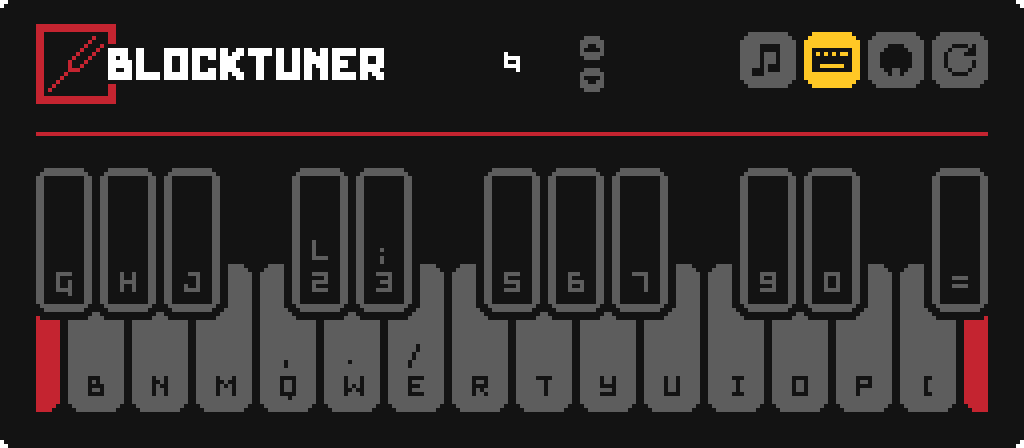
键盘映射:
鸣谢
本地化
- 俄语 - Felix14-v2(目前可能已过时)
- 日语 - misaka10843 & hakkaku
Forge 移植
许可证
版权所有 (C) 2021, xwjcool; 版权所有 (C) 2025, Lumine1909; 版权所有 (c) 2026, rs256;
本分支依据 GNU 宽通用公共许可证 v3.0(LGPLv3)分发。
这是有意为之。本仓库是在上游代码库仍采用 LGPLv3 许可时从上游分叉而来的,且在上游将其许可证更改为 GPLv3 后,本分支并未同步来自上游的提交。
因此,本仓库依据其最初分叉时的代码快照,继续依据 LGPLv3 分发。这并不意味着上游较新的代码,或上游在重新授权为 GPLv3 之后所做的更改,在此处也可依据 LGPLv3 获得。
本软件是自由软件:你可以根据自由软件基金会发布的 GNU 宽通用公共许可证条款,即许可证的第 3 版,或(由你选择)任何更高版本,对其进行再分发和/或修改。
发布本软件是为了希望它有用,但没有任何保证;甚至没有隐含的对适销性或特定用途适用性的保证。更多细节请参阅 GNU 宽通用公共许可证。
你应该已经随本程序收到了一份 GNU 宽通用公共许可证的副本。如果没有,请参阅 。
BlockTuner pitchsmith
About
This is the fabric version of BlockTuner and requires fabric API.
If you are using forge, you can check out the forge version by A_Peng215.
If you want the data pack for older versions of Minecraft, please visit this page.
BlockTuner-pitchsmith is a Fabric fork of the original BlockTuner_Continue (also forked from orginal BlockTuner), adjusted for builders who spend more time repeatedly tuning note blocks.
This branch keeps the familiar tuning workflow, but focuses on a setup that is more practical for heavy tune usage: cleaner input handling, configurable pitch-copy behavior, and a more maintainable configuration and build setup.
Highlights
- Better suited for builders who repeatedly tune note blocks during large builds
- Added a YACL-powered config screen with Mod Menu integration
- Added
require-ctrl-to-copy-pitchso pitch-copy behavior can be configured explicitly - Some hard-coded key bindings now refer to Minecraft keys
- Reworked input handling around GUI access, note display, and related interactions
- Updated build, Stonecutter, Gradle, and Loom setup for ongoing maintenance
Instructions
Required Dependencies
Installation
Put this mod in your mods folder. You also need to install Fabric API if you haven't installed it yet. For the client, also YetAnotherConfigLib (YACL) is needed.
How to Use BlockTuner
Ctrl + Right click on a note block to open up tuning UI. Placing a note block while holding Ctrl also opens the UI automatically.
Ctrl to show the note of the note block at crosshair.
Ctrl + Middle click on note blocks to pick up readily tuned note blocks.
Right click note blocks with blaze rods to play with right clicks without tuning.
[!NOTE]
- If you are using BlockTuner 1.0.0 (Minecraft 1.18.2) or lower, you don't need to hold
Ctrlto open up the tuning UI. Instead, use/blocktunerto toggle this.- If you have Tweakeroo installed and have no access to the
Ctrlkey, please go to Tweakaroo configs, findflexibleBlockPlacementOffsetunderHot Keysand set it to something else. e.g.Right Alt. Sorry for the inconvenience.
Tuning UI
Top-right corner (from left to right)
- Play mode - toggle whether the GUI will turn off immediately upon clicking a note on the piano keyboard.
- Typing keyboard to piano keyboard - toggle whether you want to play the piano keyboard using your computer keyboard.
- MIDI Device - Click to cycle through available MIDI input devices. The icon shows red if the device is currently unavailable. This usually means it is being used by another program.
Keyboard Mapping:
Credits
Localization
- Russian - Felix14-v2 (Currently outdated)
- Japanese - misaka10843 & hakkaku
Forge Port
License
Copyright (C) 2021, xwjcool; Copyright (C) 2025, Lumine1909; Copyright (c) 2026, rs256;
This fork is distributed under the GNU Lesser General Public License v3.0.
That is intentional. This repository was forked from upstream while the upstream codebase was still licensed under LGPLv3, and this fork has not synchronized commits from upstream after upstream changed its license to GPLv3.
Accordingly, this repository remains distributed under LGPLv3 based on the code snapshot it originally forked from. This does not imply that newer upstream code, or upstream changes made after the GPLv3 relicensing, are available under LGPLv3 here.
This program is free software: you can redistribute it and/or modify it under the terms of the GNU Lesser General Public License as published by the Free Software Foundation, either version 3 of the License, or (at your option) any later version.
This program is distributed in the hope that it will be useful, but WITHOUT ANY WARRANTY; without even the implied warranty of MERCHANTABILITY or FITNESS FOR A PARTICULAR PURPOSE. See the GNU Lesser General Public License for more details.
You should have received a copy of the GNU Lesser General Public License along with this program. If not, see .

下载 blocktuner-pitchsmith
需要联机服务器吗?
稳定流畅、一键部署,几分钟即可和朋友联机开服
最低仅需 8 元/月 即可畅快联机
下载 blocktuner-pitchsmith
需要联机服务器吗?
稳定流畅、一键部署,几分钟即可和朋友联机开服
最低仅需 8 元/月 即可畅快联机
下载 blocktuner-pitchsmith
需要联机服务器吗?
稳定流畅、一键部署,几分钟即可和朋友联机开服
最低仅需 8 元/月 即可畅快联机
下载 blocktuner-pitchsmith
需要联机服务器吗?
稳定流畅、一键部署,几分钟即可和朋友联机开服
最低仅需 8 元/月 即可畅快联机
下载 blocktuner-pitchsmith
需要联机服务器吗?
稳定流畅、一键部署,几分钟即可和朋友联机开服
最低仅需 8 元/月 即可畅快联机
下载 blocktuner-pitchsmith
需要联机服务器吗?
稳定流畅、一键部署,几分钟即可和朋友联机开服
最低仅需 8 元/月 即可畅快联机
下载 blocktuner-pitchsmith
需要联机服务器吗?
稳定流畅、一键部署,几分钟即可和朋友联机开服
最低仅需 8 元/月 即可畅快联机
下载 blocktuner-pitchsmith
需要联机服务器吗?
稳定流畅、一键部署,几分钟即可和朋友联机开服
最低仅需 8 元/月 即可畅快联机
下载 blocktuner-pitchsmith
需要联机服务器吗?
稳定流畅、一键部署,几分钟即可和朋友联机开服
最低仅需 8 元/月 即可畅快联机
下载 blocktuner-pitchsmith
需要联机服务器吗?
稳定流畅、一键部署,几分钟即可和朋友联机开服
最低仅需 8 元/月 即可畅快联机
v2.1.4-pitchsmith
没有变化,仅更新到 mc26.2 和 mc26.3
关于这个资源的讨论、问题反馈与使用心得
还没有讨论,来发第一帖吧
你是这个资源的作者?登录后可认领此资源。
相似资源
 模组

显示你正在注视的方块的信息。(适用于 Minecraft 1.16+ 的 Hwyla/Waila 分支)
 模组
在游戏画面角落显示附近世界地形、玩家、生物和实体的地图。可创建路径点,帮助你找到标记过的位置。
 模组

查看物品与配方
 模组
使用 JavaScript 编辑配方、添加自定义物品、编写世界事件!
 模组
AE2:一款流行的自动化与存储模组
 模组
那是什么?一个 Waila/Hwyla 的分支。
评论 0
登录后参与评分
还没有评论,来抢沙发吧