
一个由我创建的客户端模组,用于将参考图像和蓝图投影到 Minecraft 世界中。
- 图像可以定位、缩放、旋转并设置为透明。
你需要手持物品框(ItemFrame)或副手持有物品框才能看到图像。
主配置界面
默认按键 "O" 将启动配置界面,该界面会在你的文件系统中创建文件夹以上传图像:
{Minecraft}/config/blueprints/{世界名称}/{维度名称}
![主配置界面]
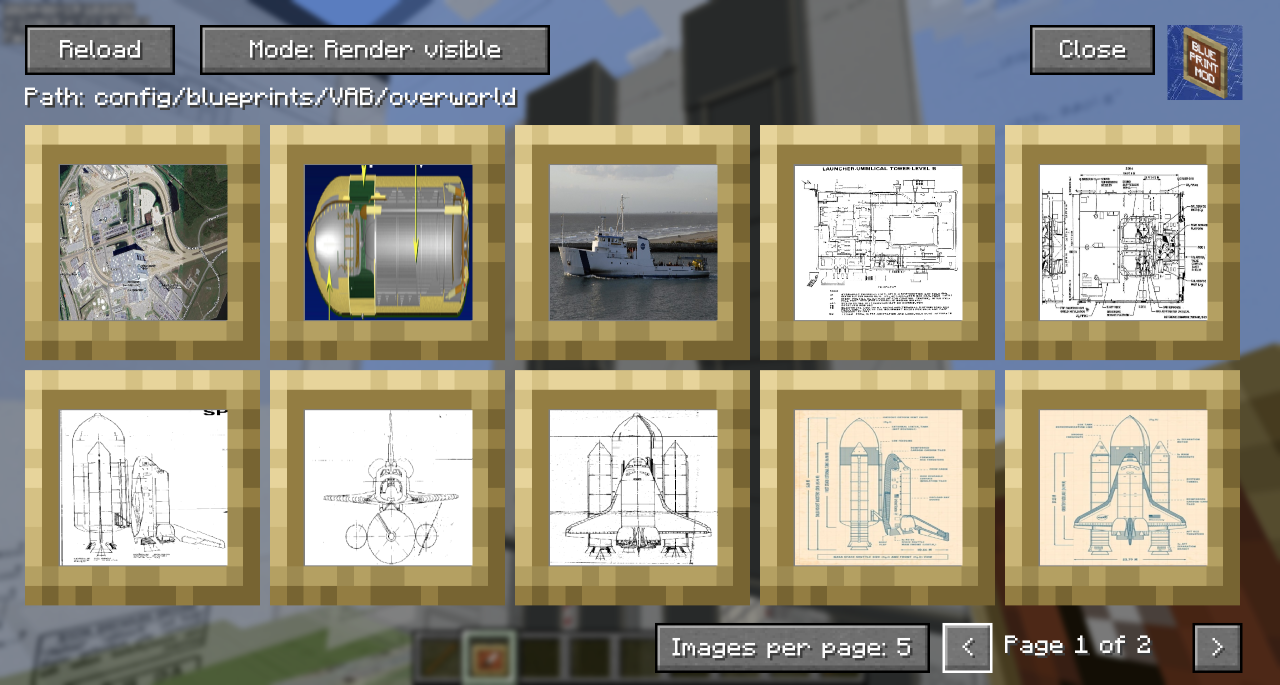
- 「重新加载」按钮将重新扫描文件系统,查找你上传的任何文件。
- 「路径」显示了你需要在 Minecraft 外部操作的文件系统的相对位置。
- 你可以切换渲染模式,使其隐藏在方块后面或始终穿透方块显示。
- 隐藏的蓝图会显示为深色叠加层。
- 你可以使用 Control+点击 作为快捷方式来在世界中显示/隐藏蓝图。
- 你可以点击某个蓝图以进入移动和定位界面。
- 在右下角,你可以更改每页显示的图像数量,以便在选择界面上进行缩放以及使用左右箭头导航页面。
蓝图的移动与定位
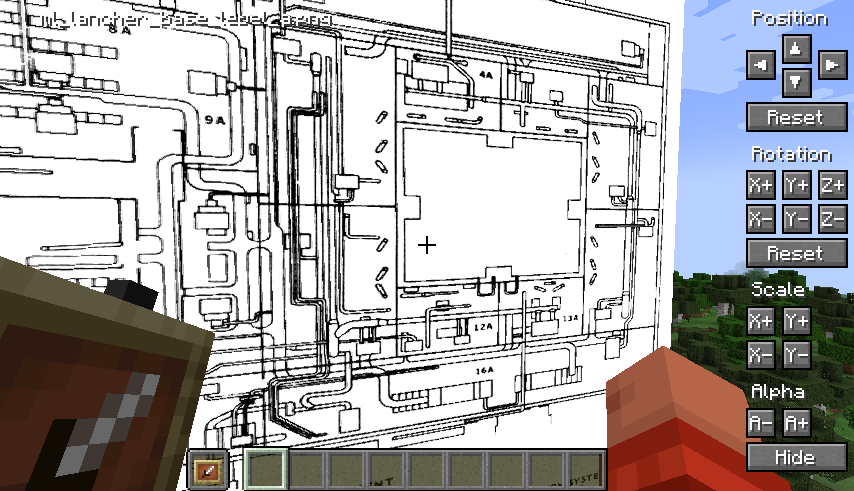
-
位置微调面向玩家视角:例如,左永远是左。
-
按住 Shift 键可以增加每次按下按钮时的变化量,以便进行大幅调整。
-
按住 Ctrl 键可以减少每次按下按钮时的变化量,以便进行细微调整。
-
同时按住 Shift 和 Ctrl 键可以在每次点击时对设置进行大幅度更改。
演示
在这个视频中可以看到快速概览,这也是我制作这个模组的原因:
A client side mod I created to project reference images and schematics into the minecraft world.
- Images can be positioned, scaled, rotated and made transparent.
You need to be holding an ItemFrame in either your hand or your offhand to see the images.
Main Config Screen
The default key "O" will launch the config which will create folders for you to upload images in your filesystem:
{Minecraft}/config/blueprints/{world name}/{dimension name}
![Main config screen]
- The Reload button will rescan the filesystem for any files you have uploaded.
- The 'Path' shows the relative position of the filesystem you'll need to work with outside of Minecraft
- You can toggle the Render mode to hide behind blocks or always show through them.
- Blueprints that are hidden show with a dark overlay.
- You can use Control-Click as a shortcut to show/hide the blueprint in the world.
- You can click on a blueprint to get to the moving and positioning screen.
- In the bottom right, you can change the number of images per page to zoom in/out on the selection screen and navigate pages with the left and right chevrons.
Blueprint Moving and Positioning
-
Position tweaking is player-facing aware: e.g. left is always left
-
You can hold down Shift to increase the amount of change each button applies for bigger tweaks.
-
You can hold down Ctrl to reduce the amount of change each button applies for small tweaks.
-
You can hold down both Shift and Ctrl to make big changes to settings on each click.
Demo
A quick overview can be seen in this video which was the reason I created the mod:

下载 Blueprints
下载 Blueprints
下载 Blueprints
下载 Blueprints
下载 Blueprints
下载 Blueprints
下载 Blueprints
下载 Blueprints
下载 Blueprints
下载 Blueprints
[26.3.12] - 2026-10-11
更改
- 升级至 Minecraft 26.3
- 更新 Fabric Loader 至 0.19.5,Fabric API 至 0.162.0+26.3,Loom 至 1.18,Gradle 至 9.7.1
- 移植至 26.3 renderpearl GPU API 和 SDL3 输入(按键绑定和鼠标按钮不再使用 GLFW)
- 启用 Gradle 配置缓存
[26.2.12] - 2026-07-04
新增
- 每个蓝图支持翻转/镜像切换(水平和垂直)
- 在配置界面拖放图片文件以导入到当前世界的蓝图文件夹中
- 配置界面中的搜索框,可按文件名筛选蓝图
修复
- 点击配置界面上的按钮时,当前页面不再重置
更改
- 升级至 Minecraft 26.2
- 更新 Fabric Loader 至 0.19.3,Fabric API 至 0.154.0+26.2
- 移植至 26.2 渲染和 GUI API(PrimitiveTopology、GpuBufferSlice 映射、Gui.setScreen、GameRenderer.mainRenderTarget)
[1.21.11.10] - 2026-02-27
修复
- “渲染可见”模式下图像穿透方块渲染的问题(问题 #24)
- 将渲染可见模式切换为直接 GPU 渲染通道,并显式绑定 DynamicTransforms UBO
- 注册自定义管线(基于 POSITION_TEX_COLOR_SNIPPET),禁用深度测试、深度写入和面剔除
[1.21.10.9] - 2025-10-12
新增
- 通过 GitHub Actions 自动发布至 Modrinth 和 CurseForge
- CHANGELOG.md 用于版本历史记录跟踪
更改
- 模组现已正确标记为仅客户端端
[1.21.10.8] - 2025-10-12
新增
- 校准功能,可根据已知尺寸调整图像大小
修复
- 因 mixin 绑定导致的崩溃
[1.21.10.7] - 2025-10-11
更改
- 升级至 Minecraft 1.21.10
[1.21.9.7] - 2025-10-11
更改
- 升级至 Minecraft 1.21.9
[1.21.8.7] - 2025-08-17
更改
- 升级至 Minecraft 1.21.8
[1.21.7.7] - 2025-08-17
更改
- 升级至 Minecraft 1.21.7
[1.21.6.7] - 2025-06-22
新增
- 蓝图现在按照距离玩家由远及近的顺序渲染
更改
- 更新至 Minecraft 1.21.6
[1.21.5.7] - 2025-06-02
新增
- 支持更多类型的图像格式
- 实验性支持动态 GIF 动画
更改
- 更新至 Minecraft 1.21.5
已知问题
- 部分 GIF 在动画播放时可能会出现轻微失真
[1.21.4.6] - 2024-12-30
更改
- 更新至 Minecraft 1.21.4
[1.21.0.6] - 2024-09-01
新增
- 重构配置界面,支持悬停滚动功能
- 游戏内推拉按钮,根据玩家朝向移动最后配置的蓝图
- 推拉操作的键盘快捷键(可在设置中配置)
更改
- 位置/旋转/缩放输入框现支持滚轮修改数值
- Ctrl/Shift/两者同时按下可改变滚轮速率
[1.21.0.5] - 2024-08-19
新增
- 蓝图现在从两侧始终可见
更改
- 重构蓝图选择界面,改为带分页的网格布局
[1.21.0.4] - 2024-08-18
新增
- 定位界面上新增单个图像的独立推拉按钮
- 可滚动的图像列表组件
更改
- 禁用定位界面的背景模糊效果
[1.21.0.3] - 2024-07-07
更改
- 图像现按其原始宽高比渲染
[1.20.1.2] - 2024-03-29
修复
- 与 ReplayMod 查看器一起使用时崩溃
[1.21.10.9] - 2025-10-15
新增
- 新的蓝图模板系统
- 支持自定义方块调色板
修复
- 修复放置大型蓝图时的崩溃
关于这个资源的讨论、问题反馈与使用心得
还没有讨论,来发第一帖吧
你是这个资源的作者?登录后可认领此资源。
相似资源
 模组

显示你正在注视的方块的信息。(适用于 Minecraft 1.16+ 的 Hwyla/Waila 分支)
 模组
使用 JavaScript 编辑配方、添加自定义物品、编写世界事件!
 模组

查看物品与配方
 模组
在游戏画面角落显示附近世界地形、玩家、生物和实体的地图。可创建路径点,帮助你找到标记过的位置。
 模组
AE2:一款流行的自动化与存储模组
 模组
那是什么?一个 Waila/Hwyla 的分支。
评论 0
登录后参与评分
还没有评论,来抢沙发吧