


项目概览
本模组为 Forge、Fabric 和 Quilt 添加了通常被称为“环绕放置”(Reach-Around Placement)的搭路辅助功能。它与《Minecraft:基岩版》及 Quark 模组中的类似特性非常相似,融合了二者的优点。
搭路功能允许你在前方、上方或下方的方块空隙中放置方块,即使该表面不可见!当可用时,会显示准星以指示方块的放置位置。当 F3 调试菜单可见时,会有额外的轮廓显示具体的放置位置(但你可以在配置文件中将其始终开启)。
向下滚动查看详细细节、截图等内容!
本模组的官方项目页面位于下方:
⚠️ 联机游玩警告
本模组仅应在单人游戏,或所有玩家都同意使用的小型服务器上使用!例如 SMP 服或与好友一起玩自制空岛等场景。
切勿在大型网络或禁止此类修改的服务器上使用!使用它可能会导致你被封禁!它在 Hypixel 上也不起作用,而且我 不会 为此进行修复。
? 致谢
Bridging Mod 低于 v2.0.0 的版本是 Quark 的“环绕放置”功能的 Fabric 移植版。你可以在这里找到 Quark 的源代码:
之后的版本已完全重写。
翻译贡献者:
- 墨西哥西班牙语:@TheLegendofSaram
- 乌克兰语:@Melishy, @StarmanMine142, @Tarteroycc, @Xicscon
- 俄语:@Melishy
- 繁体中文:@yichifauzi
- 简体中文:@Xinyang-Gao
- 土耳其语:@RuyaSavascisi
- 意大利语:@exclusive.adom
我们永远欢迎并非常感谢翻译贡献!请在此提交:Here!
☎️ 联系方式
- Discord: 支持服务器或 @CG360
- GitHub: /squeeglii
实际效果
开箱即用:
默认情况下,本模组即可正常工作。它通过准星进行搭路,支持所有轴向,并在不需要时自动避让。它允许你在垂直(上下)和水平方向的空中间隙放置方块。这对于以下用途非常有用:
- 建造平台
- 填补墙壁
- 在下界和末地建造楼梯
- ……搭路。
台阶可以自然工作,方块能正确对齐作为参照的方块,火把也不再碍事。
本模组比 Quark 更接近基岩版的环绕放置功能。它的容错率更高,但增加了垂直方向的操作能力。

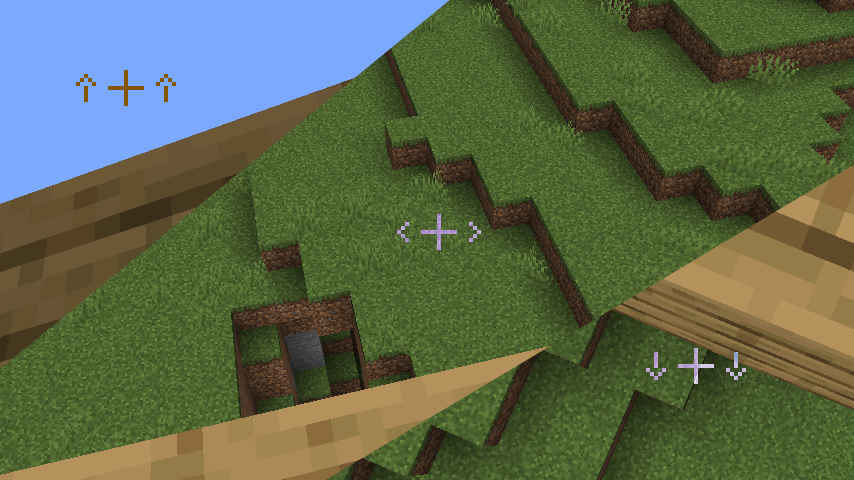
准星
准星与你的普通准星完美融合,并且支持 DynamicCrosshair(感谢 Crendgrim!)
仅在你即将使用搭路模式放置方块时可见,并提示方块将搭路到的位置(上/下/水平方向)。
可配置
本模组的几乎所有部分都是可配置的!配置文件分为四个主要标签页:
- 主设置 (Main):这些设置影响搭路功能的工作方式。从调整延迟以让你更频繁地放置,到将搭路锁定在水平轴上!
- 视觉效果 (Visuals):顾名思义。你可以在此开启轮廓,或关闭准星。
- 修复 (Fixes):此部分中的所有设置旨在使模组运行更加流畅,但如果它们导致模组出现意外行为,请尝试关闭其中一些。
- 调试 (Debug):大部分内容默认关闭。它用于在开发过程中帮助测试模组,实用性不高。不过,如果你想要使用它,它就在哪里!主要是视觉辅助工具。
如果搭路功能表现异常且你不想进入配置文件关闭它,还有一个方便的快捷键!

总之,以下是配置文件界面:
Project Overview
This mod adds a bridging assist feature often referred to as "Reach-Around Placement" for Forge, Fabric, & Quilt! It's very similar to features found in both Minecraft: Bedrock Edition & the Quark mod, taking the best parts from both.
Bridging allows for placing blocks in gaps in front, above, or below blocks, even if the surface isn't visible! When it's available, a crosshair is shown to indicate where that block will be placed. When the F3 menu is visible, there's an extra outline showing the exact position it's placing in (but you can turn it on all the time in the config)
Scroll down to see it all in detail, screenshots and all!
This mod's official project pages can be found below:
⚠️ Online Play Warning
This mod should only be used in singleplayer, or on small servers where all the players involved are okay with it! SMPs, homemade skyblock with friends - that kinda stuff.
It should NOT be used on big networks or on servers where these kinds of modifications are disallowed! You can (and probably will) get banned for using it! It doesn't work on Hypixel anyway, and I won't be fixing that.
? Credits
Versions of the Bridging Mod older than v2.0.0 were a Fabric port of Quark's "Reach-Around Placement". You can find Quark's source here:
Versions since have rewritten it from scratch.
Translations:
- Mexican Spanish: @TheLegendofSaram
- Ukranian: @Melishy, @StarmanMine142, @Tarteroycc, @Xicscon
- Russian: @Melishy
- Traditional Chinese: @yichifauzi
- Chinese (Simplified): @Xinyang-Gao
- Turkish: @RuyaSavascisi
- Italian: @exclusive.adom
Translations are always welcome & very appreciated! Please submit them Here!
☎️ Contact
- Discord: Support Server or @CG360
- GitHub: /squeeglii
In Action
Out the box:
Out of the box, the mod just works. It bridges with a crosshair, works on every axis, and tries to keep out of the way when you don't need it. It lets you place blocks in air gaps on both up/down and horizontally. This is useful for
- Building Platforms
- Filling in walls
- Building staircases in the nether & the end
- ...Bridging.
Slabs just work naturally, blocks align to the blocks you're building off properly, and torches no longer get in your way.
This mod is a bit more similar to Bedrock's reacharound than it is to Quark's. It's much more lenient, but it has that added verticality.
The Crosshair
It blends in with your regular crosshair and even has support for DynamicCrosshair (Thank you Crendgrim!)
It's only visible when you're about to place a block using bridging mode, and hints to where the block will be bridged off of (up/down/horizontally)
Configurable
Almost every part of the mod is configurable! The config is split into 4 main tabs:
- Main: These settings affect how the Bridging feature works. From changing the delay to let you spam more, to locking bridging to the horizontal axis!
- Visuals: Pretty self-explanatory. You can turn on outlines here, or turn off the crosshair.
- Fixes: Everything in this section is meant to make the mod feel smoother, but if it's making the mod do unexpected things, try turning off some of these.
- Debug: Most of this is off by default. It's used to help test the mod during development and isn't that useful. But hey, if you want to use it, it's there! Mostly visual aids.
And if Bridging is being awkward and you don't want to go into the config to turn it off, there's a handy keybind!
Anyways, here's the config:

下载 Bridging Mod
需要联机服务器吗?
稳定流畅、一键部署,几分钟即可和朋友联机开服
最低仅需 8 元/月 即可畅快联机
下载 Bridging Mod
需要联机服务器吗?
稳定流畅、一键部署,几分钟即可和朋友联机开服
最低仅需 8 元/月 即可畅快联机
下载 Bridging Mod
需要联机服务器吗?
稳定流畅、一键部署,几分钟即可和朋友联机开服
最低仅需 8 元/月 即可畅快联机
下载 Bridging Mod
需要联机服务器吗?
稳定流畅、一键部署,几分钟即可和朋友联机开服
最低仅需 8 元/月 即可畅快联机
下载 Bridging Mod
需要联机服务器吗?
稳定流畅、一键部署,几分钟即可和朋友联机开服
最低仅需 8 元/月 即可畅快联机
下载 Bridging Mod
需要联机服务器吗?
稳定流畅、一键部署,几分钟即可和朋友联机开服
最低仅需 8 元/月 即可畅快联机
下载 Bridging Mod
需要联机服务器吗?
稳定流畅、一键部署,几分钟即可和朋友联机开服
最低仅需 8 元/月 即可畅快联机
下载 Bridging Mod
需要联机服务器吗?
稳定流畅、一键部署,几分钟即可和朋友联机开服
最低仅需 8 元/月 即可畅快联机
下载 Bridging Mod
需要联机服务器吗?
稳定流畅、一键部署,几分钟即可和朋友联机开服
最低仅需 8 元/月 即可畅快联机
下载 Bridging Mod
需要联机服务器吗?
稳定流畅、一键部署,几分钟即可和朋友联机开服
最低仅需 8 元/月 即可畅快联机
2.7.0 更新日志
- 支持 26.2 和 26.3
- 由 @PrincessStellar 提供的巴西葡萄牙语翻译
- 修复按键映射顺序问题 (@cassiancc)
- 对方块瞄准后端 API 进行了重大更改。
- Sable 支持应已准备好,以便在其更新到较新版本时使用。
关于这个资源的讨论、问题反馈与使用心得
还没有讨论,来发第一帖吧
你是这个资源的作者?登录后可认领此资源。
相似资源
 模组

显示你正在注视的方块的信息。(适用于 Minecraft 1.16+ 的 Hwyla/Waila 分支)
 模组

查看物品与配方
 模组
在游戏画面角落显示附近世界地形、玩家、生物和实体的地图。可创建路径点,帮助你找到标记过的位置。
 模组
使用 JavaScript 编辑配方、添加自定义物品、编写世界事件!
 模组
添加区块认领和玩家组队功能,并与 Xaero's Minimap 和 World Map 集成
 模组
AE2:一款流行的自动化与存储模组
评论 0
登录后参与评分
还没有评论,来抢沙发吧