
Buildify 主要为建筑者提供创造模式工具,但也包含一些生存模式功能。大多数功能可以在配置文件中启用或禁用。
功能
锤子和钉子:
锤子允许玩家通过左键点击循环遍历所有方块状态属性,并通过右键点击更改各种状态。该物品可以在合成台中使用(1 铁锭、1 木棍和 1 皮革)制作。
在创造模式下,锤子可以免费使用。然而,在生存模式中,每次使用锤子都需要消耗钉子。每 10 个钉子可以在合成台中使用(2 铁锭)制作。
热交换滑块:
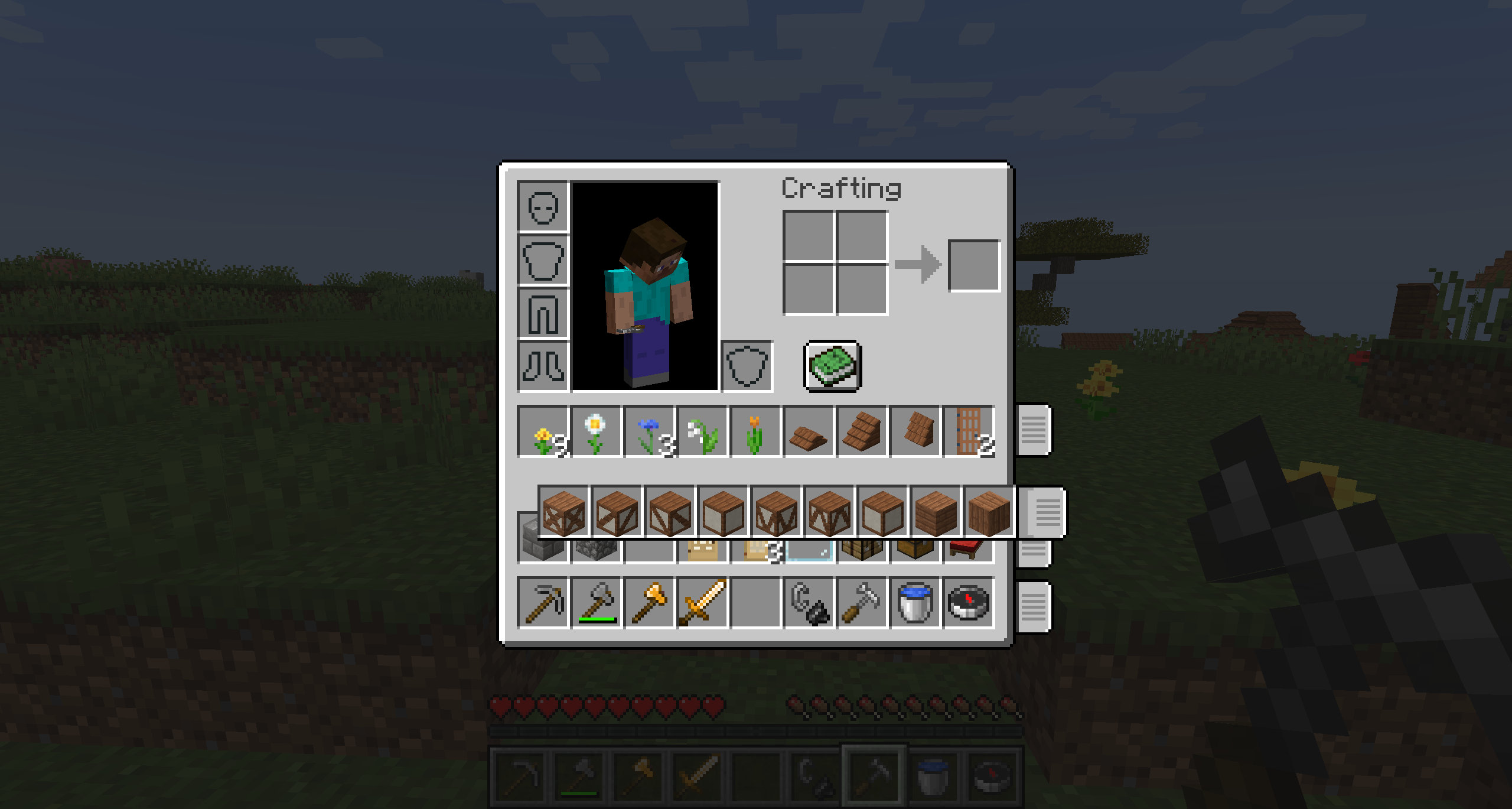
这些滑块允许玩家移动整个生存模式的物品栏行。这对于生存模式建筑者非常有用,因为你可以将不同的调色板放在单独的行上,并快速轻松地将它们切换到快捷栏。此功能可以在 buildify-client.toml 配置文件中禁用。
个人物品栏和箱子排序:
另一种用于整理物品栏的解决方案。这些按钮允许玩家按类别(基于自定义创造模式标签页)或字母顺序对物品栏进行排序。此功能可以在 buildify-client.toml 配置文件中禁用。
自定义创造模式物品栏 (仅限创造模式):
创造模式物品栏已被重新组织!我创建了自定义标签页,以更利于创造模式建筑者的方式对方块进行分类。模组开发者和玩家都可以通过在 buildify/tags/items/creative_tabs/tag_name 中添加标签来与新模组兼容。我已经添加了一些流行模组的方块,但鼓励模组开发者为他们的模组添加这些标签。此功能可以在 buildify-common.toml 配置文件中禁用。
复制方块 (仅限创造模式):
使用“复制方块”功能,精确复制目标方块及其当前的方块状态。(CTRL+中键点击) 是硬编码的,但你也可以分配另一个快捷键,默认为 (B)。此功能在放置长条屋顶、楼梯等时非常有用,因为你可以复制方块并移动到更方便的位置进行放置。
距离修改器 (仅限创造模式):
默认情况下,使用可配置的 reach distance modifier 键 (N) 来改变创造模式下的距离。这在创造模式建造期间非常有用,允许你从任意距离放置和破坏方块。最大距离可在 buildify-common.toml 配置文件中配置。只需瞄准你想要更改距离的方块并按下 (N),屏幕上将显示距离。
方块选择器 (仅限创造模式):
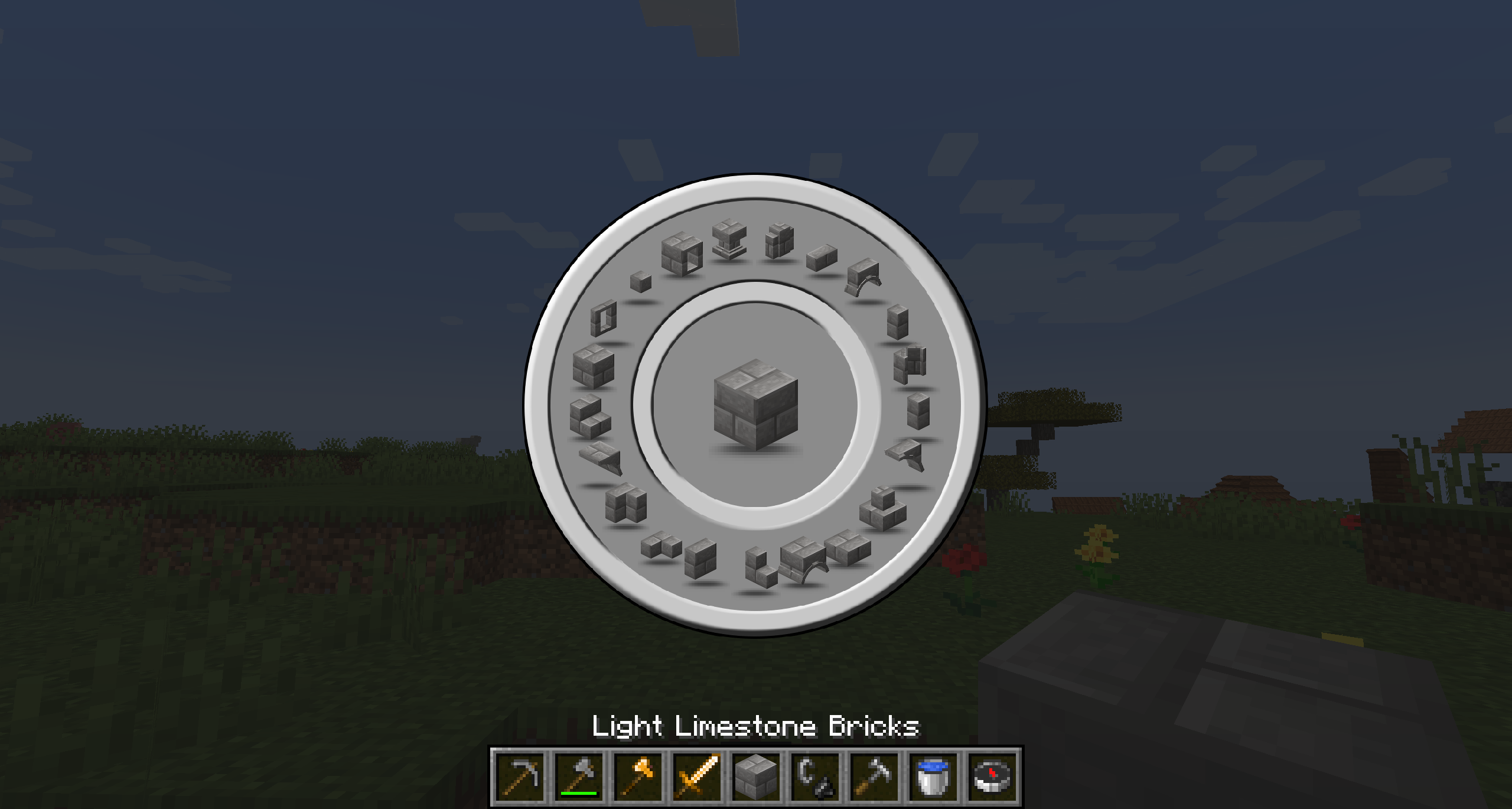
这是模组的皇冠明珠和最初目的。方块选择器允许轻松选择与当前手持方块相关的所有方块。默认情况下使用原版方块家族,但如果安装了兼容模组,如 Caliber Mod,它将在一个美观的径向 GUI 中显示同一类型的各种方块形状。只需在创造模式下按住任何方块时按下 (V) 即可访问方块选择器。
方块选择器受到了 Conquest Reforged 的启发,但我让它可供任何人使用,并使其他模组更容易与其兼容。玩家还可以使用数据包自定义自己的方块选择器列表。查看 GitHub 上的 wiki 以获取更多信息。
OP 命令:
- /time | 使用此命令将服务器时间设置为各种设置。此命令会影响整个服务器的时间。
- /ptime | 使用此命令将时间更改为任意数量的设置或将其恢复为服务器时间。这仅影响玩家。
- /pweather | 使用此命令更改天气或将其恢复为服务器天气。这仅影响玩家。
- /gm | 使用此命令更改你的游戏模式,而无需输入 gamemode。只需输入 /gm 0,1,2,3 即可!
- /repair | 使用此命令修复手中当前持有的物品。此命令会将物品修复至满耐久度。
- /heal | 使用此命令治疗自己或指定的玩家。此命令会治疗玩家并将其食物饱和度最大化。
- /fly | 使用此命令切换飞行功能的开启或关闭。此命令允许玩家在生存模式下飞行。
- /tpall | 使用此命令将所有玩家传送到指定玩家。此命令会将所有玩家传送到指定的玩家。
所有命令仅限 OP 使用,如果需要,可以在 COMMON-CONFIG 中禁用。
安装
- 需要安装 服务器端和客户端 才能使用此模组
- 整合包 欢迎在 Modrinth 或 CurseForge 上托管的整合包中使用此模组
依赖项
- 无
模组兼容性
- Biomes O' Plenty: 所有基础方块已添加到自定义创造模式物品栏
- Create: 所有基础方块已添加到自定义创造模式物品栏
- Chipped: 所有基础方块已添加到自定义创造模式物品栏(即将推出!版本 0.2.6+)
- Regions Unexplored: 所有基础方块已添加到自定义创造模式物品栏
功能请求
如果你希望看到此模组添加新功能,请联系 Charm8er 加入我们的 Discord 或在 GitHub 上留下功能建议。
功能和错误修复会随着时间逐步添加,因为我计划长期维护此模组。目前仅提供 1.18.2 和 1.20.1 Forge 版本。它也将移植到未来的 NeoForge 版本,但不会向后移植(请不要询问)。此外,并非所有功能都包含在 1.18.2 版本中。
如果有人有兴趣通过编写代码或制作资源包为本模组做出贡献,请在我们的 Discord 上联系 Charm8er。
Buildify mostly adds creative tools for builders but has a few survival features as well. Most features can be enabled and disabled in the configs.
FEATURES
Hammer and Nails:
The hammer allows players to cycle through all blockstate properties with left click and change the various states with right click. This item can be crafted at a crafting table with (1 Iron Ingot, 1 Stick and 1 Leather).
The hammer can be used in creative mode for free. However, in suvival mode the hammer will require nails for each use. The nails can be crafted at a crafting table with (2 Iron Ingots) per 10 nails.
Hot Swapping Sliders:
These slider allow players to move entire rows of their survival inventory. This is very useful for survial builders as you can place your different palettes on seperate rows and swap them to your hot bar quick and easy. This feature can be disabled in the buildify-client.toml configuration file.
Personal Inventory and Chest Sorting:
Yet another sorting solution for your inventory. These buttons allow the player to sort their inventory by category (based on the custom creative tabs) or alphabetically. This feature can be disabled in the buildify-client.toml configuration file.
Custom Creative Inventory (creative only):
The creative inventory has been reorganized! I made custom tabs that sort the blocks in a fashion that is more useful for creative builders. Mod developers and players alike can add compatibility with new mods by just adding tags to buildify/tags/items/creative_tabs/tag_name. I have included several popular mod's blocks already but I encourage mod devs to add these tags to their mods. This feature can be disabled in the buildify-common.toml configuration file.
Copy Block (creative only):
Use the Copy Block feature to copy the targeted block and it's current block state exactly as it is in that moment. (CTRL+Middle-Click) is hard coded but you can also asign another hotkey if you'd like (B) by default. This feature is very useful for placing long stretches of roofing, stairs, etc as you can copy the block and move to an easier position for placement.
Reach Distance Modifier (creative only):
Use the configurable reach distance modifier key (N) by default, to change the reach distance while in creative mode. This is very useful during creative building allowing you to place and break blocks from any distance. The max distance is configurable in the buildify-common.toml configuration file. Just target the block you want to change your distance to and press (N), the distance will be displayed on screen.
Block Picker (creative only):
The crown jewel and original purpose of the mod. The Block Picker allows for easy selection of all related blocks to the one you are currently holding. The vanilla block families are used by default but if installed with a compatible mod, like Caliber Mod, it will display a wide range of block shapes that are of the same type in a nice radial GUI. Just press (V) by default to access the Block Picker while holding any block in creative mode.
The Block Picker was inspired by Conquest Reforged but I have made it available for anyone to use and have made it easy for other mods to include compatibility with their mods too. Players can also customize the their own Block Picker lists using data packs. Check out the wiki on github for more info.
OP Commands:
- /time | Use this command to set the server time to various settings. This command will affect the time for entire server.
- /ptime | Use this command to change the time to any number of settings or set it back to server time. This only affects the player.
- /pweather | Use this command to change the weather or set it back to server weather. This only affects the player.
- /gm | Use this command to change your gamemode without having to type gamemode. Just type /gm 0,1,2,3 intead!
- /repair | Use this command to repair the item currently held in your hand. This command will repair the item to full durability.
- /heal | Use this command to heal yourself or the specified player. This command will heal the player and max out their food saturation as well.
- /fly | Use this command to toggle flying on or off. This command will allow the player to fly in survival mode.
- /tpall | Use this command to teleport all players to the specified player. This command will teleport all players to the player specified.
ALL COMMANDS ARE OP ONLY AND THEY CAN BE DISABLED IN THE COMMON-CONFIG IF DESIRED.
INSTALLATION
- Server and Client installation are required to use this mod
- Mod Packs feel free to use this in your modpack hosted on Modrinth or CurseForge only
DEPENDENCIES
- NONE
MOD COMPATIBILITY
- Biomes O' Plenty: All base blocks are added to custom creative inventory
- Create: All base blocks are added to custom creative inventory
- Chipped: All base block are added to custom creative inventory (coming soon! version 0.2.6+)
- Regions Unexplored: All base blocks are added to custom creative inventory
FEATURE REQUESTS
If there are features you would like to see added to this mod, reach out to Charm8er on our Discord or leave a feature suggestion on our github.
Features and bugfixes will be added over time as I plan to maintain the mod long term. It is currently only available for 1.18.2 and 1.20.1 Forge. It will be ported to future NeoForge versions as well but will not be backported (Please don't ask). Additionally, not all features are included in the 1.18.2 version.
If anyone is interested in contributing to this mod by coding or resource pack creation, please reach out to Charm8er on our discord.

下载 Buildify
需要联机服务器吗?
稳定流畅、一键部署,几分钟即可和朋友联机开服
最低仅需 8 元/月 即可畅快联机
下载 Buildify
需要联机服务器吗?
稳定流畅、一键部署,几分钟即可和朋友联机开服
最低仅需 8 元/月 即可畅快联机
下载 Buildify
下载 Buildify
下载 Buildify
下载 Buildify
下载 Buildify
下载 Buildify
下载 Buildify
下载 Buildify
0.2.5
功能特性
- 调整了花卉标签页的排序方式
- 从创造模式标签页中移除了被寄生的方块
- 将来自 BOP 和 RU 的缺失方块添加至自定义标签页
- 为自定义标签页添加了模组兼容性,以包含 Create 方块的显示
- 优化了创造模式标签页的标签(Tags)系统
- 新增配置选项,用于禁用生存模式背包快速切换功能
- 新增配置选项,用于将命令日志记录到服务器控制台
- 新增配置选项,用于禁用自定义 OP 命令
- 新增
/gm命令,用于更改游戏模式 - 新增
/repair命令,用于修复物品 - 新增
/time命令,用于更改服务器时间 - 新增
/fly命令,用于切换飞行状态 - 新增
/heal命令,用于治疗玩家 - 新增
/tpall命令,用于将所有玩家传送至指定玩家处 - 简化了
/ptime命令
错误修复
- 修复了在非背包界面显示排序按钮的问题
关于这个资源的讨论、问题反馈与使用心得
还没有讨论,来发第一帖吧
你是这个资源的作者?登录后可认领此资源。
相似资源
 模组

显示你正在注视的方块的信息。(适用于 Minecraft 1.16+ 的 Hwyla/Waila 分支)
 模组

查看物品与配方
 模组

原版世界生成优化模组
 模组
在游戏画面角落显示附近世界地形、玩家、生物和实体的地图。可创建路径点,帮助你找到标记过的位置。
 模组
使用 JavaScript 编辑配方、添加自定义物品、编写世界事件!
 模组
缓冲的原始输入和线程化的事件轮询
评论 0
登录后参与评分
还没有评论,来抢沙发吧