
Carpet PvP
内置 PvP 练习功能的 Carpet。它添加了会反击的服务端机器人,让你可以在自己的服务器上随时进行练习,无需陪练伙伴。所有功能均在服务端运行:原版客户端即可加入并战斗。
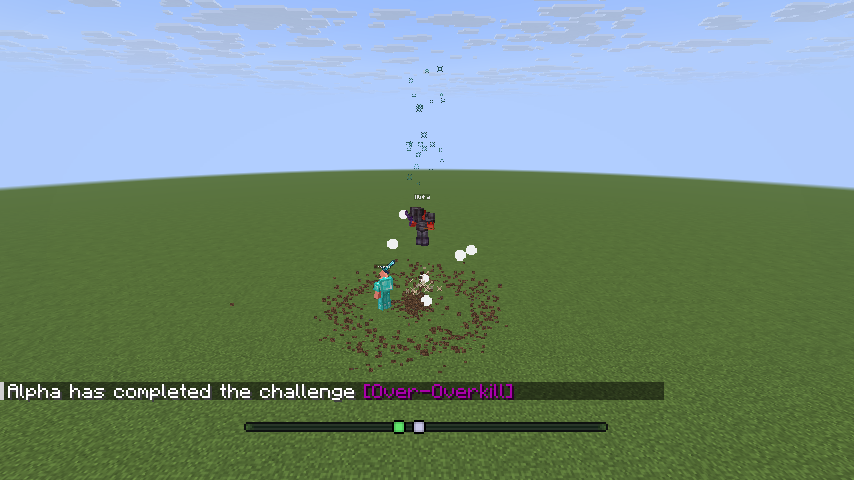
功能一览
- 五种模式的战斗机器人:
sword(剑)、smp、mace(战锤)、crystal(末影水晶)和ranged(远程),每种模式都有专属装备包。 - 五个难度等级:从
beginner(新手)到expert(专家)。它们在反应时间、瞄准精度、点击频率以及使用的技巧上有所不同,且每个机器人的设置均可单独调整。 - 一键启动:输入
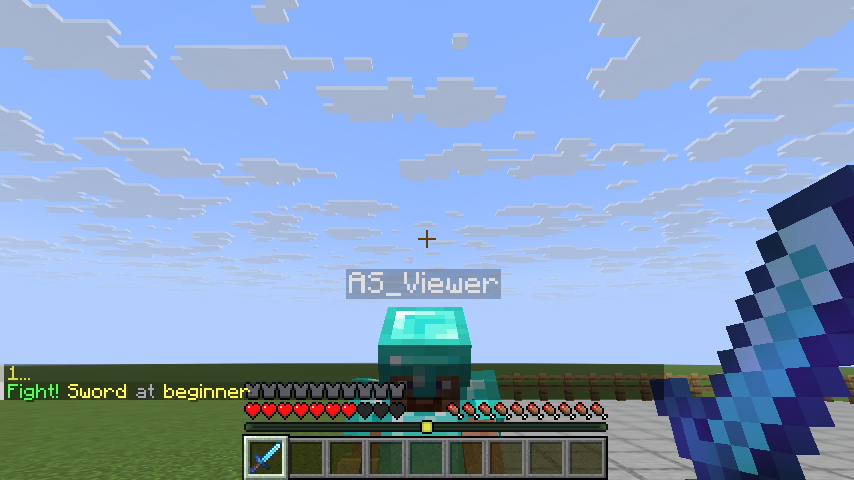
/auto-setup sword average会在你旁边建造一个围栏竞技场,为你和一个机器人分配相同的装备包,倒数后开始战斗。输入/auto-setup stop会将所有方块和背包恢复原状。 - 练习工具:计分训练、团队对战和自由混战模式、观战机器人、战斗回放、内置装备包及装备包编辑器。
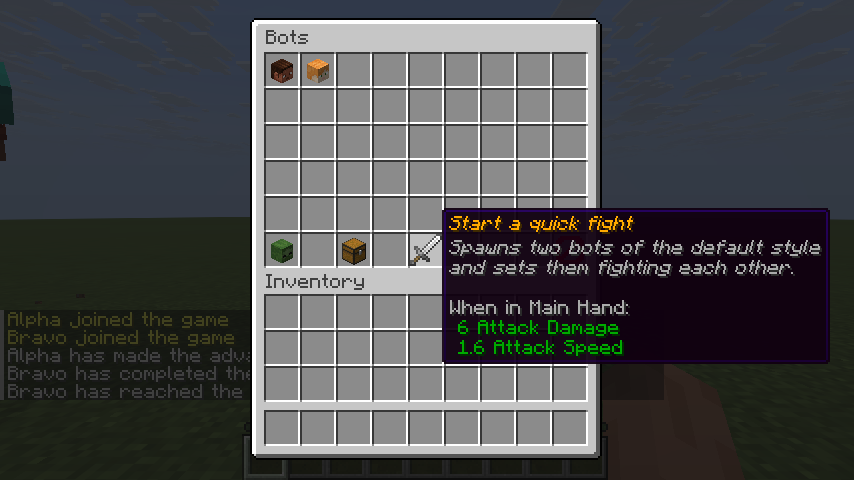
- 箱子菜单 (
/bot gui):支持原版客户端使用。 - CarpetLogic:通过节点图而非脚本来编程控制机器人。详见下文。
- Carpet 本身:假人、Scarpet 以及你熟悉的各项规则。
所需环境
| Minecraft | Java | Fabric Loader | Fabric API |
|---|---|---|---|
| 1.21.11 | 21 或更高版本 | 0.19.2 或更高版本 | 1.21.11 版本任意版本;基于 0.141.6+1.21.11 构建与测试 |
| 26.2 | 25 或更高版本 | 0.19.2 或更高版本 | 26.2 版本任意版本;基于 0.161.0+26.2 构建与测试 |
| 26.3 | 25 或更高版本 | 0.19.2 或更高版本 | 26.3 版本任意版本;基于 0.161.0+26.3 构建与测试 |
必须安装 Fabric API:否则游戏将在启动时停止并报错。Minecraft 启动器会自动提供正确的 Java 版本;如果是服务器,则需要自行安装。
安装
单人游戏
- 为你的 Minecraft 版本安装 Fabric Loader。
- 下载 Fabric API 和 Carpet PvP,确保两者对应相同的 Minecraft 版本,并将这两个
.jar文件放入你的mods文件夹中(.minecraft/mods)。 - 使用 Fabric 配置文件启动游戏并打开世界。
服务器
- 为你的 Minecraft 版本搭建 Fabric 服务器。
- 将 Fabric API 的
.jar文件和 Carpet PvP 的.jar文件放入服务器的mods文件夹中,然后启动服务器。 - 玩家使用普通客户端加入即可。他们不需要安装此模组。
使用方法
请使用 19 或更高版本的发布版。
- 获取机器人。处于生存模式,输入
/bot spawn。一个身穿钻石甲、手持剑的机器人会出现在你前方三个方块处并向你发起攻击。如果玩家处于创造模式,则不会生成机器人。 - 获取更多。再次输入
/bot spawn:它们将被命名为Bot1、Bot2等。 - 让机器人停止。
/bot stop Bot1会让其静止不动。/player Bot1 kill会将其移除。 - 选择武器和等级。
/bot spawn Tom mace expert会生成一个名为 Tom 的机器人,使用战锤并以最高难度战斗。可用的武器有sword、smp、mace、crystal、anchor和ranged;等级有beginner、casual、average、skilled和expert。 - 获取与机器人相同的装备。
/bot kit give @s sword会给你该武器的装备包,/bot kit restore会恢复你原有的装备。 - 使用按钮操作。输入
/bot会打开包含机器人列表、设置和装备包的菜单。 - 进行正式对战。
/auto-setup sword average会在你旁边建造围栏竞技场,为你和一个机器人分配相同装备包,倒数并开始战斗,记录分数并提供重赛选项。/auto-setup stop会将所有方块和背包恢复原状。 - 观看两个机器人战斗。依次输入
/bot spawn A sword、/bot spawn B sword,然后输入/bot duel A B。
默认情况下,每位玩家都可以使用 /bot 命令。服务器管理员可以通过 /carpet commandBot ops 将其限制为仅操作员可用。
在浏览器中编程机器人
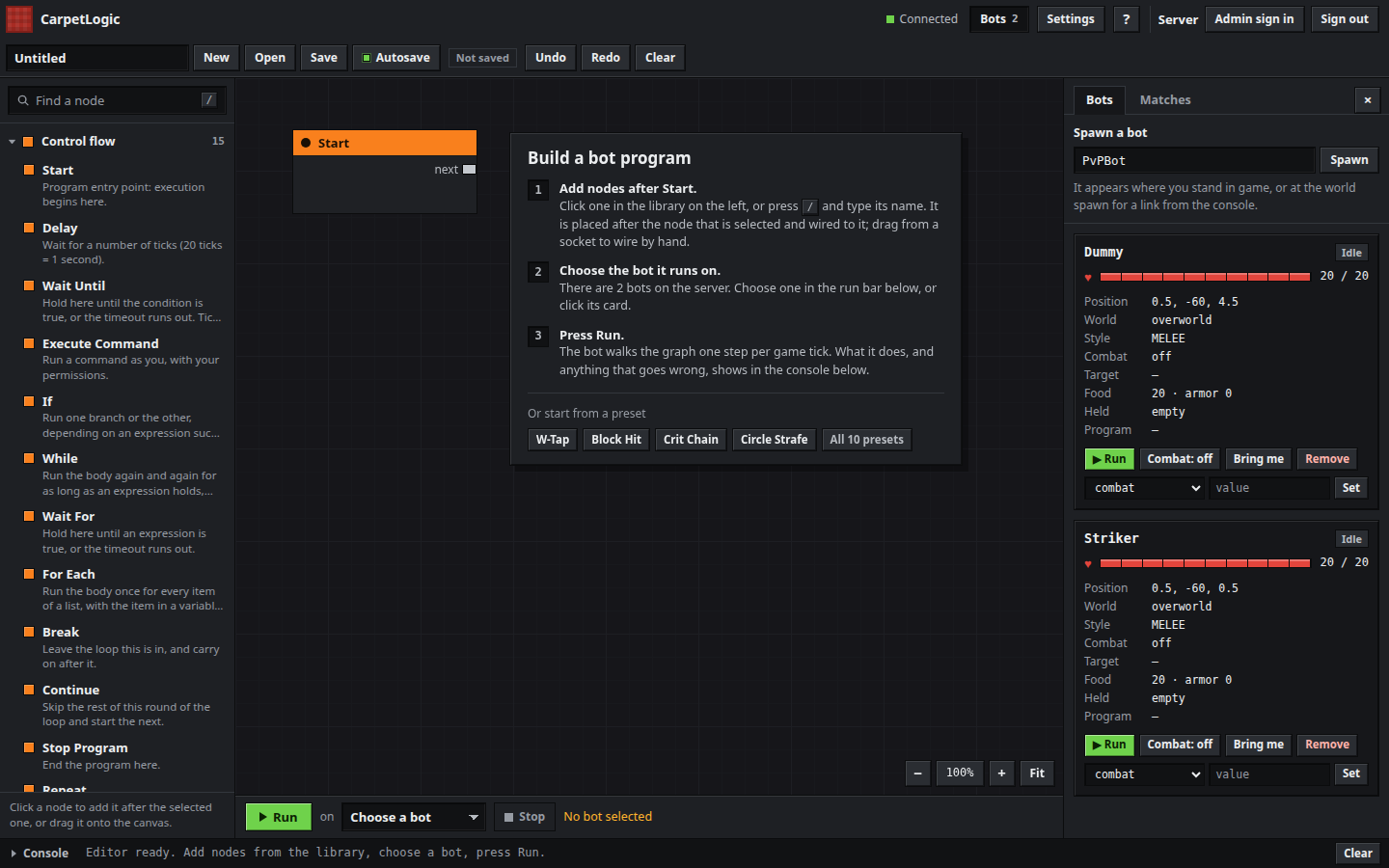
CarpetLogic 是一个可视化编辑器:你可以链接节点(移动、注视、战斗、等待、分支、循环),机器人将根据图表执行相应操作。
- 在游戏中运行
/carpetlogic open,并在聊天栏中点击 open in browser(在浏览器中打开)。默认仅限操作员使用;输入/carpet commandCarpetLogic true可向所有人开放。 - 在编辑器中,点击 Bots(机器人)面板中的 Spawn(生成)。机器人将生成在你站立的位置。
- 在空白画布上点击预设项(如 W-Tap 或 Crit Chain),或者点击左侧库中的节点,将它们链接到
Start之后。 - 选择画布下方的机器人,然后点击 Run(运行)。
程序会自动保存到世界文件夹中。在非本机运行的服务器上,管理员必须先打开编辑器:请参阅 CarpetLogic 页面。
版本信息
| Platform | Minecraft |
|---|---|
| Fabric | 1.21.11, 26.2, 26.3 |
| Paper | 1.21.11, 26.2, 26.3:附带机器人的插件,随每个 GitHub 发布版提供 |
Java 和 Fabric API 的版本要求见 What you need。Minecraft 26.1.2 版本请使用 17 版发布版。
尚未实现的功能
- 水晶机器人会使用水晶进行战斗,但尚未实现使用重生锚、占据低地或在实战中将击退效果与水晶结合。
- SMP 机器人与同等级的剑机器人实力相当;实际上它应该更强一些。
- 远程机器人会布置 TNT 矿车陷阱,但无法可靠地点燃它。
链接
Carpet PvP
Carpet with PvP practice built in. It adds server-side bots that fight back, so you can practise on your own server at any hour without a sparring partner. Everything runs on the server: a vanilla client can join and fight.
What you get
- Bots that fight in five modes:
sword,smp,mace,crystalandranged, each with its own kit. - Five difficulty levels, from
beginnertoexpert. They differ in reaction time, aim, click rate and which techniques the bot uses, and every setting can be changed per bot. - One command to start:
/auto-setup sword averagebuilds a fenced arena next to you, gives you and a bot the same kit, counts down and starts the fight./auto-setup stopputs every block and your inventory back. - Practice tools: drills that score you, team and free-for-all matches, spectating a bot, fight traces, built-in kits and a kit editor.
- Chest menus (
/bot gui) that work with a vanilla client. - CarpetLogic: program a bot in your browser with a graph of nodes instead of a script. See below.
- Carpet itself: fake players, Scarpet and the rules you already know.
What you need
| Minecraft | Java | Fabric Loader | Fabric API |
|---|---|---|---|
| 1.21.11 | 21 or newer | 0.19.2 or newer | any for 1.21.11; built and tested with 0.141.6+1.21.11 |
| 26.2 | 25 or newer | 0.19.2 or newer | any for 26.2; built and tested with 0.161.0+26.2 |
| 26.3 | 25 or newer | 0.19.2 or newer | any for 26.3; built and tested with 0.161.0+26.3 |
Fabric API is required: without it the game stops at start-up and says so. The Minecraft launcher brings the right Java by itself; on a server you install it yourself.
Install
Singleplayer
- Install Fabric Loader for your Minecraft version.
- Download Fabric API and Carpet PvP, both for the same Minecraft
version, and put the two jars in your
modsfolder (.minecraft/mods). - Start the game with the Fabric profile and open a world.
Server
- Set up a Fabric server for your Minecraft version.
- Put the Fabric API jar and the Carpet PvP jar in the server's
modsfolder and start it. - Players join with a normal client. They do not need the mod.
How to use it
Use release 19 or newer.
- Get a bot. Be in survival mode and type
/bot spawn. A bot in diamond armour with a sword appears three blocks in front of you and attacks you. A bot leaves a player in creative mode alone. - Get more. Type
/bot spawnagain: they are namedBot1,Bot2and so on. - Make one stop.
/bot stop Bot1makes it stand still./player Bot1 killremoves it. - Pick the weapon and the level.
/bot spawn Tom mace expertspawns a bot named Tom that fights with a mace at the hardest level. The weapons aresword,smp,mace,crystal,anchorandranged; the levels arebeginner,casual,average,skilledandexpert. - Get the same gear as the bot.
/bot kit give @s swordgives you its kit, and/bot kit restoregives you back what you had. - Use buttons instead.
/botopens a menu with the bots, their settings and the kits. - Have a proper match.
/auto-setup sword averagebuilds a fenced arena next to you, gives you and a bot the same kit, counts down, keeps the score and offers a rematch./auto-setup stopputs every block and your inventory back. - Watch two bots fight.
/bot spawn A sword,/bot spawn B sword, then/bot duel A B.
Every player may use /bot by default. A server admin restricts it to operators with
/carpet commandBot ops.
Program a bot in your browser
CarpetLogic is a visual editor: you chain nodes (move, look, fight, wait, branch, loop) and the bot does what the graph says.
- In game, run
/carpetlogic openand click open in browser in chat. It is for operators by default;/carpet commandCarpetLogic trueopens it to everyone. - In the editor, press Spawn in the Bots panel. The bot appears where you are standing.
- Press a preset such as W-Tap or Crit Chain on the empty canvas, or click nodes in the library on
the left to chain them after
Start. - Choose the bot under the canvas and press Run.
Programs save themselves to the world folder. On a server that is not your own computer the admin has to open the editor up first: see the CarpetLogic page.
Versions
| Platform | Minecraft |
|---|---|
| Fabric | 1.21.11, 26.2, 26.3 |
| Paper | 1.21.11, 26.2, 26.3: a plugin with the bots, attached to each release on GitHub |
Java and Fabric API versions are in What you need. Minecraft 26.1.2 stays on release 17.
What is not there yet
- The crystal bot fights with crystals but does not yet use respawn anchors, take the low ground or combine a knockback hit with a crystal in a live fight.
- The SMP bot is about even with a sword bot of the same level; it should be ahead.
- The ranged bot lays its TNT minecart trap but does not light it reliably.
Links

下载 Carpet PvP Practice
需要联机服务器吗?
稳定流畅、一键部署,几分钟即可和朋友联机开服
最低仅需 8 元/月 即可畅快联机
下载 Carpet PvP Practice
下载 Carpet PvP Practice
下载 Carpet PvP Practice
需要联机服务器吗?
稳定流畅、一键部署,几分钟即可和朋友联机开服
最低仅需 8 元/月 即可畅快联机
下载 Carpet PvP Practice
下载 Carpet PvP Practice
下载 Carpet PvP Practice
下载 Carpet PvP Practice
下载 Carpet PvP Practice
需要联机服务器吗?
稳定流畅、一键部署,几分钟即可和朋友联机开服
最低仅需 8 元/月 即可畅快联机
下载 Carpet PvP Practice
需要联机服务器吗?
稳定流畅、一键部署,几分钟即可和朋友联机开服
最低仅需 8 元/月 即可畅快联机
Carpet PvP 1.21.11-19+v261005
版本信息
| 组件 | 版本 |
|---|---|
| Carpet PvP | 19 |
| Minecraft | 1.21.11 () |
| Fabric Loader | 0.19.5 |
| Fabric API | 0.141.6+1.21.11 |
| Java | 25+ |
更新日志
修复了 Fabric 1.21.11 上机器人(bots)从不刷新的问题:18 版解决了“显示已生成但机器人未出现”或在离线模式下导致服务器崩溃的问题。所有使用 1.21.11 的玩家都应进行更新。此外还有新功能:/bot spawn 后不带任何参数会在你面前放置一个持剑机器人;/bot alone 会打开菜单;现在生成失败时会说明原因;网页编辑器会保持刚刚生成的机器人处于选中状态。
安装方法
- 为 Minecraft 1.21.11 安装 Fabric Loader (0.19.5+)
- 安装 Fabric API (0.141.6+1.21.11+)
- 将
carpet-pvp-1.21.11-19.jar放入你的mods文件夹中
在 Paper 服务器上,请将 carpet-pvp-1.21.11-paper-19.jar 放入 plugins 文件夹:它仅包含机器人功能,不包含模组的其他部分。
基于 7ca1c6c 构建于 2026-10-05 11:43 UTC
关于这个资源的讨论、问题反馈与使用心得
还没有讨论,来发第一帖吧
你是这个资源的作者?登录后可认领此资源。
相似资源
 模组

显示你正在注视的方块的信息。(适用于 Minecraft 1.16+ 的 Hwyla/Waila 分支)
 模组
在游戏画面角落显示附近世界地形、玩家、生物和实体的地图。可创建路径点,帮助你找到标记过的位置。
 模组

查看物品与配方
 模组
使用 JavaScript 编辑配方、添加自定义物品、编写世界事件!
 模组
AE2:一款流行的自动化与存储模组
 模组
那是什么?一个 Waila/Hwyla 的分支。
评论 0
登录后参与评分
还没有评论,来抢沙发吧