CBC Navigators
专为 Create: Big Cannons 设计的火控计算机。无需手动估算仰角和方位角,只需输入目标坐标,导航仪方块便会计算并设定火炮的瞄准方向——其速度受机械计算时间、射程以及(在打孔卡层级上)资源消耗的制约。这是一款真正需要建造和供能的机器,而非即点即用的作弊按钮。
本模组是 Create: Big Cannons 的非官方第三方插件,与其作者无任何关联或背书。
CBC Navigators 添加了一系列由动能驱动的“计算机”方块,它们可连接到炮架并为你自动瞄准。输入 X/Y/Z 目标坐标,为方块提供旋转动力以运行计算,完成后它会将正确的偏航角(yaw)和俯仰角(pitch)直接写入所连接的炮架。告别手动三角函数运算吧。
共有三个层级,每一层都是真正的权衡取舍,而非简单的升级路线:
- 第一层 — 机械台计算机。 廉价且简单,使用原版合成表即可制作。拥有独立的 GUI,无需消耗品。射程远,但解算精度粗糙,呈“视线直线”模式,具有较大的随机散布且无仰角补偿——适合用作粗放的臼炮,而非狙击炮。
- 第二层 — 气动导航仪。 在 Create 的机械工作台制作。使用一次性打孔卡:在加载站将目标、装药量、炮管长度、发射药和弹丸信息录入打孔卡,然后将卡片喂入导航仪。运行真实的抛物线弹道模拟(含重力和阻力),并对高度差进行补偿,精度大幅提高——代价是每次射击消耗一张打孔卡,且需手动选择装药量。
- 第三层 — 动能火控系统。 最高层级。连接到自由旋转的 Cannon Mount 而非固定式炮架,因此不受 ±45° 水平回转弧的限制。设置全精度浮点数瞄准(不进行整度舍入),散布为零,且不仅仅解算角度——它会遍历每种配置的弹丸 × 每种装药量组合,并推荐实际能命中目标的最低成本方案。
所有三种导航仪都需要 建造:正确朝向对应的炮架放置,接入旋转动力源,并且(对于二/三层级)需输入正确的弹药数据。计算本身需要耗费真实时间,该时间与 RPM 成正比,因此更大的齿轮组确实是提升火控速度的有效手段,而不仅仅是装饰。
所有平衡性数值(射程、散布、计算速度、阻力/重力常数、最大装药量、每种弹丸的阻力乘数)均在服务器配置文件中开放,因此整合包/服务器管理员可以在不修改代码的情况下重新调整整个模组的平衡。
依赖项: NeoForge, Minecraft 1.21.1, Create 6.0.7–6.1.0, 以及 Create: Big Cannons 5.11.0+。
工作原理
核心理念
每个导航仪都是一个小型 KineticBlockEntity:它需要接收旋转输入(一根轴,与任何 Create 机器相同)才能实际运行计算。没有动力就没有结果——它将永远停留在“等待目标”状态。RPM 越高 = 计算越快,但存在一个最低阈值,即使齿轮比极其夸张,也无法实现瞬发。
一旦获得目标和足够的动力,它会随时间推移累加“计算刻”,完成后计算偏航角/俯仰角,并将其推送到它所连接的任意炮架上。
连接炮架
第一层和第二层 连接到 Fixed Cannon Mount。将导航仪直接放置在炮架表面——方块会自动面朝你放置时点击的方向。固定式炮架自身的调节范围被硬编码限制在其放置朝向的 ±45° 范围内(这是 Create: Big Cannons 本身的限制),这也是为什么这两个层级感觉像是防御性臼炮而非自由转动的炮塔的原因。
第三层 以相同方式连接到 Cannon Mount(自由旋转式),同样面朝炮架方块放置。它不受 ±45° 限制;它可以利用炮架的真实全范围进行回转和俯仰,具体取决于该火炮是如何建造的。
如果导航仪未朝向有效的炮架,或者炮架尚未组装完成(Cannon Mounts 需要在装配输入端接收红石信号后,Create: Big Cannons 才会构建实际的装置),导航仪将报告该状态并拒绝解算。
第一层 — 机械台计算机
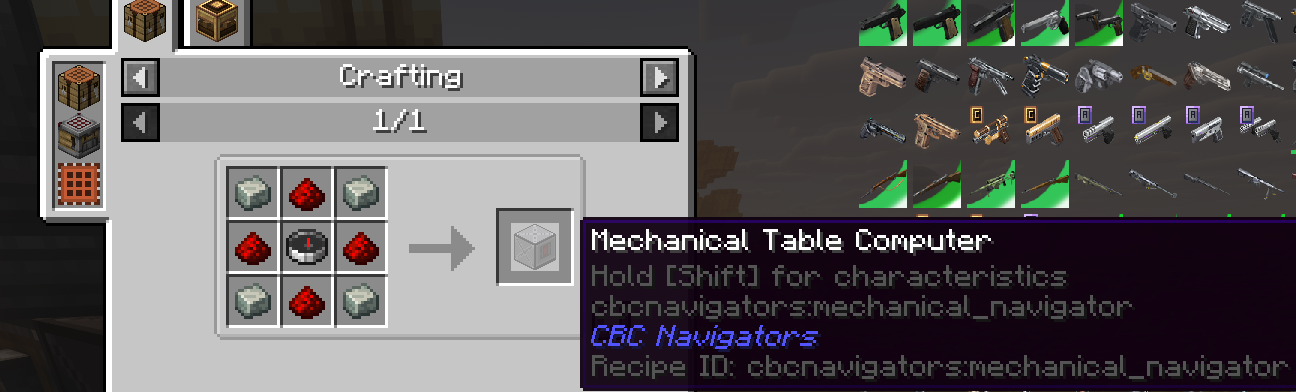
- 合成: 原版合成表,安山合金 + 红石 + 指南针。
- 使用: 右键打开坐标 GUI(X/Y/Z),输入目标,点击 Calculate。窗口保持开启并显示实时状态。
- 行为: 默认射程较大(400 格),但横向随机散布很大(在目标距离处为 10–25 格,可在配置中调整),并且——默认情况下——不补偿目标高于或低于炮架的情况。这是一种“大致指向那个方向然后祈祷”的解算器,适合作为入门级臼炮。
- 无消耗品。 除了旋转动力和目标外,无需为其提供任何材料。
第二阶 — Pneumatic Navigator
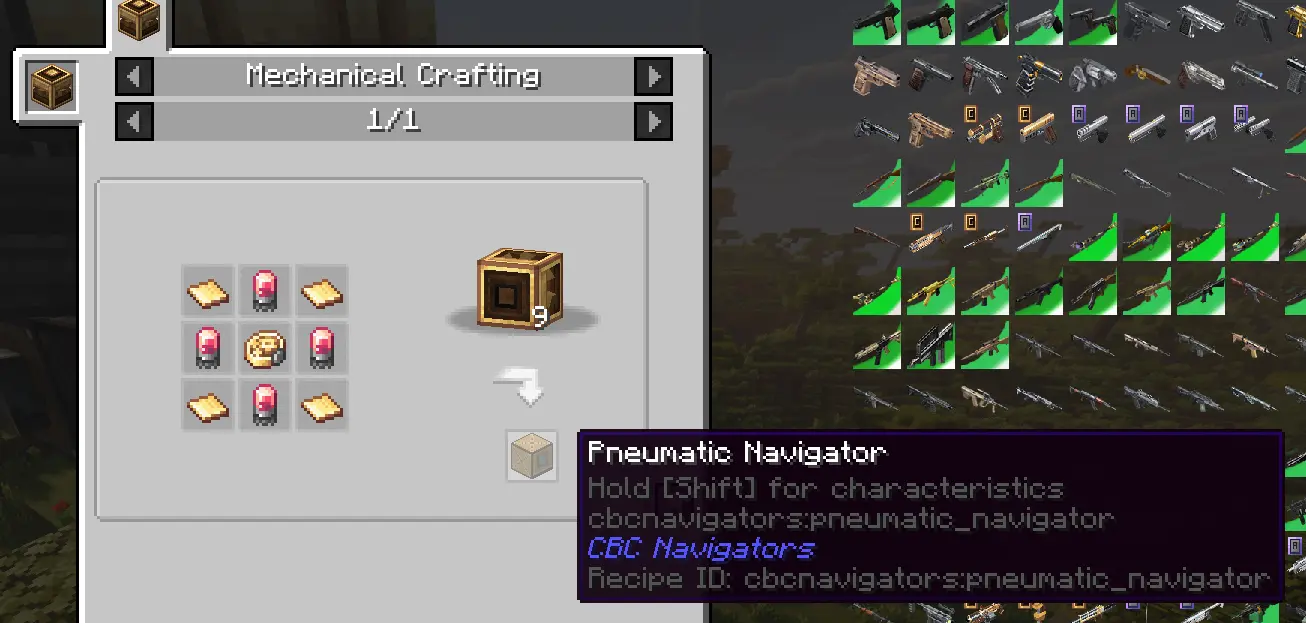
- 合成: Create 的机械工作台,黄铜板 + 电子管 + 精密机械组件。
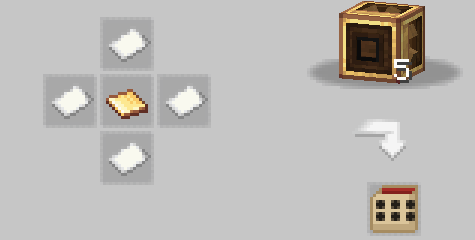
- 打孔卡是整个界面。 制作一张卡片(纸 + 黄铜板,也可在机械工作台上合成),然后在远离火炮的位置:
- 手持卡片右键点击方块 → 将该方块的坐标作为目标记录下来。
- 手持卡片右键点击空气 → 循环切换卡片上存储的火炮长度(0 到你配置的最大火炮长度)。
- Shift + 右键点击火炮支架 → 将火炮长度重置为 0。
- Shift + 右键点击空气 → 循环切换火药装填量 1–10。
- Shift + 右键点击推进剂方块 → 将该推进剂的 实际 装填强度记录到卡片上,以便求解器匹配你实际装入的内容。
- Shift + 右键点击其他任意方块 → 将其记录为投射物类型(用于弹道求解中的阻力倍增系数)。
- 将卡片悬停在物品栏中可查看实时工具提示:当前目标、装填次数、投射物、推进剂、火炮长度、此卡片的预估有效射程以及其实际预期精度 —— 这样你可以在开火前判断设置是否真的能击中目标。
- 加载: 手持打孔卡右键点击导航仪以插入它(空手右键点击可将未发射的卡片取回)。一旦导航仪获得足够的旋转动力,它就会进行求解并应用瞄准,同时消耗这张卡片。
- 行为: 运行真实的抛物线模拟(重力 + 阻力,两者均可通过配置调整),使用卡片上的装填次数 × 推进剂强度作为初速度,并且 确实 会补偿高度差异。散布比第一阶更紧密(默认为 2–5 格),但仍然是真实的物理效果。
第三阶 — Kinetic Fire Control
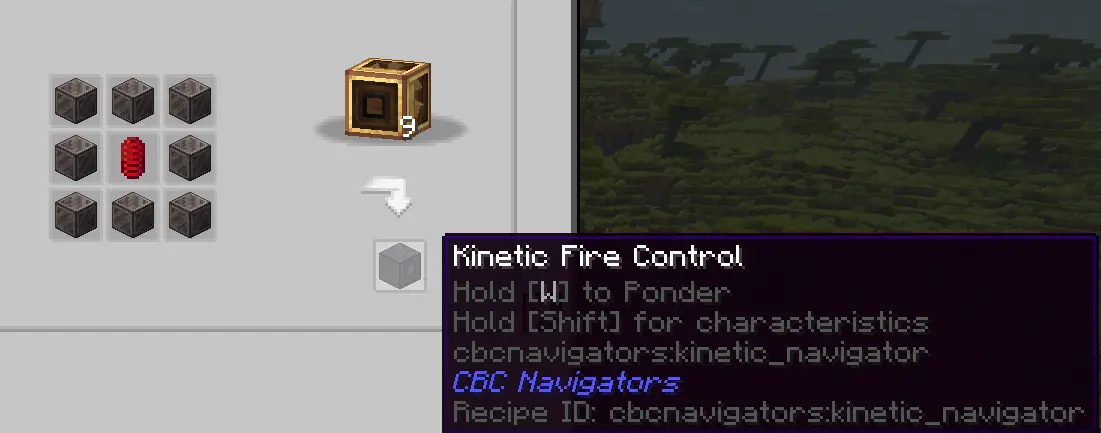
- 合成: Create 的机械工作台 —— 一个由 8 个下界钢块组成的环,中心放置一个反冲弹簧。
- 使用: 右键点击直接打开其专属 GUI(无需卡片即可发射)—— 输入 X/Y/Z 坐标并按下“计算”,与第一阶相同。窗口会持续轮询并实时更新:当无法求解时显示“连接火炮”/“未组装”提示,正在工作时显示“Calculating…”(计算中…),完成后显示一个 Recommendation(推荐)区块,包含计算得出的火药装填量和投射物,以及预测的脱靶距离。
- 如果你希望它知晓装填内容,仍需告知它:
- 在导航仪上 Shift + 右键点击推进剂方块 → 记录实际的推进剂强度。
- 在导航仪上 Shift + 右键点击投射物方块 → 将其记录为“当前已装入”,因此推荐搜索倾向于不建议更换,只要当前装入的投射物足以完成任务。
- Shift + 右键点击空手 → 以与第二阶卡片相同的方式循环切换火炮长度。这一点非常重要:如果火炮长度为 0,则从支架方块本身进行瞄准,而非真正的炮口,这将导致任何带有实际炮管的火炮都出现射击不足。
- Punch Card(打孔卡)在这里也可以作为便利工具使用:Shift+右键点击卡片到导航仪上,可以复制之前在装载站打孔记录的推进剂/投射物信息;或者直接用一张已打孔目标的卡片右键点击,直接将目标传入。第三阶 不会 消耗卡片,并且忽略其电荷计数 —— 它会自行计算得出。
- 推荐搜索逻辑: 第三阶不再让你选择装填量然后碰运气,而是尝试所有配置的投射物 × 所有装填量(从 1 到可配置最大值),并选择能以最少装填量命中的组合,在平局时优先选择你当前已装入的投射物。这也是唯一设定精确、未舍入浮点数俯仰/偏航角的层级 —— 其他两个层级会被 Create: Big Cannons 自带的 Fixed Mount 截断为整数角度 —— 也是唯一内置零散布的层级,因为这一层级的核心宗旨就是“达到模拟允许的最高精度”。
快速设置清单
- 建造(或找到)一个 Fixed Cannon Mount(固定火炮支架,适用于第一/二阶)或 Cannon Mount(火炮支架,适用于第三阶),并按照 Create: Big Cannons 的正常方式在其上组装火炮。
- 在与该支架正对的位置放置匹配的导航仪层级。
- 为导航仪提供旋转动力源 —— 一根轴就足够了,但更高的 RPM 意味着更快的求解速度。
- 第一阶 / 第三阶: 右键点击导航仪,输入目标坐标,按下 Calculate(计算)。第二阶: 在远离火炮的地方准备一张 Punch Card(打孔卡)(包含目标 + 装填量 + 火炮长度 + 推进剂 + 投射物),然后用它右键点击导航仪以加载。
- 等待计算完成(进度由 RPM 驱动 —— 更大的齿轮箱可加速此过程)。完成后,支架的瞄准会自动更新。
- 像往常一样自行装填并发射火炮 —— 导航仪仅负责瞄准,不负责装填或扣动扳机。
配置
所有平衡数值(最大射程、散布、计算速度、重力/阻力常数、默认推进剂强度、第三阶尝试的最大火药装填量、每种投射物的阻力倍增系数,以及第三阶的求解 Tick 预算)均位于模组的服务器配置文件中,每个层级各占一节,可以在不进行任何代码更改的情况下,根据整合包/服务器需求自由重新调整。
CBC Navigators
Fire control computers for Create: Big Cannons. Instead of eyeballing elevation and traverse by hand, punch in a target's coordinates and let a navigator block calculate and set the cannon's aim for you — gated by mechanical calculation time, range, and (on the punch-card tiers) resource consumption, so it's a real machine to build and power, not an instant win button.
This is an unofficial, third-party addon for Create: Big Cannons, not affiliated with or endorsed by its authors.
CBC Navigators adds a family of kinetic-powered "computer" blocks that link to a cannon mount and aim it for you. Punch in X/Y/Z target coordinates, give the block some rotational speed to power its calculation, and once it finishes it writes the correct yaw and pitch straight onto the mount. No more manual trig.
There are three tiers, each a genuine trade-off rather than a straight upgrade path:
- Tier 1 — Mechanical Table Computer. Cheap, simple, crafted at a vanilla crafting table. Opens its own GUI, no consumables needed. Big range, but a coarse, "line of sight" solve with heavy random spread and no elevation compensation — a rough battery gun, not a sniper.
- Tier 2 — Pneumatic Navigator. Built on Create's mechanical crafting table. Uses disposable Punch Cards: punch a target, powder charge count, barrel length, propellant, and projectile onto a card at a loading station, then feed the card into the navigator. Runs a real parabolic ballistics simulation (gravity + drag) and compensates for height, with much tighter accuracy — at the cost of a consumed card per shot and manual charge selection.
- Tier 3 — Kinetic Fire Control. The top tier. Links to a free-rotating Cannon Mount instead of a Fixed one, so it isn't limited to a ±45° traverse arc. Sets full-precision floating-point aim (no whole-degree rounding), has zero spread, and doesn't just solve the angle — it searches every configured projectile × every powder charge count and recommends the cheapest combination that actually lands the shot.
All three still have to be built: placed facing the right kind of mount, wired into a rotational power source, and (for tiers 2/3) fed the right ammunition data. The calculation itself takes real time that scales with RPM, so a bigger gearbox is a legitimate way to make your fire control faster, not just a decoration.
Every balance number (range, spread, calc speed, drag/gravity constants, max powder charges, per-projectile drag multipliers) is exposed in the server config, so pack/server admins can retune the whole mod without touching code.
Requires: NeoForge, Minecraft 1.21.1, Create 6.0.7–6.1.0, and Create: Big Cannons 5.11.0+.
How it all works
The shared idea
Every navigator is a small KineticBlockEntity: it needs an incoming rotation (a shaft, same as any Create machine) to actually run its calculation. No power, no result — it just sits at "Awaiting target" forever. More RPM = faster calculation, down to a small floor so it can't be trivially instant even with an absurd gear ratio.
Once it has a target and enough power, it counts up "calculation ticks" over real time and then, when done, computes a yaw/pitch and pushes it onto whichever cannon mount it's linked to.
Linking to a mount
Tiers 1 and 2 link to a Fixed Cannon Mount. Place the navigator directly against the mount's face — the block automatically faces whatever you clicked when placed. The Fixed Mount's own trim range is hard-capped to ±45° around its placement facing (that's Create: Big Cannons' own limit), which is what keeps these two tiers feeling like defensive battery guns rather than free turrets.
Tier 3 links to a Cannon Mount (the free-rotating one), the same way — place it facing the mount block. This one isn't limited to ±45°; it can traverse and elevate through the mount's full real range, whatever that cannon was built with.
If the navigator isn't facing a valid mount, or the mount hasn't been assembled yet (Cannon Mounts need a redstone signal on their assembly input before Create: Big Cannons builds the actual contraption), the navigator will just report that status and refuse to solve.
Tier 1 — Mechanical Table Computer
- Craft: vanilla crafting table, andesite alloy + redstone + compass.
- Use: right-click it to open a coordinate GUI (X/Y/Z), type a target, hit Calculate. The window stays open and shows live status.
- Behavior: big default range (400 blocks), but a large random lateral spread (10–25 blocks at the target's distance, config-tunable) and — by default — no compensation for the target being above or below the mount. It's a "point it roughly that way and pray" solver, appropriate for a starter battery.
- No consumables. Nothing to feed it besides rotation and a target.
Tier 2 — Pneumatic Navigator
- Craft: Create's mechanical crafting table, brass sheets + electron tubes + precision mechanism.
- The Punch Card is the whole interface. Craft a card (paper + brass sheet, also on the mechanical crafting table), then away from the cannon:
- Right-click a block with the card → punches that block's coordinates as the target.
- Right-click empty air → cycles the barrel length (0–your configured max cannon length) stored on the card.
- Shift + right-click the cannon mount → resets barrel length back to 0.
- Shift + right-click empty air → cycles the powder charge count 1–10.
- Shift + right-click a propellant block → punches that propellant's real charge power onto the card, so the solve matches whatever you're actually going to load.
- Shift + right-click any other block → punches it as the projectile type (used for its drag multiplier in the ballistics solve).
- Hover the card in your inventory to see a live tooltip: current target, charges, projectile, propellant, barrel length, this card's estimated working range, and its real expected accuracy — so you can tell before you fire whether the settings actually reach your target.
- Load it: right-click the navigator with a punched card to insert it (right-click empty-handed to take an unfired card back out). Once the navigator has enough rotation, it solves, applies the aim, and consumes the card.
- Behavior: runs a genuine parabolic simulation (gravity + drag, both config-tunable) using the card's own charge count × propellant strength for muzzle velocity, and does compensate for height. Tighter spread than tier 1 (2–5 blocks by default) but still real.
Tier 3 — Kinetic Fire Control
- Craft: Create's mechanical crafting table — a ring of 8 Nethersteel Blocks around a Recoil Spring in the center.
- Use: right-click opens its own GUI directly (no card required to fire) — type X/Y/Z and hit Calculate, same as tier 1. The window keeps polling and updating live: it'll show a "connect the cannon" / "not assembled" hint while it can't solve, "Calculating…" while it's working, and once done, a Recommendation block with the powder charge count and projectile it worked out, plus the predicted miss distance.
- You still have to tell it what's loaded, if you want it to know:
- Shift + right-click a propellant block on the navigator → records real propellant strength.
- Shift + right-click a projectile block on the navigator → records that as "currently loaded," so the recommendation search prefers not to suggest a swap when what you already have loaded does the job just as well.
- Shift + right-click empty-handed → cycles barrel length the same way tier 2's card does. Getting this right matters a lot: a barrel length of 0 aims from the mount block itself, not the real muzzle, and will undershoot anything with an actual barrel.
- A Punch Card still works here too, just as a convenience: shift+right-click one onto the navigator to copy over whatever propellant/projectile was already punched on it at a loading station, or plain right-click with a card that has a punched target to feed that target straight in. Tier 3 does not consume the card, and ignores its charge count — it works that out itself.
- The recommendation search: rather than you picking a charge count and hoping, tier 3 tries every configured projectile × every charge count (1 up to a configurable max) and picks whichever combination hits with the fewest charges, preferring your currently-loaded projectile on ties. This is also the only tier that sets exact, unrounded floating-point pitch/yaw — the other two get trimmed to whole degrees by Create: Big Cannons' own Fixed Mount — and the only one with zero built-in spread, since the whole point of this tier is "as accurate as the simulation allows."
Quick setup checklist
- Build (or find) a Fixed Cannon Mount (tiers 1/2) or a Cannon Mount (tier 3) and assemble a cannon on it as normal for Create: Big Cannons.
- Place the matching navigator tier directly facing that mount.
- Give the navigator a rotational power source — a shaft is enough, but more RPM means a faster solve.
- Tier 1 / Tier 3: right-click the navigator, type target coordinates, hit Calculate. Tier 2: prep a Punch Card away from the cannon (target + charges + barrel length + propellant + projectile), then right-click the navigator with it to load it.
- Wait for the calc to finish (progress is driven by RPM — a bigger gearbox speeds this up). The mount's aim updates automatically once it's done.
- Load and fire the cannon yourself as usual — navigators only aim it, they don't load or pull the trigger.
Configuration
All balance numbers (max range, spread, calculation speed, gravity/drag constants, default propellant strength, max powder charges tier 3 will try, per-projectile drag multipliers, and tier 3's solve tick budget) live in the mod's server config file, one section per tier, and can be freely retuned per pack/server without any code changes.


 模组

 模组
 模组

 模组

 模组

 模组
评论 0
登录后参与评分
还没有评论,来抢沙发吧