CC: Create Redstone Link
基于 。我本打算在那里贡献添加颜色支持的新功能,但不幸的是,该模组并非开源(尽管其页面标明了 MIT 许可证)。
此模组将 Create Redstone Link 网络 与 CC:Tweaked 计算机 连接起来。它添加了一个方块:CC Redstone Link Bridge,可以放置在世界中并用作 ComputerCraft 的外设。
此模组需要 Create 和 CC:Tweaked。
模组功能
桥接器充当两个系统之间的小型适配器:
- Create 提供 Redstone Link 网络。
- CC:Tweaked 提供来自计算机的 Lua 控制。
当世界中有桥接器方块时,连接的计算机可以:
- 读取任何 Redstone Link 频率对的当前信号强度
- 向任何 Redstone Link 频率对发送信号强度
- 可选地为任一端频率槽打上 24 位 RGB 染料颜色的标签
该模组有意保持极简。Lua 接口仅暴露直接进行网络交互所需的操作。
工作原理
当从 Lua 中使用外设时:
getLinkSignal(freq1, freq2) 查找该频率对的当前强度。sendLinkSignal(freq1, freq2, strength) 设置目标频率对并传输所选强度。
这两个函数都接受两个可选的尾部参数 color1 和 color2,它们会将染料颜色应用到对应的频率槽。
频率值是作为字符串编写的物品 ID。例如,minecraft:iron_ingot 和 minecraft:oak_sapling 构成一个有效的对。
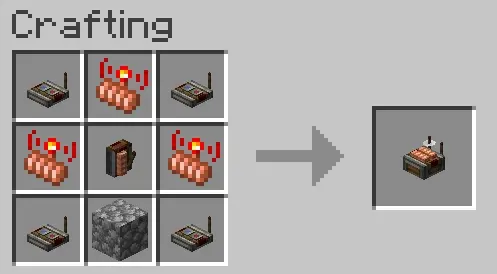
合成配方
Lua API
外设类型:
方法:
getLinkSignal(freq1, freq2 [, color1 [, color2]]) -> numbersendLinkSignal(freq1, freq2, strength [, color1 [, color2]])
频率值
freq1 和 freq2 必须是作为字符串的物品 ID。
示例:
"minecraft:iron_ingot""minecraft:oak_sapling""minecraft:redstone"
如果你想表示空的频率值,请使用空字符串 ("")。
频率颜色
color1 和 color2 是可选的 24 位 RGB 整数,格式为 0xRRGGBB。它们仅在相应的频率物品支持 Minecraft 的 DYED_COLOR 数据组件时有意义,这在原版中仅限于皮革护甲和皮革马铠。带颜色的频率槽位于不同 Redstone Link 网络上,与相同物品的未着色槽位不同,不同的颜色会产生不同的网络。
Minecraft Wiki 染料页面列出了 Java 版中将 16 种标准染料应用于皮革护甲时产生的 RGB 值。常用值:
0xB02E26 -- 红色染料0x3C44AA -- 蓝色染料0xFED83D -- 黄色染料0x5E7C16 -- 绿色染料0x1D1D21 -- 黑色染料0xF9FFFE -- 白色染料
对于应保持无色的槽位,传递 nil(或直接省略该参数)。如果只为第二个槽位着色,则为第一个槽位传递 nil。
示例
local bridge = peripheral.find("redstone_link_bridge")
assert(bridge, "No redstone_link_bridge found")

-- 读取现有的频率对
local current = bridge.getLinkSignal("minecraft:diamond", "minecraft:redstone")
print("Current signal:", current)

-- 向频率对发送信号
bridge.sendLinkSignal("minecraft:diamond", "minecraft:redstone", 7)

-- 在带有颜色标签的信道上发送。这匹配一个物理上的 Redstone Link,
-- 其皮革护甲槽位被染上了一个红色染料和一个蓝色染料。
bridge.sendLinkSignal(
    "minecraft:leather_chestplate",
    "minecraft:leather_helmet",
    15,
    0xB02E26,   -- 红色染料
    0x3C44AA)   -- 蓝色染料

-- 只有第二个槽位被着色
bridge.sendLinkSignal(
    "minecraft:leather_chestplate",
    "minecraft:leather_helmet",
    15,
    nil,
    0x3C44AA)   -- 蓝色染料
CC: Create Redstone Link
Based on . I would have simply contributed the additional feature of adding color support there, but unfortunately that mod is not source available (despite the MIT license on its page).
This mod connects Create Redstone Link networks with CC:Tweaked computers. It adds a single block, the CC Redstone Link Bridge, which can be placed in the world and then used as a ComputerCraft peripheral.
This mod requires Create and CC:Tweaked.
What the Mod Does
The bridge acts as a small adapter between two systems:
- Create provides the Redstone Link network.
- CC:Tweaked provides Lua control from computers.
With the bridge block in the world, a connected computer can:
- read the current signal strength of any Redstone Link frequency pair
- send a signal strength to any Redstone Link frequency pair
- optionally tag either frequency slot with a 24-bit RGB dye color
The mod is intentionally minimal. The Lua interface only exposes the operations required for direct network interaction.
How It Works
When the peripheral is used from Lua:
getLinkSignal(freq1, freq2) looks up the current strength for that frequency pair.sendLinkSignal(freq1, freq2, strength) sets the target frequency pair and transmits the chosen strength.
Both functions accept two optional trailing arguments, color1 and color2, which apply a dye color to the corresponding frequency slot.
The frequency values are item IDs written as strings. For example, minecraft:iron_ingot and minecraft:oak_sapling form one valid pair.
Crafting Recipe
Lua API
Peripheral type:
Methods:
getLinkSignal(freq1, freq2 [, color1 [, color2]]) -> numbersendLinkSignal(freq1, freq2, strength [, color1 [, color2]])
Frequency Values
freq1 and freq2 must be item IDs as strings.
Examples:
"minecraft:iron_ingot""minecraft:oak_sapling""minecraft:redstone"
Use an empty string ("") if you want to represent an empty frequency value.
Frequency Colors
color1 and color2 are optional 24-bit RGB integers in the form 0xRRGGBB. They are only meaningful when the corresponding frequency item supports Minecraft's DYED_COLOR data component, which is only leather armor and leather horse armor in vanilla. A colored slot is on a different Redstone Link network from an uncolored slot of the same item, and different colors produce different networks.
The Minecraft Wiki Dye page lists the RGB value each of the 16 standard dyes produces when applied to leather armor in Java Edition. Useful values:
0xB02E26 -- Red Dye0x3C44AA -- Blue Dye0xFED83D -- Yellow Dye0x5E7C16 -- Green Dye0x1D1D21 -- Black Dye0xF9FFFE -- White Dye
Pass nil (or simply omit the argument) for a slot that should remain uncolored. To color only the second slot, pass nil for the first.
Example
local bridge = peripheral.find("redstone_link_bridge")
assert(bridge, "No redstone_link_bridge found")

-- Read an existing frequency pair
local current = bridge.getLinkSignal("minecraft:diamond", "minecraft:redstone")
print("Current signal:", current)

-- Send a signal to a frequency pair
bridge.sendLinkSignal("minecraft:diamond", "minecraft:redstone", 7)

-- Send on a color-tagged channel. This matches a physical Redstone Link
-- whose leather-armor slots were dyed with one Red Dye and one Blue Dye.
bridge.sendLinkSignal(
    "minecraft:leather_chestplate",
    "minecraft:leather_helmet",
    15,
    0xB02E26,   -- Red Dye
    0x3C44AA)   -- Blue Dye

-- Only the second slot is colored
bridge.sendLinkSignal(
    "minecraft:leather_chestplate",
    "minecraft:leather_helmet",
    15,
    nil,
    0x3C44AA)   -- Blue Dye


 模组

 模组

 模组
 模组

 模组
 模组
评论 0
登录后参与评分
还没有评论,来抢沙发吧