
注意:这是对模组 ChatCalc(由 Kokeria 开发,大概率已停止维护)的全面重构。该模组提供了计算器所需的大部分功能,如果你希望添加某些内容,请随时提出!
首先,我需要澄清一下 ChatCalc 的使用方法:只需在聊天栏中输入表达式,答案就会显示在上方。如果你需要以文本形式获取答案,请按 Tab 键。如果你同时需要答案和表达式,请输入等号并按 Tab 键。
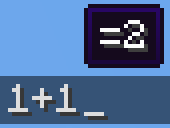
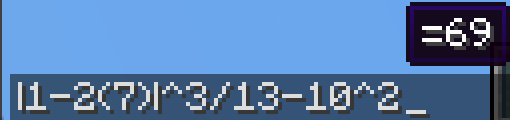


1+2(会在上方生成一个显示 =3 的提示框)
1+2 → TAB → 3
1+2= → TAB → 1+2=3
(请注意,ChatCalc 会评估光标所在的那段文本 [以空格分隔],这意味着你可以在其他内容旁边输入内容,ChatCalc 仍能正常工作 [只要中间有空格隔开])
ChatCalc 还允许你定义自己的函数和常量,例如:
f(z)=2z-1 → TAB → (空白表示已成功定义该函数)
f(4) → TAB → 7
c=sqrt(2)/2 → TAB → (空白表示已成功定义该常量)
arcsin(c) → TAB → 45
你也可以像这样删除函数和常量:
f(z)= → TAB → (空白表示已成功删除该函数)
c= → TAB → (空白表示已成功删除该常量)
函数可以支持任意数量的参数,每个参数之间用分号分隔(不能使用逗号,因为常量中允许使用逗号,即 1,000*2 → TAB → 2,000)
这里有一个可以实现非常复杂行为的函数示例:
angle(a;b)=round((((arctan((b-(z-0.5))/(a-(x-0.5)))+90+(min(1;cmp(a;(x-0.5))+1)*180)+180)%360)-180)*10)/10(归功于 thecolonel63)
这个函数接收方块的 x 和 y 坐标,并告诉你将摄像机朝向调整为多少度以便走向该方块。
你可以通过在聊天栏中输入 functions? 或 constants? 并按 Tab 键来查看已定义的函数和常量列表。
ChatCalc 包含几个配置设置,每个都可以通过在聊天窗口中输入进行配置;例如:
radians → TAB → false(默认值)
radians= → TAB → radians=false(默认值)
radians=true → TAB (空白表示已成功设置该值)
要更改输出值的格式,你可以更改 decimal_format;例如:
decimal_format → TAB → #,##0.##(默认值)
decimal_format=#0.## → TAB → (去除逗号)
decimal_format=#,###.## → TAB → (去除如 0.23 这类数值的前导 0)
decimal_format=#,##0.#### → TAB → (保留 4 位小数精度)
默认情况下,ChatCalc 会将之前评估过的表达式存储在聊天历史记录中(chat_history)。你可以将 copy_type 设置为 none 或 clipboard 以将其更改为相应值。
如果你(出于任何原因)想要禁用在上方显示表达式的提示框,你可以将 display_above 设置为 false。
附录 A(函数列表)
sqrtcbrtsincostancscseccotarcsinasinarccosacosarctanatanarccscacscarcsecasecarccotacotfloorceilroundabsloglnexpsgnminmaxgcflcmclampcmp
附录 B(常量列表)
randomrandraddegyawpitchpitauephixyz
Note: This is a complete revamp of the mod ChatCalc by Kokeria, which is most likely abandoned. This mod features almost everything you'd need in a calculator, and if you want something to be added, just ask!
Firstly, I should clarify how you use ChatCalc, simply type an expression into chat, and it'll show the answer above. If you need to get the answer in text, just press tab. If you need the answer and the expression, type an equals sign and press tab.
1+2 (will make a tooltip showing =3 above)
1+2 → TAB → 3
1+2= → TAB → 1+2=3
(Do note that ChatCalc evaluates the block of text that your cursor is in [separated by spaces], this means that you can type one thing beside another and ChatCalc will work completely fine [as long as there are some spaces in between])
ChatCalc also lets you define your own functions and constants, for example:
f(z)=2z-1 → TAB → (empty to give feedback that it's defined that function)
f(4) → TAB → 7
c=sqrt(2)/2 → TAB → (empty to give feedback that it's defined that constant)
arcsin(c) → TAB → 45
You can also remove functions and constants like this:
f(z)= → TAB → (empty to give feedback that it's removed that function)
c= → TAB → (empty to give feedback that it's removed that constant)\
Functions can support as many parameters as you want, each separated by a semicolon (they cannot use a comma due to commas being permitted in constants, i.e. 1,000*2 → TAB → 2,000)
Here's an example function that can do some very complex behavior:
angle(a;b)=round((((arctan((b-(z-0.5))/(a-(x-0.5)))+90+(min(1;cmp(a;(x-0.5))+1)*180)+180)%360)-180)*10)/10 (credit to thecolonel63)
This function takes in the x and y coordinates of a block and tells you the yaw to put your camera at to walk toward that block.
You can view the list of defined functions and constants by typing functions? or constants? into chat and pressing TAB.
ChatCalc features several config settings, each configurable by typing in the chat window; for example:
radians → TAB → false (by default)
radians= → TAB → radians=false (by default)
radians=true → TAB (empty to give feedback that the value is set)
To change the format that values are outputted in, you can change the decimal_format; for example:
decimal_format → TAB → #,##0.## (by default)
decimal_format=#0.## → TAB → (to remove commas)
decimal_format=#,###.## → TAB → (to remove the leading 0 on values like 0.23)
decimal_format=#,##0.#### → TAB → (to get 4 decimal places of accuracy)
By default, ChatCalc stores previously evaluated expressions in the chat history (chat_history). You can set copy_type to none or clipboard to change this to the respective values.
If you (for whatever reason) want to disable the tooltip showing expressions above, you can change display_above to false.
Appendix A (function list)
sqrtcbrtsincostancscseccotarcsinasinarccosacosarctanatanarccscacscarcsecasecarccotacotfloorceilroundabsloglnexpsgnminmaxgcflcmclampcmp
Appendix B (constant list)
randomrandraddegyawpitchpitauephixyz
下载 Chat Calc
下载 Chat Calc
需要联机服务器吗?
稳定流畅、一键部署,几分钟即可和朋友联机开服
最低仅需 8 元/月 即可畅快联机
下载 Chat Calc
下载 Chat Calc
需要联机服务器吗?
稳定流畅、一键部署,几分钟即可和朋友联机开服
最低仅需 8 元/月 即可畅快联机
下载 Chat Calc
下载 Chat Calc
需要联机服务器吗?
稳定流畅、一键部署,几分钟即可和朋友联机开服
最低仅需 8 元/月 即可畅快联机
下载 Chat Calc
下载 Chat Calc
需要联机服务器吗?
稳定流畅、一键部署,几分钟即可和朋友联机开服
最低仅需 8 元/月 即可畅快联机
下载 Chat Calc
下载 Chat Calc
- 你可以在同一名称下定义多个具有不同参数数量的函数
- 修复了递归问题
- 添加了求和与乘积函数
sum(n=0;12;n)作为示例 - 通过解决 CompletableFuture 的问题修复了 #11
关于这个资源的讨论、问题反馈与使用心得
还没有讨论,来发第一帖吧
你是这个资源的作者?登录后可认领此资源。
相似资源
 模组

显示你正在注视的方块的信息。(适用于 Minecraft 1.16+ 的 Hwyla/Waila 分支)
 模组
使用 JavaScript 编辑配方、添加自定义物品、编写世界事件!
 模组

查看物品与配方
 模组
在游戏画面角落显示附近世界地形、玩家、生物和实体的地图。可创建路径点,帮助你找到标记过的位置。
 模组
AE2:一款流行的自动化与存储模组
 模组
那是什么?一个 Waila/Hwyla 的分支。
评论 0
登录后参与评分
还没有评论,来抢沙发吧