聊天颜色
彻底改写了游戏运行了 14 年的文本格式化语法。
类 Markdown 语法
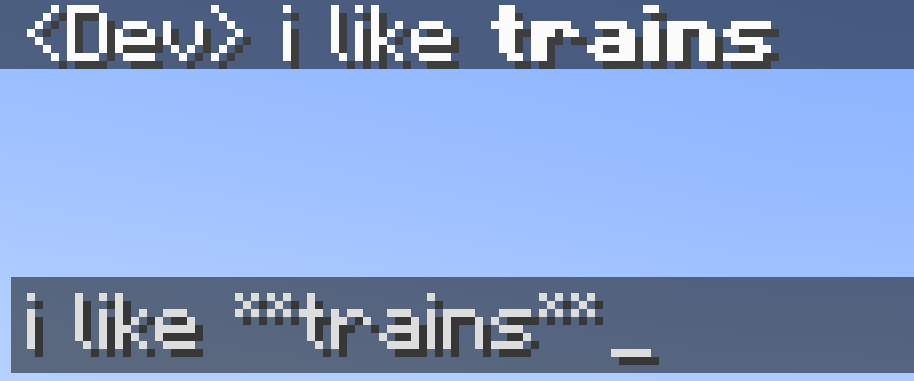
此模组允许你在 Minecraft 中使用类 Markdown 语法来格式化你的文本:
*斜体文本* -> 斜体文本
**粗体文本** -> 粗体文本
***粗体+斜体*** -> 粗体+斜体
__下划线__ -> 下划线
~~删除线~~ -> 删除线
this **is** bold -> this is bold
this __*is* multiple things__ -> this is multiple things
结束符号集是可选的,例如 **hello 仍然会显示为粗体。
如果在铁砧中物品名称前加上星号,它将取消斜体效果。
十六进制代码/自定义颜色
此模组允许你使用自定义颜色为文本着色:
[#ff0000]红色文本 -> 红色文本
 [#ff00FF]粉色文本 -> 粉色文本
**[#00ff00]绿色粗体文本** 或 [#00ff00]**绿色粗体文本** -> 绿色粗体文本
这些代码不区分大小写。
扩展格式语法
此功能已被新语法取代,但仍可正常工作。
该模组允许你使用命名颜色代替普通的单个字母。
可用的颜色名称包括:white(白)、black(黑)、blue(蓝)、green(绿)、aqua(或 cyan 青)、red(红)、purple(紫)、gray(灰)和 yellow(黄)。
这些名称不区分大小写。
若要使用该颜色的深色版本(白色和黑色除外),请在名称前或后添加 "d"、"dark" 或 "deep"。你可以在名称与前缀/后缀之间选择性地使用空格或下划线。例如,§[dark_blue]、§[deepblue]、§[blue d]、§[dblue] 都会生成深蓝色文本。
§[gold](MCWiki 给出的颜色名称)也可用于深黄色。
粗体、下划线、斜体等
你还可以使用:
§[s] 表示删除线文本,§[b] 表示粗体文本,§[o] 表示模糊文本,§[u] 表示下划线文本,- 以及
§[r] 表示 §r(重置)
多种样式选项
格式选项可以链式组合,无需使用多个 §。例如,§[red][u][i]text 将显示红色、粗体、带下划线的文本。你需要将颜色代码放在粗体和下划线之前。这是因为颜色代码会将样式重置为仅着色状态,而不会保留斜体、粗体等样式。这是 Minecraft 本身的机制,同样适用于原版格式化代码。
在服务器上使用
如果你想在服务器上使用此模组,则必须在服务器上安装此模组,或者服务器必须允许你发送 '§' 字符,否则当你使用格式化时,服务器会自动将你踢出。
Chat Colours
Overhauls the game's 14 year old text formatting syntax.
Markdown-like syntax
This mod allows you to use markdown-like syntax to format your text in
minecraft:
*italic text* -> italic text
**bold text** -> bold text
***bold + italic*** -> bold + italic
__underline__ -> underline
~~strikethrough~~ -> strikethrough
this **is** bold -> this is bold
this __*is* multiple things__ -> this is multiple things
The terminating set of symbols is optional, e.g. **hello will still be
bold.
If you put a star at the start of the name of an item in an anvil, it
will cancel out the italic
Hex codes/custom colours
This mod allows you to colour your text with custom colours:
[#ff0000]red text -> red text
 [#ff00FF]pink text -> pink text
**[#00ff00]bold green text** or [#00ff00]**bold green text**-> bold green text
The codes are case-insensitive.
Extended format syntax
This feature has been replaced by new syntax, but still works.
The mod allows you to use named colours instead of the normal single
letters.
The names are white, black, blue, green, aqua (or cyan), red, purple,
gray and yellow.
The names are case-insensitive.
To use the dark version of the colour (except white and black), put "d",
"dark" or "deep" before or after the name. You can optionaly use a space
or underscore between the name and the prefix/suffix. For example,
§[dark_blue], §[deepblue], §[blue d], §[dblue] all make dark
blue text
§[gold], the name MCWiki gives the colour, can also be used for dark
yellow.
Bold, underline, italics, etc
You can also use:
§[s] for strikeout text,§[b] for bold text,§[o] for obfuscated text,§[u] for underlined text,- and
§[r] for §r (reset)
Multiple style options
Format options can be chained without needing multiple §s. For
example, §[red][u][i]text will show red, bold, underlined text. You
need to put the colour before the bold and underline. This is because
the colour code resets the style to be coloured, but not italic, bold,
etc. This is a minecraft thing, and also applies to vanilla formatting
codes.
Use on servers
If you want to use this mod on a server, this mod will have to be
installed on it, or the server must otherwise allow you to send '§' in
chat, or the server will automatically kick you when you use formatting.

 模组

 模组
 模组

 模组
 模组
 模组
评论 0
登录后参与评分
还没有评论,来抢沙发吧