
Chat Colours
彻底重构了游戏沿用 13 年的文本格式化语法。
类 Markdown 语法
此模组允许你在 Minecraft 中使用类似 Markdown 的语法来格式化文本:
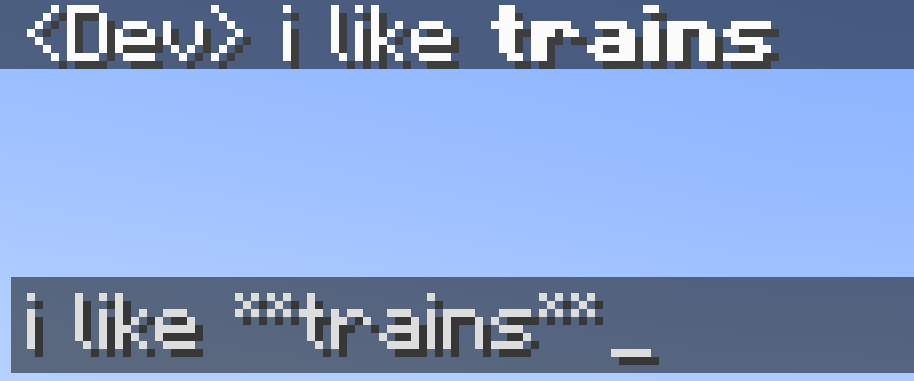
*italic text* -> italic text
**bold text** -> bold text
***bold + italic*** -> bold + italic
__underline__ -> underline
~~strikethrough~~ -> strikethrough
this **is** bold -> this is bold
this __*is* multiple things__ -> this is multiple things
终止符号集是可选的,例如 **hello 仍然会显示为粗体。
如果在铁砧中物品名称的开头加上星号,它将取消斜体效果。
十六进制代码/自定义颜色
此模组允许你使用自定义颜色为文本着色:
[#ff0000]red text-> red text
[#ff00FF]pink text-> pink text**[#00ff00]bold green text**or[#00ff00]**bold green text**-> bold green text
这些代码不区分大小写。
扩展格式语法
此功能已被新语法取代,但仍然有效。
此模组允许你使用命名颜色代替普通的单个字母。
颜色名称包括 white(白)、black(黑)、blue(蓝)、green(绿)、aqua(或 cyan 水色)、red(红)、purple(紫)、gray(灰)和 yellow(黄)。
这些名称不区分大小写。
要使用该颜色的深色版本(白色和黑色除外),请在名称前或后添加 "d"、"dark" 或 "deep"。你可以在名称与前缀/后缀之间选择性地使用空格或下划线。例如,§[dark_blue]、§[deepblue]、§[blue d]、§[dblue] 都会生成深蓝色文本。
§[gold](MCWiki 给出的颜色名称)也可用于深黄色。
粗体、下划线、斜体等
你还可以使用以下命令:
§[s]表示删除线文本,§[b]表示粗体文本,§[o]表示随机乱码文本,§[u]表示下划线文本,- 以及
§[r]表示 §r(重置)
多种样式选项
格式选项可以链接在一起,无需使用多个 §。例如,§[red][u][i]text 将显示红色、粗体、带下划线的文本。你需要将颜色放在粗体和下划线之前。这是因为颜色代码会将样式重置为仅着色状态,但不会保留斜体、粗体等效果。这是 Minecraft 本身的机制,同样适用于原版格式化代码。
在服务器上使用
如果你想在服务器上启用此模组,则必须在服务器上安装该模组,或者服务器必须允许你在聊天中发送 '§' 字符,否则当你使用格式化功能时,服务器会自动将你踢出。
Chat Colours
Overhauls the game's 13 year old text formatting syntax.
Markdown-like syntax
This mod allows you to use markdown-like syntax to format your text in minecraft:
*italic text* -> italic text
**bold text** -> bold text
***bold + italic*** -> bold + italic
__underline__ -> underline
~~strikethrough~~ -> strikethrough
this **is** bold -> this is bold
this __*is* multiple things__ -> this is multiple things
The terminating set of symbols is optional, e.g. **hello will still be bold.
If you put a star at the start of the name of an item in an anvil, it will cancel out the italic
Hex codes/custom colours
This mod allows you to colour your text with custom colours:
[#ff0000]red text-> red text
[#ff00FF]pink text-> pink text**[#00ff00]bold green text**or[#00ff00]**bold green text**-> bold green text
The codes are case-insensitive.
Extended format syntax
This feature has been replaced by new syntax, but still works.
The mod allows you to use named colours instead of the normal single letters.
The names are white, black, blue, green, aqua (or cyan), red, purple, gray and yellow.
The names are case-insensitive.
To use the dark version of the colour (except white and black), put "d", "dark" or "deep" before or after the name. You can optionaly use a space or underscore between the name and the prefix/suffix. For example, §[dark_blue], §[deepblue], §[blue d], §[dblue] all make dark blue text
§[gold], the name MCWiki gives the colour, can also be used for dark yellow.
Bold, underline, italics, etc
You can also use:
§[s]for strikeout text,§[b]for bold text,§[o]for obfuscated text,§[u]for underlined text,- and
§[r]for §r (reset)
Multiple style options
Format options can be chained without needing multiple §s. For example, §[red][u][i]text will show red, bold, underlined text. You need to put the colour before the bold and underline. This is because the colour code resets the style to be coloured, but not italic, bold, etc. This is a minecraft thing, and also applies to vanilla formatting codes.
Use on servers
If you want to use this mod on a server, this mod will have to be installed on it, or the server must otherwise allow you to send '§' in chat, or the server will automatically kick you when you use formatting.
下载 Chat Colors
需要联机服务器吗?
稳定流畅、一键部署,几分钟即可和朋友联机开服
最低仅需 8 元/月 即可畅快联机
下载 Chat Colors
需要联机服务器吗?
稳定流畅、一键部署,几分钟即可和朋友联机开服
最低仅需 8 元/月 即可畅快联机
下载 Chat Colors
需要联机服务器吗?
稳定流畅、一键部署,几分钟即可和朋友联机开服
最低仅需 8 元/月 即可畅快联机
下载 Chat Colors
需要联机服务器吗?
稳定流畅、一键部署,几分钟即可和朋友联机开服
最低仅需 8 元/月 即可畅快联机
下载 Chat Colors
需要联机服务器吗?
稳定流畅、一键部署,几分钟即可和朋友联机开服
最低仅需 8 元/月 即可畅快联机
下载 Chat Colors
需要联机服务器吗?
稳定流畅、一键部署,几分钟即可和朋友联机开服
最低仅需 8 元/月 即可畅快联机
下载 Chat Colors
需要联机服务器吗?
稳定流畅、一键部署,几分钟即可和朋友联机开服
最低仅需 8 元/月 即可畅快联机
下载 Chat Colors
需要联机服务器吗?
稳定流畅、一键部署,几分钟即可和朋友联机开服
最低仅需 8 元/月 即可畅快联机
下载 Chat Colors
需要联机服务器吗?
稳定流畅、一键部署,几分钟即可和朋友联机开服
最低仅需 8 元/月 即可畅快联机
下载 Chat Colors
需要联机服务器吗?
稳定流畅、一键部署,几分钟即可和朋友联机开服
最低仅需 8 元/月 即可畅快联机
- 修复了上一版本中的一些不一致问题
- 允许使用
&代替§,适用于输入较为困难的系统 - 再次感谢 GizmoTheMoonPig 完成移植工作
关于这个资源的讨论、问题反馈与使用心得
还没有讨论,来发第一帖吧
你是这个资源的作者?登录后可认领此资源。
相似资源
 模组

显示你正在注视的方块的信息。(适用于 Minecraft 1.16+ 的 Hwyla/Waila 分支)
 模组
在游戏画面角落显示附近世界地形、玩家、生物和实体的地图。可创建路径点,帮助你找到标记过的位置。
 模组

查看物品与配方
 模组
使用 JavaScript 编辑配方、添加自定义物品、编写世界事件!
 模组
AE2:一款流行的自动化与存储模组
 模组
那是什么?一个 Waila/Hwyla 的分支。
评论 0
登录后参与评分
还没有评论,来抢沙发吧