ChatUtils
Minecraft 中的聊天信息滚动后就会消失。ChatUtils 可以保留它们,让你搜索并重新获取这些信息。
仅客户端模组。服务器端无需任何配置,因此你可以在任何可连接的地方使用:原版、Paper 或大型网络。
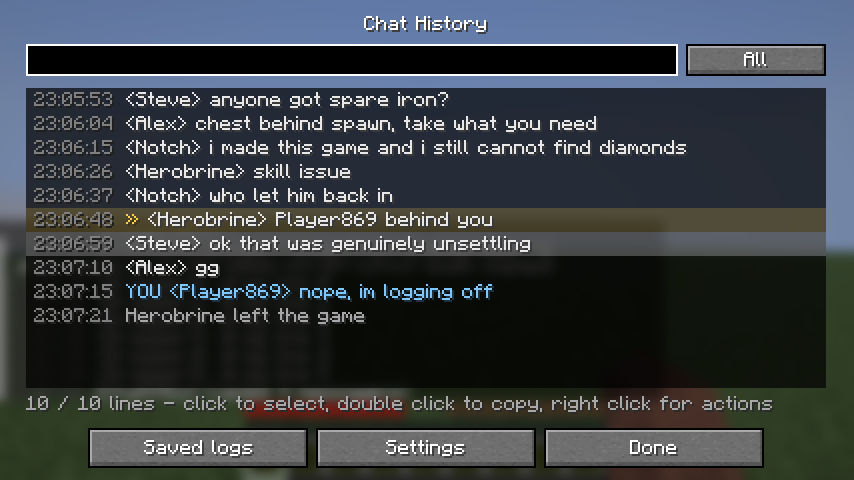
真正可搜索的聊天记录
按 H 键,你将看到本会话中的所有行,每行都带有时间戳。在输入框中键入内容即可实时过滤。它同时搜索消息文本和玩家名称,因此你可以轻松调出某个人说过的所有内容而无需滚动。
可在显示所有行、仅玩家聊天或仅系统消息之间切换。
你自己的消息会标记为 YOU 并着色,以便轻松识别。
像文件一样选择多行
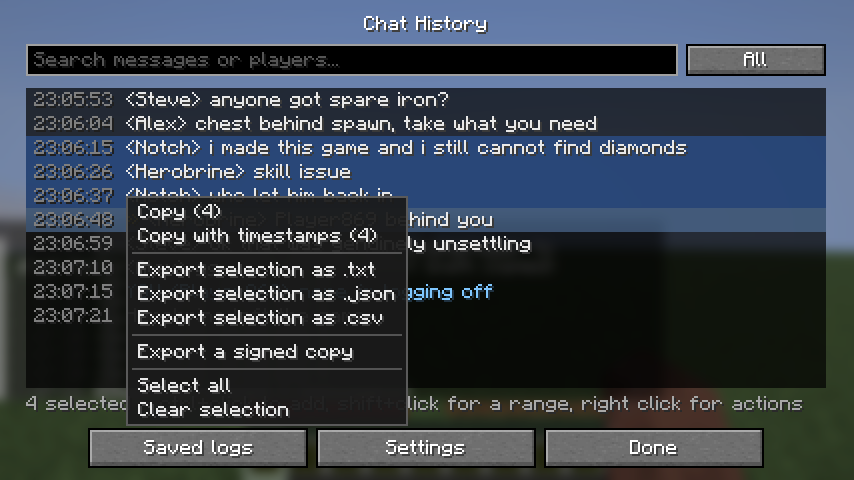
单击一行可选中它。Ctrl+单击可添加更多行。Shift+单击可选择范围。你也可以按住左键并在所需行上拖动进行选择。
右键单击选区会打开一个菜单,适用于你选中的内容:
- 复制,或带时间戳复制
- 保存为
.txt、.json 或 .csv
- 导出已签名的副本
双击可复制单行。Ctrl+A 全选,Ctrl+C 复制选区。
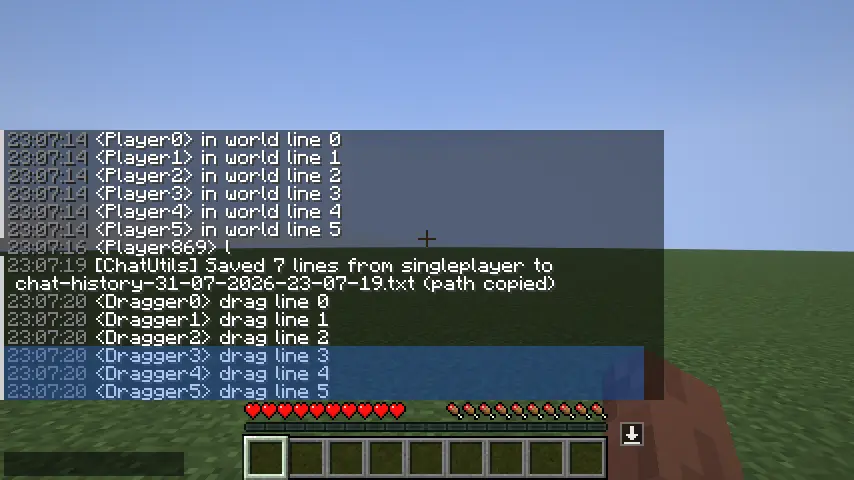
直接从聊天中选择
你甚至无需打开历史记录。打开聊天窗口,向下拖动你想要选择的行,它们在拖拽过程中会被高亮显示。Ctrl+单击可添加一行而不清除已有的选择。
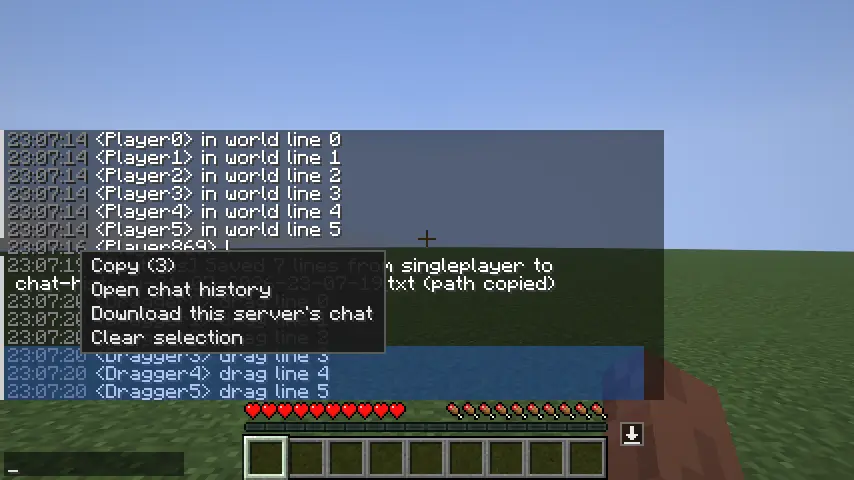
右键单击选区会弹出菜单:复制选区、打开完整历史记录,或下载该服务器的聊天记录。只需选中某人说的三行然后粘贴即可。
一键下载,按服务器区分
聊天框右边缘有一个小型下载按钮。单击一次即可将仅当前服务器的聊天记录写入文本文件,并将路径复制到剪贴板。当你只关心正在游玩的服务器上的情况时非常有用。
当有人提到你的名字时发出提醒
你会听到提示音,且该行在聊天中被标记。
模组自带三种提示音,或者你可以从可搜索列表中选择游戏自带的约 2000 种声音中的任意一种,点击时可预览。
想要自定义音效? 将 .ogg 文件放入 .minecraft/chatutils/sounds/ 目录,然后点击“加载我的音效”。无需资源包,且 ChatUtils 永远不会触碰你的资源包列表。Minecraft 仅支持 Ogg Vorbis 格式,因此 mp3 需要先转换。
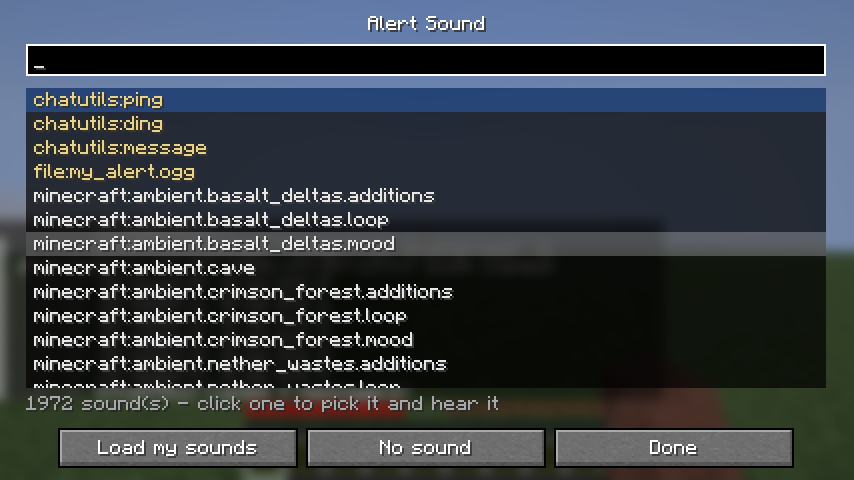 你可以在账号名称之外添加自定义关键词。所有匹配均基于单词边界,因此
Bob 会在 "hey Bob" 时触发,而在 "Bobcat" 时保持静默。无论服务器如何格式化聊天,你自己的消息绝不会触发提醒,且冷却机制可防止有人通过刷屏你的名字来连续轰炸你。
适用于以系统消息形式发送聊天的服务器,这类服务器占大多数大型网络。
在游戏中查看旧日志
你无需打开文本编辑器即可查看过去的会话。“已保存日志”列出了 ChatUtils 写出的所有文件,你可以在不退出 Minecraft 的情况下阅读其中任何一个。它支持读取运行中的日志以及所有导出格式。
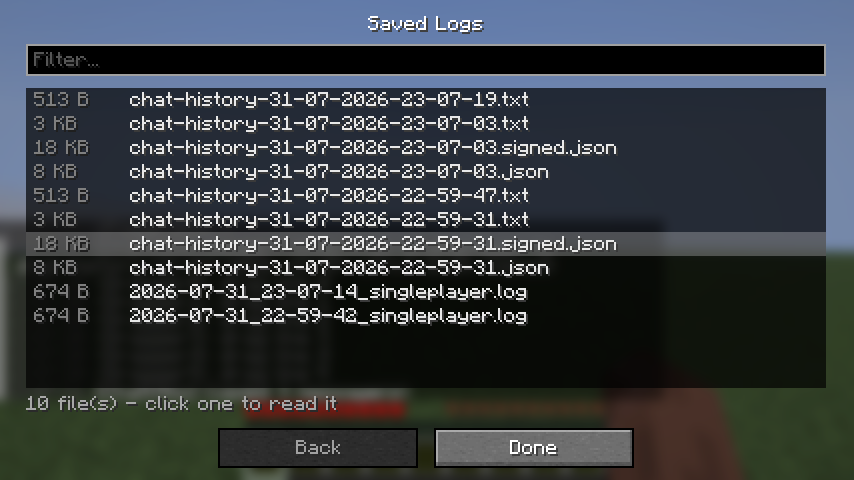 在日志中单击任意一行,你将获得该玩家发送过的所有消息,一次性从你所有保存的文件中提取,按时间排序并标注每条消息的来源文件。如果你想查看某人在一周内说过的所有内容,而不是在文件中逐个查找,这将非常有用。
隐藏垃圾信息
正则表达式规则可从聊天中移除匹配的行。例如加入/离开刷屏、商店广告等。你还可以维护一个忽略玩家列表,即使在对以系统消息形式发送聊天的服务器也有效。
被隐藏的行仍会写入你的历史记录和日志文件,因此你不会丢失任何内容,且它们不会发出任何声音。
已签名的历史文件
有时你需要向他人展示曾经说过的话。ChatUtils 可以写入一个历史文件,用于证明该文件后续未被篡改。
每条消息都会与其前一条消息的哈希值一起进行哈希计算,因此对中间部分进行更改、删除或重排都会破坏整个链。随后,整个链会使用属于你安装实例的密钥进行签名。
验证文件的功能内置于模组中:设置 → 验证文件。它会列出你历史文件夹中的所有文件,并标记每个文件的状态为 OK(正常)或 EDITED(已编辑)。
请明确此功能的含义。 它证明文件自你的客户端写入后未被触碰,且多个文件来自同一客户端。它不能证明消息确实被说过,因为是你自己在运行模组。它使得伪造报告变得更加困难,并更容易与服务器自身的日志进行交叉核对。它不是万能的信任按钮。
所有设置均可在游戏内配置
无需编辑 JSON 文件。提及提醒、提醒音效及音量、关键词、忽略的玩家、时间戳、下载按钮、聊天位置、快捷消息和按键绑定都在同一个界面上。

可从历史记录屏幕上的“设置”按钮打开,或在已安装 Mod Menu 的情况下从 Mod Menu 中打开。
其他功能
- 聊天中的时间戳 — 可选,默认关闭。
- 移动聊天窗口 — 可将聊天窗口拖到屏幕任意位置。
- 快捷消息 — 保存你经常输入的行,并通过单击或数字键快速发送。前面加
/ 会将其作为命令发送。
语言
英语、Türkçe、德语、俄语。
文件
所有内容均位于 .minecraft/chatutils/ 下:
history/ 用于存放导出文件,命名为 chat-history-31-07-2026-18-04-11.txtlogs/ 用于存放游玩期间持续写入的运行日志sounds/ 用于存放你自己的提醒音效
控制
| 操作 |
默认按键 |
| 聊天历史 |
H |
| 快捷消息 |
Z |
| 复制最后一条消息 |
未绑定 |
在“选项”→“控制设置”→“多人游戏”中重新绑定,或从 ChatUtils 的设置界面中进行修改。
依赖项
Minecraft 26.2、Fabric Loader 0.19.3+、Fabric API。Mod Menu 为可选依赖。
ChatUtils
Chat in Minecraft scrolls away and it's gone. ChatUtils keeps it, lets you search it, and lets you
get it back out again.
Client side only. Nothing is needed on the server, so it works anywhere you can connect: vanilla,
Paper, or a big network.
Chat history you can actually search
Press H and you get every line from this session with a timestamp on it. Type in the box to filter
as you go. It searches message text and player names, so you can pull up everything one person said
without scrolling.
Toggle between all lines, player chat only, or system messages only.
Your own messages are marked YOU and tinted, so they're easy to pick out.
Select lines like files
Click a line to select it. Ctrl+click adds more. Shift+click grabs a range. You can also hold the
left button and drag over the lines you want.
Right click opens a menu that works on whatever you selected:
- Copy, or copy with timestamps
- Save as
.txt, .json or .csv
- Export a signed copy
Double click copies a single line. Ctrl+A selects everything, Ctrl+C copies the selection.
Select straight out of the chat
You don't even have to open the history. Open chat, drag down the lines you want, and they highlight
as you go. Ctrl+click adds a line without clearing what you already picked.
Right click on the selection and you get a menu: copy it, open the full history, or download this
server's chat. Just grab the three lines someone said and paste them.
One-click download, per server
There's a small download button on the right edge of the chat box. One click writes just that
server's chat to a text file and copies the path to your clipboard. Useful when you only care
about what happened on the server you're actually playing on.
Alerts when someone says your name
You get a sound and the line gets marked in chat.
Three sounds ship with the mod, or pick any of the ~2000 sounds the game already has from a
searchable list, with a preview when you click.
Want your own sound? Drop .ogg files into .minecraft/chatutils/sounds/ and press "Load my
sounds". No resource pack needed, and ChatUtils never touches your pack list. Minecraft only plays
Ogg Vorbis, so mp3 needs converting first.
You can add your own keywords on top of your account name. Everything matches on word boundaries, so
Bob fires on "hey Bob" and stays quiet on "Bobcat". Your own messages never alert you, no matter
how the server formats chat, and a cooldown stops someone spamming your name from machine-gunning
you.
Works on servers that send chat as system messages, which is most big networks.
Read your old logs in game
You don't have to open a text editor to look at an old session. "Saved logs" lists every file
ChatUtils has written and you can read any of them without leaving Minecraft. It reads the running
logs and all export formats.
Click any line in a log and you get every message that player ever sent, pulled from all of your
saved files at once, sorted by time and labelled with the file each one came from. Useful when you
want to see everything one person said over a week rather than hunting through files.
Hide the junk
Regex rules drop matching lines from chat. Join and leave spam, shop adverts, whatever. You can also
keep a list of players to ignore, which works even on servers that send chat as system messages.
Hidden lines are still written to your history and log file, so you don't lose anything, and they
never make a sound.
Signed history files
Sometimes you need to show someone what was said. ChatUtils can write a history file that shows
whether it has been edited afterwards.
Each message is hashed together with the hash of the one before it, so changing, deleting or
reordering anything in the middle breaks the chain. The whole thing is then signed with a key that
belongs to your install.
Checking a file is built into the mod: Settings → Verify a file. It lists everything in your
history folder and marks each one OK or EDITED.
Be clear about what this is. It proves the file has not been touched since your client wrote
it, and that several files came from the same client. It does not prove the messages were
really said, because you're the one running the mod. It makes a report harder to fake casually and
easier to cross-check against the server's own logs. It is not a magic trust button.
Everything is configurable in game
No JSON editing. Mention alerts, the alert sound and volume, keywords, ignored players, timestamps,
the download button, chat position, quick messages and key binds are all on one screen.
Open it from the Settings button on the history screen, or from Mod Menu if you have it installed.
Odds and ends
- Timestamps in chat — optional, off by default.
- Move the chat — drag the chat box anywhere on screen.
- Quick messages — save lines you type a lot and fire them with a click or the number keys. A
leading
/ sends it as a command.
Languages
English, Türkçe, Deutsch, Русский.
Files
Everything lands under .minecraft/chatutils/:
history/ for exports, named chat-history-31-07-2026-18-04-11.txtlogs/ for the running log written while you playsounds/ for your own alert sounds
Controls
| Action |
Default |
| Chat history |
H |
| Quick messages |
Z |
| Copy last message |
unbound |
Rebind them in Options → Controls → Multiplayer, or from the ChatUtils settings screen.
Requires
Minecraft 26.2, Fabric Loader 0.19.3+, Fabric API. Mod Menu is optional.


 模组

 模组
 模组

 模组
 模组
 模组
评论 0
登录后参与评分
还没有评论,来抢沙发吧