

Chat Remastered 是一个重写的 Minecraft 聊天系统,支持图片、GIF、回复、上下文菜单、物品和实体渲染,以及可配置的聊天界面。
⚡ 功能特性
- 内联媒体 — 图片和动态 GIF 直接在聊天中渲染显示。
- 多附件 — 根据服务器配置,单条消息最多可发送 15 张照片。
- 图像格式 — 支持 PNG、JPEG、WebP、BMP、TIFF 和动态 GIF。
- 截图面板 — 直接从聊天输入框打开本地截图并选择,无需浏览文件夹。
- 物品与实体渲染 — 使用特殊的聊天标签,直接在聊天中渲染物品、实体、生物和玩家。
- 回复与线程 — 回复文本消息和图片,并在原始消息和回复之间建立视觉连接。
- 上下文菜单 — 右键点击消息以回复、复制文本或访问消息操作。
- 文本选择 — 直接从聊天窗口选择和复制特定文本。
- 游戏内设置 — 可将图像缩放比例从 50% 调整至 200%,并可设置聊天高度以及聊天关闭时显示的行数。
- 全屏查看器 — 点击图片以更大尺寸打开查看。
- 动态聊天卡片 — 消息和媒体卡片在出现和移除时具有动画效果。
- 冷却系统 — 限制玩家上传媒体的频率。
- 服务器管理 — 阻止照片上传或回复,全局删除媒体,并与服务器静音系统集成。
- 异步 TCP 传输 — 媒体通过端口
5050上的独立 TCP 连接传输,而非正常的游戏连接。
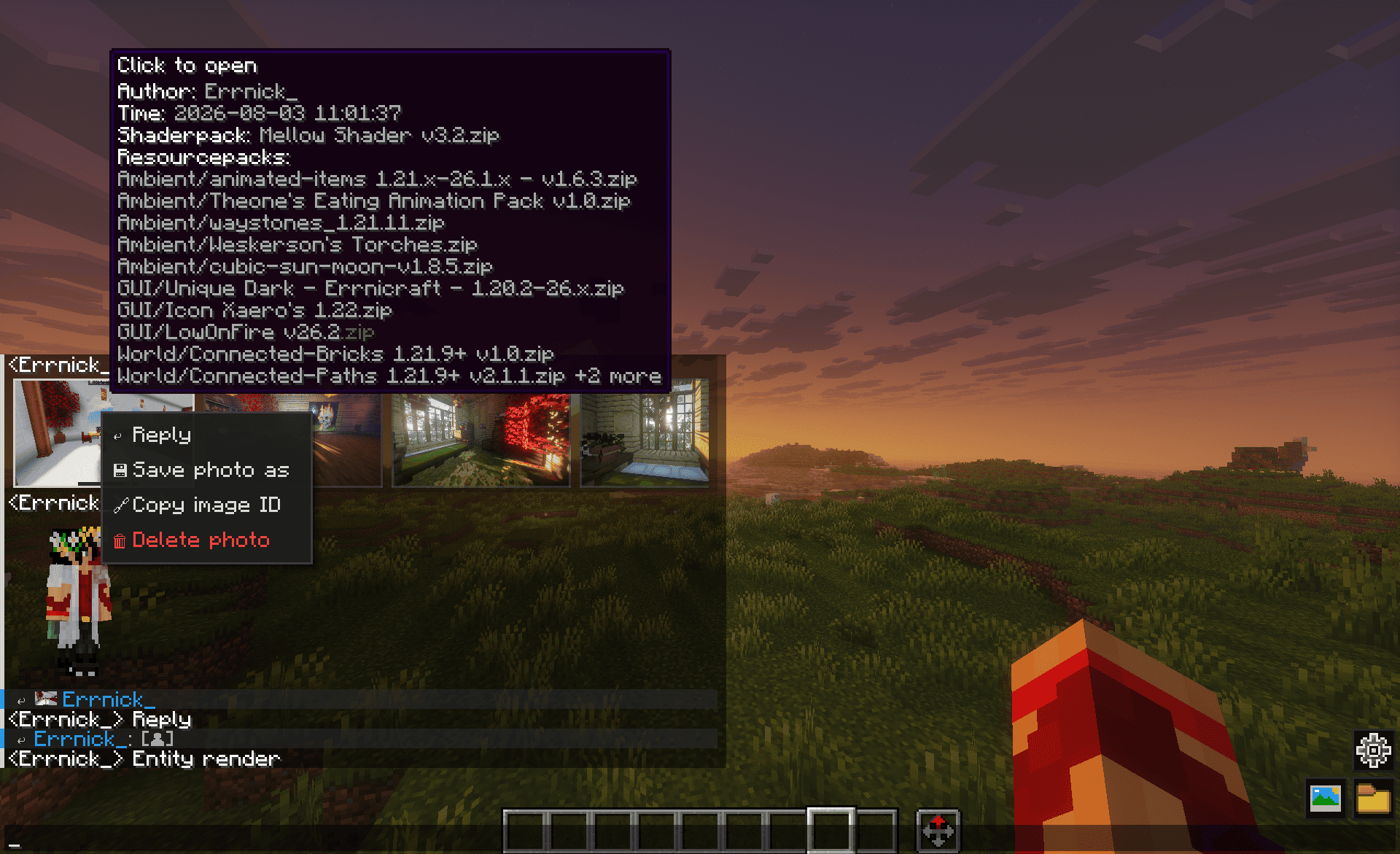
📷 发送媒体
您可以通过以下几种方式附加媒体:
- 🖱 直接将文件拖放到聊天窗口中
- 📁 点击附件按钮以打开文件选择器
- 📋 使用
Ctrl + V从剪贴板粘贴图片 - 🖼 从聊天输入框打开截图面板
- 📦 将多张图片附加到同一条消息中
服务器控制每条消息允许的最大附件数量。
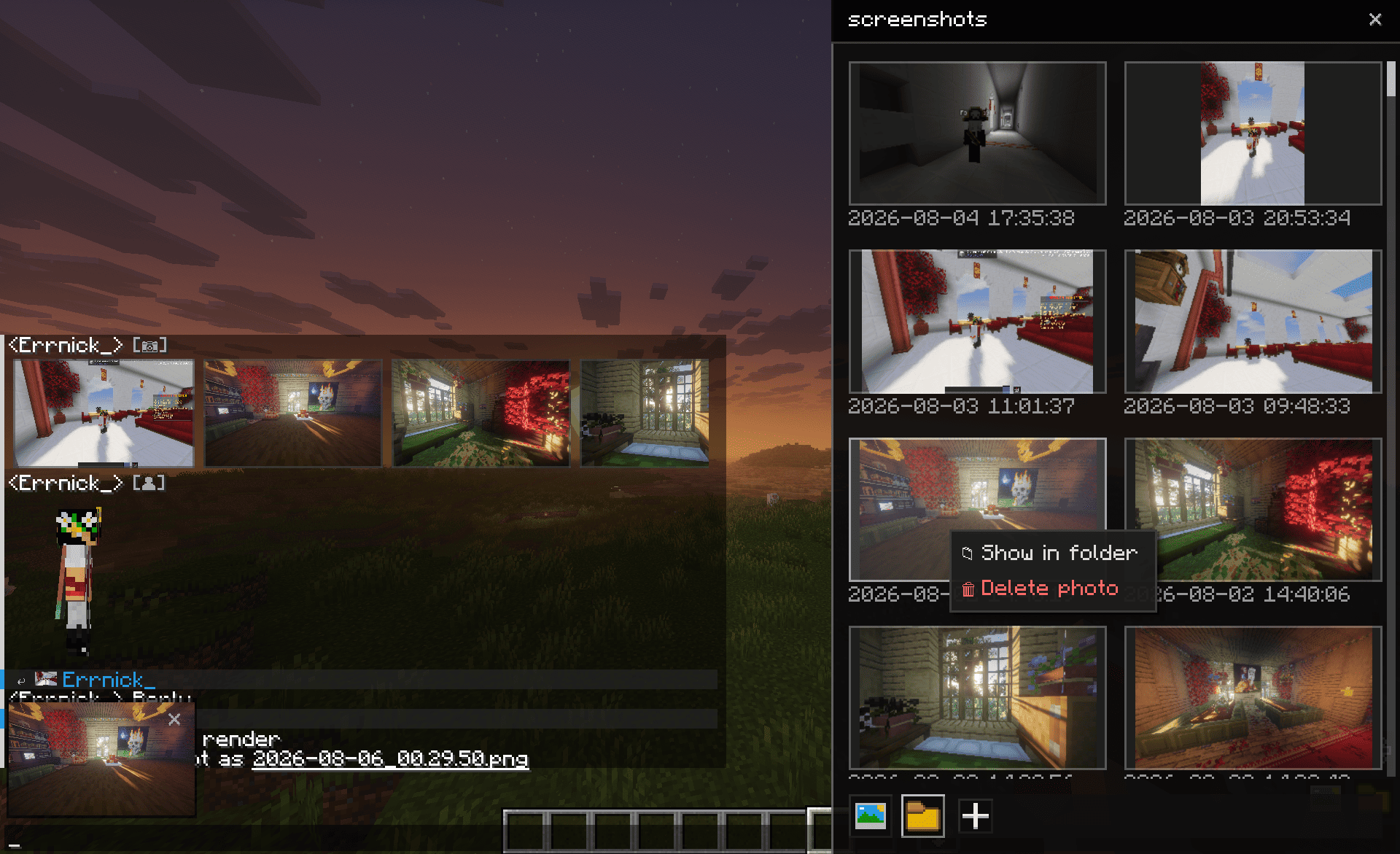
🛠 安装指南
客户端
- 安装 Fabric Loader。
- 将 Fabric API 放入您的
mods文件夹。 - 将 Cloth Config API 放入您的
mods文件夹。 - 将
chat-remastered.jar放入.minecraft/mods/。 - 启动 Minecraft。
服务器端
- 将 Chat Remastered 及其依赖项放入服务器的
mods文件夹。 - 为媒体传输打开 TCP 端口
5050,或在服务器配置中更改端口。 - 使用
config/chat-remastered-server.json配置模组。 - 启动服务器。
⚠️ 服务器必须安装 Chat Remastered,玩家才能发送或接收媒体。
🔌 支持的模组与插件
Chat Remastered 会自动检测支持的集成。无需额外配置。
| Mod/Plugin | 集成说明 |
|---|---|
| 🔨 BanHammer | 被 BanHammer 禁言的玩家将无法发送图片、GIF 和其他媒体附件。 |
| ✈️ vanutp's Telegram Bridge - Minecraft Plugin | 链接 Minecraft 和 Telegram 之间的回复。游戏内的回复可以作为 Telegram 回复发送,反之亦然。照片和组合照片也可以在两个平台之间镜像。在 Minecraft 中删除图片会同时删除相应的 Telegram 消息。 |
⚙️ 服务器配置
| 选项 | 默认值 | 描述 |
|---|---|---|
resolution |
720 |
最大媒体分辨率。可用值:360, 480, 720, HD, 2K。 |
imagePort |
5050 |
用于媒体传输的 TCP 端口。 |
photoCooldownSeconds |
5 |
同一玩家上传之间的冷却时间(秒)。 |
gifEnabled |
true |
允许玩家发送动态 GIF。 |
gifMaxDim |
480 |
GIF 最大维度。范围:240–1920。 |
maxPhotosPerMessage |
5 |
玩家可在单条消息中附加的照片最大数量。服务器最多允许 15 张。 |
mutedMessage |
(自定义文本) | 当被静音的玩家尝试发送文本、图片或回复时显示的消息。 |
🔧 命令
点击展开完整命令列表
🖥 服务器命令 (/chat-remastered-admin)
需要操作员或控制台权限。
| 命令 | 说明 |
|---|---|
/chat-remastered-admin block-photo <player> |
阻止该玩家发送照片。 |
/chat-remastered-admin unblock-photo <player> |
允许该玩家重新发送照片,无需断开重连。 |
/chat-remastered-admin mute <player> |
阻止该玩家发送照片和回复。 |
/chat-remastered-admin unmute <player> |
移除照片和回复限制。 |
/chat-remastered-admin delete <imageId> |
为所有玩家删除一张图片。 |
/chat-remastered-admin test <player> |
检查玩家的模组状态、封禁状态及上传令牌。 |
/chat-remastered |
显示模组版本和协议信息。 |
💻 客户端命令 (/chat-remastered)
| 命令 | 说明 |
|---|---|
/chat-remastered clearcache |
清除磁盘上的图片缓存。内存缓存不会被清除。 |
/chat-remastered delete <imageId> |
向服务器转发图片删除请求。 |
/chat-remastered |
显示模组版本和协议信息。 |
🎨 富文本聊天标签
直接在聊天输入框中输入以下标签,以渲染物品、实体或玩家,而非纯文本。在闭合符号 > 后可以添加可选的标题文本。
| 标签 | 渲染效果 |
|---|---|
<item>your text |
你主手当前持有的物品。 |
<entity>your text |
准星当前指向的实体。 |
<player:PlayerName>your text |
指定玩家的预览。 |
<chat_remastered:item:namespace:path>your text |
通过 ID 指定的特定物品,例如 <chat_remastered:item:minecraft:diamond_sword>。 |
<chat_remastered:item:namespace:path{nbt}>your text |
带有 NBT/组件数据的特定物品。 |
<chat_remastered:entity:namespace:path:tocursor>your text |
朝向你光标位置放置的特定实体。 |
<chat_remastered:entity:namespace:path:rotate>your text |
自动旋转的特定实体。 |
<chat_remastered:entity:namespace:path{nbt}:rotate:offsetX:offsetY:size>your text |
带有 NBT、自定义偏移量和渲染尺寸的实体。 |
<chat_remastered:player:PlayerName:tocursor>your text |
朝向你光标位置放置的玩家模型。 |
<chat_remastered:player:PlayerName:rotate>your text |
自动旋转的玩家模型。 |
<uuid-here>your text |
使用 UUID 渲染的玩家模型。 |
未安装 Chat Remastered 的玩家将看到纯文本的回退内容,而非渲染后的预览。
例如:
<chat_remastered:item:minecraft:diamond_sword>Diamond Sword
🛠 调试命令 (/chatremastereddebug)
这些命令仅用于开发和测试。
| 命令 | 说明 |
|---|---|
/chatremastereddebug placeholder [ratio] |
显示具有选定宽高比的图片占位符。 |
/chatremastereddebug placeholder custom <width> <height> |
显示具有自定义尺寸的占位符。 |
/chatremastereddebug placeholder_deleted [ratio] |
显示已删除图片的占位符。 |
/chatremastereddebug placeholder_error [ratio] |
显示错误图片的占位符。 |
/chatremastereddebug test |
测试与媒体服务器的连接。 |
可用的宽高比:
1_1, 4_3, 3_2, 16_9, 16_10, 21_9, 9_16, 3_4, 2_3
提示:右键点击媒体项目或消息,可快速复制其 ID 以便进行删除或管理。
📅 路线图
| 平台 | 状态 | 下一步 |
|---|---|---|
| Fabric | 26.2-1.21.6 ✔ 可用 |
26.3 🔜 进行中 |
| NeoForge | — | 26.x 🔜 进行中 |
| Forge | — | 1.20.1 📅 计划中 |
| Quilt | — | 📅 计划中 |
| Paper / Spigot (服务端插件) | 26.2-1.21.6 ✔ 可用 |
26.3 📅 计划中 |
Chat Remastered is a rewritten Minecraft chat system with support for images, GIFs, replies, context menus, item and entity renders, and a configurable chat interface.
⚡ Features
- Inline Media — images and animated GIFs are rendered directly in chat.
- Multiple Attachments — send up to 15 photos in a single message, depending on the server configuration.
- Image Formats — PNG, JPEG, WebP, BMP, TIFF and animated GIF.
- Screenshot Panel — open your local screenshots directly from the chat input and select them without browsing through folders.
- Item & Entity Rendering — render items, entities, mobs and players directly in chat using special chat tags.
- Replies & Threads — reply to text messages and photos with a visual connection between the original message and the reply.
- Context Menu — right-click messages to reply, copy text and access message actions.
- Text Selection — select and copy specific text directly from the chat window.
- In-game Settings — change image scaling from 50% to 200%, chat height and the number of lines shown when chat is closed.
- Fullscreen Viewer — click an image to open it at a larger size.
- Animated Chat Cards — messages and media cards animate when they appear and when they are removed.
- Cooldown System — limit how frequently players can upload media.
- Server Moderation — block photo uploads or replies, delete media globally and integrate with server mute systems.
- Asynchronous TCP Transfer — media is transferred through a separate TCP connection on port
5050instead of the normal game connection.
📷 Sending Media
You can attach media in several ways:
- 🖱 Drag and drop files directly into the chat window
- 📁 Click the attachment button to open the file picker
- 📋 Paste an image from the clipboard with
Ctrl + V - 🖼 Open the screenshots panel from the chat input
- 📦 Attach multiple images to the same message
The server controls the maximum number of attachments allowed per message.
🛠 Installation
Client
- Install Fabric Loader.
- Place Fabric API into your
modsfolder. - Place Cloth Config API into your
modsfolder. - Place
chat-remastered.jarinto.minecraft/mods/. - Start Minecraft.
Server
- Place Chat Remastered and its dependencies into the server's
modsfolder. - Open TCP port
5050for media transfer, or change the port in the server configuration. - Configure the mod using
config/chat-remastered-server.json. - Start the server.
⚠️ The server must have Chat Remastered installed for players to send or receive media.
🔌 Supported Mods & Plugins
Chat Remastered detects supported integrations automatically. No additional configuration is required.
| Mod/Plugin | Integration |
|---|---|
| 🔨 BanHammer | Players muted by BanHammer are blocked from sending images, GIFs and other media attachments. |
| ✈️ vanutp's Telegram Bridge - Minecraft Plugin | Links replies between Minecraft and Telegram. In-game replies can be sent as Telegram replies and vice versa. Photos and grouped photos can also be mirrored between the two platforms. Deleting an image in Minecraft removes the corresponding Telegram message. |
⚙️ Server Configuration
| Option | Default | Description |
|---|---|---|
resolution |
720 |
Maximum media resolution. Available values: 360, 480, 720, HD, 2K. |
imagePort |
5050 |
TCP port used for media transfer. |
photoCooldownSeconds |
5 |
Cooldown between uploads from the same player, in seconds. |
gifEnabled |
true |
Allow players to send animated GIFs. |
gifMaxDim |
480 |
Maximum GIF dimension. Range: 240–1920. |
maxPhotosPerMessage |
5 |
Maximum number of photos a player can attach to one message. The server can allow up to 15. |
mutedMessage |
(custom text) | Message shown to a muted player when they try to send text, photos or replies. |
🔧 Commands
Click to expand full command list
🖥 Server Commands (/chat-remastered-admin)
Operator or console access is required.
| Command | Description |
|---|---|
/chat-remastered-admin block-photo <player> |
Block a player from sending photos. |
/chat-remastered-admin unblock-photo <player> |
Allow a player to send photos again without requiring a reconnect. |
/chat-remastered-admin mute <player> |
Block a player from sending photos and replies. |
/chat-remastered-admin unmute <player> |
Remove the photo and reply restriction. |
/chat-remastered-admin delete <imageId> |
Delete an image for all players. |
/chat-remastered-admin test <player> |
Check mod status, ban status and upload token for a player. |
/chat-remastered |
Show mod version and protocol information. |
💻 Client Commands (/chat-remastered)
| Command | Description |
|---|---|
/chat-remastered clearcache |
Clear the image disk cache. The RAM cache is not cleared. |
/chat-remastered delete <imageId> |
Forward an image deletion request to the server. |
/chat-remastered |
Show mod version and protocol information. |
🎨 Rich Chat Tags
Enter these tags directly into the chat input to render items, entities or players instead of plain text. Optional caption text can be placed after the closing >.
| Tag | Renders |
|---|---|
<item>your text |
The item currently held in your main hand. |
<entity>your text |
The entity currently under your crosshair. |
<player:PlayerName>your text |
A preview of the specified player. |
<chat_remastered:item:namespace:path>your text |
A specific item by ID, for example <chat_remastered:item:minecraft:diamond_sword>. |
<chat_remastered:item:namespace:path{nbt}>your text |
A specific item with NBT/component data. |
<chat_remastered:entity:namespace:path:tocursor>your text |
A specific entity positioned toward your cursor. |
<chat_remastered:entity:namespace:path:rotate>your text |
A specific entity that rotates automatically. |
<chat_remastered:entity:namespace:path{nbt}:rotate:offsetX:offsetY:size>your text |
An entity with NBT, custom offset and render size. |
<chat_remastered:player:PlayerName:tocursor>your text |
A player render positioned toward your cursor. |
<chat_remastered:player:PlayerName:rotate>your text |
A player render that rotates automatically. |
<uuid-here>your text |
A player render using their UUID. |
Players without Chat Remastered installed see a plain-text fallback instead of the rendered preview.
For example:
<chat_remastered:item:minecraft:diamond_sword>Diamond Sword
🛠 Debug Commands (/chatremastereddebug)
These commands are intended for development and testing.
| Command | Description |
|---|---|
/chatremastereddebug placeholder [ratio] |
Show an image placeholder with the selected aspect ratio. |
/chatremastereddebug placeholder custom <width> <height> |
Show a placeholder with a custom size. |
/chatremastereddebug placeholder_deleted [ratio] |
Show a deleted-image placeholder. |
/chatremastereddebug placeholder_error [ratio] |
Show an error-image placeholder. |
/chatremastereddebug test |
Test the connection to the media server. |
Available aspect ratios:
1_1, 4_3, 3_2, 16_9, 16_10, 21_9, 9_16, 3_4, 2_3
Tip: Right-click a media item or message to quickly copy its ID for deletion or management.
📅 Roadmap
| Platform | Status | Next |
|---|---|---|
| Fabric | 26.2-1.21.6 ✔ Available |
26.3 🔜 In progress |
| NeoForge | — | 26.x 🔜 In progress |
| Forge | — | 1.20.1 📅 Planned |
| Quilt | — | 📅 Planned |
| Paper / Spigot (Server plugin) | 26.2-1.21.6 ✔ Available |
26.3 📅 Planned |

下载 Chat Remastered
下载 Chat Remastered
需要联机服务器吗?
稳定流畅、一键部署,几分钟即可和朋友联机开服
最低仅需 8 元/月 即可畅快联机
下载 Chat Remastered
下载 Chat Remastered
需要联机服务器吗?
稳定流畅、一键部署,几分钟即可和朋友联机开服
最低仅需 8 元/月 即可畅快联机
下载 Chat Remastered
需要联机服务器吗?
稳定流畅、一键部署,几分钟即可和朋友联机开服
最低仅需 8 元/月 即可畅快联机
下载 Chat Remastered
下载 Chat Remastered
需要联机服务器吗?
稳定流畅、一键部署,几分钟即可和朋友联机开服
最低仅需 8 元/月 即可畅快联机
下载 Chat Remastered
下载 Chat Remastered
需要联机服务器吗?
稳定流畅、一键部署,几分钟即可和朋友联机开服
最低仅需 8 元/月 即可畅快联机
下载 Chat Remastered
需要联机服务器吗?
稳定流畅、一键部署,几分钟即可和朋友联机开服
最低仅需 8 元/月 即可畅快联机
0.5.2
已修复
- 修复了在进入床铺后立即打开聊天时因屏幕组件在初始化前被访问而导致的客户端崩溃。
- 修复了聊天窗口关闭时重复消息计数器未更新的问题。
- 修复了纯文本和文件名被错误识别为链接的问题。
改进
- 重复消息现在会移至关闭的聊天窗口底部,并在带有更新计数器的情况下再次淡入显示。
- 基于 Minecraft 内置的公共后缀列表(Public Suffix List)重写了链接检测逻辑,以实现更准确的域名验证。
- 新增对显式 URL、IPv4 地址以及
host:port格式链接的支持。 - 改进了对歧义域扩展名的处理,以防止误报。
Chat Remastered 0.5.1
本次维护更新专注于修复错误、提升配置可靠性并扩展本地化支持。
已修复
- 文本选择: 修复了在多行聊天内容上拖动时选择方向不正确的问题。现在复制所选文本将保留正确的消息顺序。
- 配置保存: 修复了部分设置未保存到配置文件中的问题。
- 断开连接处理: 修复了断开连接时配置重置的问题,以确保用户偏好设置得以保留。
改进
- 设置持久化: 更改设置后现立即保存,包括图像预览缩放比例、链接颜色、链接打开方式、聊天记录及其他选项。
- 翻译: 重构了现有翻译,以改善措辞、一致性和可读性,消除了生硬的机器生成语句。
- 缺失模组通知: 重构了加入未安装 Chat Remastered 的服务器时显示的通知。该通知现已更简短、支持本地化,并包含下载按钮。
新增
- 31 种新语言: 新增了德语、法语、西班牙语、葡萄牙语、意大利语、波兰语、乌克兰语、土耳其语、中文(简体和繁体)、日语、韩语、荷兰语、瑞典语、丹麦语、挪威语、芬兰语、捷克语、斯洛伐克语、匈牙利语、罗马尼亚语、保加利亚语、希腊语、印度尼西亚语、越南语、泰语、阿拉伯语、印地语和希伯来语的翻译。
Chat Remastered 0.5.0
本次重大更新专注于提升聊天功能的可用性、性能、自定义选项及网络可靠性。
新增
- 可点击链接: 自动检测并高亮显示聊天中的 URL、裸域名和服务器 IP 地址。
- 链接颜色: 已打开和未打开的链接使用不同的颜色区分。
- 链接确认: 点击链接时会打开标准的 Minecraft 确认界面。
- 链接设置: 提供禁用链接打开功能的选项。
- 聊天右键菜单: 可从聊天消息中直接复制链接、复制服务器 IP 地址或加入服务器。
- 重复消息合并: 连续的相同文本消息会被分组,并附带重复计数。包含图片、回复或附件的消息除外。
- 可配置的聊天记录: 可选的聊天记录上限,默认关闭。启用后,上限可在 200 到 30,000 条消息之间调整。
- 文本选择(实验性): 通过鼠标左键拖拽可选择多行聊天文本,并使用 Ctrl+C 进行复制。
- 可配置的公开图片端点: 新增
imageHost和imagePublicPort服务器选项,允许媒体连接在 FRP、NAT 和端口转发环境下正常工作,而imagePort仍作为本地绑定端口。由 @Arecanronglin 贡献。
改进
- 在高消息流量下提升了聊天性能。
- 在显示大量文本和维护长聊天记录时提高了响应速度。
- 照片现在默认使用高清分辨率(位于服务器配置文件的
resolution项)。 - 改进了当配置的本地端口不可用时,图片服务器的错误处理机制。
- 现有的服务器配置与新图片端点设置保持兼容。
修复
- 修复了在回复极长消息时回复栏失效的问题。
- 修复了在对系统消息(如进度成就以及加入/离开通知)进行回复时,昵称会显示出来的问题。
- 在未安装 Chat Remastered 的服务器上回复时,现在会将
@nickname直接插入聊天输入框,而不是显示回复栏。 - 修复了鼠标悬停在可点击的聊天元素上时,光标未从手型指针改变的问题。
- 修复了当
imagePort设置为与 Minecraft 服务器相同时导致的崩溃问题。 - 修复了因无效或过大的图片数据导致的潜在崩溃问题。
修复了由于 NBT 数据处理不正确,在使用 <item> 和 <entity> 时导致间歇性踢出的问题。感谢 TheMizel 报告此问题。
关于这个资源的讨论、问题反馈与使用心得
还没有讨论,来发第一帖吧
你是这个资源的作者?登录后可认领此资源。
相似资源
 模组

显示你正在注视的方块的信息。(适用于 Minecraft 1.16+ 的 Hwyla/Waila 分支)
 模组
在游戏画面角落显示附近世界地形、玩家、生物和实体的地图。可创建路径点,帮助你找到标记过的位置。
 模组

查看物品与配方
 模组
使用 JavaScript 编辑配方、添加自定义物品、编写世界事件!
 模组
AE2:一款流行的自动化与存储模组
 模组
那是什么?一个 Waila/Hwyla 的分支。
评论 0
登录后参与评分
还没有评论,来抢沙发吧