Chatglot
 Chatglot 是一款 Fabric 客户端模组,可实时翻译 Minecraft 聊天消息。
每条聊天消息旁都会添加一个翻译按钮(默认为 ✍)。点击它,或让自动翻译处理,翻译结果将以新行显示在聊天中,或直接替换原始消息。
仅限客户端使用。无需服务器安装。
功能
- 为每条聊天消息附加翻译按钮(标签可配置)
- 点击翻译或自动聊天翻译
- 开箱即用 — 默认提供商使用 Google Translate 的免费 Web API,无需 API 密钥、账号或设置
- 本地翻译缓存 — 重复的消息会立即显示,无需再次请求
- 结果显示为新行 或 替换原始聊天消息
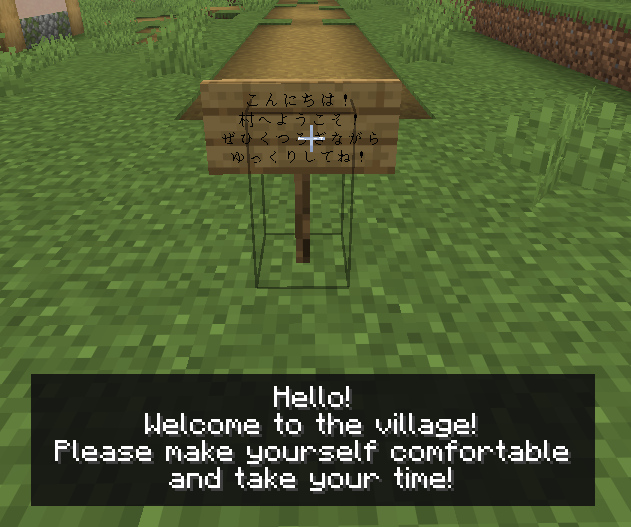
- 告示牌和悬挂告示牌翻译
- 书籍翻译
- 在已书写的书或讲台中,按下
G 键或点击 Translate 翻译当前页面
- 笔和纸页面可以通过
Translate 按钮进行翻译(页面内容永远不会被更改)
- 聊天输入翻译
- 在聊天输入框中选择发送语言,并在发送前预览草稿的翻译
- 按
Tab 键或点击应用预览
- 按
F8 或使用 /chatglot config 打开设置界面
- 使用
/chatglot translate <id> 翻译特定的聊天消息
翻译提供商
Chatglot 支持多种翻译后端。您可以在设置界面中切换它们。
| 提供商 |
所需条件 |
default |
无。使用 Google Translate 的非官方免费 Web API(非付费 Cloud Translation API)。该 API 可能受限或在未通知的情况下变更。 |
gas |
您自己的 Google Apps Script Web 应用 URL |
deepl |
DeepL API 密钥 |
google |
Google Cloud Translation API 密钥 |
openai |
OpenAI API 密钥 |
gemini |
Gemini API 密钥 |
anthropic |
Anthropic API 密钥 |
azure |
Azure Translator API 密钥 + 区域 |
codex |
浏览器 OAuth(一次性,令牌存储在本地) |
translategemma_local |
仅限 Windows。下载 llama.cpp + TranslateGemma GGUF 模型,然后在 localhost 上运行本地后端 |
推荐提供商
Default: 最适合入门。免费,无需设置,支持自动翻译。由于它依赖于非官方 API,Google 可能会在重度使用时限制速率;如果发生这种情况,请切换到其他提供商。GAS: 如果您希望使用自己的 Google 账号进行免费设置,这是一个不错的选择。对于消费者账号,Google Apps Script 每天最多允许 5,000 次翻译调用,但配额可能会发生变化。请参阅 Apps Script 配额。Codex: 如果您已经订阅了 ChatGPT,这是推荐的选择。OpenAI 指出,Codex 包含在 ChatGPT Plus、Pro、Business、Edu 和 Enterprise 计划中,具体限制取决于计划。请参阅 将 Codex 与您的 ChatGPT 计划一起使用。Azure: 如果您希望拥有带有免费层级的官方 API,这是一个不错的选择。根据 Microsoft 的定价页面,Azure Translator F0 每月免费提供 2 million 个字符。请参阅 Azure Translator 定价。TranslateGemma: 如果您的 PC 有足够的性能余量用于本地推理,这是一个强有力的选择。设置完成后,它会在 localhost 上本地运行,速度可能很快,并且不需要为每次请求支付付费 API 费用。但它需要下载 llama.cpp 运行时和 TranslateGemma GGUF 模型。
配置
配置文件位于 config/chatglot/chatglot.json。
主要设置:
enabled — 启用或禁用整个模组autoTranslateEnabled — 切换自动翻译outgoingTargetLanguage — 翻译自己聊天草稿的默认语言(默认:English)targetLanguage — 例如 JA, EN, EN-US, ZH-HANS(默认跟随 Minecraft 语言)provider — 选择您的翻译后端overwriteOriginalWithTranslation — 替换原始消息而不是添加新行appendTranslateButton — 显示或隐藏 ✍ 按钮translateButtonLabel — 自定义按钮标签showTranslationPrefix — 显示或隐藏翻译消息的前缀requestTimeoutSeconds — 网络超时时间(5-240 秒)maxConcurrentTranslations — 最大并行翻译请求数(1-16)useSharedAppDataSettings — 通过 %LOCALAPPDATA% 共享 API 密钥、模型设置和本地后端设置translationCacheEnabled — 启用本地翻译缓存(默认:true)translationCacheMaxEntries — 最大缓存翻译条目数(默认:5000)
翻译缓存
成功的翻译会保存到 config/chatglot/translation-cache.json,并在相同的文本、语言和提供商设置下重用。一旦达到限制,最旧的条目将被移除。使用 /chatglot cache clear 或设置界面中的按钮来清除缓存。
缓存以纯文本形式存储原始文本,包括聊天消息,保存在您的 PC 上。API 密钥和其他凭证绝不会存储在其中。
TranslateGemma 本地后端
translategemma_local 是一个仅限 Windows 的本地翻译选项。它不在 Minecraft JVM 内部运行推理。相反,它使用通过 127.0.0.1 / localhost 的单独本地后端进程。
当您在配置屏幕中使用 TranslateGemma 设置按钮时,Chatglot 会:
- 下载预构建的
llama.cpp Windows 运行时
- 下载 TranslateGemma GGUF 模型文件
- 在本地启动
llama-server.exe 并将翻译请求发送到该本地服务器
默认模型是 mradermacher/translategemma-4b-it-GGUF,使用 translategemma-4b-it.Q4_K_M.gguf。
默认情况下,Chatglot 将本地后端运行时、模型、日志和状态存储在以下位置:
config/chatglot/local-backend/(当禁用共享 AppData 设置时)%LOCALAPPDATA%/ChatglotLocal/(当启用共享 AppData 设置时)
你也可以从配置界面覆盖运行时路径、模型路径、下载 URL 或共享目录。
共享设置存储
如果启用了 useSharedAppDataSettings,Chatglot 会将共享设置存储在 %LOCALAPPDATA% 中,以便多个启动配置文件可以复用这些设置。
这包括:
- 受支持的翻译提供商的 API 密钥
- Codex token 文件位置及相关模型设置
- TranslateGemma 本地后端设置,如运行时路径、模型路径、端口和共享目录
共享设置存储在您的 PC 本地。即使启用了此选项,它们也不会上传到任何地方。
隐私声明 — 外部数据传输
此模组会将聊天文本发送到外部翻译服务。 目的地取决于您选择的提供商。
仅当您按下翻译按钮时,翻译聊天草稿才会发送输入字段中的文本。输入文本或打开语言选择器不会发送草稿。已缓存在本地的结果将在不发送请求的情况下显示。
default 提供商:聊天文本被发送到 Google 的非官方网页翻译 API (translate.googleapis.com)。它是免费的且无需设置,但 Google 可能会在未经通知的情况下限制或更改访问权限。请参阅 Google 隐私政策。gas 提供商:聊天文本被发送到您配置的 Google Apps Script Web 应用 URL。请求通过 Google 的基础设施进行处理。请参阅 Google Apps Script 附加条款和 Google API 服务用户数据政策。openai 提供商:聊天文本使用您的 API 密钥发送到 OpenAI API。请参阅 OpenAI 数据控制。codex 提供商:使用基于浏览器的 OAuth,将 token 存储在本地,然后使用该 token 将聊天文本发送到 OpenAI 服务。该模组还会从 获取可用的模型列表。没有聊天内容会发送到该模型列表端点。gemini 提供商:聊天文本被发送到 Gemini API。对于 Google AI Studio / Gemini API 的使用,请在此处查看提供商条款:Gemini API 条款。deepl 提供商:聊天文本被发送到 DeepL API。请参阅 DeepL 隐私政策。anthropic 提供商:聊天文本使用您的 API 密钥发送到 Anthropic 服务。请参阅 Anthropic 隐私政策。azure 提供商:聊天文本使用您的 API 密钥发送到 Azure Translator。请参阅 Azure Translator 的数据、隐私和安全。google 提供商:聊天文本使用您的 API 密钥发送到 Google Cloud Translation。请参阅 Google Cloud 隐私声明。translategemma_local 提供商:聊天文本仅发送到运行在 127.0.0.1 / localhost 上的本地后端。在安装期间,该模组会从由模组配置的第三方托管源下载 llama.cpp 运行时和 TranslateGemma GGUF 模型。
源代码与许可证
源代码:GitHub — yoima-jp/Chatglot
许可证:MIT
Chatglot
Chatglot is a Fabric client-side mod that translates Minecraft chat messages on the fly.
A translate button (✍ by default) is added to each chat message. Click it, or let auto-translate handle it, and the translated result is shown in chat either as a new line or by replacing the original message.
Client-side only. No server installation is required.
Features
- Translate button appended to every chat message (configurable label)
- Click-to-translate or automatic chat translation
- Works out of the box — the default provider uses Google Translate's free web API, with no API key, account, or setup
- Local translation cache — repeated messages are shown instantly without another request
- Result shown as a new line or replaces the original chat message
- Sign and hanging sign translation
- Look at a sign and press
G to translate its text
- Book translation
- In a written book or on a lectern, press
G or click Translate to translate the current page
- Book and quill pages can be translated with the
Translate button (page contents are never changed)
- Chat input translation
- Choose an outgoing language in the chat input and preview a translation of your draft before sending
- Apply the preview with
Tab or a click
- Open the settings screen with
F8 or /chatglot config
- Translate a specific chat message with
/chatglot translate <id>
Translation Providers
Chatglot supports multiple translation backends. Switch between them in the settings screen.
| Provider |
Requires |
default |
Nothing. Uses Google Translate's free unofficial web API (not the paid Cloud Translation API). It may be limited or changed without notice. |
gas |
Your own Google Apps Script web app URL |
deepl |
DeepL API key |
google |
Google Cloud Translation API key |
openai |
OpenAI API key |
gemini |
Gemini API key |
anthropic |
Anthropic API key |
azure |
Azure Translator API key + region |
codex |
Browser OAuth (one-time, token stored locally) |
translategemma_local |
Windows only. Downloads llama.cpp + a TranslateGemma GGUF model, then runs a local backend over localhost |
Recommended Providers
Default: Best for getting started. Free, needs no setup, and supports auto-translate. Because it relies on an unofficial API, Google may rate-limit it during heavy use; switch to another provider if that happens.GAS: Good if you want a free setup with your own Google account. Google Apps Script documents up to 5,000 Translate calls per day for consumer accounts, though quotas can change. See Apps Script quotas.Codex: Recommended if you already subscribe to ChatGPT. OpenAI states that Codex is included with ChatGPT Plus, Pro, Business, Edu, and Enterprise plans, with plan-based limits. See Using Codex with your ChatGPT plan.Azure: A good option if you want an official API with a free tier. Azure Translator F0 includes 2 million characters free per month according to Microsoft's pricing page. See Azure Translator pricing.TranslateGemma: A strong option if your PC has enough headroom for local inference. After setup, it runs locally over localhost, can be fast, and does not require a paid API for each request. It does require downloading the llama.cpp runtime and a TranslateGemma GGUF model.
Configuration
The config file is located at config/chatglot/chatglot.json.
Key settings:
enabled — Enable or disable the mod entirelyautoTranslateEnabled — Toggle automatic translationoutgoingTargetLanguage — Default language for translating your own chat draft (default: English)targetLanguage — e.g. JA, EN, EN-US, ZH-HANS (defaults to your Minecraft language)provider — Choose your translation backendoverwriteOriginalWithTranslation — Replace original message instead of adding a new lineappendTranslateButton — Show or hide the ✍ buttontranslateButtonLabel — Customize the button labelshowTranslationPrefix — Show or hide the translated-message prefixrequestTimeoutSeconds — Network timeout (5-240 seconds)maxConcurrentTranslations — Max parallel translation requests (1-16)useSharedAppDataSettings — Share API keys, model settings, and local backend settings through %LOCALAPPDATA%translationCacheEnabled — Enable the local translation cache (default: true)translationCacheMaxEntries — Maximum number of cached translations (default: 5000)
Translation Cache
Successful translations are saved to config/chatglot/translation-cache.json and reused for the same text, language, and provider settings. The oldest entries are removed once the limit is reached. Clear the cache with /chatglot cache clear or the button in the settings screen.
The cache stores the original text, including chat messages, in plain text on your PC. API keys and other credentials are never stored in it.
TranslateGemma Local Backend
translategemma_local is a Windows-only local translation option. It does not run inference inside the Minecraft JVM. Instead, it uses a separate local backend process over 127.0.0.1 / localhost.
When you use the TranslateGemma setup buttons in the config screen, Chatglot:
- Downloads a prebuilt
llama.cpp Windows runtime
- Downloads a TranslateGemma GGUF model file
- Starts
llama-server.exe locally and sends translation requests to that local server
The default model is mradermacher/translategemma-4b-it-GGUF using translategemma-4b-it.Q4_K_M.gguf.
By default, Chatglot stores the local backend runtime, model, logs, and state inside:
config/chatglot/local-backend/ when shared AppData settings are disabled%LOCALAPPDATA%/ChatglotLocal/ when shared AppData settings are enabled
You can also override the runtime path, model path, download URL, or shared directory from the config screen.
Shared Settings Storage
If useSharedAppDataSettings is enabled, Chatglot stores shared settings in %LOCALAPPDATA% so multiple launch profiles can reuse them.
This may include:
- API keys for supported translation providers
- Codex token file location and related model settings
- TranslateGemma local backend settings such as runtime path, model path, port, and shared directory
Shared settings are stored locally on your PC. They are not uploaded anywhere just because this option is enabled.
Privacy Notice — External Data Transmission
This mod sends chat text to external translation services. The destination depends on the provider you select.
Translating a chat draft sends the text in the input field only when you press the translate button. Typing or opening the language picker does not send the draft. Results already in the local cache are shown without sending a request.
default provider: Chat text is sent to Google's unofficial web translation API (translate.googleapis.com). It is free and needs no setup, but Google may limit or change access without notice. See Google Privacy Policy.gas provider: Chat text is sent to the Google Apps Script web app URL that you configure. Requests are processed through Google's infrastructure. See Google Apps Script Additional Terms and Google API Services User Data Policy.openai provider: Chat text is sent to the OpenAI API using your API key. See OpenAI data controls.codex provider: Uses browser-based OAuth, stores the token locally, and then uses that token to send chat text to OpenAI services. The mod also fetches the available model list from . No chat content is sent to that model-list endpoint.gemini provider: Chat text is sent to the Gemini API. For Google AI Studio / Gemini API usage, review the provider terms here: Gemini API Terms.deepl provider: Chat text is sent to the DeepL API. See DeepL Privacy Policy.anthropic provider: Chat text is sent to Anthropic services using your API key. See Anthropic Privacy Policy.azure provider: Chat text is sent to Azure Translator using your API key. See Data, privacy, and security for Azure Translator.google provider: Chat text is sent to Google Cloud Translation using your API key. See Google Cloud Privacy Notice.translategemma_local provider: Chat text is sent only to a local backend running on 127.0.0.1 / localhost. During setup, this mod downloads the llama.cpp runtime and the TranslateGemma GGUF model from a third-party hosting source configured by the mod.
Source & License
Source code: GitHub — yoima-jp/Chatglot
License: MIT


 模组

 模组
 模组

 模组
 模组
 模组
评论 0
登录后参与评分
还没有评论,来抢沙发吧