
📜 Cherished Trades
Cherished Trades 让村民交易变得更加轻松。将你关注的交易置顶,快速定位你正在寻找的附魔书,并一目了然地判断价格是否划算。
这是一个轻量级的 客户端 模组:它既适用于单人游戏,也适用于任何服务器,无需在服务器上安装任何内容。
✨ 功能
🔖 收藏交易
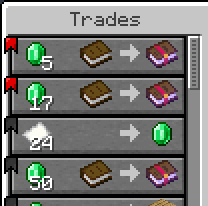
点击交易旁边的书签图标即可将其固定在列表顶部。收藏记录会针对每个村民以及每个世界或服务器单独保存,因此当你再次回来时,你最喜爱的交易始终排在最前面。
🏷️ 在村民头顶查看收藏
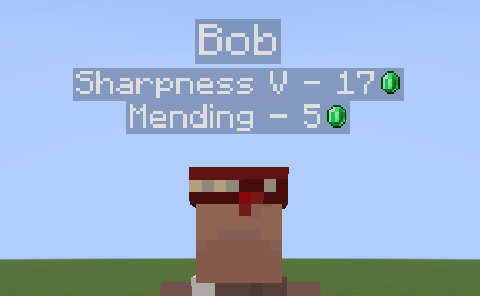
注视一个村民,其收藏的交易便会显示在其头顶上方(如果有名字则显示在名字下方)。再也不用打开交易大厅里的每一个村民来寻找拥有修补术的图书管理员了。
📚 高亮显示书籍
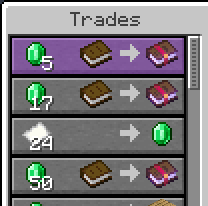
选择你正在寻找的附魔书,出售这些书的交易将会被高亮显示。非常适合用来重置图书管理员。默认选中“修补”和“耐久 III”。
💰 价格检查器
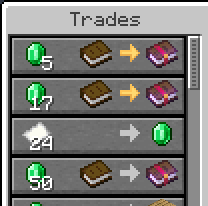
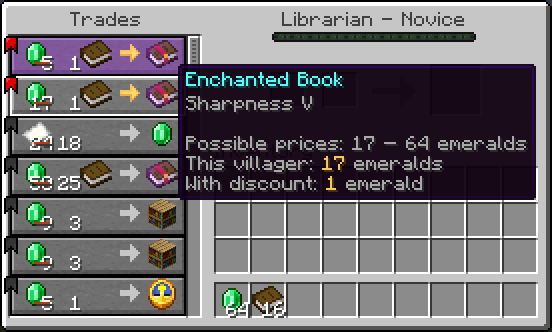
金色箭头标记出村民以最低可能价格出售的附魔书:默认为最便宜的 5%,你可以在设置中更改。它会参考该村民自身的基础价格,因此诸如“村庄英雄”之类的临时折扣不会让原本不划算的交易看起来很好。
将鼠标悬停在书上即可查看它所有可能的价格、该村民当前的要价,以及通过治愈该村民获得的持久折扣。
⚙️ 配置
通过 Mod Menu 打开设置界面。
- 启用书签:在交易旁显示书签图标。
- 启用书签标签:在你注视的村民上方显示已收藏的交易。关闭此项可在不使用标签的情况下继续使用书签功能。
- 启用高亮书籍:高亮显示在 Highlighted Books(高亮书籍)选项卡中选择的书籍。关闭此项不会影响你的选择设置。
- 启用价格检查器:显示金色箭头和价格提示框。
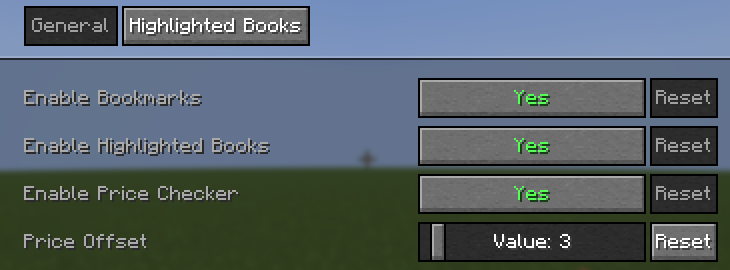
- 划算价格范围:从最便宜的价格开始计算,有多少比例的可能价格会被标记为金色箭头。默认值为 5%,这意味着无论书籍等级如何,大约每 20 个提供该书的村民中就有 1 个给出了划算的价格。最便宜的价格始终计入在内。
- 清除本世界的书签:清除你当前所在世界或服务器中的所有书签。其他世界和服务器的书签不受影响。需在世界内打开设置界面才能使用此功能。
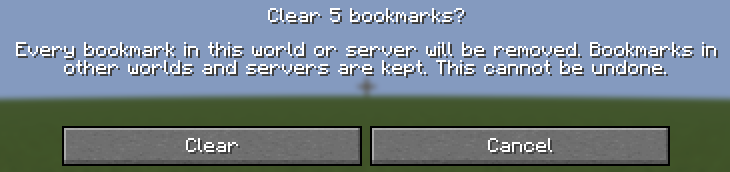
清除书签的操作不可撤销,因此系统会先进行确认。
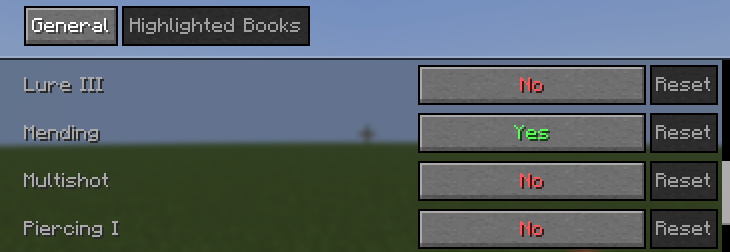
在 Highlighted Books(高亮书籍)选项卡中,列出了村民可以出售的所有附魔效果,每个等级对应一个切换开关。在搜索栏中输入文字可以快速查找书籍,或者按下 Turn All Off(全部关闭)重新开始。除非保存,否则任何更改都不会生效。
📦 依赖项
- Minecraft 26.3
- Fabric Loader 和 Fabric API
- Mod Menu (可选,用于打开设置界面)
Cloth Config 已包含在内。
📝 备注
- 书签保存在你的电脑上,因此它们可以在任何服务器上工作,并且会随着你一起保留。
- 发现漏洞或有新想法?提交 Issue。
- 你可以自由地将此模组添加到任何整合包中。
📜 Cherished Trades
Cherished Trades makes villager trading easier. Pin the trades you care about, spot the enchanted books you are hunting for, and see at a glance whether a price is a good deal.
It is a lightweight, client-side mod: it works in singleplayer and on any server, with nothing to install on the server.
✨ Features
🔖 Bookmark trades
Click the bookmark next to a trade to pin it to the top of the list. Bookmarks are remembered per villager and per world or server, so your favourite trades are always first when you come back.
🏷️ See bookmarks above villagers
Look at a villager and its bookmarked trades appear above its head, under its name if it has one. No more opening every villager in your trading hall to find the Mending librarian.
📚 Highlighted books
Choose the enchanted books you are looking for, and any trade selling one is highlighted. Great for rerolling librarians. Mending and Unbreaking III are selected by default.
💰 Price checker
A gold arrow marks enchanted books sold at one of the lowest prices a villager can roll: the cheapest 5% of them by default, which you can change in the settings. It looks at the villager's own price, so temporary discounts such as Hero of the Village don't make a bad deal look good.
Hover over a book to see every price it can have, what this villager asks, and the lasting discount you get from curing it.
⚙️ Configuration
Open the settings from Mod Menu.
- Enable Bookmarks: show the bookmark icons next to trades.
- Enable Bookmark Labels: show the bookmarked trades above the villager you are looking at. Turn it off to keep using bookmarks without the labels.
- Enable Highlighted Books: highlight the books picked in the Highlighted Books tab. Turning it off keeps your choices.
- Enable Price Checker: show the gold arrow and the price tooltip.
- Good Deal Range: how many of a book's possible prices get the gold arrow, starting from the cheapest. At the default 5%, about 1 in 20 villagers offering a book has it at a good price, whatever the book's level. The cheapest price always counts.
- Bookmarks in This World: clears every bookmark in the world or server you are playing on. Other worlds and servers keep theirs. Open the settings from inside a world to use it.
Clearing bookmarks can't be undone, so it asks first.
In the Highlighted Books tab, every enchantment villagers can sell is listed, one toggle per level. Type in the search bar to find a book quickly, or press Turn All Off to start over. Nothing changes until you save.
📦 Requirements
- Minecraft 26.3
- Fabric Loader and Fabric API
- Mod Menu (optional, to open the settings)
Cloth Config is already included.
📝 Notes
- Bookmarks are stored on your computer, so they work on any server and stay with you.
- Found a bug or have an idea? Open an issue.
- You are free to add this mod to any modpack.

下载 Cherished Trades
下载 Cherished Trades
下载 Cherished Trades
下载 Cherished Trades
下载 Cherished Trades
下载 Cherished Trades
新增
- 高亮书籍 标签页新增了搜索栏,无需滚动整个列表即可快速查找书籍。
- 高亮书籍 标签页新增了“全部关闭”按钮,可一键将所有书籍的标记取消。修改内容在保存前不会生效。
- 新增了“当前世界的书签”按钮,用于清除你所在世界或服务器中的所有书签。操作前会进行确认,其他世界和服务器的书签不受影响。
更改
- “价格偏移(Price Offset)”已替换为“优惠范围(Good Deal Range)”。不再使用固定的绿宝石数量作为判断标准,而是将书籍可能价格中最便宜的那一档视为优惠,从而对低等级和高等级书籍采用相同的评判方式。默认值为 5%。如果你之前修改过“价格偏移”,请重新设置“优惠范围”。
新增
- 新增「启用书签标签」设置,可在不使用村民上方标签的情况下继续使用书签功能。
修复
- 修复了书签标签在远距离或穿墙时仍显示的问题。现在其显示时机与名牌完全一致:仅在你近距离注视特定村民时显示,且当目标不可见或 HUD 被隐藏时将不再显示。
- 修复了从上方或下方观察村民时,村民名称与其书签标签之间出现的间距问题。
新增
- 注视村民可在其头顶上方、名字下方(若有名字)查看已收藏的交易。
- 将鼠标悬停在附魔书上来查看它可能拥有的所有价格、该村民的报价,以及治愈它后获得的持续折扣。
- 新增“启用高亮书籍”设置项,可关闭高亮显示而不丢失你的列表。
更改
- 高亮书籍现在通过各自设置标签页中的“是/否”切换开关来选择,而非输入名称。
- 默认情况下会高亮“经验修补”和“耐久 III”。
- 价格检查器现在会参考村民自身的价格,因此“村庄英雄”等临时折扣不再会让糟糕的交易看起来不错。
修复
- 添加高亮书籍的文本框不可见的问题已修复。
已更新至 Minecraft 26.3
新增
在模组设置中列出你想要的附魔书,匹配的交易所会高亮显示,让你一目了然。
关于这个资源的讨论、问题反馈与使用心得
还没有讨论,来发第一帖吧
你是这个资源的作者?登录后可认领此资源。
相似资源
 模组

显示你正在注视的方块的信息。(适用于 Minecraft 1.16+ 的 Hwyla/Waila 分支)
 模组
在游戏画面角落显示附近世界地形、玩家、生物和实体的地图。可创建路径点,帮助你找到标记过的位置。
 模组

查看物品与配方
 模组
使用 JavaScript 编辑配方、添加自定义物品、编写世界事件!
 模组
AE2:一款流行的自动化与存储模组
 模组
那是什么?一个 Waila/Hwyla 的分支。
评论 0
登录后参与评分
还没有评论,来抢沙发吧