
ChestESP
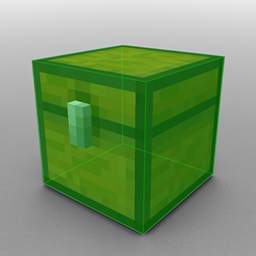
此模组会高亮显示附近的箱子,让你能够透视墙壁看到它们。它基于 Wurst Client 中同名功能。

在 WI Mods 上第一时间获取最新的 ChestESP 版本!(包含对 26.1.x 和 1.21.11 的支持)
安装方法
[重要提示:请务必确保你的加载器以及所有模组都适用于相同的 Minecraft 版本。如果混合使用不同版本的游戏将会崩溃。]
使用 Fabric 安装
1. 安装 Fabric Loader。
2. 将 Fabric API 添加到你的 mods 文件夹。
3. 将 ChestESP 添加到你的 mods 文件夹。
[注意:旧版本的 ChestESP 还需要你添加 Cloth Config 和 ModMenu 到你的 mods 文件夹。从 ChestESP 1.2 开始,你不再需要这样做。]
使用 NeoForge 安装
1. 安装 NeoForge。
2. 将 ChestESP 添加到你的 mods 文件夹。
使用方法
安装完成后,ChestESP 会自动高亮显示任何附近的箱子。
该模组还带有一个游戏内设置菜单,可以通过 Fabric 中的 ModMenu 或 NeoForge 内置的模组列表访问。
在设置菜单中,你可以:
- 更改高亮样式(方框、线条或两者都有)。
- 自定义每种容器的颜色。
- 切换特定容器类型的开启/关闭状态。
- 启用/禁用整个模组。
在“选项 > 控制 > 按键绑定”菜单中还有一个“切换 ChestESP”条目,允许你通过按下按钮快速启用/禁用模组。此功能默认未绑定任何按键。
支持的容器类型
ChestESP 支持以下容器类型:
- 箱子
- 陷阱箱
- 末影箱
- 桶
- 潜影盒
- 装饰陶罐
- 箱子矿车
- 箱子船
- 漏斗矿车
- 漏斗
- 投掷器
- 发射器
- 酿造台
- 熔炉
- 高炉
- 烟熏炉
并非所有这些容器默认都是启用的,以防止屏幕杂乱。请确保检查设置菜单并启用你想要的那些。
支持的语言
目前仅支持英语。
ChestESP
This mod highlights nearby chests so you can see them through walls. It's based on a Wurst Client feature of the same name.
Get the latest ChestESP versions as soon as they're released, only on WI Mods! (includes 26.1.x and 1.21.11 support)
Installation
[Important: Always make sure that your modloader and all of your mods are made for the same Minecraft version. Your game will crash if you mix different versions.]
Installation using Fabric
1. Install Fabric Loader.
2. Add Fabric API to your mods folder.
3. Add ChestESP to your mods folder.
[Note: Older ChestESP versions also required that you add Cloth Config and ModMenu to your mods folder. As of ChestESP 1.2, you no longer need to do this.]
Installation using NeoForge
1. Install NeoForge.
2. Add ChestESP to your mods folder.
Usage
Once installed, ChestESP will automatically highlight any nearby chests.
The mod also comes with an in-game settings menu that can be accessed through ModMenu in Fabric or the built-in mod list in NeoForge.
In the settings menu, you can:
- Change the style of the highlights (boxes, lines, or both).
- Customize the color of each container type.
- Toggle on/off specific container types.
- Enable/disable the entire mod.
There is also a "Toggle ChestESP" entry in the Options > Controls > Key Binds menu that allows you to quickly enable/disable the mod at the press of a button. This feature is not bound to any key by default.
Supported containers
ChestESP supports the following container types:
- Chests
- Trapped chests
- Ender chests
- Barrels
- Shulker boxes
- Decorated pots
- Chest minecarts
- Chest boats
- Hopper minecarts
- Hoppers
- Droppers
- Dispensers
- Crafters
- Furnaces
- Blast furnaces
- Smokers
Not all of these containers are enabled by default to prevent cluttering your screen. Be sure to check the settings menu and enable all the ones you want.
Supported languages
Only English for now.
下载 ChestESP
需要联机服务器吗?
稳定流畅、一键部署,几分钟即可和朋友联机开服
最低仅需 8 元/月 即可畅快联机
下载 ChestESP
需要联机服务器吗?
稳定流畅、一键部署,几分钟即可和朋友联机开服
最低仅需 8 元/月 即可畅快联机
下载 ChestESP
需要联机服务器吗?
稳定流畅、一键部署,几分钟即可和朋友联机开服
最低仅需 8 元/月 即可畅快联机
下载 ChestESP
需要联机服务器吗?
稳定流畅、一键部署,几分钟即可和朋友联机开服
最低仅需 8 元/月 即可畅快联机
下载 ChestESP
需要联机服务器吗?
稳定流畅、一键部署,几分钟即可和朋友联机开服
最低仅需 8 元/月 即可畅快联机
下载 ChestESP
需要联机服务器吗?
稳定流畅、一键部署,几分钟即可和朋友联机开服
最低仅需 8 元/月 即可畅快联机
下载 ChestESP
需要联机服务器吗?
稳定流畅、一键部署,几分钟即可和朋友联机开服
最低仅需 8 元/月 即可畅快联机
下载 ChestESP
需要联机服务器吗?
稳定流畅、一键部署,几分钟即可和朋友联机开服
最低仅需 8 元/月 即可畅快联机
下载 ChestESP
需要联机服务器吗?
稳定流畅、一键部署,几分钟即可和朋友联机开服
最低仅需 8 元/月 即可畅快联机
下载 ChestESP
需要联机服务器吗?
稳定流畅、一键部署,几分钟即可和朋友联机开服
最低仅需 8 元/月 即可畅快联机
更新日志位于:

关于这个资源的讨论、问题反馈与使用心得
还没有讨论,来发第一帖吧
你是这个资源的作者?登录后可认领此资源。
相似资源
 模组

显示你正在注视的方块的信息。(适用于 Minecraft 1.16+ 的 Hwyla/Waila 分支)
 模组

查看物品与配方
 模组
在游戏画面角落显示附近世界地形、玩家、生物和实体的地图。可创建路径点,帮助你找到标记过的位置。
 模组
使用 JavaScript 编辑配方、添加自定义物品、编写世界事件!
 模组
AE2:一款流行的自动化与存储模组
 模组
添加区块认领和玩家组队功能,并与 Xaero's Minimap 和 World Map 集成
评论 0
登录后参与评分
还没有评论,来抢沙发吧