
Chest Search
简介
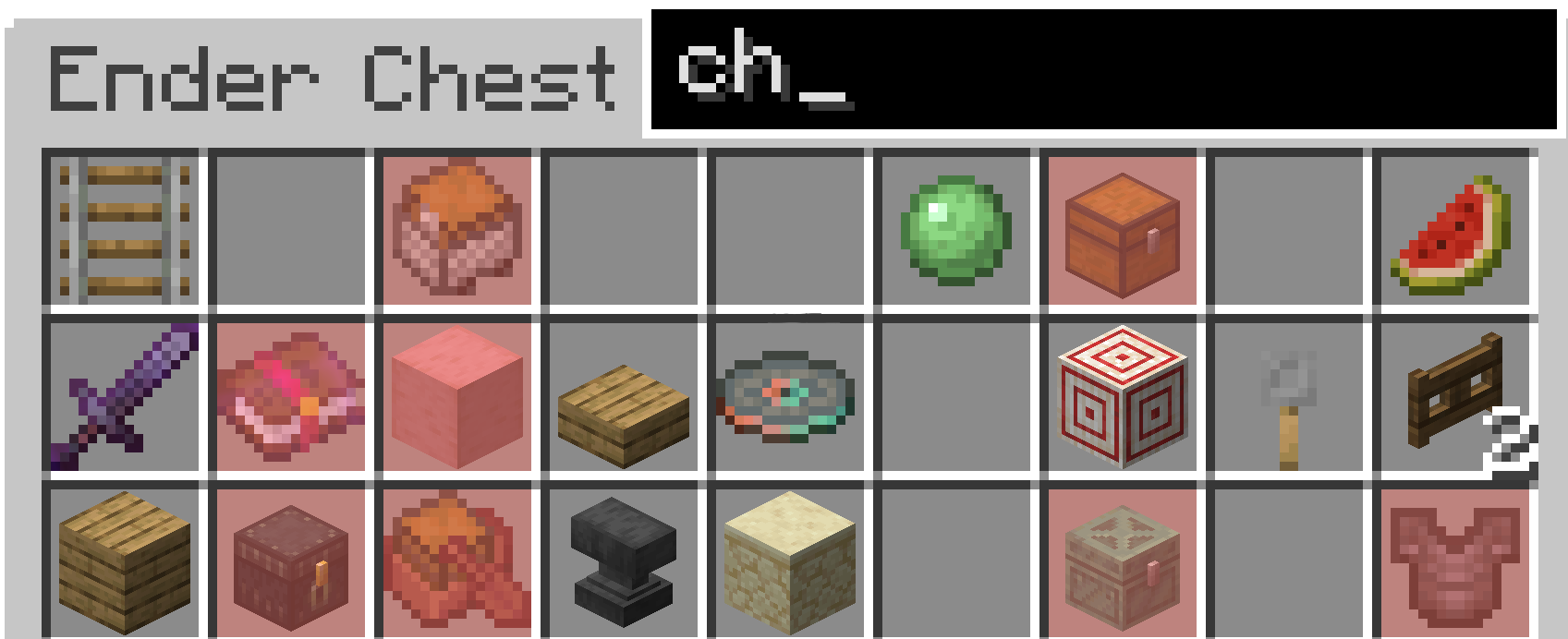
本模组添加了一个搜索栏,让你能够搜索箱子和潜影盒中的物品。它会使用 Mod Menu 中设定的颜色高亮显示与你输入内容匹配的物品。最酷的功能是你可以更改高亮颜色(前提是你已安装 Mod Menu 和 Cloth Config),以匹配你的资源包或个人游戏风格。操作方法是按 Esc -> Mods -> 搜索 “Chest Search” -> 点击 Settings -> 更改颜色。
从 1.2.0+ 版本开始
你现在可以搜索武器和书本上的附魔效果了。
安装
要在 Fabric 上安装此模组,首先你需要安装 Fabric 安装器。或者拥有 Modrinth 应用或其他类似的管理器。
Fabric (适用于单个版本)
Modrinth (适用于多个实例安装)
在成功安装了 Fabric 实例后,你需要导航到 mods 文件夹(Minecraft Launcher Fabric)或通过 Modrinth 启动器直接安装。
Fabric
Windows
在 Windows 上按下 WIN + R,在弹出的框中输入 appdata 然后回车。你应该能看到一个名为 .minecraft 的文件夹。进入该文件夹后,你会看到一个名为 mods 的文件夹。将对应版本的模组 .jar 文件放入其中。
Mac
打开 Finder 窗口。在顶部菜单栏,选择 Go → Go to folder。输入 "~/Library/Application Support/minecraft"。在该目录中放入对应版本的模组 .jar 文件。
Linux (Ubuntu 可能因发行版而异)
打开文件管理器并导航到 home 目录。在那里,按 CTR + H 显示隐藏文件夹。接着导航到 .minecraft 文件夹。然后进入 mods 文件夹,并将对应版本的模组 .jar 文件放入其中。
Modrinth
在 Modrinth 应用中,找到你的 Fabric 安装实例,应该会有一个名为 install mods 的标签页。点击它并搜索该项目。然后点击安装。如果遇到任何问题,网上有相关教程,但整个过程相当简单直接。
Chest Search
About
This mod adds a search bar to let you search through chest and shulker boxes. It will then highlight with a chosen colour in Mod Menu the items that match what you type. The coolest feature is you can change the colour (if you have modmenu and clothconfig installed to match either your resource pack or how you like to play the game. To do this hit Esc -> Mods -> Search "Chest Search" -> Click Settings -> Change Colour.
From 1.2.0+
You can now search for enchantments on weapons and books.
Installation
To install it on Fabric first you must install the Fabric installer. Or have the Modrinth app or a similar installation manager.
Fabric (for one version)
Modrinth (for multiple installations)
After having an instance of fabric installed, you must either navigate to the mods folder (Minecraft Launcher Fabric) or directly install it through the modrinth launcher.
Fabric
Windows
On Windows press WIN + R and in the box that shows up type appdata then hit enter. From there you should see a folder called .minecraft. Once inside there, you should see a folder called mods. In there put the mod .jar for the correct version.
Mac
Open Finder Window. In the top bar, select Go → Go to folder. Type in "~/Library/Application Support/minecraft". In there put the mod .jar for the correct version.
Linux (On Ubuntu could vary from distro)
Open Files and navigate to home. From there, press CTR + H to show hidden folders. From there, navigate to .minecraft. Then go to the mods folder and place the mod .jar for the correct version.
Modrinth
In the modrinth app go to your installation of fabric and there should be a tab called install mods. Click on this and search for this project. Then hit install. If you have trouble with this there are tutorials online, however it is quite straight forward.

下载 Chest Search
需要联机服务器吗?
稳定流畅、一键部署,几分钟即可和朋友联机开服
最低仅需 8 元/月 即可畅快联机
下载 Chest Search
下载 Chest Search
下载 Chest Search
需要联机服务器吗?
稳定流畅、一键部署,几分钟即可和朋友联机开服
最低仅需 8 元/月 即可畅快联机
下载 Chest Search
需要联机服务器吗?
稳定流畅、一键部署,几分钟即可和朋友联机开服
最低仅需 8 元/月 即可畅快联机
下载 Chest Search
需要联机服务器吗?
稳定流畅、一键部署,几分钟即可和朋友联机开服
最低仅需 8 元/月 即可畅快联机
下载 Chest Search
下载 Chest Search
需要联机服务器吗?
稳定流畅、一键部署,几分钟即可和朋友联机开服
最低仅需 8 元/月 即可畅快联机
下载 Chest Search
需要联机服务器吗?
稳定流畅、一键部署,几分钟即可和朋友联机开服
最低仅需 8 元/月 即可畅快联机
下载 Chest Search
需要联机服务器吗?
稳定流畅、一键部署,几分钟即可和朋友联机开服
最低仅需 8 元/月 即可畅快联机
修复 Windows 和 Linux 下的问题。
感谢 SlushyBoy1212 在 Github Issue 中报告该问题,以及 dima-dencep 协助解决该问题。
关于这个资源的讨论、问题反馈与使用心得
还没有讨论,来发第一帖吧
你是这个资源的作者?登录后可认领此资源。
相似资源
 模组

显示你正在注视的方块的信息。(适用于 Minecraft 1.16+ 的 Hwyla/Waila 分支)
 模组
使用 JavaScript 编辑配方、添加自定义物品、编写世界事件!
 模组

查看物品与配方
 模组
在游戏画面角落显示附近世界地形、玩家、生物和实体的地图。可创建路径点,帮助你找到标记过的位置。
 模组
AE2:一款流行的自动化与存储模组
 模组
那是什么?一个 Waila/Hwyla 的分支。
评论 0
登录后参与评分
还没有评论,来抢沙发吧