
更小的世界。更轻的存档。同样的游戏。
你探索的区域越多,你的世界就越大。Chunkis 为 Minecraft 提供了一种不同的区块存储方式:CIS,这是一种紧凑格式,旨在实现安全、可预测的保存和加载。
它不会添加方块、更改配方或改变渲染效果。你的世界仍然像原版 Minecraft 一样游玩。
Chunkis 的功能
- 紧凑存储区块,使用空间高效的区域文件。
- 后台保存,将编码和写入操作移至工作线程。
- 缓存最近卸载的区块,在你返回某个区域时提供帮助。
- 不仅保留方块数据,还包括方块实体、实体、结构、生物群系、光照和待处理刻(pending ticks)。
- 保护不可读条目,拒绝覆盖解码失败的区块。
- 迁移现有的单人世界,当你打开它们时进行迁移。
性能
在未限制线程数的测试中,Chunkis 比原版存储节省了 31% 的磁盘空间 和 26% 的堆内存占用。结果喜忧参半:tick p99 和重新加载延迟更低,而 tick p50、tick p90 和卸载 p50 更高(这是有意为之的设计,旨在分散负载,因此游戏平均运行速度 可能 会稍慢一点,但整体感觉更加一致)。
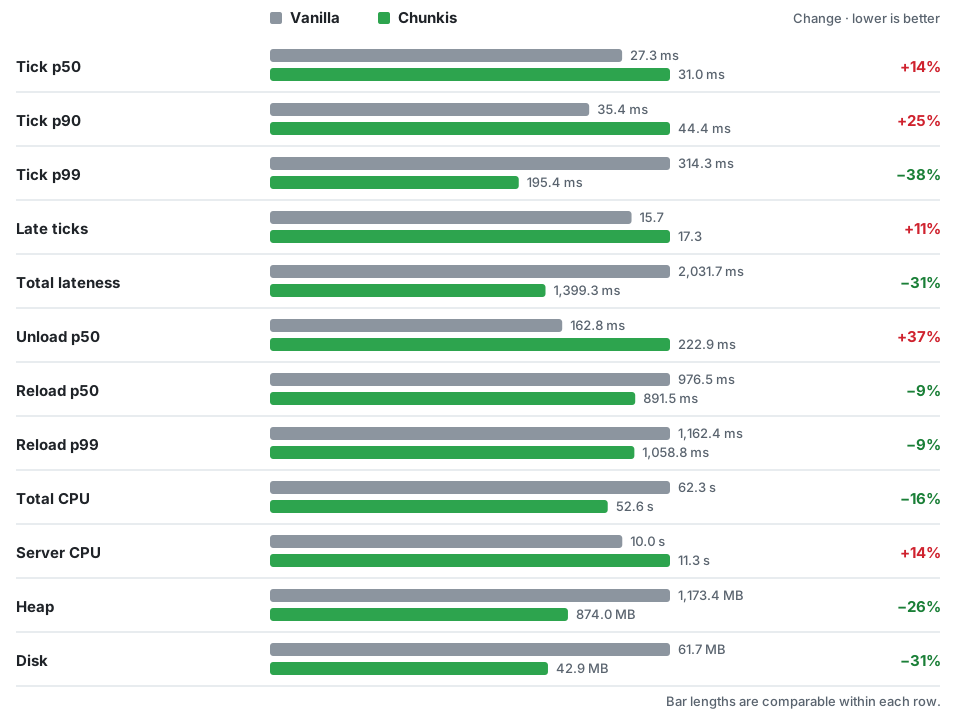
该测试卸载、重新加载、编辑并保存了一片 64 × 64 区块的自然地形区域。每个结果是每侧三次交替运行的平均值。测试机器配备 Ryzen 7 5700X(4.6 GHz)处理器和 32 GB DDR4-3600 内存。原版存储测试时仍加载了 Chunkis;磁盘测量在压缩整理之前进行。你的结果会根据你的世界、硬件和其他模组有所不同。
安装
需要: Minecraft 1.21.11、Java 21+、Fabric Loader 0.16.5+ 和 Fabric API。
- 备份你的世界,并将备份保存在安全的地方。
- 安装 Fabric Loader 和 Fabric API,然后将 Chunkis
.jar放入.minecraft/mods文件夹。 - 使用 Fabric 配置文件启动。现有的单人世界将在打开时进行迁移。
迁移是单向的。 移除 Chunkis 不会将 CIS 世界变回原版存档。若要恢复,请还原你在迁移前制作的备份。
Chunkis 处于测试阶段:请先在新世界或副本上尝试,重启后检查你的方块、箱子、实体和维度,然后再依赖它。
兼容性
- 单人和局域网: 支持。
- 专用服务器: 尚未测试;专用服务器上不提供现有世界迁移功能。
- 其他模组和工具: 请在副本上测试组合,特别是任何直接读取或写入原版
.mca文件或更改区块保存和加载内容的模组。
常见问题?
所有世界都会变小吗? 不一定。节省的空间取决于地形、建筑、实体和已安装的模组。
它会提高 FPS 吗? Chunkis 针对的是存储,而非渲染。它对帧率和 tick 性能的影响取决于工作量。
我可以使用现有世界吗? 可以,仅限单人模式。请先备份,如果以后想回到原版,请保留备份。
发现问题? 提交 Issue,附上你的 Minecraft 和 Fabric 版本、模组列表、复现步骤以及 latest.log(如果有崩溃报告也请附上)。
Smaller worlds. Lighter saves. Same game.
Your world grows with every area you explore. Chunkis gives Minecraft a different way to store those chunks: CIS, a compact format designed for safe, predictable saving and loading.
It doesn't add blocks, change recipes, or alter rendering. Your world still plays like Minecraft.
What Chunkis does
- Stores chunks compactly, using space-efficient region files.
- Saves in the background, moving encoding and writing to worker threads.
- Caches recently unloaded chunks, helping when you return to an area.
- Preserves more than blocks, including block entities, entities, structures, biomes, light, and pending ticks.
- Protects unreadable entries by refusing to overwrite a chunk that failed to decode.
- Migrates existing singleplayer worlds when you open them.
Performance
In one unpinned test, Chunkis used 31% less disk space and 26% less retained heap than vanilla storage. Results were mixed: tick p99 and reload latency were lower, while tick p50, tick p90, and unload p50 were higher (This is an intetional design to spread the load so the game might run slightly slower on avg but feels overall more consistent).
The test unloaded, reloaded, edited, and saved a 64 × 64 chunk area of natural terrain. Each result is the average of three alternating runs per side. The machine had a Ryzen 7 5700X at 4.6 GHz and 32 GB DDR4-3600 RAM. Vanilla storage was tested with Chunkis still loaded; disk was measured before shutdown compaction. Your results will vary with your world, hardware, and other mods.
See the full results · How the test works
Install
Requires: Minecraft 1.21.11, Java 21+, Fabric Loader 0.16.5+, and Fabric API.
- Back up your world and keep the backup somewhere safe.
- Install Fabric Loader and Fabric API, then put the Chunkis
.jarin your.minecraft/modsfolder. - Launch with the Fabric profile. An existing singleplayer world will migrate when opened.
Migration is one-way. Removing Chunkis does not turn a CIS world back into a vanilla save. To go back, restore the backup you made before migration.
Chunkis is beta software: try it on a copy or new world first, restart it, and check your blocks, chests, entities, and dimensions before relying on it.
Compatibility
- Singleplayer and LAN: supported.
- Dedicated servers: not tested yet; existing-world migration is not available on dedicated servers.
- Other mods and tools: test combinations on a copy, especially anything that reads or writes vanilla
.mcafiles directly or changes chunk saving and loading.
Questions?
Will every world be smaller? Not necessarily. Savings depend on terrain, builds, entities, and installed mods.
Will it improve FPS? Chunkis targets storage, not rendering. Its effect on frame rate and tick performance depends on the workload.
Can I use an existing world? Yes, in singleplayer. Back it up first and keep the backup if you may want to return to vanilla.
Found a problem? Open an issue with your Minecraft and Fabric versions, mod list, reproduction steps, and latest.log (plus a crash report if available).

下载 Chunkis
下载 Chunkis
下载 Chunkis
下载 Chunkis
下载 Chunkis
下载 Chunkis
下载 Chunkis
下载 Chunkis
下载 Chunkis
下载 Chunkis
修复了掉落物品和实体无法正确还原的问题。如果您使用的是 4.2.0 版本,请更新到最新版本。物品和实体并未丢失,它们依然安全!
与 3.0.0 相比,这是一次重大的持久性和稳定性更新。
亮点
- 引入了更权威的 CIS 快照还原功能。
- 提升了方块实体、实体、元数据和区块重载的持久性。
- 增加了对不安全或损坏存档的更强保护。
- 改进了 MCA 到 CIS 的迁移以及维度存储处理。
- 优化了区块捕获、解码、还原、压缩和预加载。
- 减少了重复的客户端区块数据并简化了客户端同步。
- 提高了与 Lithium 及其他优化模组的兼容性。
- 增加了扩展调试、耐久性测试、存储报告和追踪工具。
- 重组了内部架构并改进了构建/测试验证。
- 添加了带有可下载 JAR 工件的自动化 CI 构建。
- 将管理工具归类于
/chunkis下。
关于这个资源的讨论、问题反馈与使用心得
还没有讨论,来发第一帖吧
你是这个资源的作者?登录后可认领此资源。
相似资源
 模组
缓冲的原始输入和线程化的事件轮询
 模组

显示你正在注视的方块的信息。(适用于 Minecraft 1.16+ 的 Hwyla/Waila 分支)
 模组

查看物品与配方
 模组

原版世界生成优化模组
 模组
在游戏画面角落显示附近世界地形、玩家、生物和实体的地图。可创建路径点,帮助你找到标记过的位置。
 模组
使用 JavaScript 编辑配方、添加自定义物品、编写世界事件!
评论 0
登录后参与评分
还没有评论,来抢沙发吧