
Citrus 模组有什么功能? ?
Citrus 会添加一个极简且简洁的 HUD(抬头显示),用于向用户展示游戏中对象/生物的相关信息。
查看画廊以了解在观察不同对象时显示的信息。

模组显示哪些信息? ?
该模组会根据你注视的目标显示少量不同类型的信息。
方块:
方块名称及物品纹理。
物品:
掉落物品的名称、纹理,以及地面上的数量。
生物:
生物名称及其当前生命值 / 最大生命值。
护甲信息 (Citrus 1.2.0+):
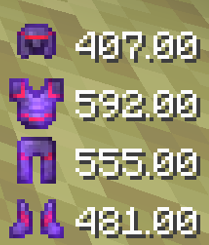
当用户穿上护甲部件时,该护甲部件的生命值将以百分比或数值形式显示。
护甲耐久度 HUD (抬头显示) ?
要使用此功能,请确保下载 Citrus 1.2.0 或更高版本。它会在右下角添加一个 HUD,显示你所穿戴护甲的状态。显示的生命值采用颜色编码:
- 白色 ? (耐久度 51-100%)
- 橙色 ? (耐久度 11-50%)
- 红色 ❤️ (耐久度 0-10%)
显示的生命值可以设置为百分比或数值。
如何开启或关闭特定的 HUD 元素? ?
Citrus 1.2.0+ 使用 Mod Menu,这是一个让你查看和配置已安装模组设置的模组。Mod Menu 对于 Citrus 是可选的,但如果你想更改以下设置,则必须安装它。
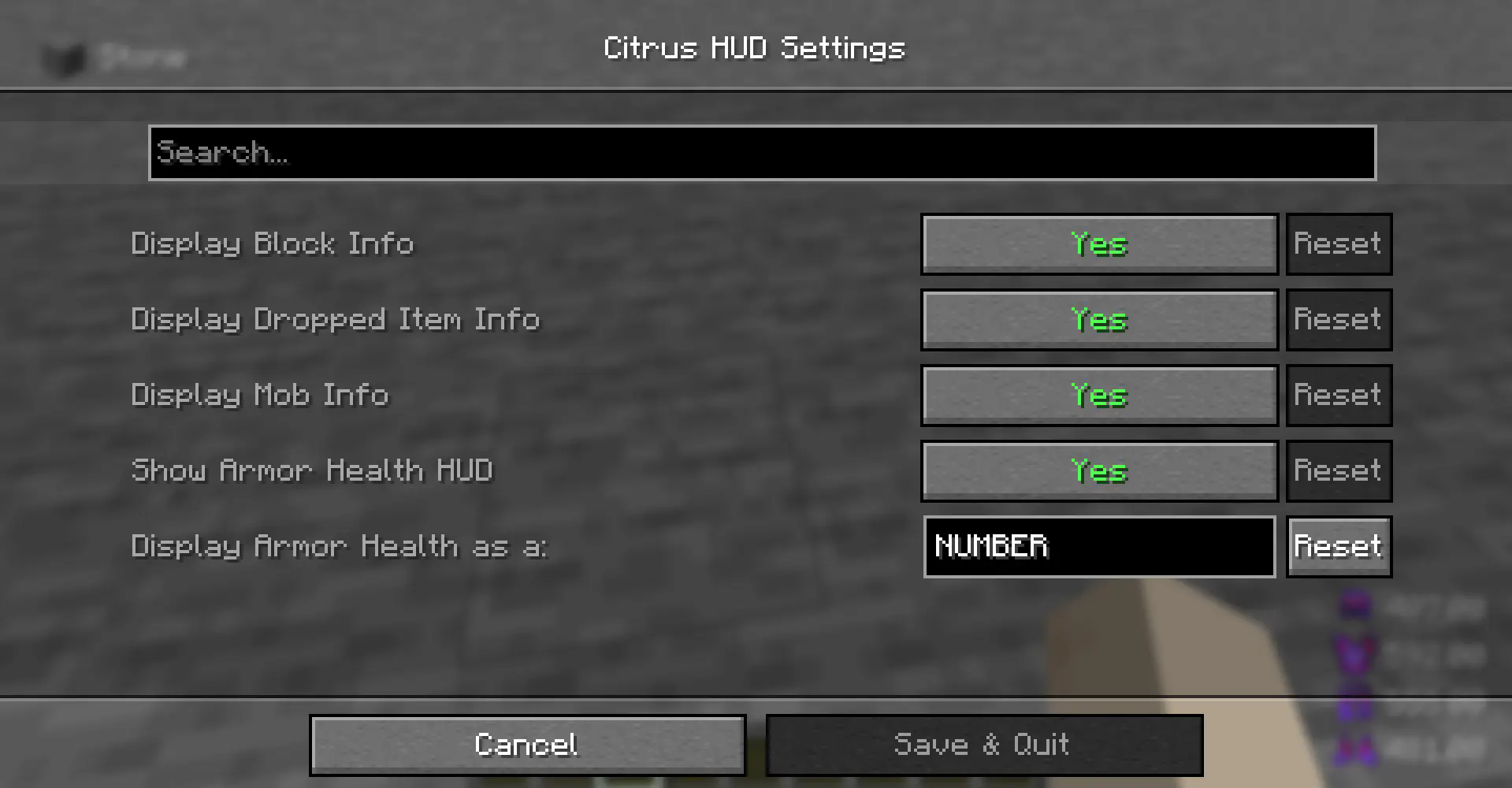
配置 Citrus 1.2.0+ 的步骤:
-
确保安装了 Mod Menu 和 Citrus
-
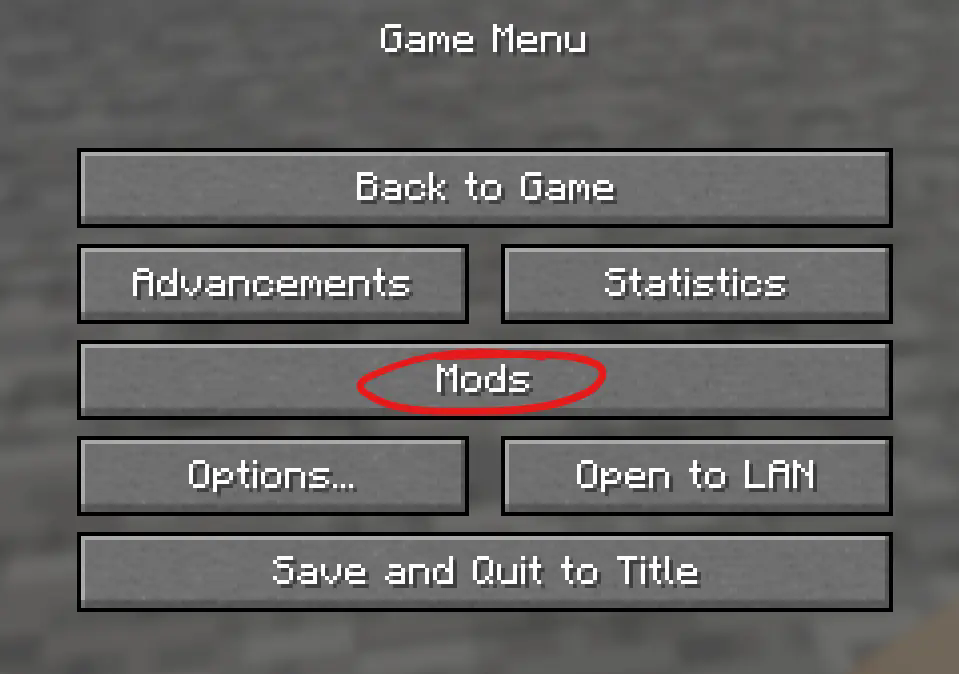
在主页面/暂停界面查找“Mods”按钮
-
在 Mod Menu 中找到 Citrus 并按下“Configure”按钮。
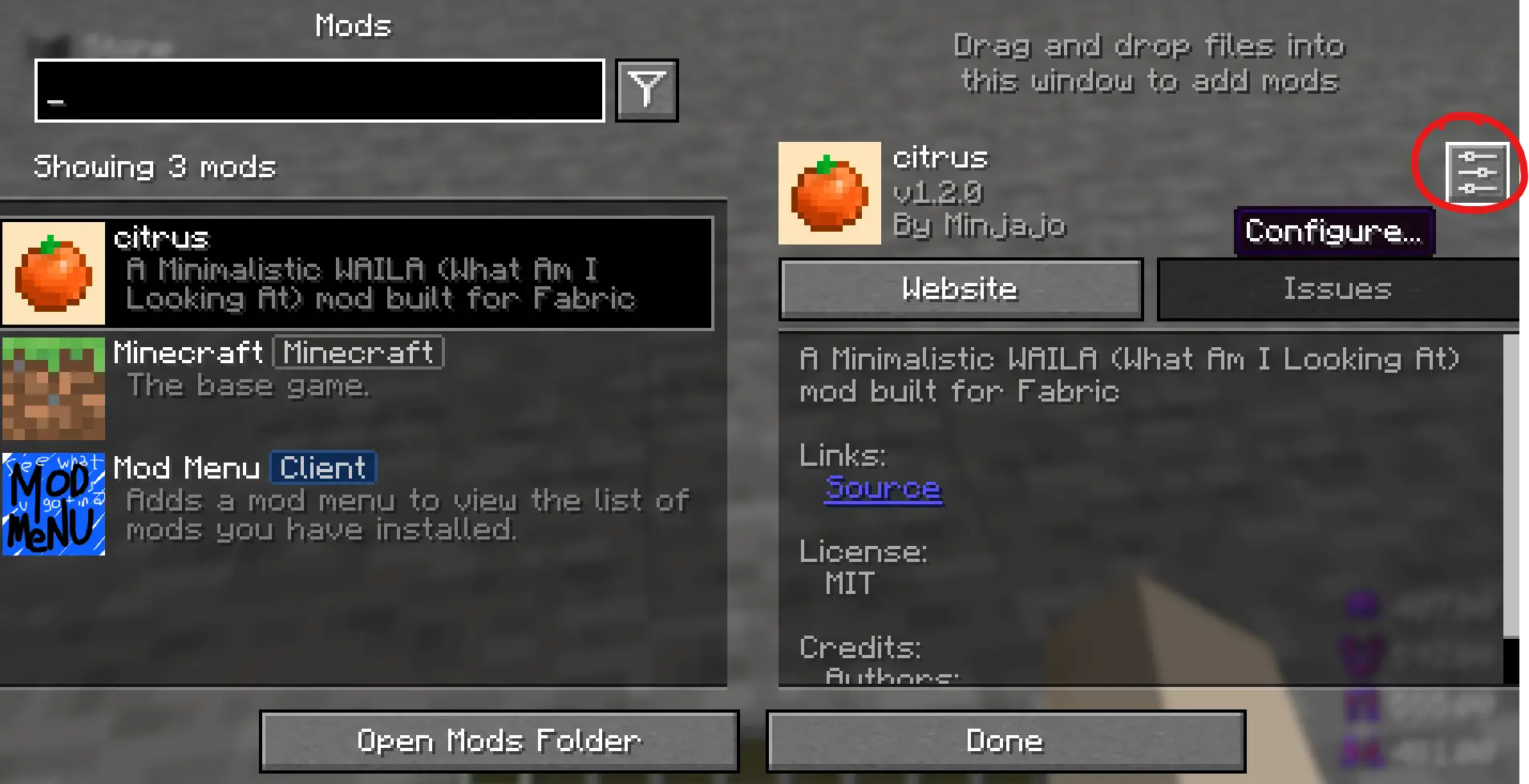
这将带你进入配置页面。 感谢试用 Citrus! ??
What does the Citrus mod do? ?
Citrus will add a minimalistic and simple HUD (Heads Up Display) which shows the user information about objects/mobs in game.
Take a look at the gallery to see the information shown when looking at different objects.
What information does the mod display? ?
The mod displays a small variety of information based on what you're looking at.
Blocks:
The block name, and item texture.
Items:
The dropped item's name, texture, as well as the number of that item on the floor.
Mobs:
The mob's name, as well as its current health / max health.
Armor Info (Citrus 1.2.0+):
When the user puts on a piece of armor, the health of that piece of armor will show as either a percentage or a number.
Armor Durability HUD (Heads up Display) ?
For this feature, make sure you download Citrus 1.2.0 or later. Adds a HUD on the bottom right showing the status of the armor that you're wearing. The Displayed health is color coded:
- White ? (51-100% durability)
- Orange ? (11-50% durability)
- Red ❤️ (0-10% durability)
The displayed health can be set to either a percent or a number.
How do I toggle certain HUD elements on or off? ?
Citrus 1.2.0+ uses Mod Menu, a mod that lets you view and configure the settings of the mods you have installed. Mod Menu is optional for Citrus but it is required if you would like to change the settings shown below.
To configure Citrus 1.2.0+,
-
Make sure you install Mod Menu along with Citrus
-
Look for the Mods button on your homepage/escape screen
-
Locate Citrus in the Mod Menu and press the Configure button.
That will take you to the configuration page. Thank you for trying Citrus! ??

下载 Citrus
下载 Citrus
下载 Citrus
下载 Citrus
下载 Citrus
下载 Citrus
下载 Citrus
小型设置功能
关于这个资源的讨论、问题反馈与使用心得
还没有讨论,来发第一帖吧
你是这个资源的作者?登录后可认领此资源。
相似资源
 模组

显示你正在注视的方块的信息。(适用于 Minecraft 1.16+ 的 Hwyla/Waila 分支)
 模组
使用 JavaScript 编辑配方、添加自定义物品、编写世界事件!
 模组

查看物品与配方
 模组
在游戏画面角落显示附近世界地形、玩家、生物和实体的地图。可创建路径点,帮助你找到标记过的位置。
 模组
AE2:一款流行的自动化与存储模组
 模组
那是什么?一个 Waila/Hwyla 的分支。
评论 0
登录后参与评分
还没有评论,来抢沙发吧