
将 硬件遮挡剔除 (HOC) 引入 Minecraft 实体渲染优化。
CLab 是一款客户端渲染优化模组。它利用 GPU OpenGL 遮挡查询来直接判断实体的可见性,从而消除了传统 CPU 端路径追踪固有的近似误差和副作用。
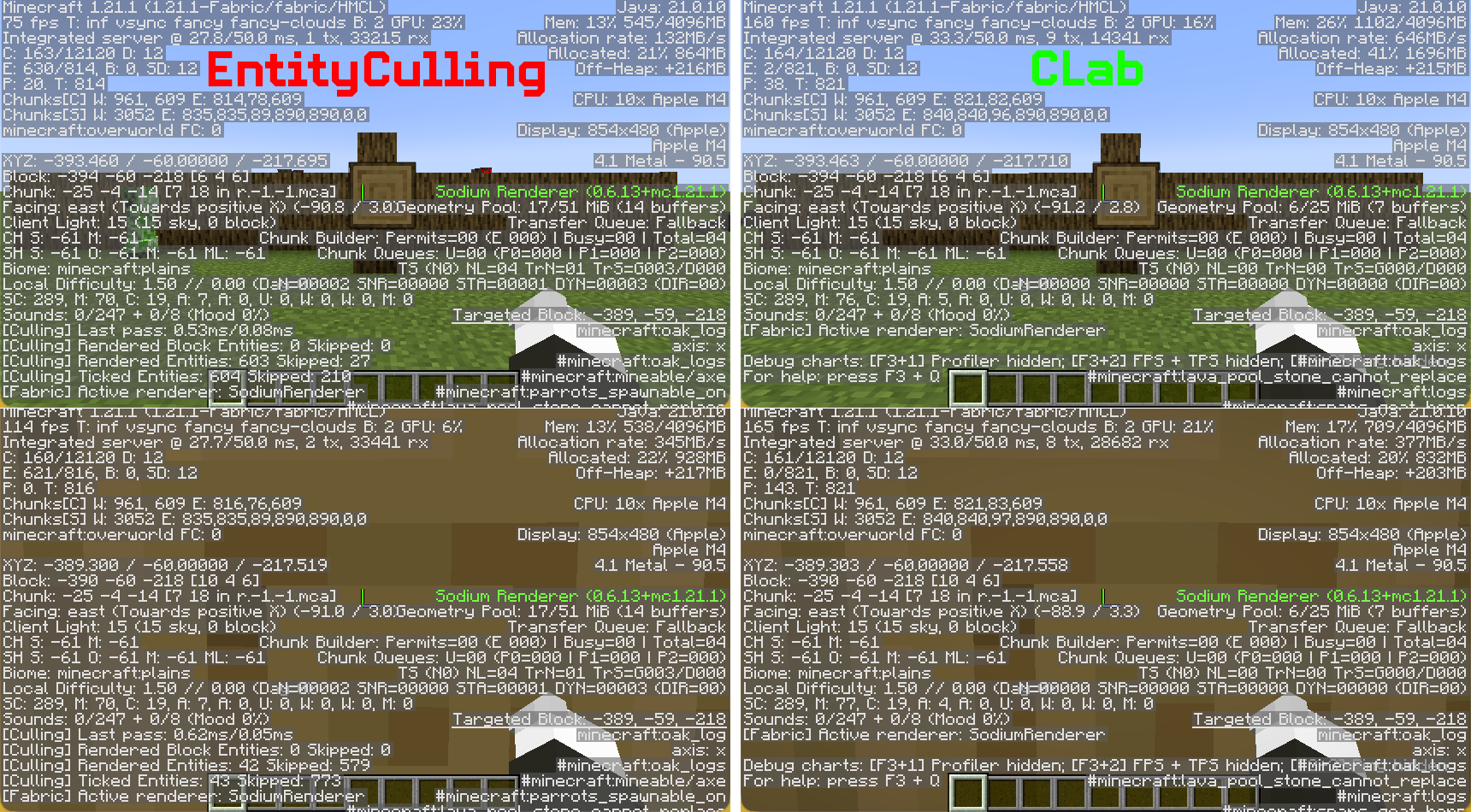
核心功能
-
硬件遮挡剔除 (HOC)
使用 GPU 查询来测试实体边界框与深度缓冲区的重叠情况,针对实际渲染的地形而非 CPU 端对世界模型的近似值来测量真实的遮挡关系。 -
零误判剔除
基于真实深度缓冲区的测试。只要实体有任何一个像素可见,就绝不会将其隐藏。无需白名单,也无需针对每个模组进行补丁修改。 -
仅作用于渲染层,零侵入性
仅决定是否调用实体渲染方法。不干扰客户端 Tick、动画状态、位置插值或任何逻辑。火车、载具和机械结构均表现正常。 -
内置树叶面片剔除
自动剔除被相邻树叶遮挡的树叶面片,降低地形渲染开销。 -
零配置,开箱即用
无需实体白名单,无需距离阈值,无需 Tick 剔除开关。安装即可游玩。
技术概览
CLab 使用 硬件遮挡剔除 (HOC):
- 在实体渲染期间,将实体边界框作为遮挡查询(OpenGL Query)提交给 GPU。
- GPU 在硬件层面将边界框与已渲染的地形深度缓冲区进行比较。
- 读取上一帧的查询结果:如果没有像素通过深度测试,则跳过该实体的渲染。
这带来了根本性的差异:
| 方面 | CPU 路径追踪 | CLab HOC |
|---|---|---|
| 遮挡依据 | 对世界模型的简化假设 | 实际的 GPU 渲染深度缓冲区 |
| 误判(隐藏可见实体) | 常见(靠近非固体方块时) | 极不可能发生 |
| 实体 Tick/动画 | 经常冻结或跳过 | 完全不受影响 |
| CPU 开销 | 持续的后台遍历 | 渲染线程仅提交 AABB;其余由 GPU 异步处理 |
| 所需配置 | 需要白名单、距离限制、阈值等补偿机制 | 无需任何配置 |
⚠️ 重要兼容性说明
- 硬件要求: CLab 需要具有 OpenGL 3.3 或更高版本 的独立显卡。大多数现代 GPU 都满足此要求,但某些较旧的集成显卡或过时的驱动程序可能不支持。
- 不要与其他实体剔除模组一起使用: CLab 不应 与 EntityCulling 或任何其他修改实体/区块实体可见性的模组同时安装。虽然这些模组使用不同的技术,但它们最终都会覆盖相同的可见性决策。运行多个此类模组不会提升性能——相反,它们可能会发生冲突并相互抵消优化效果,导致资源浪费和潜在的视觉不一致。为了获得最佳效果,请仅保留 CLab 处于激活状态。
兼容性与未来优化
选择当前的方法是为了保持对旧设备和 macOS 系统的兼容性。虽然有一种更先进的技术可用,但它会在这些系统上引入兼容性问题。目前的开发和测试均在 Mac 上进行,这限制了我在当前阶段能做出的改进幅度。我计划很快切换到支持 OpenGL 4.6 的设备,之后我将引入一种在加载时自动选择最优方法的系统。
Bringing Hardware Occlusion Culling (HOC) to Minecraft entity rendering optimization.
CLab is a client-side rendering optimization mod. It leverages GPU OpenGL occlusion queries to determine entity visibility directly, eliminating the approximation errors and side effects inherent to traditional CPU-side pathtracing.
Core Features
-
Hardware Occlusion Culling (HOC)
Uses GPU queries to test entity bounding boxes against the depth buffer, measuring real occlusion against actually rendered terrain rather than CPU-side approximations of the world model. -
Zero False-Positive Culling
Based on ground-truth depth buffer testing. An entity is never hidden if even a single pixel is visible. No whitelist needed, no per-mod patches required. -
Render-Layer Only, Zero Intrusion
Only decides whether to invoke the entity render method. Does not interfere with client-side ticks, animation states, position interpolation, or any logic. Trains, vehicles, and contraptions behave normally. -
Built-in Leaf Face Culling
Automatically culls leaf faces occluded by adjacent leaves, reducing terrain rendering overhead. -
Zero-Config, Works Out of the Box
No entity whitelist, no distance threshold, no tick-culling toggle. Install and play.
Technical Overview
CLab uses Hardware Occlusion Culling:
- During entity rendering, submit the entity bounding box to the GPU as an occlusion query (OpenGL Query).
- The GPU compares the bounding box against the already-rendered terrain depth buffer at the hardware level.
- Read the previous frame's query result: if no pixels passed the depth test, skip rendering this entity.
This creates a fundamental difference:
| Aspect | CPU Pathtracing | CLab HOC |
|---|---|---|
| Occlusion basis | Simplified assumptions about world model | Actual GPU-rendered depth buffer |
| False positives (hiding visible entities) | Common (near non-solid blocks) | Extremely unlikely |
| Entity tick/animation | Often frozen or skipped | Completely unaffected |
| CPU overhead | Continuous background traversal | Render thread submits AABB only; GPU handles the rest asynchronously |
| Configuration required | Whitelists, distance limits, thresholds as compensatory mechanisms | None required |
⚠️ Important Compatibility Notes
- Hardware Requirement: CLab requires a dedicated graphics card with OpenGL 3.3 or higher. Most modern GPUs meet this requirement, but certain older integrated graphics or outdated drivers may not.
- Do NOT use with other entity culling mods: CLab should not be installed alongside EntityCulling or any other mod that modifies entity/block entity visibility. While these mods use different techniques, they all ultimately override the same visibility decisions. Running more than one will not improve performance — instead, they may conflict and cancel out each other's optimizations, resulting in wasted resources and potential visual inconsistencies. For the best results, keep only CLab active.
Compatibility & Future Optimizations
The current approach was chosen to maintain compatibility with older devices and macOS. A more advanced technique is available, but it would introduce compatibility problems on those systems. Development and testing are currently done on a Mac, which limits how far I can improve things today. I plan to transition to a machine with OpenGL 4.6 support soon, after which I’ll introduce a system that automatically selects the optimal method during loading.

下载 CLab
需要联机服务器吗?
稳定流畅、一键部署,几分钟即可和朋友联机开服
最低仅需 8 元/月 即可畅快联机
下载 CLab
下载 CLab
下载 CLab
下载 CLab
下载 CLab
下载 CLab
下载 CLab
下载 CLab
下载 CLab
功能(渲染器):为方块实体添加硬件遮挡剔除
- 实现了基于 OpenGL 查询的可见性检测 HardwareOcclusionBlockEntityCuller
- 添加了 BlockEntityCullingManager,用于处理方块实体的注册和剔除逻辑
- 通过 MixinBlockEntityRenderDispatcher 将方块实体剔除集成到渲染管线中
- 增强了 MixinLevelRenderer,使其在渲染阶段后处理方块实体查询
- 添加了基于距离的查询频率调整和结果批处理支持
- 实现了带有查询池扩展和清理例程的正确资源管理
- 更新了 ClientClass,以便与实体剔除系统一起初始化和管理方块实体剔除系统
关于这个资源的讨论、问题反馈与使用心得
还没有讨论,来发第一帖吧
你是这个资源的作者?登录后可认领此资源。


评论 0
登录后参与评分
还没有评论,来抢沙发吧