
大家好,好消息!我找到了修复你 Minecraft 体验的秘诀。我将它们打包在这个模组里了。
这个模组添加了许多可选的调整项,以提升游戏过程中的生活质量(Quality of Life)。这些调整项可以单独启用或禁用,并进行配置。许多调整项默认处于禁用状态,因此请务必启用你想要的功能,以获得最佳体验。
此模组需要 Balm,必须与模组一同安装。
要在 Fabric 上访问配置界面,请安装一个支持配置界面的模组。

UI
主音量滑块
将主音量滑块重新添加回主选项屏幕。节省了一次点击操作。
音乐音量滑块
也将音乐滑块重新添加回主选项屏幕,因为有时候音乐确实是你想要调整的内容。
优先显示经验条
优先显示经验条信息,而不是定位器栏。如果你两者都关心,可以通过按键绑定进行切换。
渲染
仅持武器时显示盾牌
除非你手持武器,否则防止副手盾牌渲染。
仅格挡时显示盾牌
除非你正在主动格挡,否则防止副手盾牌渲染。
隐藏副手物品
防止副手中的物品渲染,以防你讨厌看到自己拿着什么。这也可以通过按键绑定进行切换,以防你只是偶尔讨厌看到自己拿着的东西。
隐藏空的主手
在第一人称视角下隐藏你空置的主手。毕竟谁需要一个闲置的手呢?
隐藏双手
无论手中是否持有物品,隐藏所有双手。这可以通过按键绑定进行切换。
隐藏自身药水粒子效果
在第一人称视角下隐藏自身的药水效果粒子。其他玩家仍会正常看到它们。
隐藏自身药水粒子效果(第三人称)
在第三人称视角下也隐藏自身的药水效果粒子。其他玩家仍会正常看到它们。
移动性
自动攀爬梯子
我经常建造非常长的梯子下到矿洞,而在爬回地面时需要一直按住按键,这很麻烦。开启此调整后,只要你在梯子上向上看,就会继续向上攀爬。这意味着你可以在聊天中输入内容并做其他事情,而不会立即摔落并失去长途跋涉中的所有进度。
禁用台阶辅助
有些人讨厌台阶辅助功能,但有时那些提供台阶辅助的物品还附带一些我们想要的酷炫加成。因此,此选项允许你仅禁用台阶辅助部分。可选按键绑定用于切换。
响应式疾跑按键
当释放疾跑按键或关闭疾跑开关时停止疾跑。配合吹向你风扇可实现完全沉浸感。
采矿
不使用最后一点耐久度(修补术)
防止具有“修补术”附魔的工具使用其最后一点耐久度。现在安全了,毁灭之镐。
防止意外挖掘
除非你按住 Shift 键,否则防止意外挖掘某些脆弱方块,如紫水晶芽。
建筑
栏杆和玻璃板建筑支持
当你手持匹配的方块时,增加铁栏杆和玻璃板的碰撞箱,使它们更容易彼此放置在一起。
链条建筑支持
当你手持链条方块时,增加链条的碰撞箱,使它们更容易彼此放置在一起。
交互
禁用原木去皮
完全禁用原木去皮功能。当你使用木材建造且手中经常拿着斧头类工具时很有用,可防止意外去皮。可通过按键绑定进行切换。
原木去皮需按住 Shift
仅在按住 Shift 键时才允许原木去皮,以免意外的右键点击破坏你的墙壁结构。
副手持方块时禁用铺路
当副手持有一个方块时,防止铲子创建路径。
主手持食物时禁用副手使用物品
当主手持食物时,防止从副手使用物品。
未在空中时禁用副手烟花(鞘翅)
如果你穿着鞘翅但未在空中飞行,则防止从副手发射烟花。
甜浆果放置需按住 Shift
除非你按住 Shift 键,否则防止放置甜浆果。
火把
不使用最后一个火把
此选项在使用添加动态光照模组的场景中很有用。副手中的最后一个火把将无法放置,这样你总能随身携带光源。
完全不使用副手火把
完全禁用从副手放置火把。如果你仅在副手持火把用于动态光照等用途,此选项非常有用。
主手持方块时禁用副手火把
如果你在主手持有一个方块,则拒绝放置火把。因为在这种情况下,你绝对不打算放置火把。可能只是有什么东西挡住了你想放置该方块的位置,但由于火把较小所以能塞进去。已为你修复此问题。
主手持食物时禁用副手火把
当主手持食物时,防止你从副手放置火把。退散吧,午饭后仪式用的火把。
主手为空时禁用副手火把
你知道那种感觉吗?当你累了,试图打开箱子却误点了旁边的方块?当然你副手里还拿着火把。当然它就放置了。现在你又得把它挖掉。唉。此选项仅允许在主手不为空时放置火把。
仅持有工具时允许副手放置火把
这是我认为是最佳的选项,但它改变了原版行为太多,因此不能作为默认设置。这将仅允许在你手持工具时从副手放置火把。从此再也不会有意外的火把放置了。
创造模式
创造模式破坏支持
增加创造模式下随机偏移方块的碰撞箱,使其更容易快速破坏。
清除创造模式菜单搜索栏
使右键点击创造模式菜单的搜索栏时将其清空,如同大多数其他文本字段一样。
保留创造模式菜单搜索内容
在重新打开创造模式搜索标签页时,保留你的搜索文本。
配方书
阻止配方书移动物品栏
防止打开配方书时移动物品栏。在使用较小的 GUI 缩放和较高分辨率时效果最佳。
清除配方书搜索栏
使右键点击配方书的搜索栏时将其清空,如同大多数其他文本字段一样。
导航至幽灵成分
允许你点击合成表中的幽灵成分以跳转到其对应的配方(在配方书中)。按退格键可返回上一个配方。简而言之,现在你的配方书可以像 JEI 一样使用了。
保留配方书搜索内容
在重新打开配方书时,保留你的搜索文本。
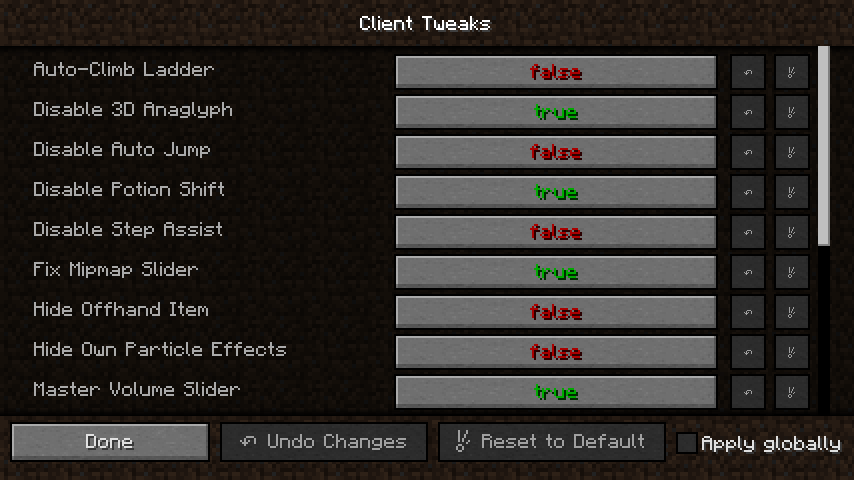
Good news everyone, I've found the secrets to fixing your Minecraft experience. I've bundled them in this mod.
This mod adds a bunch of optional tweaks to improve the Quality of Life during gameplay. Tweaks can be individually enabled or disabled and configured. Many of the tweaks are disabled by default, so make sure to enable the features you want for the most bestest experience possible.
This mod requires Balm, which must be installed alongside the mod.
To access the config screen on Fabric, install a supported config screen mod.
UI
Master Volume Slider
Adds the Master Volume slider back to the main options screen. Saved you a click.
Music Volume Slider
Adds the Music slider back to the main options screen too, because sometimes the music is the thing you wanted to change after all.
Prioritize Experience Bar
Prioritizes the experience bar info over the locator bar. Can be toggled with a keybind if you care about both.
Rendering
Hide Shield Unless Holding Weapon
Prevents shields from rendering in your offhand unless you are holding a weapon.
Hide Shield Unless Blocking
Prevents shields from rendering in your offhand unless you are actively blocking.
Hide Offhand Item
Prevents the item in your offhand from rendering, in case you hate seeing what you're holding. This can be toggled by a keybind too, in case you only hate seeing what you're holding sometimes.
Hide Empty Main Hand
Hides your empty main hand in first person. Who needs an unused hand anyways?
Hide Hands
Hides all of your hands regardless of whether they hold an item. This can be toggled by a keybind.
Hide Own Effect Particles
Hides your own potion effect particles in first person. Other players will still see them normally.
Hide Own Effect Particles (3rd Person)
Hides your own potion effect particles in third person as well. Other players will still see them normally.
Mobility
Auto Climb Ladder
I often make really long ladders down to my mine, and it's a pain having to hold down a key the whole time while climbing back up. With this tweak on, you will continue to climb upwards as long as you look upwards while on a ladder. That means you can type in chat and do other things without instantly falling back down and losing all of your progress on the long journey.
Disable Step Assist
There's people who hate step assist, but sometimes those step-assist granting items add some other cool perks that we want. So this option lets you disable the step-assist part only. With optional keybind to toggle.
Reactive Sprint Key
Makes sprinting stop when the sprint key is released or sprinting is toggled off. Combine with a fan blowing at you for full immersion.
Mining
Do Not Use Last Durability (Mending)
Prevents tools with Mending from using their last point of durability. You're safe now, Pickaxe of Doom.
Prevent Accidental Mining
Prevents accidental mining of certain fragile blocks like budding amethysts unless you are holding shift.
Building
Pane Building Support
Increases the hitbox of iron fences and glass panes when you're holding a matching block, making it easier to place them against each other.
Chain Building Support
Increases the hitbox of chains when you're holding a chain block, making it easier to place them against each other.
Interactions
Disable Log Stripping
Disables log stripping outright. Useful when you build using wood and have an axe-like tool in your hand a lot to prevent accidental strippings. Can be toggled with a keybind.
Log Stripping Requires Shift
Only allows log stripping while holding shift, so accidental right-clicks do not remodel your walls.
Disable Paving with Block in Offhand
Prevents shovels from creating paths when you have a block in your offhand.
No Offhand Use With Food
Prevents items from being used from your offhand while you have food in your main hand.
No Offhand Fireworks With Elytra Unless Airborne
Prevents fireworks from being launched from your offhand if you are wearing an Elytra, unless you're already flying.
Berry Placement Requires Shift
Prevents sweet berries from being placed unless you are holding shift.
Torches
Do Not Use Last Torch
This option is useful when using a mod adding dynamic lights. The last torch in your offhand will not be placeable, so you always have a light to carry around with you.
No Offhand Torch At All
Completely disables placing torches from your offhand. Useful if you only carry a torch in your offhand for things like dynamic lighting.
No Offhand Torch With Block
Refuses to place a torch if you're holding a block in your main hand. Because there's no way you intended to place a torch in that case. Something was just standing in the way of the spot you wanted to place that block in but the torch was fitting since it's smaller. Fixed it for ya.
No Offhand Torch With Food
Prevents you from placing a torch from your offhand when you have food in your main hand. Begone, ceremonial post-lunch torch.
No Offhand Torch With Empty Hand
You know that feeling when you're tired, try to open the chest but misclicked the block next to it? And of course you still had a torch in your offhand. And of course it placed it. And now you have to break it again. Ugh. This option only allows torches to be placed when your main hand is not empty.
Offhand Torch With Tool Only
This is the option I consider best, but it changes vanilla behavior too much to be the default. This will only allow placing torches from the offhand when you're holding a tool. No more accidental torch placement, ever again.
Creative Mode
Creative Breaking Support
Increases the hitbox of random-offset blocks in creative mode, making it easier to break them quickly.
Clear Creative Menu Search
Makes right-clicking the creative menu search bar clear it, like most other text fields do.
Retain Creative Menu Search
Keeps your creative menu search text when reopening the creative search tab.
Recipe Book
No Recipe Book Shifting
Prevents the recipe book from shifting the inventory when opened. Works best with smaller GUI scales and bigger resolutions.
Clear Recipe Book Search
Makes right-clicking the recipe book search bar clear it, like most other text fields do.
Navigate to Ghost Ingredients
Lets you click ghost ingredients in the crafting grid to navigate to their recipe in the recipe book. Backspace returns to the previous recipe. Or in short, your recipe book is JEI-ish now.
Retain Recipe Book Search
Keeps your recipe book search text when reopening the recipe book.

下载 Client Tweaks
需要联机服务器吗?
稳定流畅、一键部署,几分钟即可和朋友联机开服
最低仅需 8 元/月 即可畅快联机
下载 Client Tweaks
下载 Client Tweaks
需要联机服务器吗?
稳定流畅、一键部署,几分钟即可和朋友联机开服
最低仅需 8 元/月 即可畅快联机
下载 Client Tweaks
需要联机服务器吗?
稳定流畅、一键部署,几分钟即可和朋友联机开服
最低仅需 8 元/月 即可畅快联机
下载 Client Tweaks
需要联机服务器吗?
稳定流畅、一键部署,几分钟即可和朋友联机开服
最低仅需 8 元/月 即可畅快联机
下载 Client Tweaks
需要联机服务器吗?
稳定流畅、一键部署,几分钟即可和朋友联机开服
最低仅需 8 元/月 即可畅快联机
下载 Client Tweaks
需要联机服务器吗?
稳定流畅、一键部署,几分钟即可和朋友联机开服
最低仅需 8 元/月 即可畅快联机
下载 Client Tweaks
需要联机服务器吗?
稳定流畅、一键部署,几分钟即可和朋友联机开服
最低仅需 8 元/月 即可畅快联机
下载 Client Tweaks
需要联机服务器吗?
稳定流畅、一键部署,几分钟即可和朋友联机开服
最低仅需 8 元/月 即可畅快联机
下载 Client Tweaks
- 已更新至 Minecraft 26.3
关于这个资源的讨论、问题反馈与使用心得
还没有讨论,来发第一帖吧
你是这个资源的作者?登录后可认领此资源。
相似资源
 模组

显示你正在注视的方块的信息。(适用于 Minecraft 1.16+ 的 Hwyla/Waila 分支)
 模组
使用 JavaScript 编辑配方、添加自定义物品、编写世界事件!
 模组

查看物品与配方
 模组
在游戏画面角落显示附近世界地形、玩家、生物和实体的地图。可创建路径点,帮助你找到标记过的位置。
 模组
AE2:一款流行的自动化与存储模组
 模组
那是什么?一个 Waila/Hwyla 的分支。
评论 0
登录后参与评分
还没有评论,来抢沙发吧