
摘要
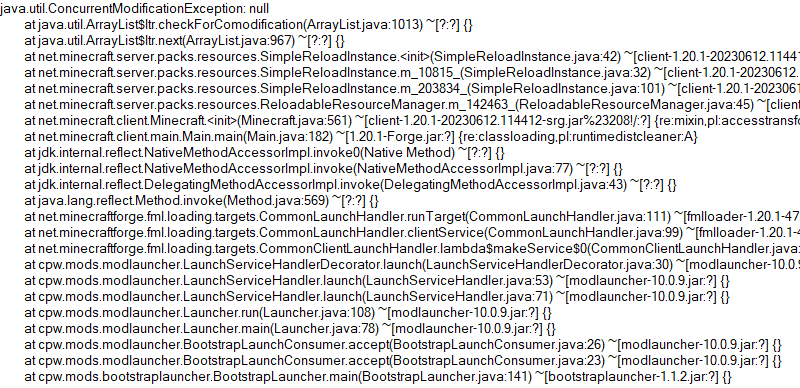
玩家和整合包开发者有时会发现游戏因 ConcurrentModificationExceptions (CME) 和 IndexOutOfBoundsExceptions (IOOBE) 而崩溃,这些异常仅给出当前线程的堆栈跟踪,难以追踪是哪个模组导致了它们。以下是由 SimpleReloadInstance 在 1.20.1 Forge 环境中引发的一次崩溃示例:
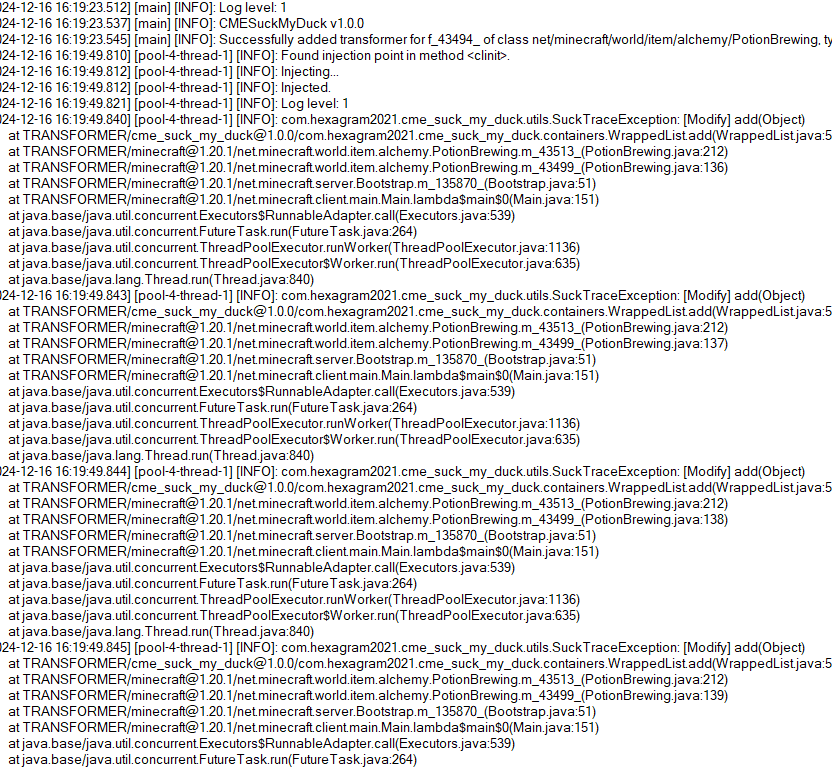
因此,本模组应运而生。正确安装此模组并将 javaagent 添加到 JVM 参数的玩家将收到特定集合修改历史的完整日志:
使用方法
首先,将此 jar 文件放入 mods 文件夹。
其次,编辑启动器中的 Java Virtual Machine Argument(JVM 参数)。添加 -javaagent:mods/CMESuckMyDuck-<version>.jar=<class full name>;<field name>;<type>;<phase>。
最后,运行游戏并游玩,直到崩溃发生。
其他 Java 项目的使用方法
本模组不仅可用于 Minecraft 调试,还可用于调试其他 Java 项目。与 Minecraft 类似,唯一的区别步骤是:在 javaagent 之前,你需要将 gson 和 asm jar 添加到类路径 (-cp);在 javaagent 之后,将我们的 CMESuckMyDuck-<version>.jar 添加到类路径。
参数说明
<class full name>
包含你想要监控的容器的类的完整名称。使用 \ 代替 .(即类的内部名称)。
<field name>
目标类中容器字段的名称,即你想要监控的对象。对于 Forge,请使用 SRG 名称;对于 Fabric,请使用 intermediary 名称;对于 NeoForge,请使用官方名称。
<type>
目前,我们仅支持三种容器:List、Set、Map。此参数指示被监控容器的类型。
<phase>
static 或 nonstatic。此参数指示该容器是静态字段还是非静态字段。
如何获取 <class full name> 和 <field name>
让我们从一个例子开始。
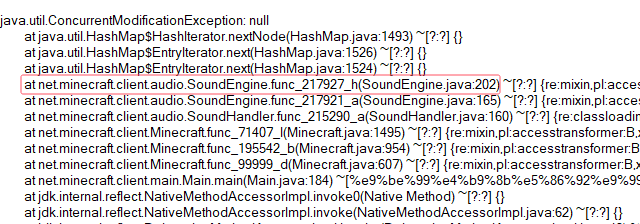
首先,查看 CME/IOOBE 的堆栈跟踪:
其次,阅读 SoundEngine 的源代码并确认哪个容器面临此问题:
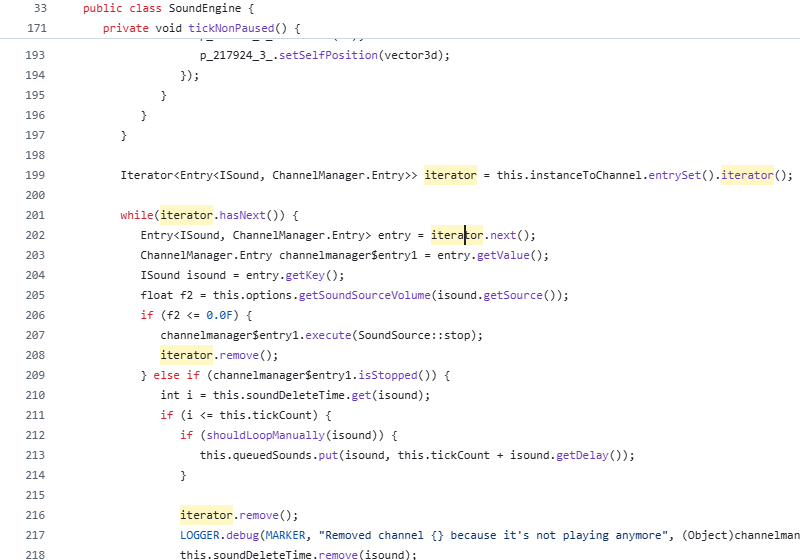
现在我们知道应该监控 SoundEngine 中的 map field_217942_m(即 instanceToChannel)。继续下一步。
第三,安装此模组,并将 "-javaagent:mods/CMESuckMyDuck-1.0.0.jar=net/minecraft/client/audio/SoundEngine;field_217942_m;Map;nonstatic" 添加到 Java Virtual Machine Argument。重新启动游戏并等待下一次崩溃。
最后,打开 CMESuckMyDuck.log 文件,你将看到是哪个线程和哪个模组并发修改了该容器。
示例 (JVM 参数)
Forge 1.16.5 环境中 SoundEngine 引发的 ConcurrentModificationException
-javaagent:mods/CMESuckMyDuck-1.0.0.jar=net/minecraft/client/audio/SoundEngine;field_217942_m;Map;nonstatic
Forge 1.20.1 环境中 PotionBrewing 引发的 ConcurrentModificationException
-javaagent:mods/CMESuckMyDuck-1.0.0.jar=net/minecraft/world/item/alchemy/PotionBrewing;f_43494_;List;static
Zeta 模组引发的 ArrayIndexOutOfBoundsException
-javaagent:CMESuckMyDuck-1.0.0.jar=org/violetmoon/zetaimplforge/event/ForgeZetaEventBus;convertedHandlers;Map;nonstatic
其他选项
日志级别 (Log Level)
使用系统属性 -Dcme_suck_my_duck.log_level=<level> 设置自定义日志级别。
默认值为 1,表示不记录任何调试消息。
用户可将其设置为 0 以输出调试消息,但这不推荐——当设置为 0 时,诸如 Map#get、Set#containsAll 等查询函数也会被记录,导致文件变得非常长。
ASM API 版本 (v1.0.2+)
为了保持与最新 Minecraft 版本的兼容性,本模组使用 asm 9.7 编译。对于较旧版本的 Minecraft(例如 1.12.2),无法应用如 ASM_9 这样的 API 级别操作,因此玩家需要使用 -Dcme_suck_my_duck.asm_api_version=<version> 来修改 ASM API 版本兼容性。例如,游戏版本 1.12.2:-Dcme_suck_my_duck.asm_api_version=5。
文件最大条目数 (File Max Entries, v1.0.3+)
由于我们注意到当崩溃发生时,日志末尾的最后几次操作比之前的操作更重要。因此,我们的模组在 v1.0.3 版本后采用了分页策略,仅在末尾保留最后两页。每页输出的日志数量(即操作调用栈的数量)是固定的,默认值为 500。玩家可以使用 -Dcme_suck_my_duck.file_max_entries=<size> 来修改每页的最大元素数量。
构造函数白名单 (Whitelist of Constructor, v1.0.3+)
有时,某个类中的容器在许多地方都被使用(例如 CompoundTag#tags)。直接使用该模组会导致日志过长,或者有效内容被后续操作覆盖。因此,玩家可以指定额外的构造函数白名单,以仅监控特定模组中对应类的相应容器。默认为空,即没有白名单。玩家可以使用 -Dcme_suck_my_duck.whitelist_constructor_stacktrace=<str> 进行指定。如果构建该容器的堆栈跟踪中的任何一行包含白名单字符串的内容,则该容器将被监控——否则,该容器不会被监控,这大大简化了日志输出信息。
转换为线程安全 (Transform to Thread Safe, v1.0.4+)
使用系统属性 -Dcme_suck_my_duck.transform_to_thread_safe=true 将该字段转换为线程安全的容器。
除非你喜欢性能下降且不想修复问题,否则不建议这样做。
注入方法 (Inject method, v1.0.4+)
使用系统属性 -Dcme_suck_my_duck.inject_method=true 切换到注入模式。
如果已设置,你应该使用 -javaagent:CMESuckMyDuck-<version>.jar=<class full name>;<method name>,并且每当调用此方法时,你将在日志文件中收到堆栈跟踪信息。
忽略线程 (v1.0.5+)
使用系统属性 -Dcme_suck_my_duck.ignore_threads=<thread name1>;<thread name2>;<thread name3>;... 来忽略某些预期会修改给定容器(或调用给定方法)的线程。例如,-Dcme_suck_my_duck.ignore_threads="Server thread"。
提前停止日志记录 (v1.0.7+)
使用系统属性 -Dcme_suck_my_duck.stop_logging_if_exception_created=false 在发生严重错误时停止日志记录。
Trace ID 更新器 (v1.0.8+)
使用系统属性 -Dcme_suck_my_duck.trace_id_updater=<class full name>;<method name> 在调用指定方法时更新 Trace ID。这在注入模式下可能非常有用。
监控局部变量 (v1.1.0+)
使用系统属性 -Dcme_suck_my_duck.local_var_index=<index> 来监控指定方法中给定索引处的局部变量。
如果设置了该参数,你应该使用 -javaagent:CMESuckMyDuck-<version>.jar=<类全名>;<方法名>;<类型>。顺便一提,索引可以被不同的局部变量复用。因此,你可能需要使用 -Dcme_suck_my_duck.match_local_index=<序数> 来指定 ASTORE <索引> 操作的序数,以指示要监控哪个局部变量。
结论
我喜欢吃北京烤鸭。它太美味了!

Abstract
Players and modpack developers sometimes find the game crashed with ConcurrentModificationExceptions (CME) and IndexOutOfBoundsExceptions (IOOBE), which only give stacktrace of current thread and are hard to trace which mod causes them. Here's one of the crashes which is caused by SimpleReloadInstance in 1.20.1 Forge:
So this is what the mod is developed for. Players who install this mod and add javaagent to JVM Argument correctly will receive a full log for modification history of a certain collection:
Usage
First, add this jar to mods folder.
Second, edit your Java Virtual Machine Argument in your launcher. Add -javaagent:mods/CMESuckMyDuck-<version>.jar=<class full name>;<field name>;<type>;<phase>.
Finally, run the game, play and wait until the crash happens.
Usage for Other Java Projects
This mod can not only be used for Minecraft debugging, but also be utilized to debug other java projects. Similar to Minecraft. The only different step is that you should add gson and asm jar to classpath (-cp) before javaagent, and add our CMESuckMyDuck-<version>.jar to classpath after javaagent.
Arguments
<class full name>
A full name of the class, which has a container that you would like to monitor. Use \ instead of . (a.k.a. the internal name of class).
<field name>
A field name of the container in target class, which you would like to monitor. For Forge, use SRG name. For Fabric, use intermediary name. For NeoForge, use official name.
<type>
Currently, we only support three containers: List, Set, Map. This argument indicates the type of monitored container.
<phase>
static or nonstatic. This argument indicates the container is a static field or non-static field.
How to get <class full name> and <field name>
Let's start with an example.
First, take a look at the stacktrace of CME/IOOBE:
Second, read the source code of SoundEngine and confirm which container is facing this issue:
Now we know we should monitor map field_217942_m (instanceToChannel in SoundEngine). Keep going.
Third, install this mod, and add "-javaagent:mods/CMESuckMyDuck-1.0.0.jar=net/minecraft/client/audio/SoundEngine;field_217942_m;Map;nonstatic" to Java Virtual Machine Argument. Relaunch the game and wait for the next crash.
Finally, open CMESuckMyDuck.log file and you will see which thread and which mod has concurrently modified the container.
Examples (JVM Arguments)
ConcurrentModificationException from SoundEngine in Forge 1.16.5 Environment
-javaagent:mods/CMESuckMyDuck-1.0.0.jar=net/minecraft/client/audio/SoundEngine;field_217942_m;Map;nonstatic
ConcurrentModificationException from PotionBrewing in Forge 1.20.1 Environment
-javaagent:mods/CMESuckMyDuck-1.0.0.jar=net/minecraft/world/item/alchemy/PotionBrewing;f_43494_;List;static
ArrayIndexOutOfBoundsException from Zeta mod
-javaagent:CMESuckMyDuck-1.0.0.jar=org/violetmoon/zetaimplforge/event/ForgeZetaEventBus;convertedHandlers;Map;nonstatic
Other options
Log Level
Use system property -Dcme_suck_my_duck.log_level=<level> to set custom log level.
Default 1, which means no debug message will be logged.
Users can set it to 0 to output debug message, which is not recommended - query functions like Map#get, Set#containsAll will also be logged when set to 0, and make the file very very long.
ASM API Version (v1.0.2+)
In order to maintain compatibility with the latest version of Minecraft, this mod is compiled with asm version 9.7. For older versions of Minecraft (such as 1.12.2), API level operations such as ASM_9 cannot be applied, so players need to use -Dcme_suck_my_duck.asm_api_version=<version> to modify the ASM API version compatibility. For example, game version 1.12.2: -Dcme_suck_my_duck.asm_api_version=5.
File Max Entries (v1.0.3+)
Since we notice that when crash happens, the last few operations in the log are much more important than the previous ones. So our mod adopts a paging strategy after v1.0.3, and only the last two pages are retained at the end. The number of logs output on each page (that is, the number of operation call stacks) is fixed, and the default value is 500. Players can use -Dcme_suck_my_duck.file_max_entries=<size> to modify the maximum number of elements on the page.
Whitelist of Constructor (v1.0.3+)
Sometimes a container in a certain class is used in many places (eg. CompoundTag#tags). Directly using this mod will cause the log to be too long or the valid content to be replaced by subsequent operations. Therefore, players can specify an additional constructor whitelist to monitor the corresponding container in the corresponding class of a specific module. The default is empty, that is, there is no whitelist. Players can use -Dcme_suck_my_duck.whitelist_constructor_stacktrace=<str> to specify it. If any line in the stack trace where the container is constructed includes the content of the whitelist string, the container will be monitored - otherwise, the container will not be monitored, which greatly simplifies the log output information.
Transform to Thread Safe (v1.0.4+)
Use system property -Dcme_suck_my_duck.transform_to_thread_safe=true to transform the field into a thread-safe container.
This is NOT recommended unless you like slowness and don't want to fix the problem.
Inject method (v1.0.4+)
Use system property -Dcme_suck_my_duck.inject_method=true to switch to inject mode.
If set, you should use -javaagent:CMESuckMyDuck-<version>.jar=<class full name>;<method name> and whenever this method is called, you will receive a stack trace in log files.
Ignore threads (v1.0.5+)
Use system property -Dcme_suck_my_duck.ignore_threads=<thread name1>;<thread name2>;<thread name3>;... to ignore some thread that is expected to modify the given container (or call the given method). For example, -Dcme_suck_my_duck.ignore_threads="Server thread".
Stop logging early (v1.0.7+)
Use system property -Dcme_suck_my_duck.stop_logging_if_exception_created=false to stop logging if critical error occurs.
Trace ID Updater (v1.0.8+)
Use system property -Dcme_suck_my_duck.trace_id_updater=<class full name>;<method name> to update trace ID when calling the given method. This might be useful in inject mode.
Monitoring Local Variables (v1.1.0+)
Use system property -Dcme_suck_my_duck.local_var_index=<index> to monitor local variable at given index in the given method.
If set, you should use -javaagent:CMESuckMyDuck-<version>.jar=<class full name>;<method name>;<type>. By the way, the index can be reused by different local variables. So you might have to use -Dcme_suck_my_duck.match_local_index=<ordinal> to specify the ordinal of ASTORE <index> operation to indicate which local variable to monitor.
Conclusion
I like eating peking duck. It's so delicious!

下载 CME is Bad
需要联机服务器吗?
稳定流畅、一键部署,几分钟即可和朋友联机开服
最低仅需 8 元/月 即可畅快联机
下载 CME is Bad
需要联机服务器吗?
稳定流畅、一键部署,几分钟即可和朋友联机开服
最低仅需 8 元/月 即可畅快联机
下载 CME is Bad
需要联机服务器吗?
稳定流畅、一键部署,几分钟即可和朋友联机开服
最低仅需 8 元/月 即可畅快联机
下载 CME is Bad
需要联机服务器吗?
稳定流畅、一键部署,几分钟即可和朋友联机开服
最低仅需 8 元/月 即可畅快联机
下载 CME is Bad
需要联机服务器吗?
稳定流畅、一键部署,几分钟即可和朋友联机开服
最低仅需 8 元/月 即可畅快联机
下载 CME is Bad
需要联机服务器吗?
稳定流畅、一键部署,几分钟即可和朋友联机开服
最低仅需 8 元/月 即可畅快联机
下载 CME is Bad
需要联机服务器吗?
稳定流畅、一键部署,几分钟即可和朋友联机开服
最低仅需 8 元/月 即可畅快联机
下载 CME is Bad
需要联机服务器吗?
稳定流畅、一键部署,几分钟即可和朋友联机开服
最低仅需 8 元/月 即可畅快联机
下载 CME is Bad
需要联机服务器吗?
稳定流畅、一键部署,几分钟即可和朋友联机开服
最低仅需 8 元/月 即可畅快联机
下载 CME is Bad
需要联机服务器吗?
稳定流畅、一键部署,几分钟即可和朋友联机开服
最低仅需 8 元/月 即可畅快联机
暂无更新日志
关于这个资源的讨论、问题反馈与使用心得
还没有讨论,来发第一帖吧
你是这个资源的作者?登录后可认领此资源。
相似资源
 模组

一个用于收集生物掉落物的多区块模组。
 模组

显示你正在注视的方块的信息。(适用于 Minecraft 1.16+ 的 Hwyla/Waila 分支)
 模组
在游戏画面角落显示附近世界地形、玩家、生物和实体的地图。可创建路径点,帮助你找到标记过的位置。
 模组

查看物品与配方
 模组
使用 JavaScript 编辑配方、添加自定义物品、编写世界事件!
 模组
AE2:一款流行的自动化与存储模组
评论 0
登录后参与评分
还没有评论,来抢沙发吧