
“Cobble Spawn Tracker” 是一款通用的客户端追踪模组。虽然它最初是为定位 Cobblemon 宝可梦而设计的,但理论上它可以追踪你指定的任何实体。
开始使用前,请加载游戏并按下 F8 键。
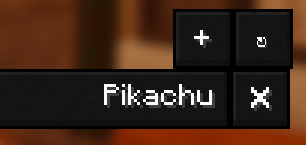
在配置界面中,找到 “Tracked names”(追踪名称),然后点击 + 符号 / “New entry”(新建条目)。

输入你想要追踪的宝可梦名称,然后按 Enter 键。
接着点击右下角的 “Save Changes”(保存更改)。
对于地区形态,只需输入其基础名称即可(例如:“Sandshrew”)。
1.08 版本新增内容:
- 添加硬性依赖 YACL (YetAnotherConfigLib)
- 添加配置选项 “Show Pokemon level”(显示宝可梦等级)
- 添加配置选项 “Always show IV%”(始终显示个体值百分比)
- 添加配置选项 “Auto-track Uncaught Pokemon”(自动追踪未收服的宝可梦)(大多数玩家不建议启用此选项)
1.07 版本新增内容:
- 通过平均个体值百分比进行个体值追踪(需要可选的服务端安装)
- 通过完美个体值数量进行个体值追踪(需要可选的服务端安装)
- 默认情况下,客户端无法获取个体值数据
1.06 版本新增内容:
- 支持地区形态追踪
- 添加热键(默认为 F8)以召唤配置界面
该模组基于配置文件驱动,默认情况下不会追踪任何特定实体。要开始使用,你需要打开配置文件并添加你想追踪的宝可梦的全名。示例如下:
文件:config/cobble_spawn_tracker-common.toml
要追踪的生物名称列表
name_list = ["Sentret", "Copperajah", "Torchic"]
1.02 版本更新:
添加了 4 个新的配置选项,默认全部启用,但均可手动禁用。
- 闪光宝可梦会自动被追踪。
- 传说宝可梦会自动被追踪。
- 追踪器将不再追踪玩家拥有的宝可梦。
- 如果你切换维度,追踪器会隐藏相关实体。
你可以追踪任意数量的实体。默认情况下,追踪器会在首次发现新实体时显示一条系统消息,但该功能可以禁用。之后,追踪器会为你持续显示与该实体的距离和方向。
该模组可以安装在服务端,但在服务端不会产生任何效果。
请注意,为了使追踪器正常工作,配置文件中的名称必须与实体的名称完全匹配。大小写不敏感。
特别说明:
当你第一次向列表中添加名称时,如果该宝可梦就在你附近,可能不会立即检测到它。但如果你进行探索并再次遇到该宝可梦,它应该会被自动检测到。
'Cobble Spawn Tracker' is general-purpose client-side tracking mod. While it was originally made for locating Cobblemon Pokemon, it can technically locate any entity you want.
To begin, load the game and press F8.
In the config screen, locate "Tracked names" and press the + symbol/"New entry"
Type the Pokemon name you want to track then press Enter
Then click "Save Changes" in the bottom right
For regional forms, just enter the base name (e.g., "Sandshrew")
New in 1.08:
Add hard dependency YACL (YetAnotherConfigLib)
Add config option "Show Pokemon level"
Add config option "Always show IV%"
Add config option "Auto-track Uncaught Pokemon" (for most players, it is not recommended to use this option)
New in 1.07: Add IV tracking by average IV percentage (requires optional SERVER SIDE INSTALL)
Add IV tracking by perfect IV count (requires optional SERVER SIDE INSTALL)
By default IV values are NOT available to the client
New in 1.06:
Add regional form tracking
Add hotkey (default F8) to summon config UI
The mod is configuration-driven and by default does not track any specific entity. To begin using it, you will need to open the config and add the pokemon you want to track, by their full name. Here is an example:
File: config/cobble_spawn_tracker-common.toml
List of mob names to track
name_list = ["Sentret", "Copperajah", "Torchic"]
Update 1.02:
4 New config options added, all enabled by default, but can be disabled.
-
Shinies are automatically tracked.
-
Legendaries are automatically tracked.
-
The tracker will no longer track player-owned pokemon
-
Tracker will hide entities if you change dimensions
You can track as many entities as you would like. By default the tracker will display a system message the first time it spots a new entity, but this can be disabled. The tracker will then track the distance and direction to the entity for you.
The mod can be installed on the server-side but it will not do anything there.
Note that for the tracker to work, the name in the config must be an exact match with the name of the entity. Casing does not matter.
Special note:
When you first add a name to the list it may not immediately detect that pokemon if it's near you. But if you explore and that pokemon appears, it should automatically detect it.

下载 Cobble Spawn Tracker
下载 Cobble Spawn Tracker
下载 Cobble Spawn Tracker
下载 Cobble Spawn Tracker
下载 Cobble Spawn Tracker
下载 Cobble Spawn Tracker
下载 Cobble Spawn Tracker
下载 Cobble Spawn Tracker
下载 Cobble Spawn Tracker
首次 Fabric 版本发布
--- 1.08 更新内容:
新增对 YACL(YetAnotherConfigLib)的硬性依赖
新增配置选项“显示宝可梦等级”
新增配置选项“始终显示个体值百分比”
新增配置选项“自动追踪未收服的宝可梦”
关于这个资源的讨论、问题反馈与使用心得
还没有讨论,来发第一帖吧
你是这个资源的作者?登录后可认领此资源。
相似资源
 模组

一个用于收集生物掉落物的多区块模组。
 模组

显示你正在注视的方块的信息。(适用于 Minecraft 1.16+ 的 Hwyla/Waila 分支)
 模组

查看物品与配方
 模组
在游戏画面角落显示附近世界地形、玩家、生物和实体的地图。可创建路径点,帮助你找到标记过的位置。
 模组
使用 JavaScript 编辑配方、添加自定义物品、编写世界事件!
 模组
AE2:一款流行的自动化与存储模组
评论 0
登录后参与评分
还没有评论,来抢沙发吧