
本模组为 Cobblemon 添加了货币和商人。
依赖项:
- Kotlin For Forge (forge & NeoForge)
- Fabric API (fabric only)
- Architectury API (1.5.2 & lower only)
- Cobblemon
如果你想支持我,我有 Patreon <3。
欢迎将我的模组添加到你的整合包中!
如何使用此模组
- 要赚取金钱,你需要击杀野生宝可梦,获得的金额取决于它们的等级。
- 商人在主世界村庄中生成,就像原版村民一样(~8%)。
- 原版村民可以通过 Cobblemon 中的 展示框 方块获得 CobbleMerchant 职业。
- 如果你手持精灵球,商人会跟随玩家。
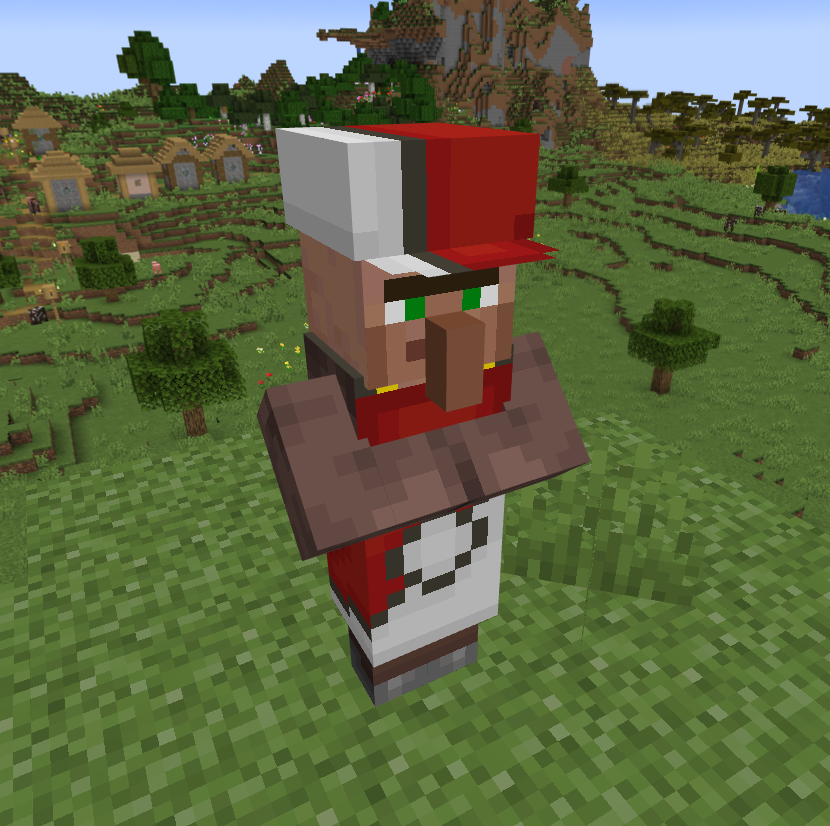
商人菜单
商店
- 右键点击商人:
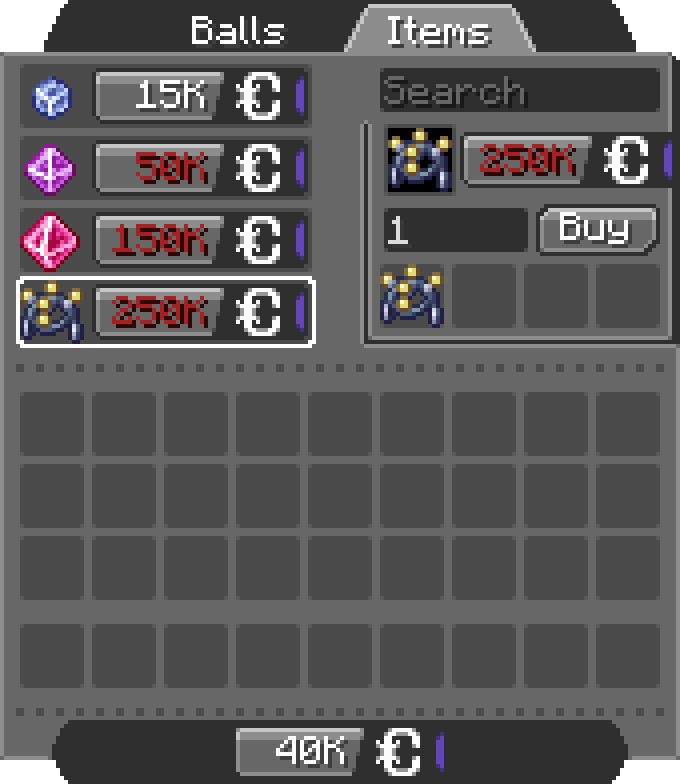
- 你可以在列表中滚动,搜索物品,设置数量(最大 256)并点击购买按钮(预览物品右侧可以看到总价)!(如果你没有足够的 CobbleDollars,价格会显示为红色)
- 你可以切换到已配置的标签页,每个标签页提供不同的物品。
银行
- Shift + 右键点击商人:
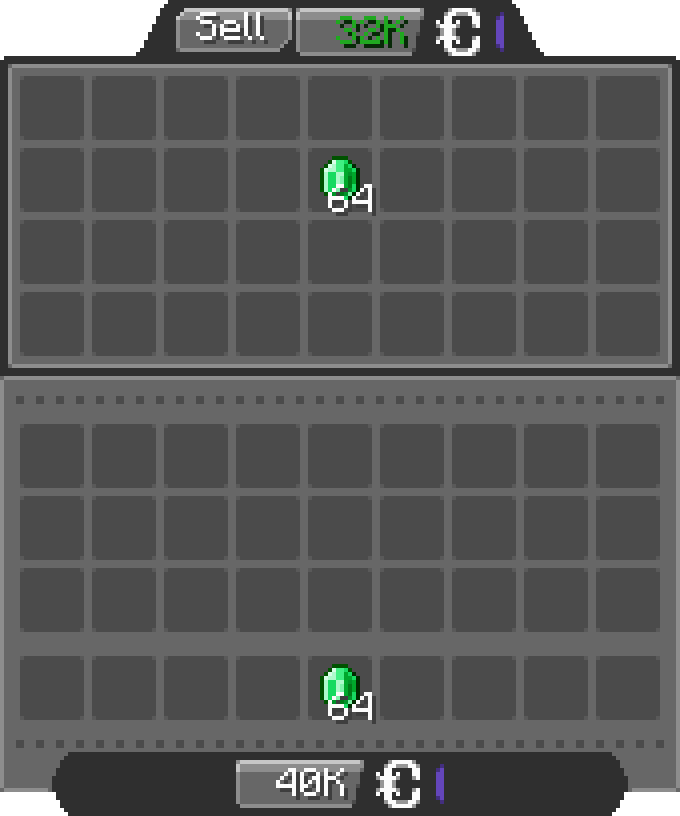
- 你可以将配置允许的任何物品存入银行库存,商人将以配置的价格购买这些物品(默认为 1 绿宝石 = 500 CobbleDollars)。
配置
配置文件位于 "[Minecraft files or Server location]\config\cobbledollars"
客户端 (Client)
你可以选择金钱覆盖层的位置:
- 左上角
- 右上角
- 左下角
- 右下角(默认)
通用 (Common)
商店
你可以配置商人出售哪些物品,例如:
2.X.X:
{
  "defaultShop": [
    {
      "Poké Balls": [
        {
          "item": "cobblemon:poke_ball",
          "price": 2000
        }
      ]
    },
    {
      "Items": [
        {
          "item": "minecraft:stick",
          "price": 250000
        },
        {
          "item": "create:cogwheel",
          "price": 100
        }
      ]
    }
  ]
}
1.5.X:
{
  "merchantShop": {
    "balls": {
      "cobblemon:poke_ball": 2000
    },
    "items": {
      "minecraft:stick": 250000,
      "create:cogwheel": 100
    }
  }
}
1.5 之前版本:
{
  "merchantBalls": {
    "cobblemon:poke_ball": 2000
  },
  "merchantItems": {
    "minecraft:stick": 250000,
    "create:cogwheel": 100
  }
}
在这里他们将出售
- 精灵球,每颗 2k CobbleDollars,类别为 "Balls"
- 木棍,每根 250k CobbleDollars,以及来自模组 Create 的齿轮,每颗 100 CobbleDollars,类别为 "Items"
银行
你可以配置银行接受哪些物品以及对应的价格:
2.X.X:
{
  "bank": [
    {
      "item": "minecraft:emerald",
      "price": 500
    },
    {
      "item": "cobblemon:red_apricorn",
      "price": 2500
    }
  ]
}
1.5.X:
{
  "bankItems": {
    "minecraft:emerald": 500,
    "cobblemon:red_apricorn": 2500
  }
}
在此处银行接受
- 绿宝石,每颗 500 CobbleDollars
- 红栗果,每颗 2.5k
你甚至可以放入其他模组的物品。
权限
- cobbledollars
- cobbledollars.reload
- cobbledollars.leaderboard
- cobbledollars.leaderboard.update
- cobbledollars.cobbledollars
- cobbledollars.cobbledollars.give
- cobbledollars.cobbledollars.pay
- cobbledollars.cobbledollars.query
- cobbledollars.cobbledollars.remove
- cobbledollars.cobbledollars.set
- cobbledollars.cobblemerchant
- cobbledollars.cobblemerchant.edit
- cobbledollars.cobblemerchant.open
- cobbledollars.cobblemerchant.open.bank
- cobbledollars.cobblemerchant.open.shop
This mod adds money and Merchants for Cobblemon.
Dependencies:
- Kotlin For Forge (forge & NeoForge)
- Fabric API (fabric only)
- Architectury API (1.5.2 & lower only)
- Cobblemon
If you'd like to support me, I have a Patreon <3.
Feel free to add my mods to your modpacks!
How to use the mod
- To earn money you have to kill wild pokémons, you'll earn a certain amount depending on their level.
- The merchant spawns in overworld villages, just like vanilla villagers (~8%).
- Vanilla Villagers can obtain the CobbleMerchant profession with a Display Case block from Cobblemon
- The merchant follow the player if you hold a pokéball.
The Merchant Menus
The Shop
- By Right Clicking the merchant:
- You can scroll in the list, search for items, set the amount (MAX 256) and click the Buy button (you can see the total price on the right of the preview item) ! (if you don't have enough CobbleDollars the price will be red)
- You can switch between the configured tabs, each one offer different items.
The Bank
- By Shift + Right Clicking the merchant:
- You can insert any items allowed by the config in the bank inventory, the merchant will buy the items for the configured price (by default 1 Emerald = 500 CobbleDollars).
Configuration
The configuration files are located under "[Minecraft files or Server location]\config\cobbledollars"
Client
You can choose the position of the money overlay:
- top left
- top right
- bottom left
- bottom right (default)
Common
Shop
You can configure which items the merchant sells, for example:
2.X.X:
{
  "defaultShop": [
    {
      "Poké Balls": [
        {
          "item": "cobblemon:poke_ball",
          "price": 2000
        }
      ]
    },
    {
      "Items": [
        {
          "item": "minecraft:stick",
          "price": 250000
        },
        {
          "item": "create:cogwheel",
          "price": 100
        }
      ]
    }
  ]
}
1.5.X:
{
  "merchantShop": {
    "balls": {
      "cobblemon:poke_ball": 2000
    },
    "items": {
      "minecraft:stick": 250000,
      "create:cogwheel": 100
    }
  }
}
Before 1.5:
{
  "merchantBalls": {
    "cobblemon:poke_ball": 2000
  },
  "merchantItems": {
    "minecraft:stick": 250000,
    "create:cogwheel": 100
  }
}
Here they will sell
- Pokéballs for 2k CobbleDollars each under the category "Balls"
- Sticks for 250k CobbleDollars each and Cogwheels from the mod Create for 100 CobbleDollars each under the category "Items"
Bank
You can configure the items accepted in the bank and for what price:
2.X.X:
{
  "bank": [
    {
      "item": "minecraft:emerald",
      "price": 500
    },
    {
      "item": "cobblemon:red_apricorn",
      "price": 2500
    }
  ]
}
1.5.X:
{
  "bankItems": {
    "minecraft:emerald": 500,
    "cobblemon:red_apricorn": 2500
  }
}
Here the bank accept
- Emeralds for 500 CobbleDollars each
- Red Apricorns for 2.5k each
You can even put items from other mods.
Permissions
- cobbledollars
- cobbledollars.reload
- cobbledollars.leaderboard
- cobbledollars.leaderboard.update
- cobbledollars.cobbledollars
- cobbledollars.cobbledollars.give
- cobbledollars.cobbledollars.pay
- cobbledollars.cobbledollars.query
- cobbledollars.cobbledollars.remove
- cobbledollars.cobbledollars.set
- cobbledollars.cobblemerchant
- cobbledollars.cobblemerchant.edit
- cobbledollars.cobblemerchant.open
- cobbledollars.cobblemerchant.open.bank
- cobbledollars.cobblemerchant.open.shop

下载 CobbleDollars [Cobblemon Addon]
下载 CobbleDollars [Cobblemon Addon]
下载 CobbleDollars [Cobblemon Addon]
下载 CobbleDollars [Cobblemon Addon]
下载 CobbleDollars [Cobblemon Addon]
下载 CobbleDollars [Cobblemon Addon]
下载 CobbleDollars [Cobblemon Addon]
下载 CobbleDollars [Cobblemon Addon]
下载 CobbleDollars [Cobblemon Addon]
下载 CobbleDollars [Cobblemon Addon]
⚠️ 重要提示
本次更新引入了新的商店/银行序列化格式。 您的现有数据应自动迁移,但迁移过程中可能会出现一些问题。
在更新之前,强烈建议:
- 备份你的世界存档。
- 备份你的配置文件。
本次更新可能会影响以下内容:
- 存储在实体上的商人商店
- 商店配置文件
- 银行配置文件
已更改
- 重命名了银行配置文件:
bank.json->default_bank.json
已修复
- 修复了银行配置文件的迁移问题
关于这个资源的讨论、问题反馈与使用心得
还没有讨论,来发第一帖吧
你是这个资源的作者?登录后可认领此资源。
相似资源
 模组

显示你正在注视的方块的信息。(适用于 Minecraft 1.16+ 的 Hwyla/Waila 分支)
 模组
在游戏画面角落显示附近世界地形、玩家、生物和实体的地图。可创建路径点,帮助你找到标记过的位置。
 模组

查看物品与配方
 模组
使用 JavaScript 编辑配方、添加自定义物品、编写世界事件!
 模组
AE2:一款流行的自动化与存储模组
 模组
那是什么?一个 Waila/Hwyla 的分支。
评论 0
登录后参与评分
还没有评论,来抢沙发吧