
Cobblemon Challenge
Cobblemon Challenge 是一款针对 Cobblemon 的极简插件,旨在让你与朋友和对手进行满级宝可梦对战变得更加轻松!使用 /challenge 命令向附近的训练家发送对战请求,对方可以选择接受或拒绝。这是一个服务端插件,仅需安装在服务器上即可运行。
简易满级 PVP:
厌倦了为了竞技对战而将所有宝可梦练到 100 级吗?无需再等待。只需一条简单的命令,你就可以挑战他人进行一场 PVP 比赛,比赛中所有宝可梦都被设定为指定等级。此更改是非永久性的,不会在对战结束后保留。在挑战中消耗的任何持有道具也不会对宝可梦的实际持有物品产生任何影响:
/challenge <username> level <level> - 指定玩家进行等级 X 的对战,其中 X 的范围为 1-100。
示例:
/challenge TurtleHoarder level 100
- 向 TurtleHoarder 发起 100 级对战挑战
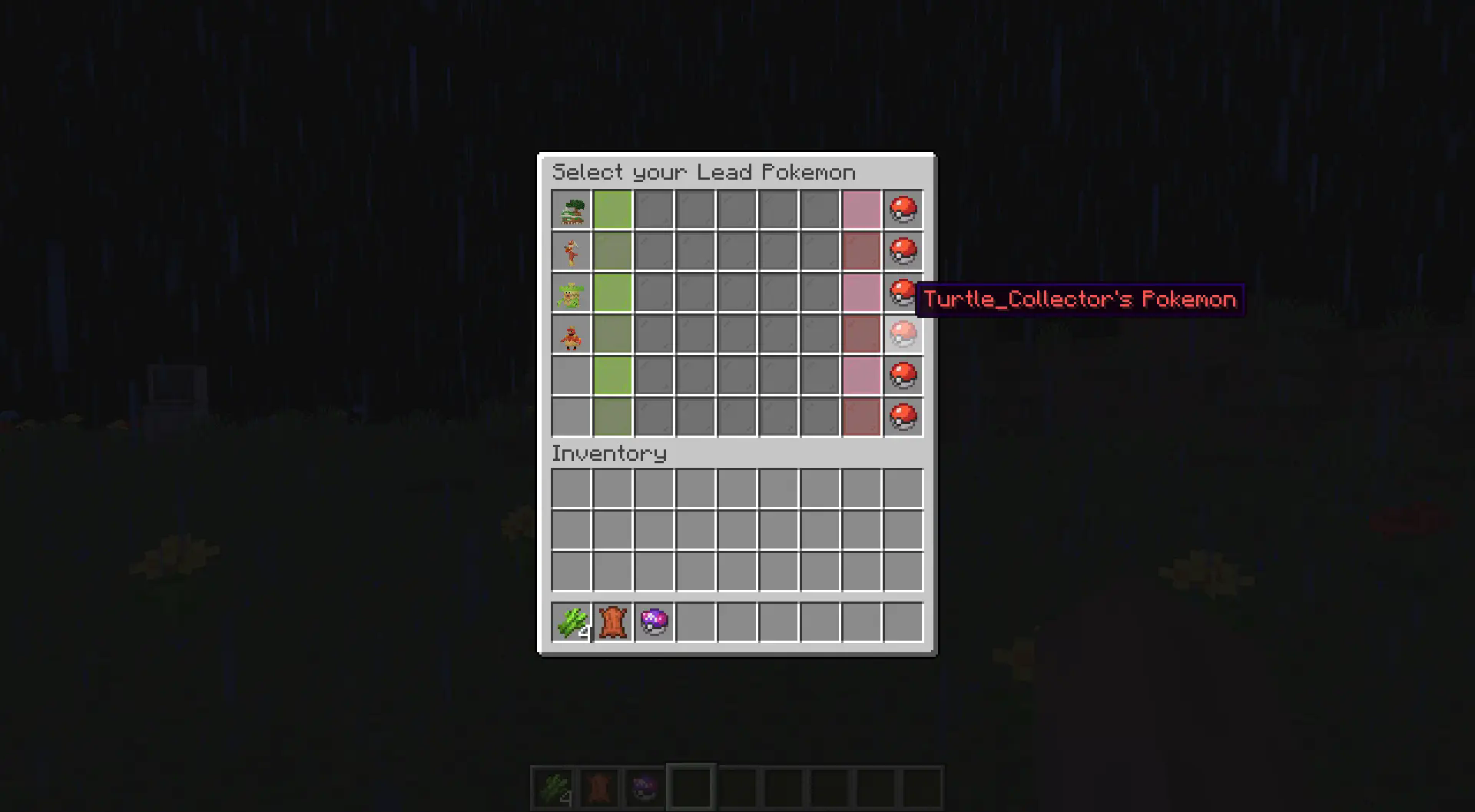
首发宝可梦 & 队伍预览 GUI:
选择你的首发宝可梦率先出场,并预览你和你对手的阵容 [如果已启用]。

(自版本 2.0 起)支持 3v3、1v1 等形式的挑战:
你可以向其他玩家发起限制数量的宝可梦对战,你需要从自己的队伍中选择参与战斗的宝可梦。你可以使用类似以下的命令:
/challenge3v3 <username> level <level>
/challenge1v1 <username> level <level>

也支持通过 /challengedouble 命令进行双打对战:
/challengedouble <username> level <level>
/challengedouble4v4 <username> level <level> - 用于 4v4 双打对战:
隐藏你的宝可梦:
不想让对手知道你的阵容?只需使用 nopreview 选项即可隐藏你的队伍!
示例:
/challenge TurtleHoarder level 100 nopreview - 在战斗开始之前,将对战者隐藏你的队伍。
Cobblemon 兼容版本:
请为你的 Cobblemon 服务器使用以下版本。使用不兼容的版本可能会导致游戏在战斗中崩溃!旧版本可在 Curseforge 获取
Cobblemon 1.6.0 -> Challenge 1.2.0 / Challenge 2.0.0+
Cobblemon 1.5.0 -> Challenge 1.1.8
Cobblemon 1.4.1 -> Challenge 1.1.7
命令:
/challenge <username> - 向指定玩家发起 50 级宝可梦对战挑战。对方可以选择接受或拒绝该挑战。
/challenge <username> level <level> - 向指定玩家发起等级为 X 的对战挑战,其中 X 的取值范围为 1-100。
示例:/challenge TurtleHoarder level 100 - 向 TurtleHoarder 发起 100 级对战挑战
配置项:
通过修改服务器 config 文件夹中配置文件内的值,可以更改以下服务器设置:
challengeDistanceRestriction - 用于确定是否限制挑战距离的值。如果你希望不受距离限制,请将其设置为 false。默认情况下,此值为 true。
maxChallengeDistance - 如果 challengeDistanceRestriction 设置为 true,则此值定义了发送挑战的最大距离。默认值为 50 格。
defaultChallengeLevel - 当挑战者未指定等级时,用于确定挑战等级的值。默认值为 50,适用于 50 级对战。
challengeExpirationTime - 用于确定挑战在过期前保持待处理状态的时间长度。默认值为 60000 毫秒 / 1 分钟。
challengeCooldownTime - 决定玩家在发送连续请求前必须等待的时间长度。该值默认设置为 5000 毫秒 / 5 秒,不过玩家需要等到现有挑战过期后才能发送另一个挑战。
Cobblemon Challenge
Cobblemon Challenge is an extremely simple plugin for Cobblemon that makes challenging your friends and rivals to flat-level Pokemon battles easier! Use the /challenge command to send a battle request to a nearby trainer, which they will be able to either accept or deny. This is a server-side plugin that only needs to be installed on the Server.
Easy Flat-Level PVP:
Tired of levelling all your pokemon to level 100 for competitive battling? Wait no longer. With one simple command, you can challenge others to a PVP match where all your pokemon are set to a specific level. This change is non-permanent is will not persist outside the battle. Any held items consumed in a challenge will also have no actual effect on a pokemon's held item:
/challenge <username> level <level> - Challenges specified player to a lvl X battle where X can be 1-100.
Example:
/challenge TurtleHoarder level 100
- challenges TurtleHoarder to a level 100 battle
Lead Pokemon & Team Preview GUI:
Select your lead pokemon to send out first and preview both your team and the enemy team [If enabled].
(As of 2.0) Challenge to 3v3, 1v1, etc.:
You can challenge other players to limited pokemon battles where you select the pokemon from your party to battle. You can use commands similar to below:
/challenge3v3 <username> level <level>
/challenge1v1 <username> level <level>
Double battles are also supported via the /challengedouble command:
/challengedouble <username> level <level>
/challengedouble4v4 <username> level <level> - For a 4v4 double battle:
Hide your Pokemon if you desire:
Don't want your rival to know your team? Just use the nopreview option to keep your team hidden!
Example:
/challenge TurtleHoarder level 100 nopreview - Will hide your team from the other challenger until the battle begins.
Cobblemon Compatibility Versions:
Please use the following versions for your Cobblemon Server. Using incompatible versions will likely cause your game to crash during battles! Older versions are available on Curseforge
Cobblemon 1.6.0 -> Challenge 1.2.0 / Challenge 2.0.0+
Cobblemon 1.5.0 -> Challenge 1.1.8
Cobblemon 1.4.1 -> Challenge 1.1.7
Commands:
/challenge <username> - Challenges specified player to a lvl 50 pokemon battle. They may accept or deny this challenge.
/challenge <username> level <level> - Challenges specified player to a lvl X battle where X can be 1-100.
Example: /challenge TurtleHoarder level 100 - challenges TurtleHoarder to a level 100 battle
Configurations:
These server settings can be changed by altering the values in the config file located in the config folder of your server:
challengeDistanceRestriction - The value that determines if challenges are restricted by distance. Set to false if you would want no restrictions on distance. This value is set to true by default.
maxChallengeDistance - If challengeDistanceRestriction is set to true, then this value defines the max distance that a challenge can be sent. This is set to 50 blocks by default.
defaultChallengeLevel - The value that determines the level of a challenge if there is not level specified by the challenger. This is set to 50 by default for lvl 50 battles.
challengeExpirationTime - The value that determines how long a challenge should be pending before it expires. This is set to 60000 milliseconds / 1 minute by default.
challengeCooldownTime - The value that determines how long a player must wait before sending a consecutive request. This value is set to 5000 milliseconds / 5 seconds by default, though players will need to wait until their existing challenge expires before sending another one.

下载 Cobblemon Challenge
下载 Cobblemon Challenge
下载 Cobblemon Challenge
下载 Cobblemon Challenge
下载 Cobblemon Challenge
下载 Cobblemon Challenge
下载 Cobblemon Challenge
下载 Cobblemon Challenge
适用于 Cobblemon 1.8.1 的兼容性补丁
关于这个资源的讨论、问题反馈与使用心得
还没有讨论,来发第一帖吧
你是这个资源的作者?登录后可认领此资源。
相似资源
 模组

让你能够在世界中的任何位置定位结构。
 模组

TerraFirmaCraft (TFC) 是一个全面转换模组,对生存模式进行了彻底的改造与重新设计。
 模组
一堆修复
 模组

如果游戏能告知重要的刷新点,会怎样?
 模组
一款适用于你选择的加载器的 Minecraft VR 模组!
 模组

为盔甲架添加图形用户界面,允许你配置其姿势和其他属性
评论 0
登录后参与评分
还没有评论,来抢沙发吧