将宝可梦繁殖转化为精致、可视化且可自动化的工作流。
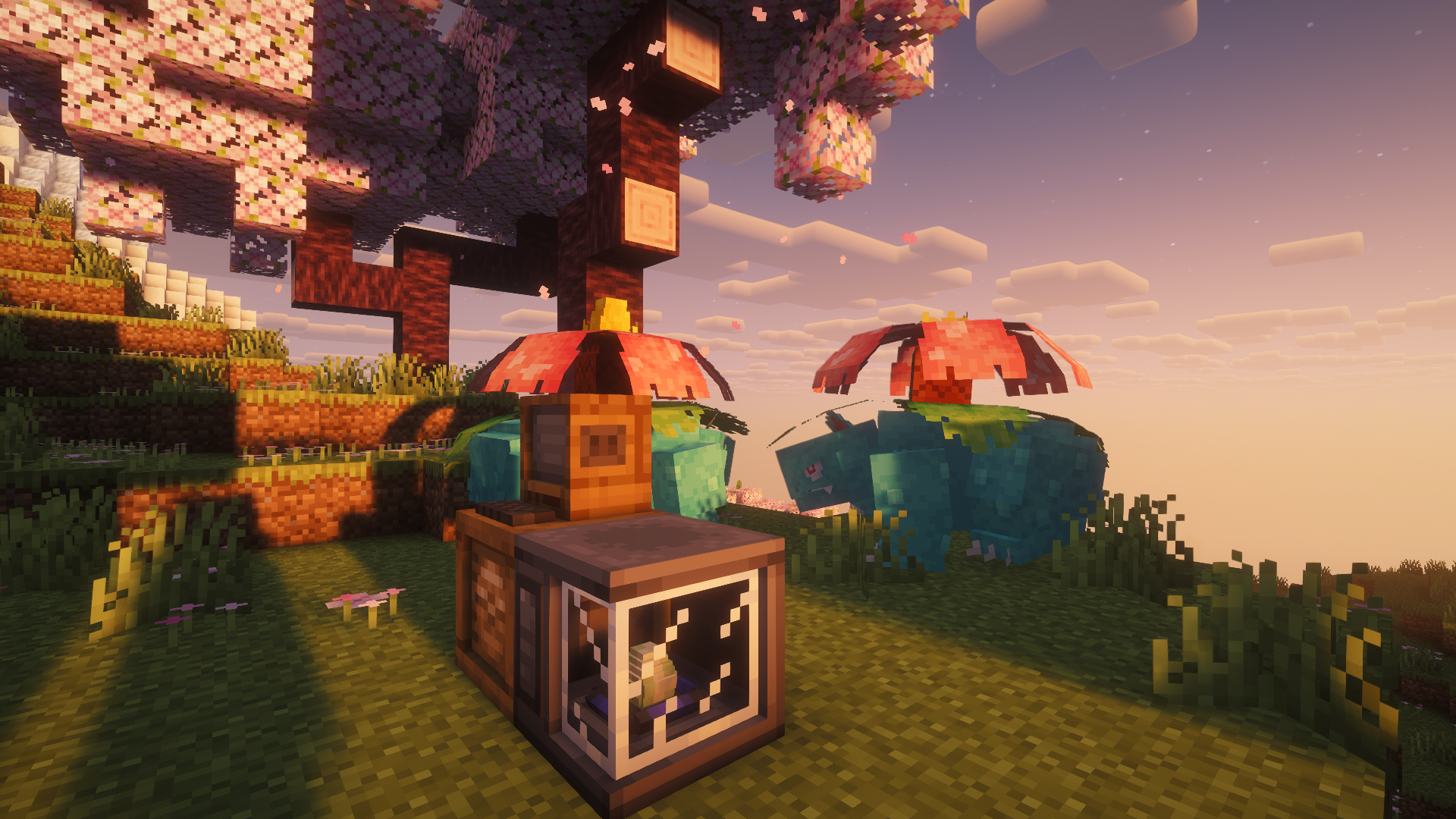
Cobblemon Incubator 是 Cobblemon 和 Cobbreeding 的一个附加模组,它添加了一台专用的孵化机。投入蛋以加速孵化、查看繁殖信息、配置高级筛选条件,或将机器连接到牧场和存储系统以实现全面自动化。
完整的蛋孵化机器
孵化机提供了一个受 Cobblemon PC 屏幕界面启发的自定义界面。当蛋在内部时,界面显示:
- 宝可梦的 3D 模型
- 物种
- 性格
- 特性
- 雷达图中可视化的全部六项个体值(IVs)
- 显示孵化进度的动画蛋
当机器内含蛋时,方块外观会发生变化;当其界面打开时,机器会亮起灯光。
更快的孵化速度
蛋默认以 5倍速度 孵化。添加速度升级后,使用默认配置可达到 10倍速度。
服务器管理员可以在以下文件中自定义基础速度和速度升级的倍率:
config/cobblemon_incubator.json
三种强力升级
速度升级
倍增机器的孵化速度,使蛋能更快完成孵化。
PC 升级
手持该升级右键点击即可将其绑定到你的玩家账号。安装后,孵化出的宝可梦将直接存入你的 PC 中。
链接基于你的 UUID,因此更改 Minecraft 用户名不会导致链接失效。当宝可梦送达时,你会收到一条聊天通知。悬停在宝可梦名称上可查看其性格、特性和个体值。
如果你处于离线状态或你的 PC 已满,蛋会安全地回退到机器的输出槽中。
筛选升级
无需设置所有字段即可构建精确的繁殖规则:
- 搜索并选择物种
- 搜索并选择性格
- 选择特性
- 使用
>=、<=或=筛选每一项个体值 - 从 0 到 31 之间选择任意个体值
选择物种后,特性选择器仅显示该物种实际可能拥有的特性,包括隐藏特性。
被拒绝的蛋可以根据你选择的动作移至输出槽或被删除。
牧场与存储自动化
将孵化机直接放置在兼容的牧场旁边,只要输入槽为空,它就会自动收集可用的蛋。
将箱子或其他兼容的容器放置在机器旁,完成的输出蛋将自动插入其中。输入和输出自动化在所有六个面均有效,并遵循侧向库存规则。
这实现了完整的生产线:
牧场 -> 蛋孵化机 -> 箱子
其他功能
- 三个升级槽位
- 专属创造模式标签页
- 可搜索的筛选选择器
- 空载和满载状态的方块模型
- 使用时的活跃机器纹理
- 透明玻璃渲染效果
- 支持方向性放置
- 自定义升级纹理和工具提示
- 提供英文和巴西葡萄牙语翻译
- 支持 Fabric 和 NeoForge
依赖要求
- Cobblemon
- Cobbreeding
- Architectury API
Fabric 安装还需:
- Fabric API
- Fabric Language Kotlin
NeoForge 安装还需:
- Kotlin for Forge
兼容性
支持的加载器:
- Fabric
- NeoForge
Cobblemon Incubator 必须在服务器端和客户端都安装。
可配置的服务器设置
Cobblemon Incubator 包含一个服务器端的 JSON 配置文件,允许整合包制作者自定义蛋孵化机提供的控制权和信息量。
可配置的选项包括:
- 孵化机 UI 中显示的蛋数据:宝可梦模型、物种、性格、特性和个体值。
- 启用的升级类型:速度升级、PC 升级和筛选升级。
- 可用的筛选类型:物种、性格、特性、个体值、拒绝操作和蛋的删除。
- 孵化机是否能自动从相邻的牧场抽取蛋。
- 孵化机是否能自动将完成的蛋推入相邻的容器中。
- 基础孵化速度和速度升级倍率。
游戏规则在服务端强制执行,孵化机 UI 与服务端配置同步,因此玩家只能看到该服务器上可用的选项。
{
  "baseSpeed": 5,
  "speedUpgradeMultiplier": 2.0,
  "display": {
    "pokemonModel": true,
    "species": true,
    "nature": true,
    "ability": true,
    "ivs": true
  },
  "upgrades": {
    "speed": true,
    "pc": true,
    "filter": true
  },
  "filters": {
    "species": true,
    "nature": true,
    "ability": true,
    "ivs": true,
    "rejectAction": true,
    "deleteRejectedEggs": true
  },
  "automation": {
    "autoInputFromPastures": true,
    "autoOutputToInventories": true
  }
}
编辑配置后重启游戏或服务器。
Turn Pokemon breeding into a polished, visual, and automatable workflow.
Cobblemon Incubator is an addon for Cobblemon and Cobbreeding that adds a dedicated Egg Incubator machine. Insert an egg to incubate it faster, inspect its breeding information, configure advanced filters, or connect the machine to a Pasture and storage system for full automation.
A Complete Egg Incubation Machine
The Egg Incubator provides a custom interface inspired by Cobblemon's PC screens. While an egg is inside, the interface displays:
- The Pokemon's 3D model
- Species
- Nature
- Ability
- All six IVs in a visual radar chart
- An animated egg showing incubation progress
The block also changes visually when it contains an egg and lights up while its interface is open.
Faster Incubation
Eggs incubate at 5x speed by default. Add a Speed Upgrade to reach 10x speed with the default configuration.
Server owners can customize both the base speed and the Speed Upgrade multiplier in:
config/cobblemon_incubator.json
Three Powerful Upgrades
Speed Upgrade
Multiplies the machine's incubation speed, allowing eggs to finish much faster.
PC Upgrade
Right-click while holding the upgrade to bind it to your player. Once installed, hatched Pokemon are sent directly to your PC.
The link uses your UUID, so changing your Minecraft name will not break it. When a Pokemon is delivered, you receive a chat notification. Hover over the Pokemon's name to view its Nature, Ability, and IVs.
If you are offline or your PC is full, the egg safely falls back to the machine's output slot.
Filter Upgrade
Build precise breeding rules without requiring every field:
- Search and select a species
- Search and select a Nature
- Select an Ability
- Filter every IV using
>=,<=, or= - Choose any IV value from 0 to 31
After selecting a species, the Ability selector only shows abilities that species can actually have, including hidden abilities.
Rejected eggs can either be moved to the output slot or deleted, depending on your chosen action.
Pasture and Storage Automation
Place the Incubator directly against a compatible Pasture and it will automatically collect available eggs whenever its input is empty.
Place a chest or another compatible inventory against the machine and completed output eggs will be inserted automatically. Input and output automation works on all six faces and respects sided inventory rules.
This enables complete production lines:
Pasture -> Egg Incubator -> Chest
Additional Features
- Three upgrade slots
- Dedicated creative-mode tab
- Searchable filter selectors
- Empty and occupied block models
- Active machine texture while in use
- Transparent glass rendering
- Directional placement
- Custom upgrade textures and tooltips
- English and Brazilian Portuguese translations
- Fabric and NeoForge support
Requirements
- Cobblemon
- Cobbreeding
- Architectury API
Fabric installations also require:
- Fabric API
- Fabric Language Kotlin
NeoForge installations also require:
- Kotlin for Forge
Compatibility
Supported loaders:
- Fabric
- NeoForge
Cobblemon Incubator must be installed on both the server and client.
Configurable Server Settings
Cobblemon Incubator includes a server-side JSON config that lets modpack makers customize how much control and information the Egg Incubator provides.
Configurable options include:
- Which egg data is shown in the incubator UI: Pokemon model, species, Nature, Ability, and IVs.
- Which upgrades are enabled: Speed Upgrade, PC Upgrade, and Filter Upgrade.
- Which filter types are available: species, Nature, Ability, IVs, reject action, and egg deletion.
- Whether the incubator can automatically pull eggs from adjacent Pastures.
- Whether the incubator can automatically push finished eggs into adjacent inventories.
- Base incubation speed and Speed Upgrade multiplier.
Gameplay rules are enforced server-side, and the incubator UI syncs with the server config so players only see the options available on that server.
{
  "baseSpeed": 5,
  "speedUpgradeMultiplier": 2.0,
  "display": {
    "pokemonModel": true,
    "species": true,
    "nature": true,
    "ability": true,
    "ivs": true
  },
  "upgrades": {
    "speed": true,
    "pc": true,
    "filter": true
  },
  "filters": {
    "species": true,
    "nature": true,
    "ability": true,
    "ivs": true,
    "rejectAction": true,
    "deleteRejectedEggs": true
  },
  "automation": {
    "autoInputFromPastures": true,
    "autoOutputToInventories": true
  }
}
Restart the game or server after editing the configuration.
下载 Cobblemon Incubator
下载 Cobblemon Incubator
下载 Cobblemon Incubator
下载 Cobblemon Incubator
下载 Cobblemon Incubator
下载 Cobblemon Incubator
下载 Cobblemon Incubator
下载 Cobblemon Incubator
下载 Cobblemon Incubator
下载 Cobblemon Incubator
- Cobblemon 1.8.2+ 支持:更新了对 Cobblemon 1.8.2 和 1.8.4+ 以及 Cobbreeding 2.4.1+ 的兼容性。
- 修复服务器崩溃:修复了因 Cobblemon 1.8.2+ 中字段签名变更导致的
DESTINY_KNOT和LIGHT_BALL上的NoSuchFieldError。 - 繁殖扫描仪稳定性:添加了防御性错误处理、安全的牧场宝可梦解析以及报告限制,以防止聊天溢出和卡顿。
- 修复服务器崩溃:修复了因 Cobblemon 1.8.2+ 中字段签名变更导致的
- 添加蛋袋和高级蛋袋
- 添加蛋袋升级配方和搜索过滤
- 支持 Cobblemon 1.8.0(不向后兼容)
- 修复蛋性别生成与孵化的一致性
关于这个资源的讨论、问题反馈与使用心得
还没有讨论,来发第一帖吧
你是这个资源的作者?登录后可认领此资源。
相似资源
 模组

一个用于收集生物掉落物的多区块模组。
 模组

显示你正在注视的方块的信息。(适用于 Minecraft 1.16+ 的 Hwyla/Waila 分支)
 模组
在游戏画面角落显示附近世界地形、玩家、生物和实体的地图。可创建路径点,帮助你找到标记过的位置。
 模组

查看物品与配方
 模组
使用 JavaScript 编辑配方、添加自定义物品、编写世界事件!
 模组
AE2:一款流行的自动化与存储模组
评论 0
登录后参与评分
还没有评论,来抢沙发吧