Cobblemon Wiki Gui
一款开源的 Minecraft Java 版模组,使用 Kotlin 编写,支持 Fabric 和 NeoForge。
这是 Cobblemon 的辅助模组。
- Pokémon Wiki(宝可梦百科):一个允许你查看宝可梦物种信息(如图鉴)的界面。
强烈建议仅在服务端或单人游戏中使用
功能
Cobblemon Wiki Gui 允许你查看:
- 属性类型
- 基础能力值
- 捕获率
- 特性
- 生物群系生成
- 生成时间
- 进化链
- 进化条件
- 等级招式
- 招式学习器招式 (TM)
- 导师招式
- 蛋招式
- 进化招式
- 形态变化招式
- 蛋组
- 形态
- 超级化 (Dynamax)
- 掉落物
截图
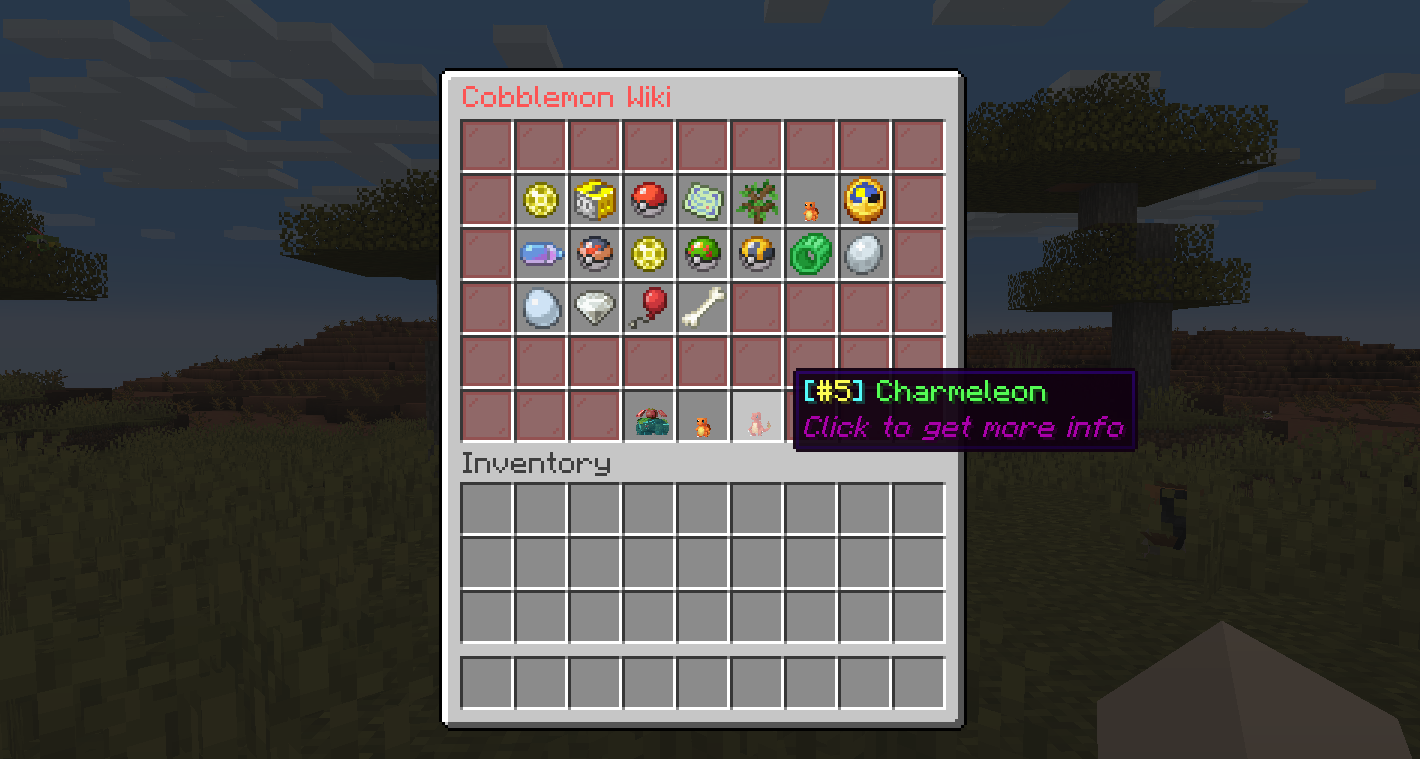
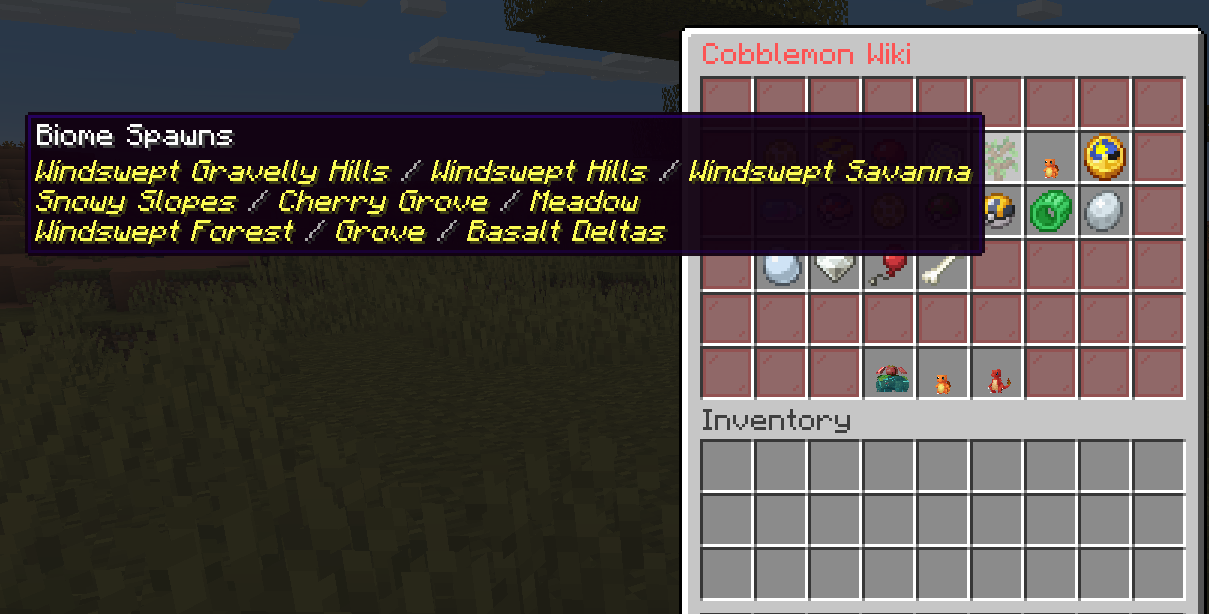
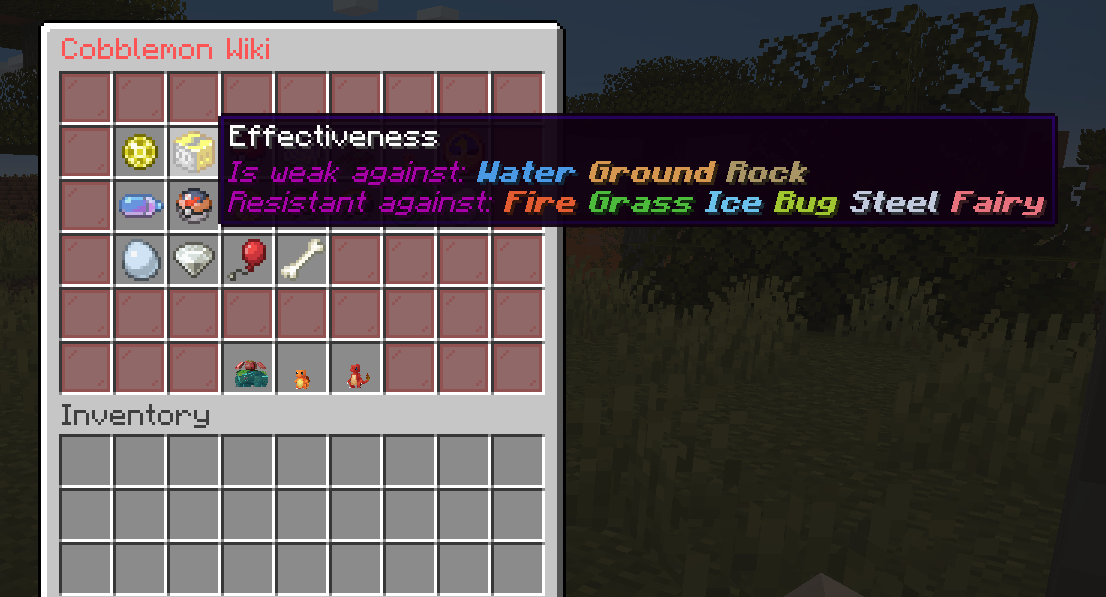
命令
PokeWiki — 为执行者打开宝可梦百科 GUI。
| 权限 |
命令 |
描述 |
cobblemon_wiki_gui.command.pwiki |
/pwiki <pokemon> [form] |
打开某物种的百科。可选参数 form 仅显示该形态(例如 /pwiki zorua hisui)。 |
别名:/pokewiki, /pokemonwiki, /cobblemonwiki, /cobblewiki, /cwiki
PokeWiki (other player) — 为其他玩家打开宝可梦百科 GUI。
| 权限 |
命令 |
描述 |
cobblemon_wiki_gui.command.pwikianother |
/pwikiother <player> <pokemon> [form] |
为指定玩家打开某物种的百科。可选参数 form 仅显示该形态(例如 /pwikiother Steve zorua hisui)。 |
别名:/pokewikiother, /pokemonwikiother, /cobblemonwikiother, /cobblewikiother, /cwikiother
PWikiDex — 打开已实现的所有宝可梦物种的分页浏览器,以便玩家在不知道物种名称的情况下也能进入百科。默认关闭(参见权限),因为它会列出所有内容,无论玩家是否已经遭遇过。
| 权限 |
命令 |
描述 |
cobblemon_wiki_gui.command.pwikidex |
/pwikidex |
打开物种浏览器。 |
Reload — 在游戏中重载配置文件。
| 权限 |
命令 |
描述 |
cobblemon_wiki_gui.command.cwgreload |
/cwg reload |
无需重启即可重载 lang.json 配置文件。 |
默认配置文件
位于 config/cobblemon_wiki_gui 下的 main.json 文件包含通用的模组设置:
{
  "version": "1.0.0",
  "fillerItem": "minecraft:red_stained_glass_pane",
  "showGithubIssuesButton": true
}
fillerItem — 用作每个百科 GUI 边框/填充物的物品 ID。设置为 "" 或 "none" 可完全禁用填充物(空槽位保持为空)。如果 ID 无效或未知,则回退到 minecraft:red_stained_glass_pane。showGithubIssuesButton — 在 Wiki 和图鉴屏幕的角落槽位显示“报告问题”按钮(打开 GitHub 问题页面)。设置为 false 可移除该按钮,并使该槽位保持为普通填充物。
位于 config/cobblemon_wiki_gui 下的 lang.json 文件包含以下默认设置:
{
  "useItem": "使用 %s",
  "tradeAny": "完成任意交易或使用 %s",
  "tradeSpecific": "交换获得 %s 或使用 %s",
  "level": "等级: %s",
  "friendship": "亲密度: %s",
  "heldItem": "宝可梦携带道具: %s",
  "anyRequirement": "需要满足以下任一条件:",
  "attackDefenceRatioAttackHigher": "攻击力需高于防御力",
  "attackDefenceRatioDefenceHigher": "防御力需高于攻击力",
  "attackDefenceRatioEqual": "攻击力和防御力数值需相等",
  "blocksTraveled": "需移动 %s 格距离",
  "defeat": "需击败 %s 次",
  "moveSet": "需掌握 %s 个招式",
  "moveType": "需拥有任意 %s 属性的招式",
  "recoil": "需造成 %s 点反伤",
  "statEqual": "能力值 %s 和 %s 需相等",
  "statCompare": "能力值 %s 应高于 %s",
  "timeRange": "时间段: %s",
  "useMove": "需使用 %s 招式 %s 次",
  "biomeCondition": "需在生物群系标签: %s 中",
  "biomeAntiCondition": "黑名单生物群系标签: %s",
  "structureCondition": "需在结构: %s 附近",
  "structureAntiCondition": "黑名单结构: %s",
  "noEvolutionFound": "未找到 %s 的进化",
  "rightClick": "右键点击 %s",
  "goBackClick": "点击返回",
  "seeEvolutions": "点击查看进化链",
  "basestats": "基础能力值",
  "type": "属性",
  "effectiveness": "克制关系",
  "catchrate": "捕获率",
  "spawnbiome": "生物群系生成",
  "spawntime": "生成时间",
  "evolutions": "进化",
  "movesbylevel": "等级招式",
  "tmMoves": "招式学习器招式",
  "tutorMoves": "导师招式",
  "evolutionMoves": "进化招式",
  "eggMoves": "蛋招式",
  "formChangeMoves": "形态变化招式",
  "abilities": "特性",
  "drops": "掉落物",
  "eggGroups": "蛋组",
  "forms": "形态",
  "dynamax": "超级化",
  "baseFriendship": "亲密度",
  "weakness": "被以下属性克制:",
  "resistant": "抵抗以下属性:",
  "immune": "免疫以下属性:",
  "pokeInfo": "点击获取更多信息",
  "noDrops": "无掉落物",
  "pokeWikiTitle": "Cobblemon 百科",
  "pokeWikiTitleWithForm": "Cobblemon 百科 - %species% (%form%)",
  "githubIssuesButtonName": "报告问题",
  "githubIssuesButtonLore": "点击获取链接以在 GitHub 上报告错误或提出建议",
  "githubIssuesLinkText": "点击此处打开 GitHub 问题页面"
}
安装
Cobblemon 与 CobblemonWikiGui 常见问题解答 (FAQ)
Q: CobblemonWikiGui 是什么?
A: CobblemonWikiGui 添加了一个界面,允许你查看宝可梦信息(例如图鉴)。该界面专为 Cobblemon 服务器设计(建议在服务器上启用使用)
Q: 是否可以通过命令打开宝可梦 Wiki 界面?
A: 是的,只需输入 /pokewiki <pokemon> 或 /pokewiki <pokemon> <form> 即可打开特定形态的界面(例如 /pokewiki zorua hisui)。
A: 你也可以通过以下命令为其他玩家打开界面:/pokewikiother <player> <pokemon> 或 /pokewikiother <player> <pokemon> [form]。
Q: 是否可以自定义配置文件?
A: 是的,只要保持标准的 JSON 格式且不更改文件键名即可。
A: 在游戏中,你可以输入 /cwg reload,修改后的 lang.json 文件将被加载。
许可证
MIT
作者
Cobblemon Wiki Gui
An open-source mod for Minecraft Java Edition, written in Kotlin for Fabric and NeoForge.
This is a sidemod for Cobblemon
- Pokémon Wiki : an interface that allows you to view Pokémon species information (such as pokédex).
I strongly recommend that you only use the server side or singleplayer
Features
The Cobblemon wiki gui allows you to view:
- Pokémon type
- Base stats
- Catch Rate
- Abilities
- Spawn at Biomes
- Spawntime
- Evolutions
- Evolution Requirements
- Moves by level
- TM Moves
- Tutor Moves
- Egg Moves
- Evolution Moves
- Form Change Moves
- Egg Groups
- Forms
- Dynamax
- Drops
Screenshots
Commands
PokeWiki — Opens the Pokémon wiki GUI for the executor.
| Permission |
Command |
Description |
cobblemon_wiki_gui.command.pwiki |
/pwiki <pokemon> [form] |
Open the wiki for a species. Optional form shows that form only (e.g. /pwiki zorua hisui). |
Aliases: /pokewiki, /pokemonwiki, /cobblemonwiki, /cobblewiki, /cwiki
PokeWiki (other player) — Opens the Pokémon wiki GUI for another player.
| Permission |
Command |
Description |
cobblemon_wiki_gui.command.pwikianother |
/pwikiother <player> <pokemon> [form] |
Open the wiki for a species for the given player. Optional form shows that form only (e.g. /pwikiother Steve zorua hisui). |
Aliases: /pokewikiother, /pokemonwikiother, /cobblemonwikiother, /cobblewikiother, /cwikiother
PWikiDex — Opens a paginated browser of every implemented Pokémon species, so players can jump into the wiki without already knowing a species' name. Off by default (see permission) since it lists everything regardless of what the player has encountered.
| Permission |
Command |
Description |
cobblemon_wiki_gui.command.pwikidex |
/pwikidex |
Opens the species browser. |
Reload — Reloads the configuration files in-game.
| Permission |
Command |
Description |
cobblemon_wiki_gui.command.cwgreload |
/cwg reload |
Reloads the lang.json configuration file without restarting. |
Default Configuration Files
The main.json file, located under config/cobblemon_wiki_gui, contains general mod settings:
{
  "version": "1.0.0",
  "fillerItem": "minecraft:red_stained_glass_pane",
  "showGithubIssuesButton": true
}
fillerItem — item id used as the border/filler in every wiki GUI. Set to "" or "none" to disable filler entirely (empty slots stay empty). Falls back to minecraft:red_stained_glass_pane if the id is invalid or unknown.showGithubIssuesButton — shows a "Report an Issue" button (opens the GitHub issues page) in a corner slot of the Wiki and Pokedex screens. Set to false to remove it and keep that slot as plain filler.
The lang.json file, located under config/cobblemon_wiki_gui, contains the following default settings:
{
  "useItem": "Use a %s",
  "tradeAny": "Complete any trade or use a %s",
  "tradeSpecific": "Trade for an %s or use a %s",
  "level": "Level: %s",
  "friendship": "Friendship: %s",
  "heldItem": "Pokémon held item: %s",
  "anyRequirement": "Need any of these requirements:",
  "attackDefenceRatioAttackHigher": "Need more attack than defence",
  "attackDefenceRatioDefenceHigher": "Need more defence than attack",
  "attackDefenceRatioEqual": "Need equal value of attack and defence",
  "blocksTraveled": "Need %s blocks traveled",
  "defeat": "Need %s defeats",
  "moveSet": "Need %s move",
  "moveType": "Need any type %s move",
  "recoil": "Need %s recoil",
  "statEqual": "Stats %s and %s need to be equal",
  "statCompare": "Stat %s should be higher than %s",
  "timeRange": "Time of day: %s",
  "useMove": "Need to use %s movement %s times",
  "biomeCondition": "Need biome tag: %s",
  "biomeAntiCondition": "Blacklisted biome tag: %s",
  "structureCondition": "Need structure: %s",
  "structureAntiCondition": "Blacklisted structure: %s",
  "noEvolutionFound": "No evolution found for %s",
  "rightClick": "Right click a %s",
  "goBackClick": "Click to go back",
  "seeEvolutions": "Click to see evolutions",
  "basestats": "Base Stats",
  "type": "Type",
  "effectiveness": "Effectiveness",
  "catchrate": "CatchRate",
  "spawnbiome": "Biome Spawns",
  "spawntime": "Time Spawns",
  "evolutions": "Evolutions",
  "movesbylevel": "Moves by level",
  "tmMoves": "TM Moves",
  "tutorMoves": "Tutor Moves",
  "evolutionMoves": "Evolution Moves",
  "eggMoves": "Egg Moves",
  "formChangeMoves": "Form Changes Moves",
  "abilities": "Abilities",
  "drops": "Drops",
  "eggGroups": "Egg Groups",
  "forms": "Forms",
  "dynamax": "Dynamax",
  "baseFriendship": "Friendship",
  "weakness": "Is weak against:",
  "resistant": "Resistant against:",
  "immune": "Immune against:",
  "pokeInfo": "Click to get more info",
  "noDrops": "No Drops",
  "pokeWikiTitle": "Cobblemon Wiki",
  "pokeWikiTitleWithForm": "Cobblemon Wiki - %species% (%form%)",
  "githubIssuesButtonName": "Report an Issue",
  "githubIssuesButtonLore": "Click to get a link to report bugs or suggestions on GitHub",
  "githubIssuesLinkText": "Click here to open the GitHub issues page"
}
Installation
Frequently Asked Questions (FAQ) for Cobblemon and CobblemonWikiGui
Q: What is the CobblemonWikiGui?
A: The CobblemonWikiGui adds an interface that allows you to view Pokémon information (such as pokédex). that are focused on Cobblemon servers (I recommend using it on the server)
Q: Is it possible to open the Pokemon Wiki gui by command?
A: Yes, just type /pokewiki <pokemon> or /pokewiki <pokemon> <form> to open a specific form (e.g. /pokewiki zorua hisui).
A: You can also open the gui for another player with: /pokewikiother <player> <pokemon> or /pokewikiother <player> <pokemon> [form].
Q: Is it possible to customize the configuration files?
A: Yes, as long as you keep the standard Json formatting and don't change the file keys.
A: In game, you can type /cwg reload and the modified lang.json file will be loaded
License
MIT
Author


 模组

 模组
 模组

 模组
 模组
 模组
评论 0
登录后参与评分
还没有评论,来抢沙发吧