Cogwheel
一个基于节点的 Create 及其他配方驱动模组的可视化工厂规划器。在建造前以图的形式规划你的工厂。

Cogwheel 是一个内置于游戏中的工厂设计器,其理念与《幸福工厂》(Satisfactory) 的蓝图工具一脉相承。只需按下单个按键,你便可以将配方拖入画布中进行连线,而不是将它们扔进 Wiki 查阅——Cogwheel 会进行吞吐量计算,为你追踪 Create 的压力值,并在你的动能预算无法支撑时发出警告。
它可作为任何包含配方的整合包的规划笔记本,但与 Create 模组配合使用时效果最佳。
✨ 功能概览
- ?️ 可视化图编辑器 — 将配方拖到画布上,将输出连接到输入,在你放置任何方块之前就能看到工厂的雏形。
- ⚡ Create 压力计算 — 每个基于 Create 的配方都知道其在任意 RPM 下的 SU(Stress Units)消耗。搅拌机在 128 RPM?那就是 512 SU。数学运算自动完成。
- ? 跨工厂电源 — 定义一次蒸汽机、风车或飞轮,将工厂分配给它们,一旦预算超标立即收到警告。
- ? 序列装配自动展开 — 投入精密机械配方,Cogwheel 会将其展开为一个包含全部五个步骤、循环控制及正确 SU 总和的锁定集群。
- ? 循环节点 — 使用循环节点对链条进行门控,使其包含的配方运行 N 次。通过底部的紫色端口连接。
- ? 每个存档多个工厂 —
cogwheel/factories/ 目录下每个工厂对应一个独立的 JSON 文件,可从左侧面板切换,易于分享。
- ? 跨工厂布线 — 从工厂 A 导出物品,并通过引用将其作为源导入工厂 B。
- ? 集群 (Clusters) — 将任意选择项分组为子图(用户集群 USER)或通过序列配方获取自动构建的集群(锁定 LOCKED)。支持就地编辑集群。
- ? 完全可主题化 — 颜色、文本缩放比例、面板大小均可通过选项卡设置页面进行配置。
- ? JEI 集成 — 配方选择器渲染 JEI 自身的分类。右键点击任何选择器行即可直接跳转至 JEI 的完整配方视图。
? 入门指南
在游戏中按下 K(或你绑定的 Open Factory Editor 快捷键)以打开编辑器。
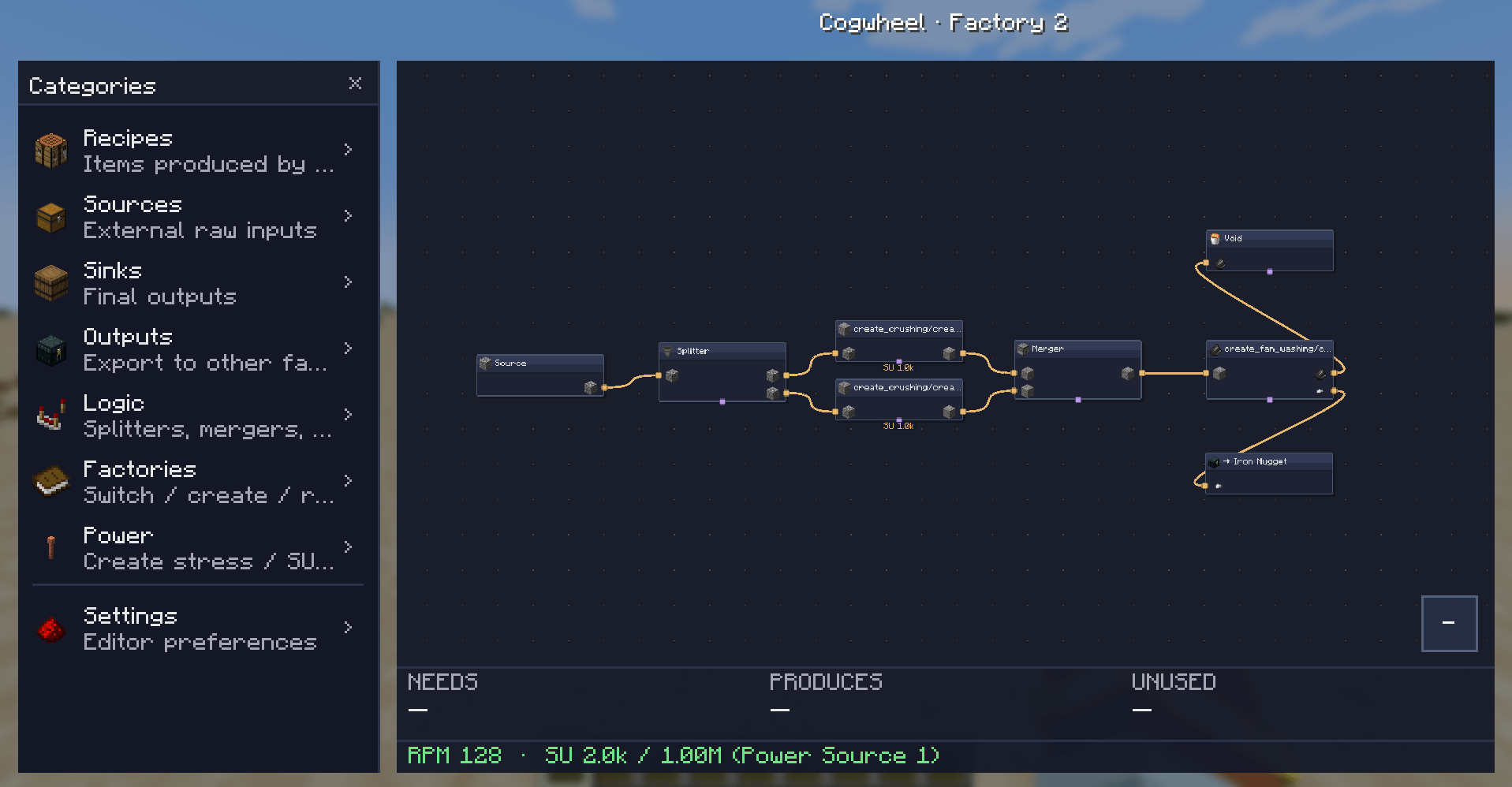
从左到右:
- 分类面板(左侧):浏览配方、源、汇、输出、逻辑、工厂、电源和设置。
- 画布:中键平移,滚轮缩放,在此处投放物品以添加节点。
- 属性面板(右侧):右键点击任意节点 → 编辑,或双击。配置并行度、RPM、配方变体、端口配对。
- 求解器叠加层(底部):实时显示工厂的需求、产出和浪费量 —— 以及相对于已分配电源的 RPM 和 SU 消耗。
添加节点: 拖拽 左侧面板中的物品或逻辑方块到画布上。物品会在你放置的位置落地。
? Create 集成
Cogwheel 直接读取 Create 的压力影响表和配方类型。每个 Create 配方都会被识别,并根据配置的 RPM 贡献其 SU 消耗:
| 配方类型 |
每 RPM 的 SU |
128 RPM 时 (1 台机器) |
| 粉碎轮 (一对) |
8 |
1,024 SU |
| 机械压力机 |
8 |
1,024 SU |
| 机械搅拌机 |
4 |
512 SU |
| 研钵 |
4 |
512 SU |
| 机械锯 |
4 |
512 SU |
| 部署者 |
4 |
512 SU |
| 漏斗 / 物品排空 |
4 |
512 SU |
| 封装风扇 (洗涤/附魔) |
2 |
256 SU |
按工厂和按配方的 RPM
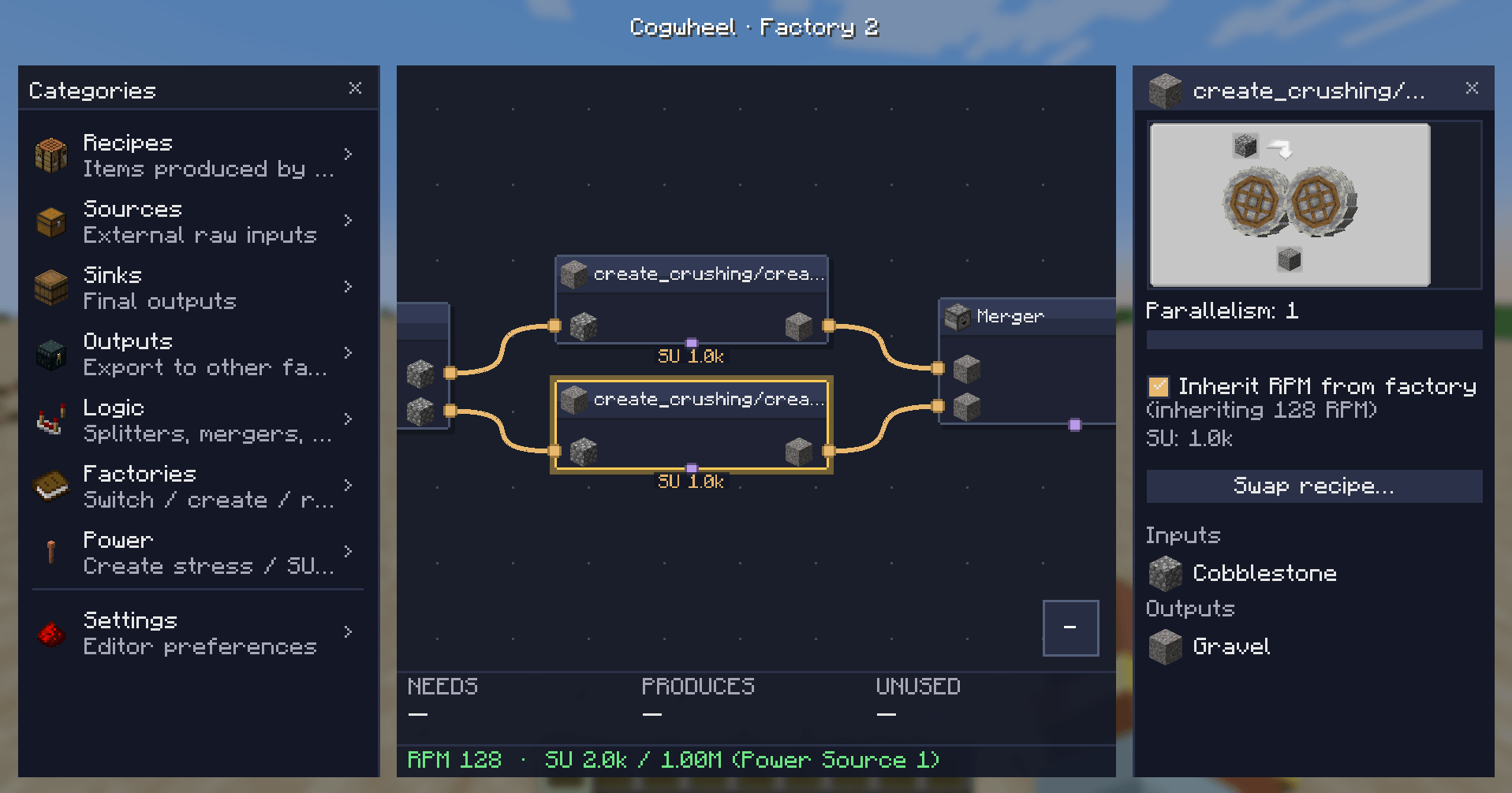
每个工厂都有一个默认 RPM(1–256)。每个 Create 配方节点和每个集群都可以继承该 RPM,也可以通过属性面板中的复选框使用自己的值进行覆盖。
序列装配集群
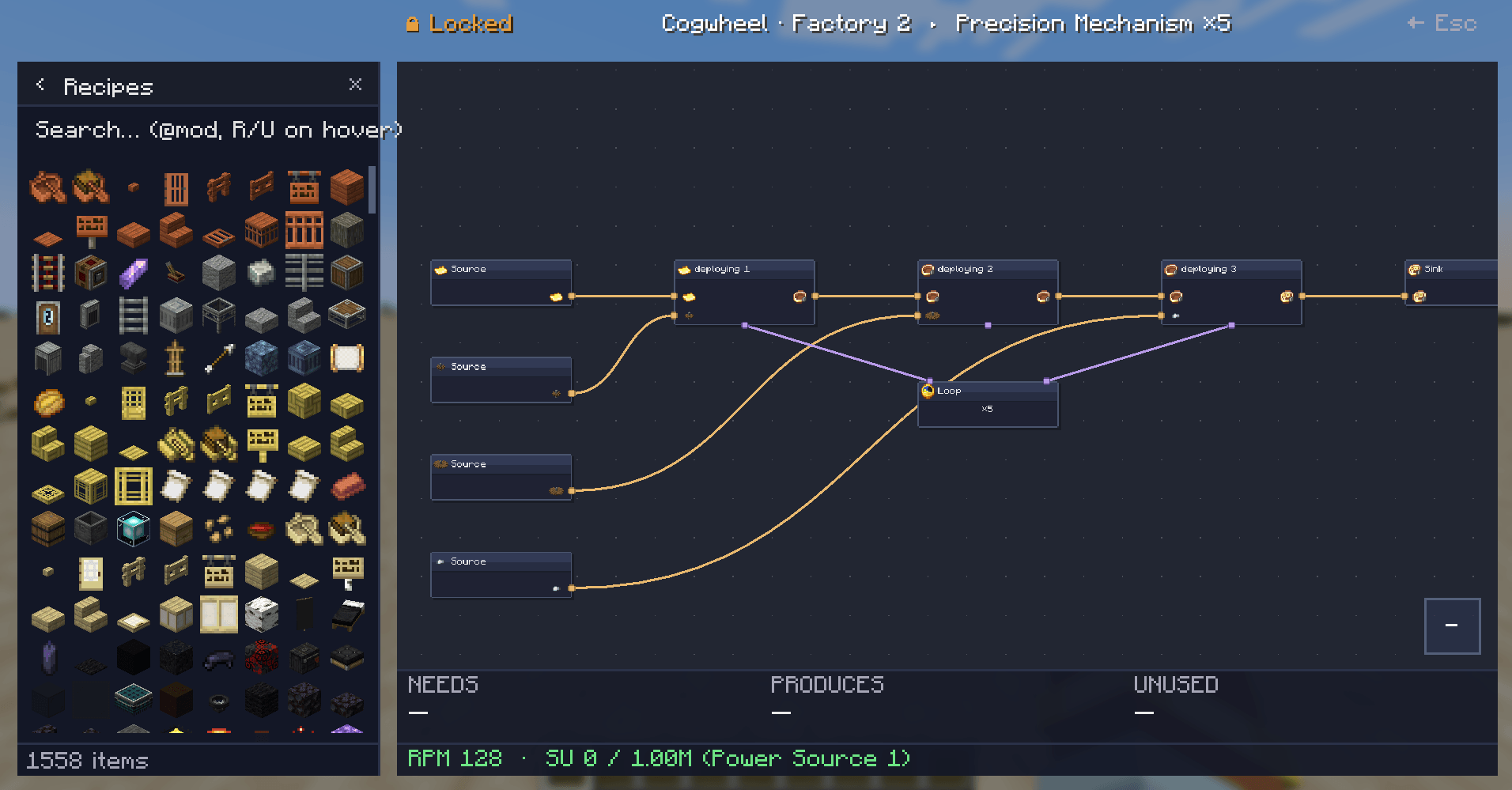
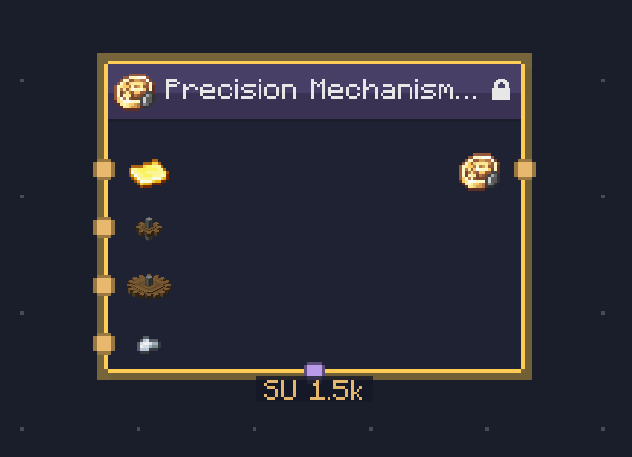
投入精密机械、轨道或黄铜外壳配方,Cogwheel 会为你构建一个完整的 LOCKED 集群 —— 按顺序排列的每一步,正确的原料流动,以及显示迭代计数的循环节点。
⚡ 电源
电源位于任何单个工厂之外。在左侧面板的 Power 类别中创建一次电源,并命名及其 SU 容量:
- 蒸汽机 — 16,384 SU
- 大型风车阵列 — 4,096 SU
然后通过工厂页面上的 ⚡ 按钮将每个工厂分配给一个电源。Cogwheel 会对指向同一来源的所有工厂的 SU 消耗求和,并显示:
- ? 绿色:预算充足
- ? 橙色:接近容量极限
- ? 红色 ⚠:超出预算 —— 超出的具体数值
? 设置
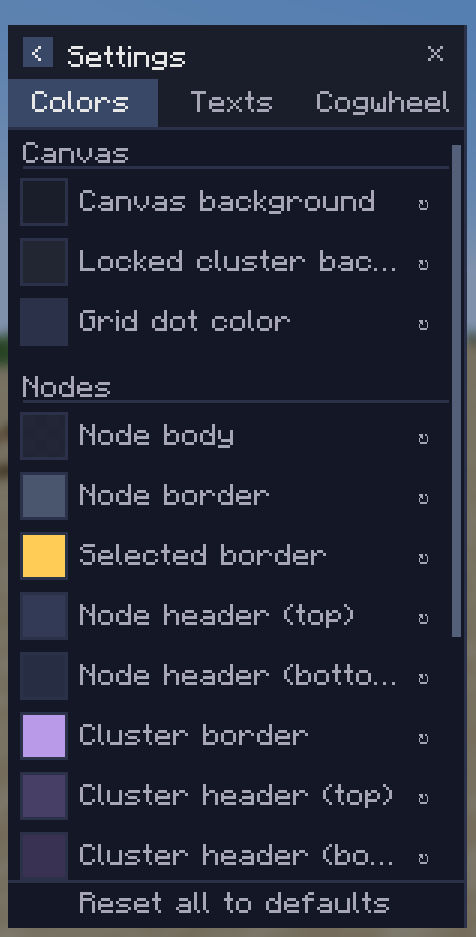
设置页面包含三个选项卡:
- Colors(颜色) — 节点主体、边框、端口点、边缘、画布背景。点击色块,从 HSV 选择器中选择颜色,完成。
- Texts(文本) — 文本颜色和两个缩放旋钮(节点文本缩放比例、侧面板文本缩放比例)。
- Cogwheel — 行为切换开关。从选择器中隐藏原版配方,以免你的模组化工厂被压缩配方淹没。Ponder 集成已在路标计划中。
? 逻辑节点
除了配方、源和汇之外,Logic 类别还包含:
- Splitter — 1 个输入,2–8 个输出。可配置分配模式。
- Merger — 2–8 个输入,1 个输出。
- Limiter — 限制单条线路的流动速率。
- Void — 丢弃物品(可用于故意模拟损耗)。
- Cluster — 空的自定义子图,用于分组。
- Loop — 对链条进行门控,使其每周期运行 N 次迭代。
? Requirements
|
|
| Minecraft |
1.21.1 |
| Mod loader |
NeoForge 21.1.228+ |
| Java |
21 |
| JEI |
Required |
| Create |
Recommended — unlocks SU calculation, sequenced assembly expansion, and accurate Create recipe enumeration |
该模组为仅客户端使用 —— 无需在服务器安装。
?️ Roadmap
我计划中但尚未发布的内容:
- ? Ponder integration — 自动为您的工厂构建示例装置。
- ⚡ 瓶颈感知求解器(真实反向压力建模)。
- ? Splitter 和 Merger 支持按输出权重/固定速率。
- ? 更好的 Create 附加模组覆盖(CC&A、Create: New Age 等)。
如果您想请求功能或报告错误,请前往问题页面。
? Compatibility notes
- 专为重度依赖 Create 及附加模组的整合包设计,但作为原版规划工具也能正常工作。
- 配方枚举通过 JEI 进行,因此任何提供 JEI 分类的模组,其配方均可被选择。
- Cogwheel 不会改变任何游戏内行为 —— 它只是一个规划界面。您的工厂仍需手动建造。(目前。)
? Credits
由 Kima 制作。基于 NeoForge + JEI + Mojang Codec 构建。应力值已与 Create wiki 交叉核对。
源码 / 问题反馈:Github
Cogwheel
A node-based visual factory planner for Create and other recipe-driven mods. Plan your factory as a graph before you build it.
Cogwheel is an in-game factory designer built on the same wavelength as Satisfactory's blueprint tool. Press a single key, and instead of throwing recipes into a wiki, you wire them up on a canvas — Cogwheel does the throughput math, tracks Create's stress for you, and warns when your kinetic budget can't keep up.
It works as a planning notebook for any modpack with recipes, but it really shines next to Create.
✨ Features at a glance
- ?️ Visual graph editor — drag recipes onto a canvas, connect outputs to inputs, watch your factory take shape before you place a single block.
- ⚡ Create stress calculation — every Create-backed recipe knows its SU draw at any RPM. Mixer at 128 RPM? 512 SU. The math just shows up.
- ? Cross-factory power sources — define your steam engines, windmills or flywheels once, assign factories to them, get warned the moment your budget tips over.
- ? Sequenced assembly auto-expands — drop a Precision Mechanism recipe and Cogwheel unfolds it into a locked cluster with all five steps, the loop control, and the right SU sum.
- ? Loop nodes — gate a chain with a Loop node that runs the contained recipes N times. Connect via the violet bottom-port ports.
- ? Multiple factories per save — separate JSON file per factory in
cogwheel/factories/, switchable from the left panel, easy to share.
- ? Cross-factory wiring — export an item from Factory A and import it as a source in Factory B by reference.
- ? Clusters — group any selection into a sub-graph (USER cluster) or get auto-built ones (LOCKED) from sequenced recipes. Edit clusters in-place.
- ? Fully themeable — every color, every text scale, every panel size is configurable from a tabbed settings page.
- ? JEI integration — recipe pickers render JEI's own categories. Right-click any picker row to jump straight to JEI's full recipe view.
? Getting started
Press K in-game (or whatever you've bound Open Factory Editor to) to open the editor.
From left to right:
- Categories panel (left side): browse Recipes, Sources, Sinks, Outputs, Logic, Factories, Power sources, Settings.
- Canvas: pan with middle-mouse, zoom with scroll, drop items here to add nodes.
- Properties panel (right side): right-click any node → Edit, or double-click. Configure parallelism, RPM, recipe variant, port pairing.
- Solver overlay (bottom): live readout of what your factory needs, produces, and wastes — plus RPM and SU draw against your assigned power source.
Adding nodes: drag an item or logic block from the left panel onto the canvas. Items land where you drop them.
? Create integration
Cogwheel reads Create's stress-impact tables and recipe types directly. Every Create recipe is recognized and contributes its SU draw at the configured RPM:
| Recipe type |
SU per RPM |
At 128 RPM (1 machine) |
| Crushing wheels (pair) |
8 |
1,024 SU |
| Mechanical Press |
8 |
1,024 SU |
| Mechanical Mixer |
4 |
512 SU |
| Millstone |
4 |
512 SU |
| Mechanical Saw |
4 |
512 SU |
| Deployer |
4 |
512 SU |
| Spout / Item Drain |
4 |
512 SU |
| Encased Fan (washing/haunting) |
2 |
256 SU |
Per-factory and per-recipe RPM
Each factory has a default RPM (1–256). Each Create recipe node and each cluster can either inherit that RPM or override it with its own value via a checkbox in the properties panel.
Sequenced assembly clusters
Drop a Precision Mechanism, Track, or Brass Casing recipe and Cogwheel builds an entire LOCKED cluster for you — every step in order, the right ingredients flowing through, a Loop node showing the iteration count.
⚡ Power sources
Power sources live outside any single factory. Create them once in the Power category (left panel) with a name and an SU capacity:
- Steam Engine — 16,384 SU
- Big windmill array — 4,096 SU
Then assign each factory to a power source via the ⚡ button on the Factories page. Cogwheel sums SU draw across every factory pointing at the same source and:
- ? Green: comfortably within budget
- ? Orange: nearly at capacity
- ? Red ⚠: over budget — by exactly how much
? Settings
Three tabs in the settings page:
- Colors — every node body, border, port dot, edge, canvas background. Click the swatch, pick a color from the HSV picker, done.
- Texts — text colors and the two scale knobs (node text scale, sidepanel text scale).
- Cogwheel — behavior toggles. Hide vanilla recipes from the picker so your modded factory isn't drowned in compaction recipes. Ponder integration is on the roadmap.
? Logic nodes
In addition to recipes, sources, and sinks, the Logic category has:
- Splitter — 1 input, 2–8 outputs. Configurable distribution mode.
- Merger — 2–8 inputs, 1 output.
- Limiter — caps the rate of flow on a single line.
- Void — discards items (useful for modeling waste on purpose).
- Cluster — empty user-created sub-graph for grouping.
- Loop — gates a chain to run N iterations per cycle.
? Requirements
|
|
| Minecraft |
1.21.1 |
| Mod loader |
NeoForge 21.1.228+ |
| Java |
21 |
| JEI |
Required |
| Create |
Recommended — unlocks SU calculation, sequenced assembly expansion, and accurate Create recipe enumeration |
The mod is client-side only — no server install needed.
?️ Roadmap
Things I'm planning but haven't shipped yet:
- ? Ponder integration — auto-build example contraptions for your factories.
- ⚡ Bottleneck-aware solver (real backpressure modeling).
- ? Per-output weights / fixed rates on Splitter and Merger.
- ? Better Create addon coverage (CC&A, Create: New Age, etc).
If you want to ask for a feature or report a bug, head to the issues page.
? Compatibility notes
- Designed for modpacks heavy in Create + addons, but works fine as a vanilla planner too.
- Recipe enumeration goes through JEI, so any mod that ships JEI categories will have its recipes pickable.
- Cogwheel doesn't change any in-world behavior — it's a planning surface. Your factory still has to be built by hand. (For now.)
? Credits
Made by Kima. Built on NeoForge + JEI + Mojang Codec. Stress values cross-checked against the Create wiki.
Source / issues: Github


 模组
 模组

 模组

 模组
 模组

 模组
评论 0
登录后参与评分
还没有评论,来抢沙发吧