注意:如果您在寻找此模组的服务器端替代方案(即客户端无需安装即可连接至您的服务器),CommandTokens 已包含在我的服务器端基础模组中:
Henny Essentials
概述
CommandTokens 允许用户创建自定义物品,当玩家使用这些物品时,将执行相应的命令。
本模组面向服务器管理员、整合包制作者和地图创作者,但在多种场景下都具有广泛的用途。
命令
你可以使用命令 /commandtokens give <玩家名称> <令牌别名> 来向玩家发放令牌。
或者,你也可以使用 Minecraft 的 give 命令来向玩家发放令牌,如下所示:
/give <玩家名称> commandtokens:token[custom_data={"commandtoken":"令牌别名"}]
如何创建令牌
要创建令牌,请将此模组放入你的 mods 文件夹中,并以创造模式加载一个世界。如果你导航到 CommandTokens 创意标签页,将会看到默认生成的 3 个令牌。
现在保存并退出你的世界,然后进入配置目录,你会看到一个名为 CommandTokens.json 的文件。
这就是你可以创建自定义令牌的地方。下面是一个“令牌”对象的分解说明:
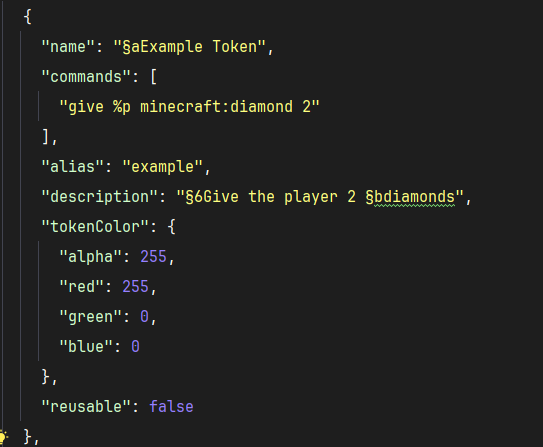
注意:从 V1.0.4 版本开始,你可以在令牌中添加一个权限选项 "some.permission.node",它将使用 LuckPerms 来检查玩家是否有使用该令牌的权限。如果未安装 LuckPerms 或权限字符串为空,则不会进行权限检查。
根据需要创建任意数量的此类对象,并将它们放置在配置中的 "tokens": [] 数组内,下次加载世界时,你将能够访问这些令牌。
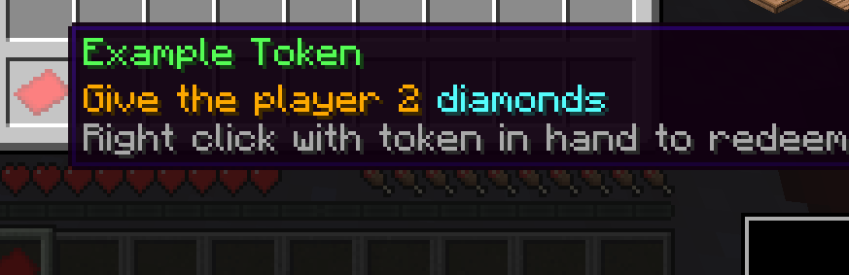
例如,上面定义的配置令牌将在游戏中生成此令牌:
NOTE: If you are looking for a server-side alternative to this mod (that clients dont also have to install to connect to your server) - CommandTokens has been included in my server-side essentials mod:
Henny Essentials
Overview
CommandTokens gives the user the ability to create custom items that execute commands when a player uses them.
This mod is aimed toward server owners, modpack creators and map makers but has a wide range of uses in many scenarios.
Commands
You can use the command /commandtokens give <playername> <tokenalias> to give a token to a player.
Alternatively, you can use the Minecraft give command to give a player a token as follows:
/give <playername> commandtokens:token[custom_data={"commandtoken":"tokenAlias"}]
How to create a Token
To create a token, place this mod in your mods folder and load up a world in creative mode. If you navigate to the CommandTokens creative tab you will see 3 tokens that are created by default.
Now save and quit your world and navigate to the config directory, you will see a file called: CommandTokens.json
This is the file where you can create your custom tokens. Below is a breakdown of a "token" object:
NOTE: as of V1.0.4 you can add a permission: "some.permission.node" option to tokens and it will use LuckPerms to check if player has permission to use the token. If LuckPerms is not installed, or the permission string is blank, the token will not check permissions.
Create as many of those objects as you want and place them within the "tokens": [] array in the config and the next time you load your world you will have access to these tokens.
For example, the config token defined above will create this token in game:


 模组

 模组

 模组

 模组
 模组
 模组
评论 0
登录后参与评分
还没有评论,来抢沙发吧