
Forge Config Screens 已于 2026-04-02 停止维护。
NeoForge 现已为 Minecraft 1.21+ 提供开箱即用的配置界面。
? 简介:
Config Menums for Forge 允许你在游戏内直接编辑所有模组的配置文件,无需再手动触碰任何文件。
? 功能概览:
该模组最显著的功能包括:编辑 Forge 的所有配置类型(包括服务器配置,以及支持与在线服务器和其他玩家同步)、设置创建新世界时使用的默认配置、强大的沉浸式搜索功能、对各种数据类型列表的正确处理、一目了然的单模组全部配置管理界面等,还有更多实用功能。
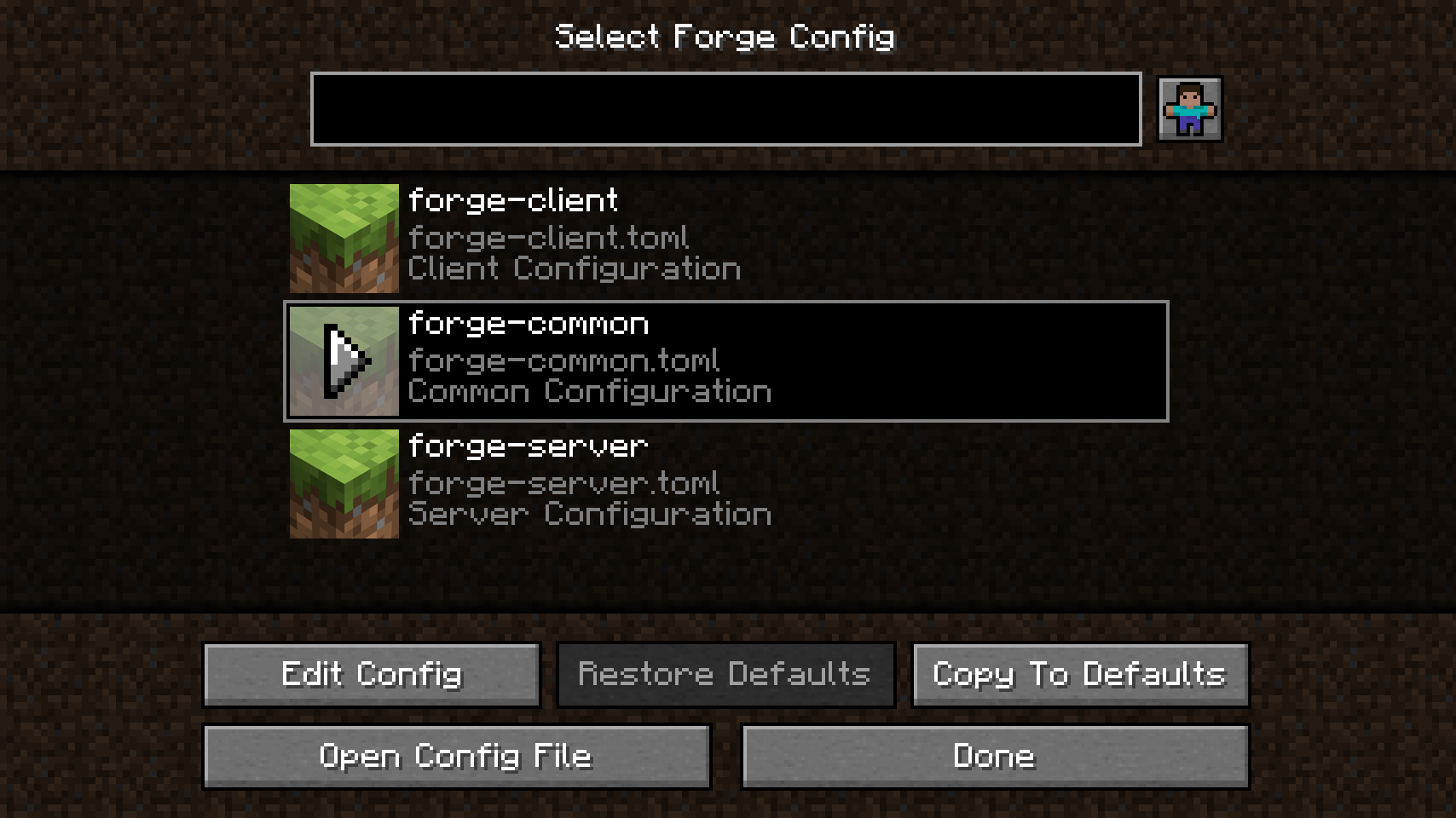
打开模组的配置菜单时,你会看到一个文件选择屏幕,列出该模组添加的所有配置文件。恢复默认按钮允许重置整个单个配置文件(当配置文件名称以斜体显示时,表示它已被修改)。还有一个按钮可以在编辑器中打开实际的配置文件。复制到默认值按钮允许你将此配置设置为默认配置,以便在重新创建配置时使用(主要在创建新世界时为服务器配置有用)。
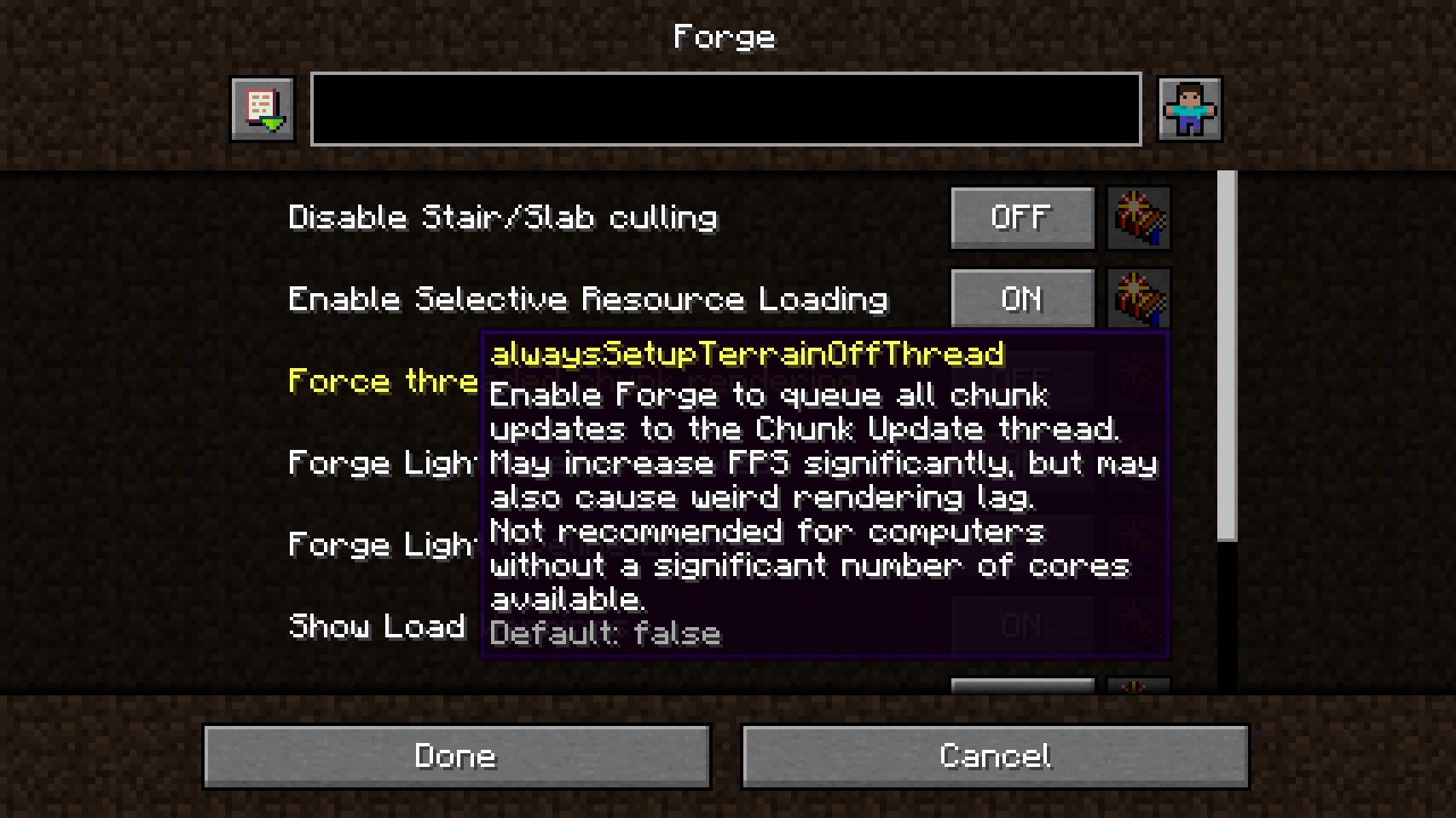
打开配置文件后,你会看到一个包含所有配置选项和分类的大列表。每个选项右侧的按钮可将其恢复为默认值。悬停在某个选项上时,工具提示会提供额外信息,包括内部键名、描述、范围、允许值和默认值。底部有关闭按钮用于放弃更改,完成按钮将保存所有更改到配置文件。
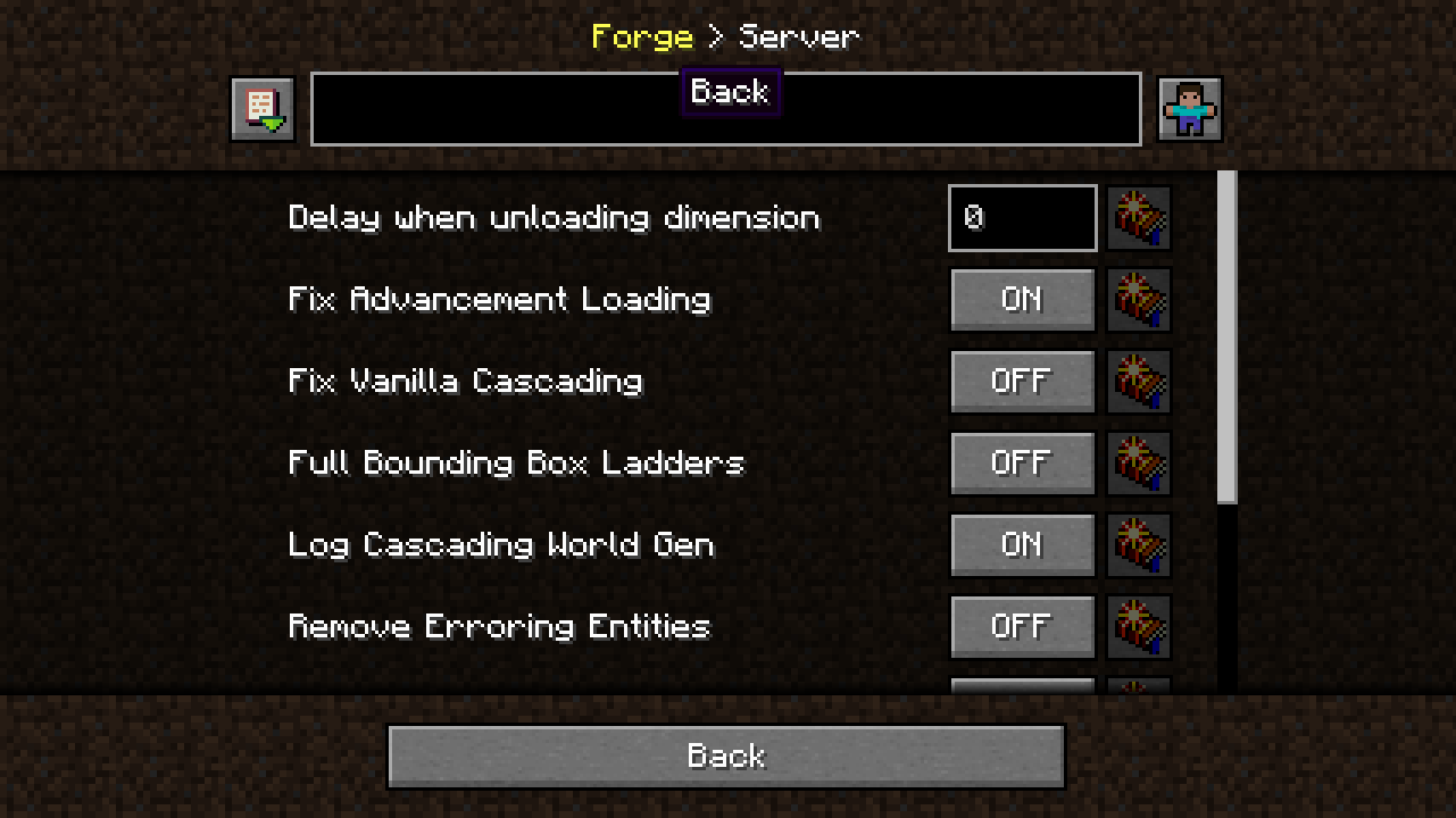
顶部的路径栏显示你当前在活跃配置文件中的位置。但不仅如此:它还充当导航栏。你可以点击之前的分类返回到那里。
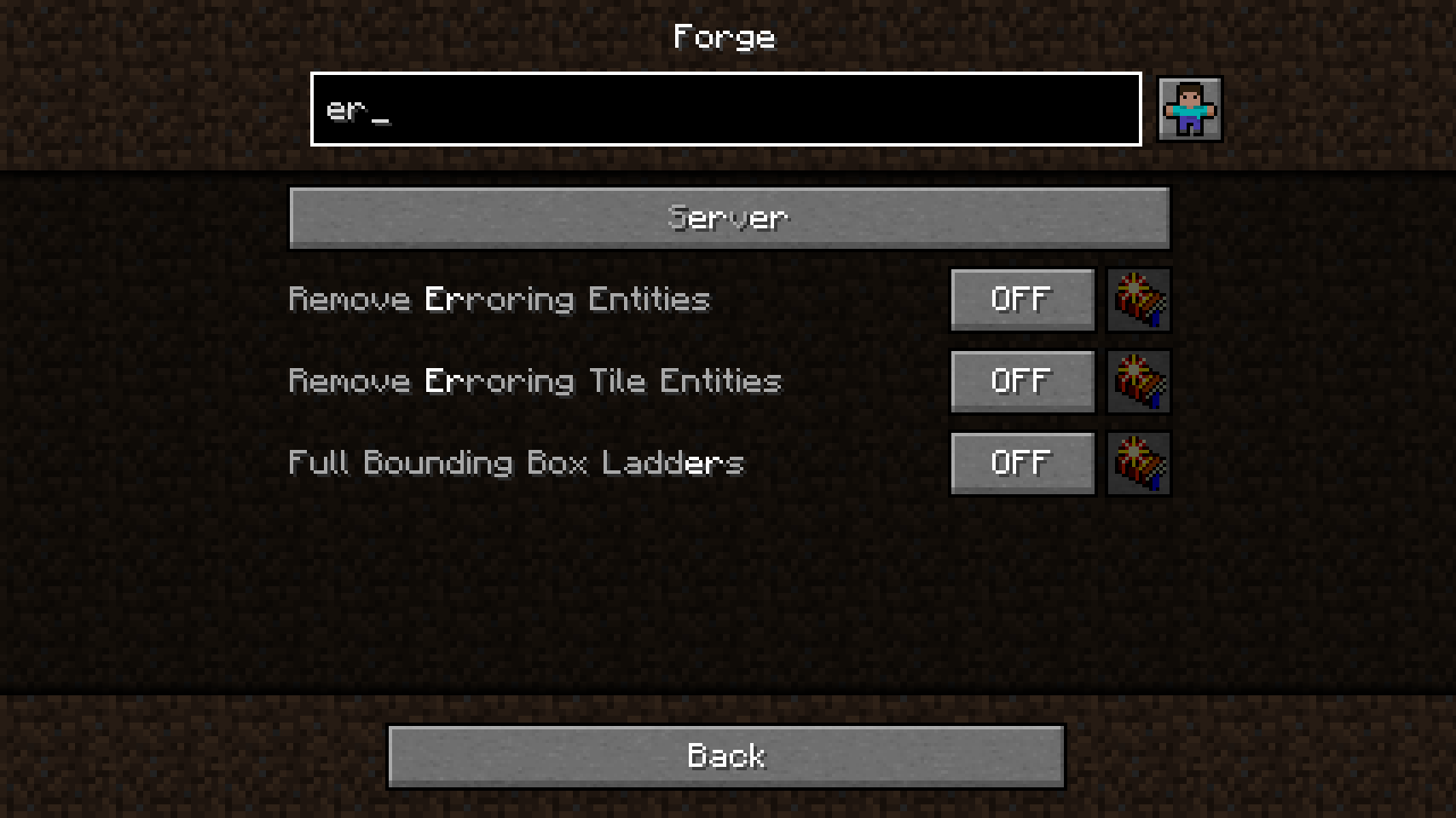
搜索功能相当智能,当前查询词会被高亮显示,找到的条目也会相应排序。结果将位于当前及所有后续分类中。最重要的是,只需简单左击即可清空搜索字段。
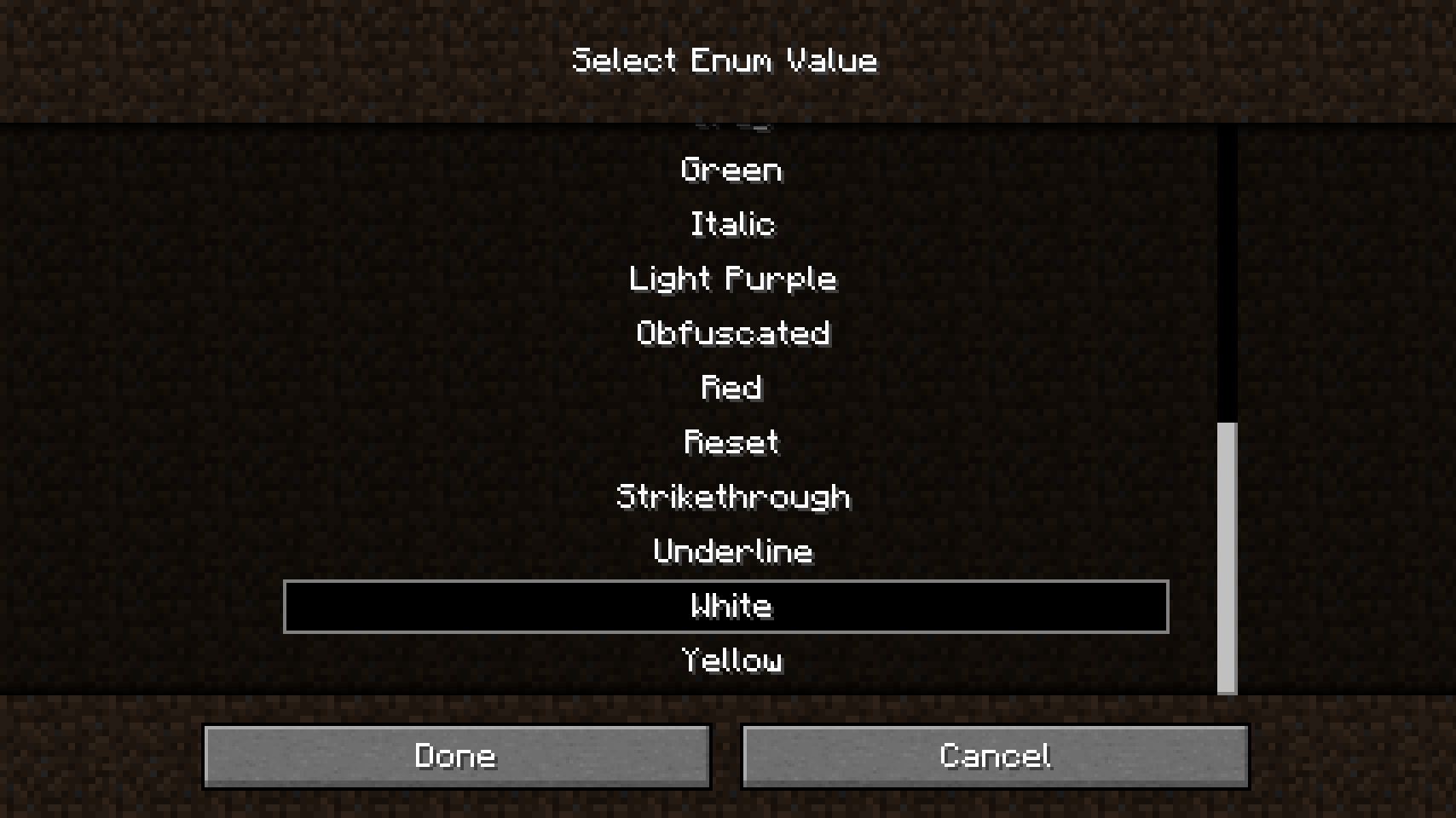
编辑更复杂的值(如字符串、枚举和列表)需要通过单独的屏幕进行。在这种情况下,可以从列表中选择一个枚举值,所有选项均可一览无余。
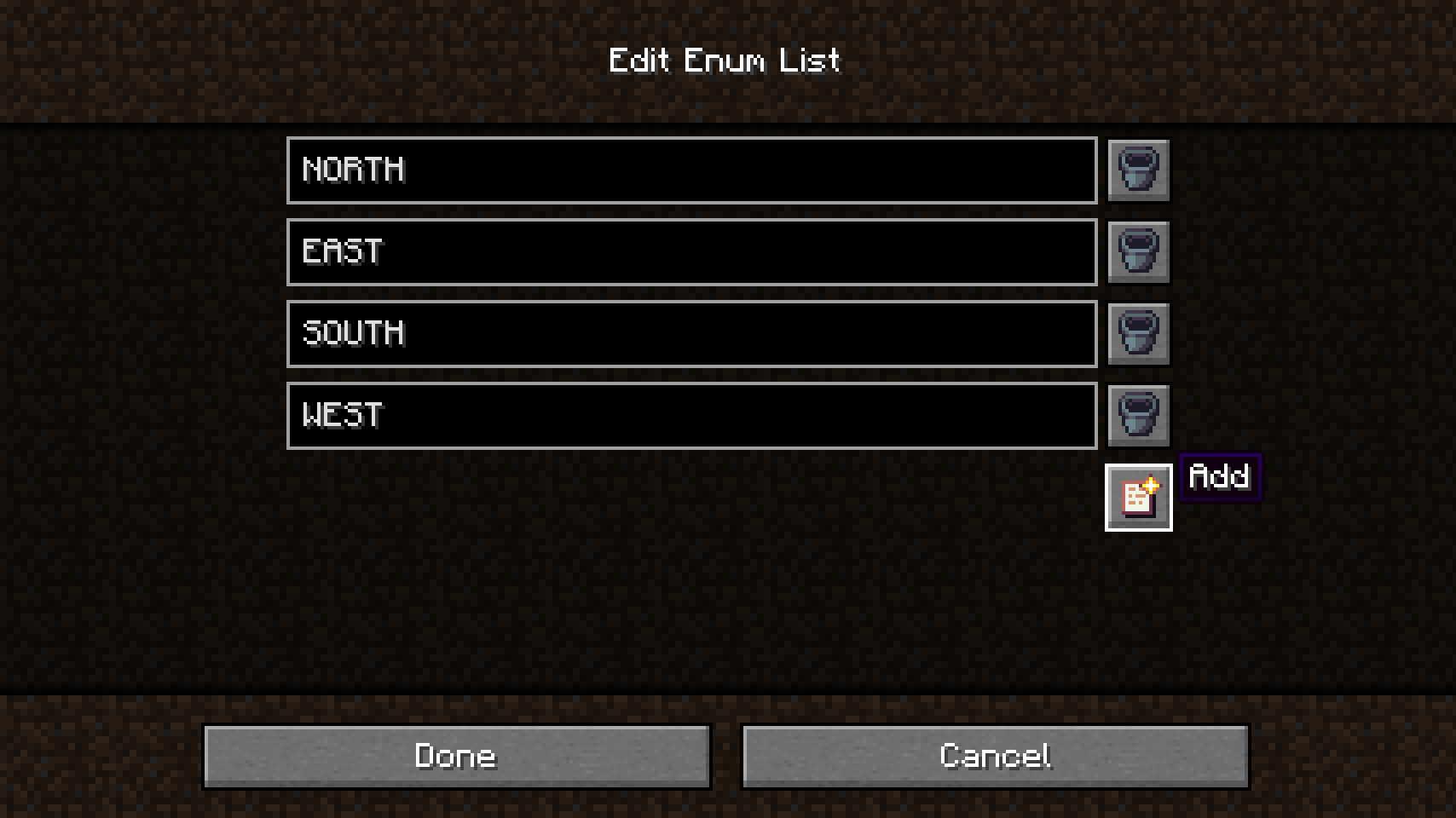
另一方面,编辑列表则看起来大不相同。所有值均以字符串形式输入,并会自动转换和检查。有时,Config Menus for Forge 无法确定列表的类型,因此系统会提示你自行选择类型,或直接编辑配置文件中的选项(尚未实现)。此外,如果添加了无效条目,列表将无法保存,需要在此之前手动修正。
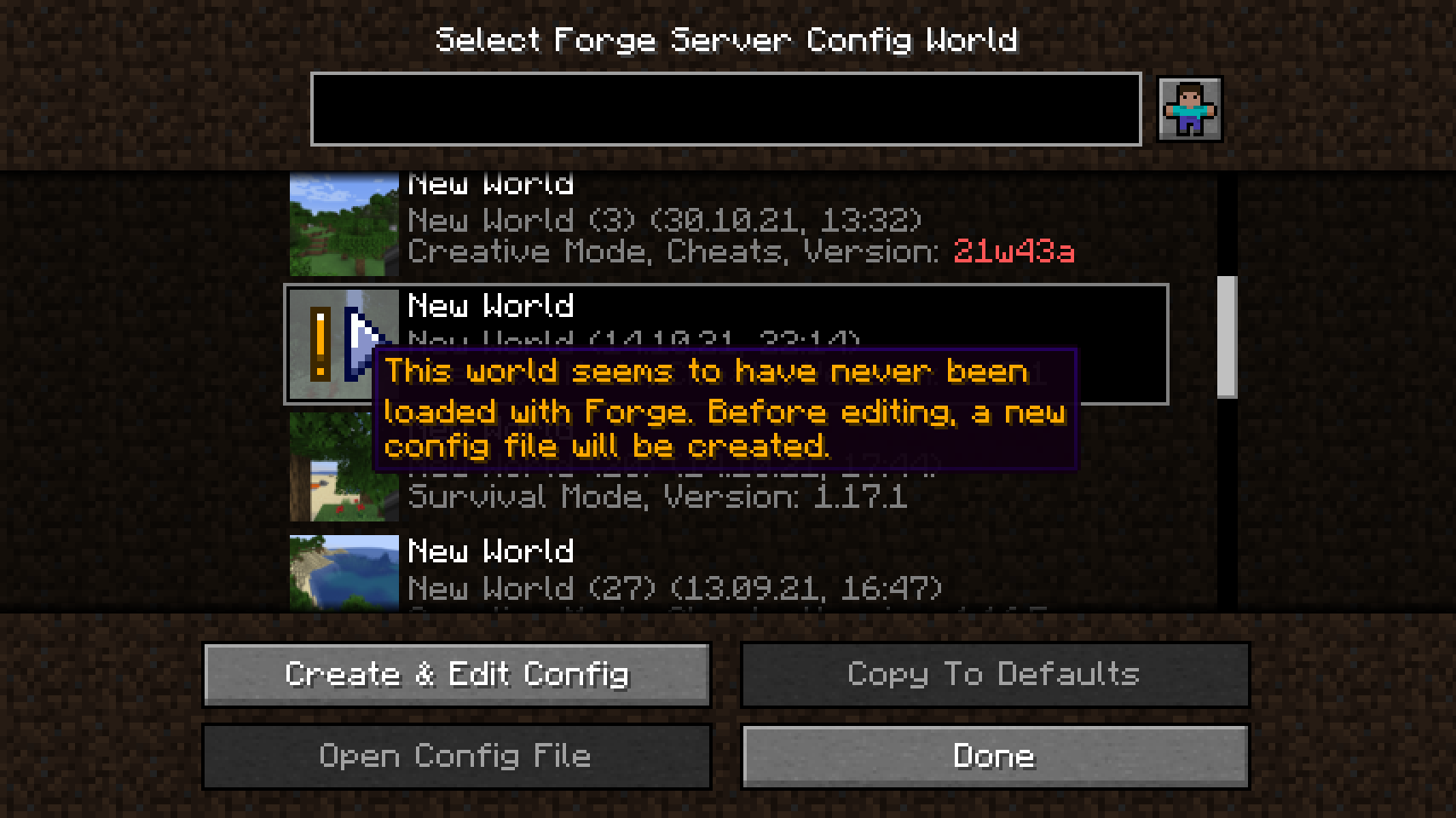
编辑服务器配置与其他类型的配置略有不同。它们针对每个单独的世界存在,因此要从主菜单编辑服务器配置,你必须选择一个世界。当你正在某个世界中游玩时,该世界将被自动选中。当 Config Menus for Forge 需要首先创建尚不存在的服务器配置时,会显示此消息。
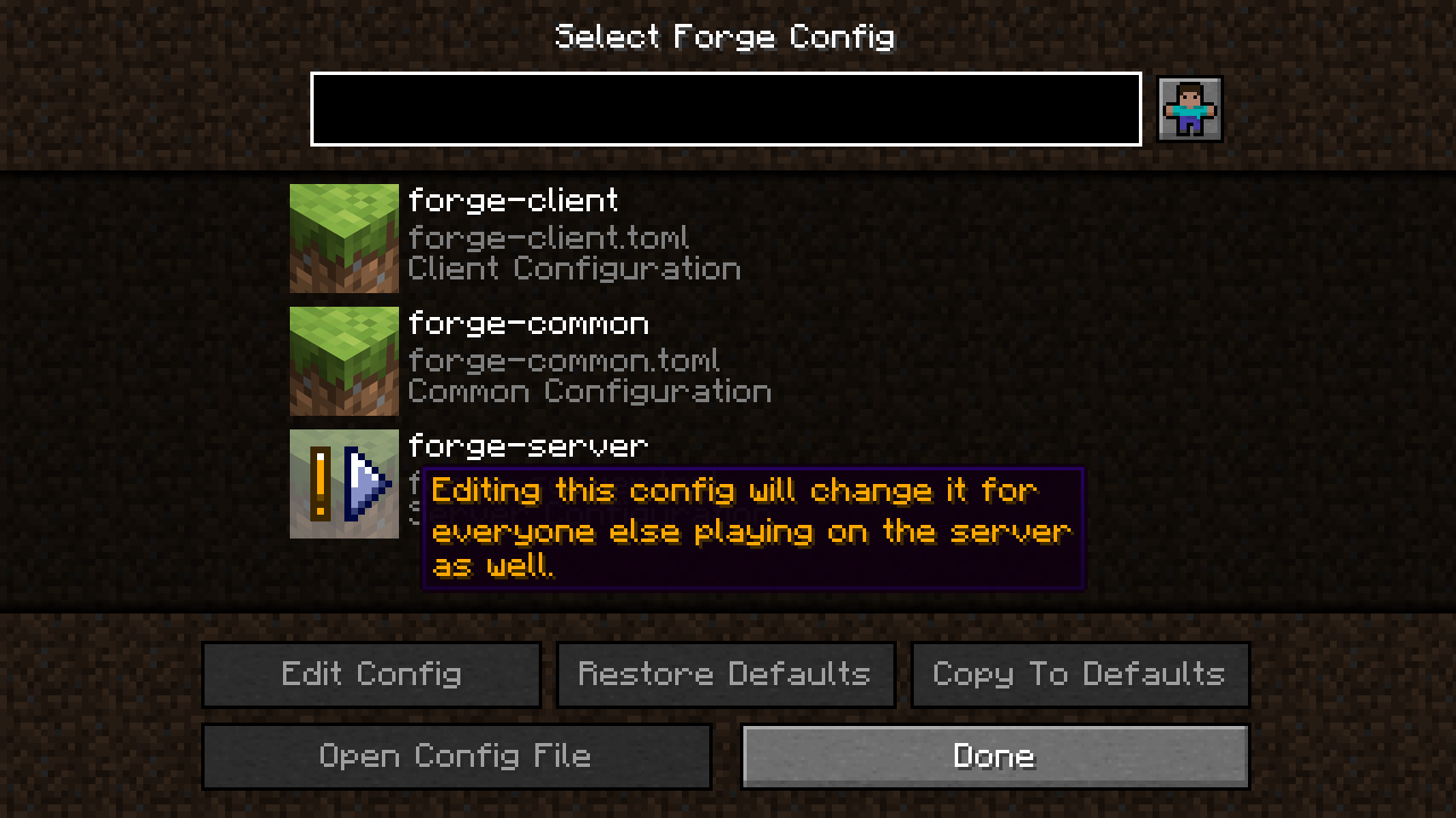
当你在在线服务器上游玩时,会显示此消息。只有服务器操作员才能编辑服务器配置。这样做时,配置将同步回服务器,并从那里同步到所有其他客户端。在单人游戏中不会显示警告,也不会发生同步,因为所有内容都在本地完成。
? 常见问题解答:
问:我可以用这个模组编辑服务器配置吗?
答:可以!
问:我可以在多人服务器中编辑服务器配置文件吗?
答:当然可以!唯一的限制是你必须拥有该服务器的操作员(OP)权限,并且 Config Menus for Forge 的服务器端组件也必须安装。
问:我无法编辑 Forge 客户端的配置文件!
答:因为你安装了 OptiFine。在这种情况下,Forge 的客户端配置文件将无法使用。这与 Config Menus for Forge 无关。
问:我是服务器管理员,我不希望有人在服务器运行时编辑服务器配置。
答:只需不在你的服务器上安装 Config Menus for Forge 即可。除了无法编辑服务器配置外,其他功能对你的玩家来说仍然正常工作。
问:我是模组开发者,我已经为 Configured 添加了自定义背景。我需要为这个模组再次添加吗?
答:不需要。Config Menus for Forge 也会利用 Configured 模组提供的资源。不过未来还计划有其他面向开发者的选项。如果你不确定如何为你的模组在配置菜单中添加自定义背景,请查看 Configured 模组页面中的说明。
问:我是开发者,我希望我的模组使用这些配置菜单。我需要做什么?
答:基本上什么都不用做。只需让你的用户在安装你的模组的同时也安装本模组即可。你不需要添加任何依赖项或类似的东西。
? 鸣谢:
Config Menus for Forge 的开发得益于以下模组的帮助与启发:
- MrCrayfish 的 Configured 模组,Config Menus for Forge 最初就是基于该模组的一个分支开发的
- Finalbossblues 提供的精美图标,可在 itch.io 获取
- UnitedMel 允许我使用其 BetterMenu 资源包中可爱的玩家图标
Forge Config Screens is discontinued as of 2026-04-02.
NeoForge now offers config screens out of the box for Minecraft 1.21+.
? About:
Config Menus for Forge allows for editing config files for all mods directly in-game without having to ever touch a single file again.
? Contents:
Most notably, this mod allows for: editing all of Forge's config types (including server configs, as well as syncing with an online server and other players), setting default configs to be used when creating new worlds, a powerful and immersive search, proper handling for editing lists with various data types, an easy to use interface for dealing with all configs added by a single mod at a glance, and much more.
When opening a mods config menu you'll be greeted with a file selection screen listing all config files added by the mod. The restore defaults button allows for resetting a single config file as a whole (you can tell a config has been modified when it's name is in italics). There is also a button for opening the actual config file in an editor. The copy to defaults button allows you to set this config as a default config to be used whenever the config is recreated (mainly useful for server configs when creating new worlds).
When a config is open, you'll find a big list with all config options and categories. The button to the right of every option will restore it's default value. When an option is hovered, a tooltip will provide additional information, including the internal key, description, range, allowed values, and the default value. On the bottom, the cancel button can be used for discarding changes, the done button will save all changes to the config file.
The path bar on top shows where you currently are within the active config file. But there's more: It also functions as a navigation bar. You can click on previous categories to go back to them.
Searching is quite fancy, the current query is highlighted, and found entries are sorted accordingly. Results will be located in the current, as well as all subsequent categories. And best of all, the search field can be cleared again with a simple left-click.
Editing more complex values such as strings, enums and lists is done via a separate screen. In this case, an enum value can be chosen from a list where all choices can be viewed at a glance.
Editing lists on the other hand looks quite a bit different. All values are entered as strings and will be converted and checked automatically. Sometimes, the type of a list cannot be determined by Config Menus for Forge, so you'll be promted to choose the type yourself, or edit the option directly in the config file instead (not yet implemented). Also lists cannot be saved when invalid entries have been added, they need to be manually corrected before that.
Editing server configs is a bit different from other config types. They exist for every single world, so to edit a server config from the main menu you'll have to select a world. When you're currently playing in a world this world will be selected automatically. This message is shown when Config Menus for Forge has to create the server config first as it doesn't exist yet.
This message is shown when playing on an online server. Server configs can only be edited by server operators. When doing so, they'll be synced back to the server and from there to all other clients. In singleplayer no warnings are shown and no syncing happens as everything is done locally.
? FAQ:
Q: Can I edit server configs with this mod?
A: YES!
Q: Can I edit server configs while on a multiplayer server?
A: Yes again! The only limitations are that you need to be an operator on that server, and Config Menus for Forge needs to be installed server-side as well.
Q: I can't edit Forge's client config!
A: You have OptiFine installed, Forge's client config can't be used then. This has nothing to do with Config Menus for Forge.
Q: I'm a server owner and I don't want anyone to edit the server's configs while it is running.
A: Simply don't install Config Menus for Forge on your server, everything but editing server configs will still work for your players.
Q: I'm a mod developer and I already added custom backgrounds for Configured. Do I need to do it for this mod again?
A: No, Config Menus for Forge uses the resources provided by mods for Configured as well. There are other developer options planned for the future though. In case you're unsure about adding a custom background to the config menus for your mod, check out the instructions on the mod page for Configured.
Q: I'm a developer and I want my mod to use these config menus. What do I need to do?
A: Nothing really. Just ask your users to install this mod alongside yours. You don't need to add a dependency or anything like that.
? Credits:
Developing Config Menus for Forge was helped and inspired by:
- MrCrayfish for their Configured mod, which Config Menus for Forge initially was a fork of
- Finalbossblues for their amazing icons available over on itch.io
- UnitedMel for allowing me to use the cute player icon from their BetterMenu resource pack
下载 Forge Config Screens [Archived]
需要联机服务器吗?
稳定流畅、一键部署,几分钟即可和朋友联机开服
最低仅需 8 元/月 即可畅快联机
下载 Forge Config Screens [Archived]
需要联机服务器吗?
稳定流畅、一键部署,几分钟即可和朋友联机开服
最低仅需 8 元/月 即可畅快联机
下载 Forge Config Screens [Archived]
需要联机服务器吗?
稳定流畅、一键部署,几分钟即可和朋友联机开服
最低仅需 8 元/月 即可畅快联机
下载 Forge Config Screens [Archived]
需要联机服务器吗?
稳定流畅、一键部署,几分钟即可和朋友联机开服
最低仅需 8 元/月 即可畅快联机
下载 Forge Config Screens [Archived]
需要联机服务器吗?
稳定流畅、一键部署,几分钟即可和朋友联机开服
最低仅需 8 元/月 即可畅快联机
下载 Forge Config Screens [Archived]
需要联机服务器吗?
稳定流畅、一键部署,几分钟即可和朋友联机开服
最低仅需 8 元/月 即可畅快联机
下载 Forge Config Screens [Archived]
需要联机服务器吗?
稳定流畅、一键部署,几分钟即可和朋友联机开服
最低仅需 8 元/月 即可畅快联机
下载 Forge Config Screens [Archived]
需要联机服务器吗?
稳定流畅、一键部署,几分钟即可和朋友联机开服
最低仅需 8 元/月 即可畅快联机
下载 Forge Config Screens [Archived]
需要联机服务器吗?
稳定流畅、一键部署,几分钟即可和朋友联机开服
最低仅需 8 元/月 即可畅快联机
下载 Forge Config Screens [Archived]
需要联机服务器吗?
稳定流畅、一键部署,几分钟即可和朋友联机开服
最低仅需 8 元/月 即可畅快联机
更新日志
本项目的所有重要更改都将记录在此文件中。
本文件的格式基于 Keep a Changelog 规范。
[v8.0.2-1.20.1] - 2023-07-30
修复
- 修复了与 Night Config Fixes 模组的兼容性问题
[v8.0.1-1.20.1] - 2023-07-29
修复
- 修复了某些文本框字符限制过低,导致无法输入较长值的问题
- 修复了因无效类构造函数导致部分网络消息解码失败的问题
[v8.0.0-1.20.1] - 2023-07-10
- 移植至 Minecraft 1.20.1
关于这个资源的讨论、问题反馈与使用心得
还没有讨论,来发第一帖吧
你是这个资源的作者?登录后可认领此资源。
相似资源
 模组

一个用于收集生物掉落物的多区块模组。
 模组

显示你正在注视的方块的信息。(适用于 Minecraft 1.16+ 的 Hwyla/Waila 分支)
 模组
在游戏画面角落显示附近世界地形、玩家、生物和实体的地图。可创建路径点,帮助你找到标记过的位置。
 模组

查看物品与配方
 模组
使用 JavaScript 编辑配方、添加自定义物品、编写世界事件!
 模组
AE2:一款流行的自动化与存储模组
评论 0
登录后参与评分
还没有评论,来抢沙发吧