Convenient Storage 是一款轻量级模组,仅添加了一个物品:Storage Tablet。
注意事项
- 请勿使用 Inventory Profiles Next 和 Inventory Essentials,它们与该模组存在冲突。
- 建议使用 Inventory Sorter 和 Mouse Tweaks。
- 使用 this mod 以允许你的存储系统与方块进行交互。
- 如果你正在使用 Apotheosis,建议搭配 Apothic Enchanting Vanilla Integration 使用,这样就能识别 Apotheosis 的书柜了。
- AE 风格资源包:AppliedConvenient
集成与附加组件
用于世界交互的附加组件:Convenient Interface。
与 Applied Energistics 2 的集成:Convenient Applied。
与 Mekanism 的集成:Convenient Mekanism。
与 ProjectE 的集成:Convenient ProjectE。
实用功能
- 基础用法:存储近乎无限数量的物品、流体和经验值。(上限为 9223372036854775807)
- 附魔:存储附魔效果。若需解除附魔抽取的限制,请使用命令
/gamerule limitedEnchantmentLevels false。
- 信标点:随时随地记录并使用任意位置的信标点。
- 实体:右键点击实体即可将其存储。你可以攻击它们、重新召唤它们,或将它们转化为存储中的刷怪蛋。
- 交互:像桶一样从层级中收集流体;当“选中流体”不为空时,像装满水的桶一样向层级倾倒流体。
- 自动拾取:配置物品在手持 Tablet 拾取时自动存入存储系统,按 'Q' 键移除物品。
- 流体自动拾取:启用后,手持 Tablet 时自动拾取范围内的流体方块。
- 快速战利品:右键点击战利品箱可直接拾取其中的战利品。
- 合成:内置于 Storage Tablet 菜单中的合成台,支持复杂操作。
- 烧炼:在 Storage Tablet 菜单中使用“热源”而非燃料来烧炼物品。
- 锻造:内置铁砧,且永远不会出现“过于昂贵”的提示!
- smithing:内置锻造台!
- 切割:内置复合切割机,意味着你也可以在 Tablet 内切割木材和石头。木材切割配方可通过数据包配置。
- 酿造:内置酿造台,支持连续酿造。
- 附魔:内置附魔台。
- 信标:内置信标。
- 搜索:以 c 开头开始搜索 s。 '@':模组名称; '#':标签; ':':物品 ID。
- 团队存储:使用 /storage 与其他玩家共同存储物品。
- 能量:如果启用了能量存储,则可存储无限能量。
详细信息
烧炼
我们使用火把、营火和岩浆块作为烧炼的热源。
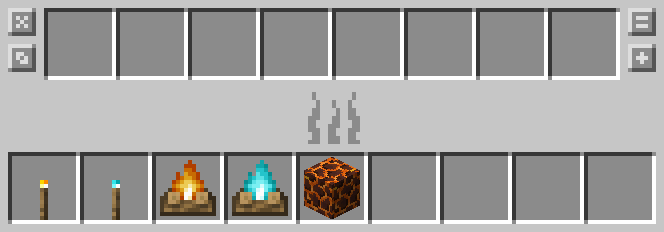
此设置可通过数据包进行配置。
附魔

将书柜放置在右侧,在左侧对物品进行附魔。
如果你对附魔结果不满意,点击“x”按钮以清除附魔。
其他说明
一旦你合成了 Storage Tablet,初始状态下你只能使用物品存储和合成实用功能。
使用相应的配方升级你的 Tablet,以获得更多的存储和实用功能。
如果你不喜欢频繁升级 Tablet,请使用命令 /gamerule restrictedTabletTabs false 来禁用此限制。
之后,无论是否经过升级,你都可以使用所有的存储和实用功能。
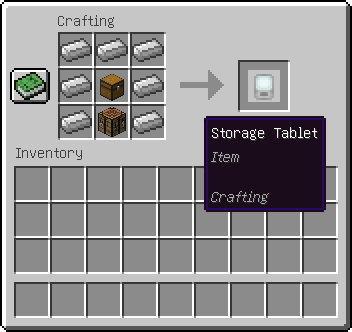
制作你的 Tablet
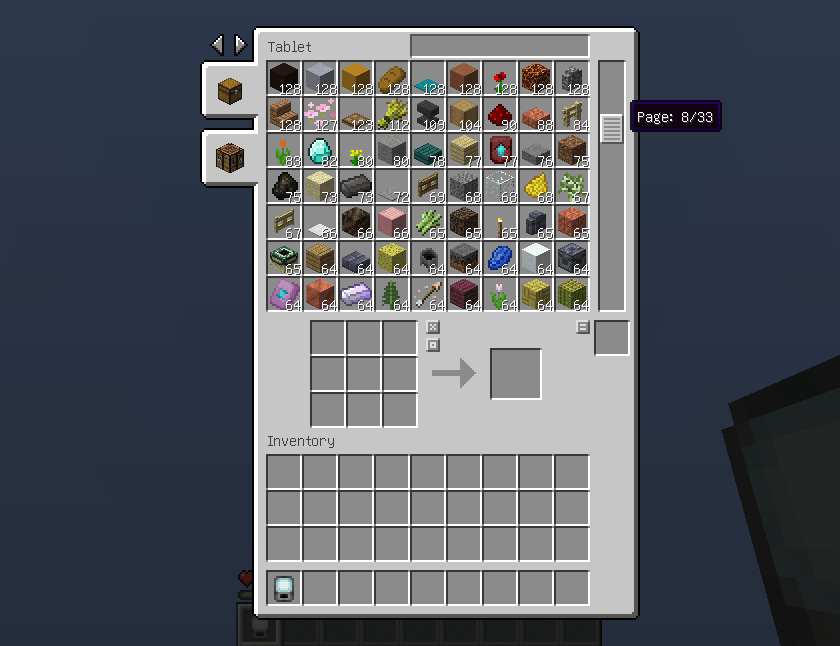
存储你的物品
升级你的 Tablet
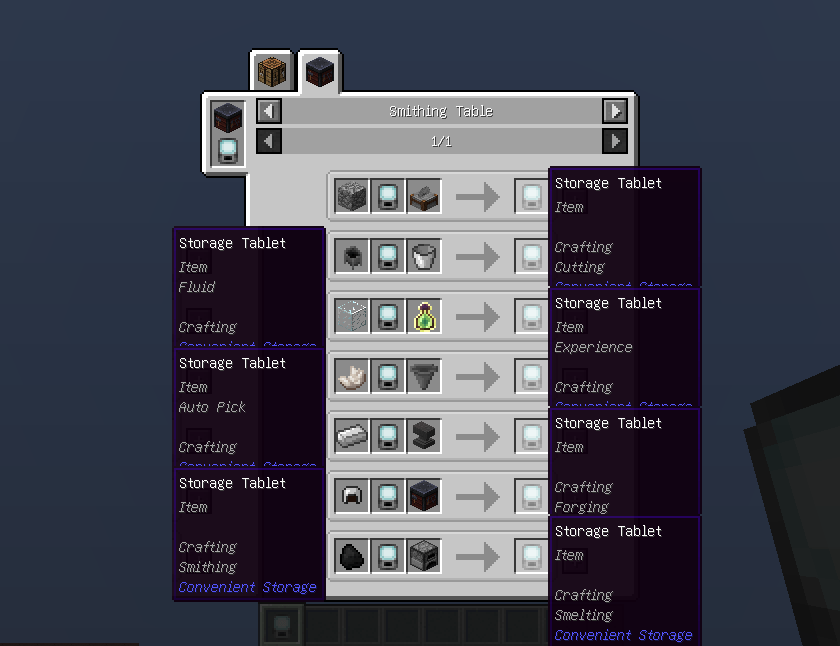
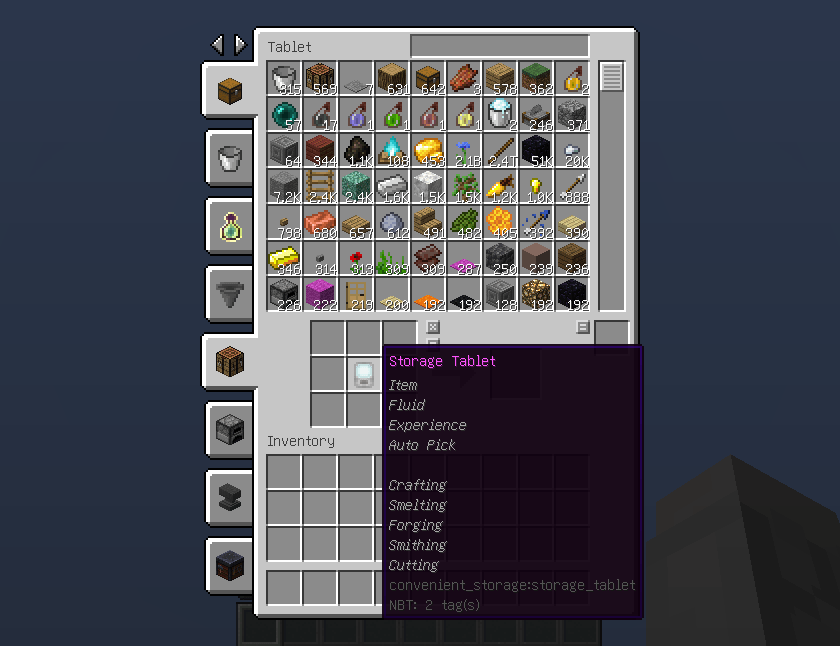
满级 Tablet
Convenient Storage is a lightweight mod that only added an item: Storage Tablet.
NOTICE
- Don't use Inventory Profiles Next and Inventory Essentials, they conflicts with this mod.
- It is recommended to use Inventory Sorter and Mouse Tweaks.
- Use this mod to allow your storage to interact with blocks.
- If you're using Apotheosis, consider using Apothic Enchanting Vanilla Integration, then bookshelves of Apotheosis will be recognized.
- Resourcepack in AE styles: AppliedConvenient
Integrations & Addons
Addon for world interacting: Convenient Interface.
Integration with Applied Energistics 2: Convenient Applied.
Integration with Mekanism: Convenient Mekanism.
Integration with ProjectE: Convenient ProjectE.
UTILITIES
- Basic Usage: Storing almost infinity items, fluids, experience.(Capped at 9223372036854775807)
- Enchantment: Stores enchantments, use /gamerule limitedEnchantmentLevels false to disable the limit of enchantment withdrawed.
- Waypoint: Stores waypoints anywhere you come and use casually anytime.
- Entity: Stores when rightclick on an entity, you can attack or resummon them or make them to spawn eggs in storage.
- Interact: Collecting fluid from level like a bucket, pouring fluid into level like a filled bucket while "Selected Fluid" is not empty.
- Auto Pick: Configure items automatically store into storage when picked up inside tablet, use key 'Q' to remove items.
- Fluid Auto Pick: Pick up fluid blocks within your reach automatically while enabled and holding tablet.
- Quick Loot: Right click on loot chests to pick up loots directly.
- Craft: Built in a crafting table in Storage Tablet's menu, supporting complex operations.
- Smelt: Smelt items with "heat_source" instead of fuel in Storage Tablet's menu.
- Forge: Inner anvil that never causes "Too Expensive"!
- Smith: Inner smithing table!
- Cut: Inner composite cutter which means you can also cut woods and stones inside tablet, wood-cutting recipes can be configured with datapack.
- Brew: Inner brewing stand which can brew continuously.
- Enchant: Built in Enchanting Table.
- Beacon: Built in Beacon.
- Search: Start with c to search s. '@':Mod name; '#':Tag; ':':Item ID.
- Team Storage: Use /storage to store items with other players.
- Energy: Storing infinity energy if energy storage is enabled.
DETAILED INFORMATION
Smelting
We use torches, campfires and magma blocks as heat source for smelting.

This is configurable by datapack.
Enchanting

Place bookshelf at right and enchant item at left.
If you are not satisfied with the enchantment, click "x" button to clear the enchantment.
ADDITIONAL
Once you crafted a Storage Tablet, you can only use Item Storage and Crafting Utility initially.
Use according recipes to upgrade your tablet with more Storages and Utilities.
If you disliked upgrading tablet frequently, use command "/gamerule restrictedTabletTabs false" to disable this.
Then you can use all Storages and Utilities regardless of whether it was upgraded.
CRAFT YOUR TABLET

STORE YOUR ITEMS

UPGRADE YOUR TABLET

MAXED TABLET

评论 0
登录后参与评分
还没有评论,来抢沙发吧