
Cool Functions
为你的 Minecraft 世界添加有趣、强大且实用的功能——全部打包在一个数据包中!

? 描述
CoolFunctions 是一个 Minecraft 数据包,为游戏添加了多种有趣的机制和实用功能,包括:
- ? 末影弓 — 一把自定义弓,允许你瞬移到射出的箭矢处
- ? 喷气背包 — 五种等级的喷气背包,拥有递增的燃料容量、速度和高度,以及可调节的飞行模式
- ? 变形系统 (实验性) — 变成不同的生物
- ? 幽灵方块 — 放置可穿透的方块
- ? 实用功能 — 有用的工具,如 ClearLag 或 give(仅限管理员使用)
? 内容与使用说明
你可以自由地在视频、直播或展示中使用此数据包,只要明确署名给我(例如在描述中)。
⚠️ 未经许可,禁止重新上传或分发此数据包。
本项目基于 MIT License 许可
? 安装
CoolFunctions 提供两种形式:
| 格式 | 位置 | 所需内容 |
|---|---|---|
| 数据包 + 资源包 | Modrinth | 两个文件:数据包和资源包 |
| 模组 | Modrinth 或单独的 CurseForge 项目 | 单个文件 — 数据包和资源包已合并 |
? 模组版本的优势在于你只需下载并安装一个文件,因为它将数据包和材质包合并在一个模组中。
?️ 单人游戏
选择以下任一方式:
- 安装数据包 + 资源包,或者
- 仅安装模组。
? 服务器
选择以下任一方式:
- 仅在服务器上使用数据包: 在服务器上安装数据包。玩家只需下载资源包/模组(无需数据包)。
- 在服务器上使用模组: 在服务器上安装模组。玩家只需下载资源包/模组。
? 末影弓
? 获取
选项 1 - 合成台:

选项 2 - 掉落合成:
在地面上放下以下物品:
- 1 把弓
- 4 个末影珍珠
当你获得所需材料时,末影弓的配方也会自动解锁。
? 使用方法
- 按住右键,就像普通弓一样。
- 你会跟随箭矢直到它落地。
- 射击时,末影弓会暂时占用你的副手槽位。你在那里持有的物品(例如盾牌)会被存储并在之后归还给你。
? 喷气背包
喷气背包有五个等级,每个等级提供更高的燃料容量、速度和最大高度。
每个等级都有其独特的自定义颜色,便于区分。
? 高度限制是测量玩家正下方地面的高度(*)。一旦达到最大高度,喷气背包将不再提供向上的推力,你将悬停在最大高度附近。
*树叶不计入地面。
? 剩余燃料显示在喷气背包的耐久条中,并与当前飞行模式一起显示在操作栏中。
等级 1
- ⛽ 燃料: 2 分钟
- ⚡ 速度: 低
- ? 最大高度: 高于地面 15 格
合成:

等级 2
- ⛽ 燃料: 5 分钟
- ⚡ 速度: 中低
- ? 最大高度: 高于地面 30 格
合成:

等级 3
- ⛽ 燃料: 10 分钟
- ⚡ 速度: 中等
- ? 最大高度: 高于地面 40 格
合成:

等级 4
- ⛽ 燃料: 20 分钟
- ⚡ 速度: 中高
- ? 最大高度: 高于地面 70 格
合成:

等级 5
- ⛽ 燃料: 40 分钟
- ⚡ 速度: 高
- ? 最大高度: 高于地面 100 格
合成:
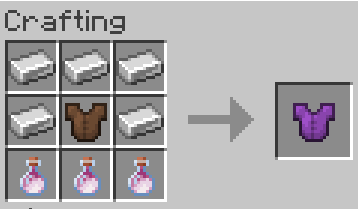
配方更新: 等级 5 喷气背包的配方现在需要3 瓶龙息。
ℹ️ 上述燃料持续时间适用于连续使用。燃料消耗取决于所选的飞行模式(见下文),因此高级模式燃烧燃料更快。
创造模式喷气背包
一种专为创造模式使用的特殊喷气背包。
- ⛽ 燃料: 无限
- ⚡ 速度: 非常高
- ? 高度: 无限制
给予指令:
/function coolfunctions:give/jetpack
?️ 使用方法
- 将喷气背包装备在胸甲槽位。
- 按住跳跃键上升。
- 潜行切换飞行模式。
- 停止推进将以缓降效果下降。
提示: 如果缓降对你来说太慢,可以考虑切换回你的普通胸甲以更快下降,并在即将触地前切换回来(-> 无摔落伤害,但保持正常下落速度!)
⚙️ 飞行模式
潜行循环切换五种飞行模式。当前模式显示在燃料操作栏中。
| 模式 | 上升功率 | 备注 |
|---|---|---|
| 0 | 悬停 | 保持当前高度,燃料消耗最低 |
| 1 | 25% | |
| 2 | 50% | |
| 3 | 75% | |
| 4 | 100% | 上升速度最快,燃料消耗最高 |
? 模式越高,你消耗的燃料越多。选择较低的模式可以让你的燃料更持久。
? 变形系统
⚠️ 实验性功能: 变形系统仍处于实验阶段,可能无法与所有生物完美兼容(尤其是像铁傀儡这样的大型生物)。
? 变身为生物
/function coolfunctions:morph/<MobName>
将 <MobName> 替换为你想要变身的生物名称。
? 解除变身
/function coolfunctions:unmorph
? 幽灵方块
幽灵方块看起来像普通方块,但你可以穿过它们。
? 获取方法
/function coolfunctions:ghostblocks/<BlockName>
将 <BlockName> 替换为你想要生成对应幽灵方块的实体蛋的目标方块。
? 使用方法
在你想要的位置直接生成它即可
?️ 移除方法
移除一个幽灵方块(最近的):
/function coolfunctions:ghostblocks/remove
移除 10×10×10 范围内的所有幽灵方块:
/function coolfunctions:ghostblocks/removemr
移除世界中所有的幽灵方块(*):
/function coolfunctions:ghostblocks/ra
- 在所有已加载的世界区块中
⚙️ 工具函数
Cool Functions 还提供了各种实用函数,你可以直接通过 Minecraft 的 /function 命令访问它们。
? ClearLag
ClearLag 允许你手动移除世界中的掉落物。当地面上有大量物品时,这有助于提升性能。
?️ 清除所有地面物品
/function coolfunctions:clearlag
这会从世界中移除掉落物实体(*)。
- 在所有已加载的世界区块中
? 给予功能
给予一把末影弓:
/function coolfunctions:give/enderbow
给予一个创造模式喷气背包:
/function coolfunctions:give/jetpack
? 这些给予功能已整理在
coolfunctions:give/命名空间下,以便于查找和使用。
? 致谢与使用规范
本项目采用 MIT 许可证 授权。
Cool Functions 由 mattmunich 制作。
你欢迎在你的视频、直播和其他 Minecraft 内容中展示和使用这个数据包,但必须确保提供适当的署名。
⚠️ 未经许可,请勿重新上传或分发此数据包。
Cool Functions
Add fun, powerful, and useful features to your Minecraft world — all packed into one datapack!
? Description
CoolFunctions is a Minecraft Data Pack that adds several fun mechanics and useful functions to the game, including:
- ? Ender Bow — A custom bow that allows you to teleport to your arrows
- ? Jet Packs — Five tiers of Jet Packs with increasing fuel capacity, speed, and altitude, plus adjustable flight modes
- ? Morph System (experimental) — Transform into different mobs
- ? Ghost Blocks — Place phase-through blocks
- ? Utility Functions — Useful utilities such as ClearLag or give (only for administrators)
? Content & Usage Notice
You are free to use this datapack in videos, streams, or showcases, as long as you clearly credit me (for example in the description).
⚠️ Reuploading or redistributing this datapack without permission is not allowed.
Project is licensed under the MIT License
? Installation
CoolFunctions is available in two forms:
| Format | Where | What you need |
|---|---|---|
| Datapack + Resource Pack | Modrinth | Two files: the datapack and the resource pack |
| Mod | Modrinth or the separate CurseForge project | One single file — the datapack and the resource pack combined |
? The mod version has the advantage that you only need to download and install one file, since it combines the datapack and the texture pack in one mod.
?️ Singleplayer
Choose one of the following:
- Install the datapack + resource pack, or
- Install just the mod.
? Server
Choose one of the following:
- Datapack on the server only: install the datapack on the server. Players only have to download the resource pack/mod (not the datapack).
- Mod on the server: install the mod on the server. Players only have to download the resource pack/mod.
? Ender Bow
? Obtaining
Option 1 - Crafting table:
Option 2 - Drop Crafting:
Drop the following items on the ground:
- 1 Bow
- 4 Ender Pearls
The Ender Bow recipe will also automatically unlock when you obtain the required materials.
? Usage
- Hold right-click, just like a normal bow.
- You'll follow the arrow until it lands.
- While shooting, the Ender Bow temporarily uses your offhand slot. The item you were holding there (e.g. a shield) is stored and given back to you afterwards.
? Jet Packs
The Jet Pack comes in five tiers, each providing increased fuel capacity, speed, and maximum altitude.
Each tier also has its own custom color, making it easy to distinguish between them.
? The altitude limit is measured as the height above the ground directly below the player(*). Once the maximum altitude is reached, the Jet Pack will no longer provide upward thrust and you will hover around the max altitude.
*Leaves are not counted as ground.
? The remaining fuel is shown as the durability bar of the Jet Pack, and in the action bar together with the current flight mode.
Tier 1
- ⛽ Fuel: 2 minutes
- ⚡ Speed: Low
- ? Maximum altitude: 15 blocks above ground
Craft:
Tier 2
- ⛽ Fuel: 5 minutes
- ⚡ Speed: Medium-low
- ? Maximum altitude: 30 blocks above ground
Craft:
Tier 3
- ⛽ Fuel: 10 minutes
- ⚡ Speed: Medium
- ? Maximum altitude: 40 blocks above ground
Craft:
Tier 4
- ⛽ Fuel: 20 minutes
- ⚡ Speed: Medium-high
- ? Maximum altitude: 70 blocks above ground
Craft:
Tier 5
- ⛽ Fuel: 40 minutes
- ⚡ Speed: High
- ? Maximum altitude: 100 blocks above ground
Craft:
Recipe Update: The Tier 5 Jet Pack recipe now requires 3 Dragon's Breath.
ℹ️ Fuel durations above are for continuous use. Fuel is consumed depending on the selected flight mode (see below), so higher modes burn fuel faster.
Creative Jet Pack
A special Jet Pack intended for creative use.
- ⛽ Fuel: Infinite
- ⚡ Speed: Very high
- ? Altitude: Unlimited
Give:
/function coolfunctions:give/jetpack
?️ Usage
- Equip the Jet Pack in your chestplate slot.
- Hold jump to ascend.
- Sneak to cycle through the flight modes.
- Stop thrusting to descend with Slow Falling.
Tip: if Slow Falling is too slow for you, consider switching to your normal chestplate to descend faster and switch back just before hitting the ground (-> no fall damage, but normal fall speed!)
⚙️ Flight Modes
Sneaking cycles through five flight modes. The current mode is displayed in the fuel action bar.
| Mode | Ascend power | Notes |
|---|---|---|
| 0 | Hover | Hold your altitude, lowest fuel consumption |
| 1 | 25% | |
| 2 | 50% | |
| 3 | 75% | |
| 4 | 100% | Fastest ascent, highest fuel consumption |
? The higher the mode, the more fuel you burn. Pick a lower mode to make your fuel last longer.
? Morph System
⚠️ Experimental: The Morph System is still experimental and may not work perfectly with every mob (especially big mobs like the Iron Golem).
? Morph into a Mob
/function coolfunctions:morph/<MobName>
Replace <MobName> with the name of the mob you want to morph into.
? Unmorph
/function coolfunctions:unmorph
? Ghost Blocks
Ghost Blocks appear as normal blocks, but you can phase through them.
? Obtaining
/function coolfunctions:ghostblocks/<BlockName>
Replace <BlockName> with the block you want to get the Ghost Block spawn egg for.
? Usage
Just spawn it wherever you want
?️ Removal
Remove one Ghost Block (the nearest one):
/function coolfunctions:ghostblocks/remove
Remove all Ghost Blocks in a 10×10×10 area:
/function coolfunctions:ghostblocks/removemr
Remove all Ghost Blocks in the world(*):
/function coolfunctions:ghostblocks/ra
*In all the loaded chunks of the world
⚙️ Utility Functions
Cool Functions also provides various utility functions that can be accessed directly through Minecraft's /function command.
? ClearLag
ClearLag allows you to manually remove dropped items from the world. This can help performance when there's a lot of items on the ground.
?️ Clear All Ground Items
/function coolfunctions:clearlag
This removes dropped item entities from the world(*).
*In all the loaded chunks of the world
? Give Functions
Give an Ender Bow:
/function coolfunctions:give/enderbow
Give a Creative Jet Pack:
/function coolfunctions:give/jetpack
? The give functions have been organized under
coolfunctions:give/to make them easier to find and use.
? Credits & Usage
Project is licensed under the MIT license
Cool Functions is created by mattmunich.
You are welcome to showcase and use this datapack in your videos, streams, and other Minecraft content, but you have to make sure proper credit is given.
⚠️ Do not reupload or redistribute the datapack without permission.

下载 Cool Functions
需要联机服务器吗?
稳定流畅、一键部署,几分钟即可和朋友联机开服
最低仅需 8 元/月 即可畅快联机
下载 Cool Functions
需要联机服务器吗?
稳定流畅、一键部署,几分钟即可和朋友联机开服
最低仅需 8 元/月 即可畅快联机
下载 Cool Functions
需要联机服务器吗?
稳定流畅、一键部署,几分钟即可和朋友联机开服
最低仅需 8 元/月 即可畅快联机
下载 Cool Functions
下载 Cool Functions
需要联机服务器吗?
稳定流畅、一键部署,几分钟即可和朋友联机开服
最低仅需 8 元/月 即可畅快联机
下载 Cool Functions
下载 Cool Functions
需要联机服务器吗?
稳定流畅、一键部署,几分钟即可和朋友联机开服
最低仅需 8 元/月 即可畅快联机
下载 Cool Functions
需要联机服务器吗?
稳定流畅、一键部署,几分钟即可和朋友联机开服
最低仅需 8 元/月 即可畅快联机
下载 Cool Functions
需要联机服务器吗?
稳定流畅、一键部署,几分钟即可和朋友联机开服
最低仅需 8 元/月 即可畅快联机
下载 Cool Functions
需要联机服务器吗?
稳定流畅、一键部署,几分钟即可和朋友联机开服
最低仅需 8 元/月 即可畅快联机
Cool Functions - v1.6 - 模组
更新日志
喷气背包:
- 喷气背包现在通过跳跃键上升,而非潜行,这样更加直观。
- 新增5 种飞行模式(0 = 悬停,1 = 25%,2 = 50%,3 = 75%,4 = 100% 上升功率)。潜行可切换模式,当前模式会在燃料动作条中显示。
- 燃料消耗现取决于所选的飞行模式。
- 剩余燃料现也作为喷气背包的耐久条显示。
- 重新平衡了各等级的燃料容量:
- 等级 1:1 分钟 → 2 分钟
- 等级 2:15 分钟 → 5 分钟
- 等级 3:30 分钟 → 10 分钟
- 等级 4:45 分钟 → 20 分钟
- 等级 5:60 分钟 → 40 分钟
末影弓:
- 副手物品(例如盾牌)在射击时会被暂时存储,并在射击结束后归还,而不再被移除。
注:描述文件和说明文件已相应更新。
关于这个资源的讨论、问题反馈与使用心得
还没有讨论,来发第一帖吧
你是这个资源的作者?登录后可认领此资源。
相似资源
 模组

一个用于收集生物掉落物的多区块模组。
 模组

显示你正在注视的方块的信息。(适用于 Minecraft 1.16+ 的 Hwyla/Waila 分支)
 模组

查看物品与配方
 模组
在游戏画面角落显示附近世界地形、玩家、生物和实体的地图。可创建路径点,帮助你找到标记过的位置。
 模组
使用 JavaScript 编辑配方、添加自定义物品、编写世界事件!
 模组
添加区块认领和玩家组队功能,并与 Xaero's Minimap 和 World Map 集成
评论 0
登录后参与评分
还没有评论,来抢沙发吧