
(旧版 MC) 坐标
这是一个 jarmod,为 Minecraft Alpha 和 Infdev 调试菜单添加了坐标显示功能。
适用于从 inf-20100227 到 a1.2.2 的 Minecraft 版本 (见下载)。
特性
显示界面基于 Notch 在 Alpha 中原始的坐标实现方式,xyz 和 f 分别显示在不同行上。
由于 Notch 直到 a1.2.3 才添加坐标功能,因此存在许多拥有无限世界生成的更早版本,在这些版本中坐标是一个必要的补充。
提供两种显示选项:
“修订版”显示 (左) 和未修改的“怀旧版”显示 (右)。 这样做是为了满足那些希望看到 Notch 在各种改进实施之前的原始显示效果的需求。
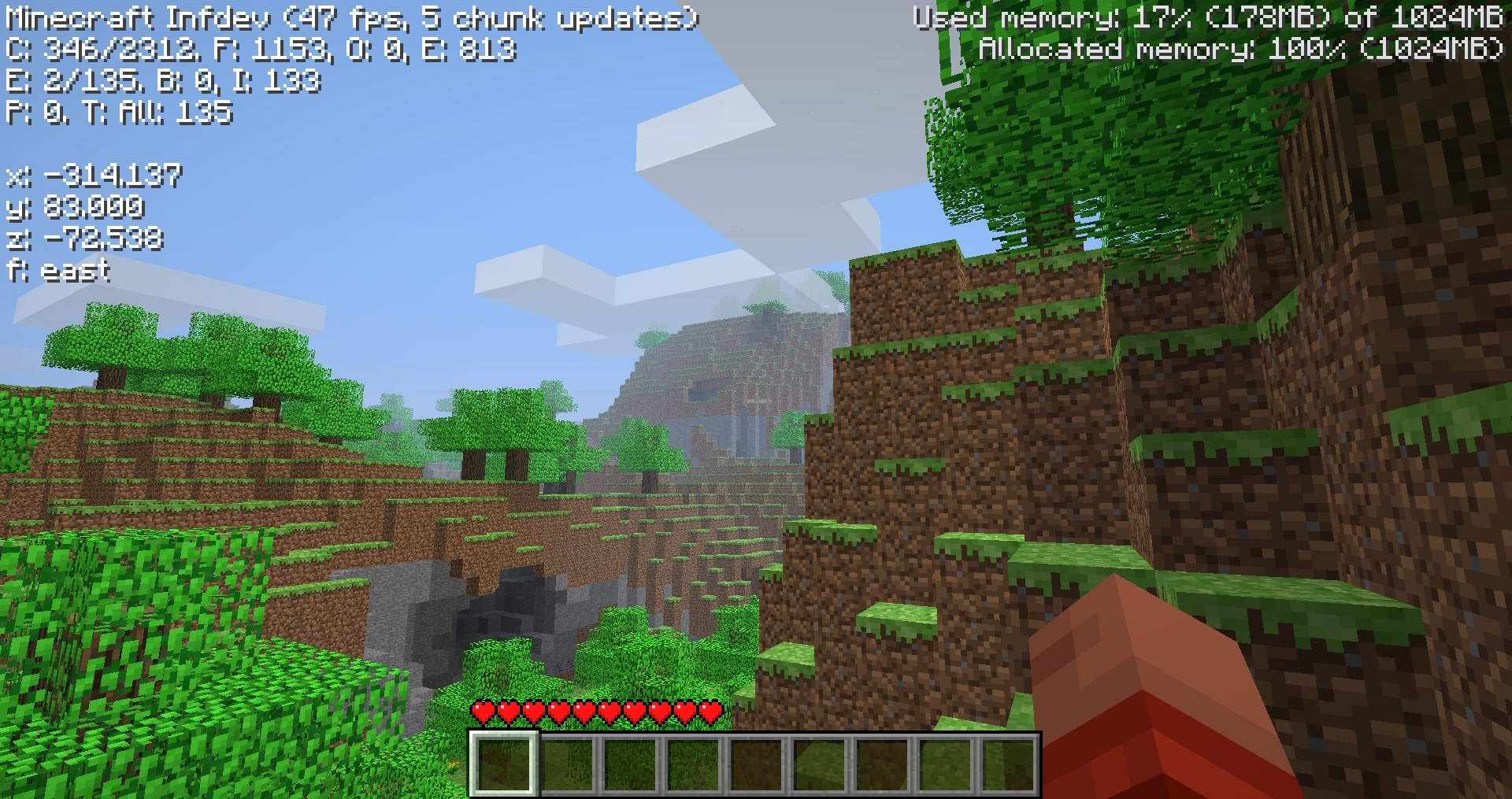
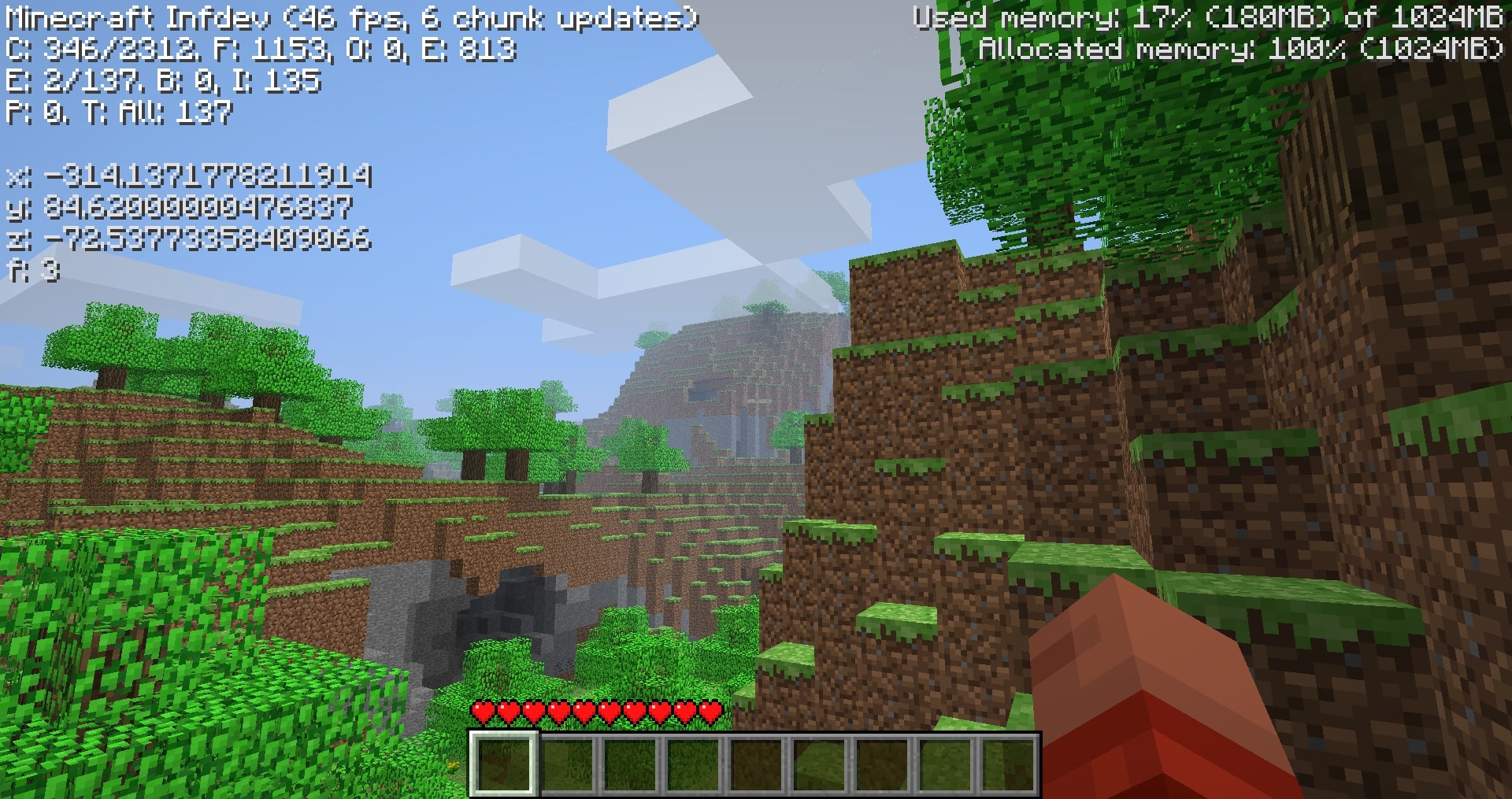
可以通过在打开调试屏幕时按 N 键来切换这两种显示。默认情况下显示的是修订版。
修订版显示仅对原始格式进行了以下改进:
- 将 15 位小数四舍五入至 3 位
- 提高文字颜色亮度
- 增加文字形式的方位指示
- Y 轴向下取整至方块层级(当站在 y-64 的完整方块上时显示 64.000 而非 65.620)。
兼容性
覆盖 GuiIngame.java,混淆后的 (GuiIngame).class 名称因版本而异。
换句话说,该模组很可能与不更改调试菜单的其他模组兼容。
下载
由于旧版本中存在各种不可预见的情况,我尚未对从 inf-20100227 到 a1.2.2 之间的每个版本进行模组化(目前为止)。我成功处理了此范围内的 39 个版本,并针对较重要的发布版本进行了适配。希望你能找到你正在寻找的版本。
下载文件命名为 "Coordinates_v1.0_" 后接 "(版本号)",请确保你下载的是正确的版本。
注意:仅根据我的 zip 文件名确认版本。 为了上传模组,Modrinth 要求填写默认的 MC 启动器版本和模组加载器字段。(例如:inf-630 显示支持 inf-618 和 risugami 的 modloader,这是错误的)
安装方法
安装 Java 8,大多数旧版本模组都使用 Java 8。因此始终建议安装它。
这是一个 jarmod,所以我推荐使用 MultiMC、PrismLauncher 或 Betacraft v2.0。这些启动器允许轻松设置旧版本的 jarmod。它们添加 jarmod 的方式类似……在上述启动器中编辑你的实例,找到 add to Minecraft.jar 按钮,然后打开下载的 coords.zip。
对于 Betacraft v1.0,操作更复杂一些,因为你需要自己进行 jarmod 操作。你还需要一个 zip 解压工具(Windows 用户我喜欢用 WinRAR)
- 下载首选版本的 coords.zip 后,搜索并打开隐藏的
%appdata%文件夹 - 打开
.betacraft文件夹 - 打开
versions文件夹 - 选中并右键点击你正在使用的 version.jar(例如:
a1.1.2_01.jar) - 右键后,选择
Open with WinRAR - 打开 jar 包后,也打开下载的 coords.zip
- 将 coords.zip 中的单个
.class文件移动到已打开的 version.jar 中。 - 按下
OK,完成!你已成功用我的模组文件替换了游戏文件! - 重新启动 Betacraft v1.0 并开始游戏。
其他
任何问题都可以在 Github 上提出。
你也可以加入 Modification Station Discord 服务器,这是一个致力于旧版 Minecraft 模组开发的社区!
一旦加入服务器,你可以通过点击 mods 标签页并搜索 coordinates 找到我的模组帖子。你可以在这里直接联系我提问(即不需要在 Github 上创建工单)
感谢下载我的模组!
(Old MC) Coordinates
This is a jarmod that adds coordinates to Minecraft Alpha and Infdev debug menus.
Works for Minecraft versions ranging from inf-20100227 to a1.2.2 (see downloads).
Features
The display is based off of Notch's original implementation of coordinates in Alpha, xyz and f on separate lines.
Since Notch didn't add coordinates until a1.2.3, there are many older versions with infinite world gen where coordinates are a needed addition.
There are two display options:
The "revised" display (left) and the unmodified "nostalgia" display (right). This was done in case some are looking for the OG display by Notch before the various improvements were made in later versions.
These can be toggled using the N key with the debug screen on. By default, the revised display is shown.
The revised display simply improves the original format:
- rounds 15 leading decimals to 3
- brightens text color
- adds cardinal directions in words
- floors the y-axis to feet level (64.000 and not 65.620 when standing on a full block at y-64).
Compatibility
Overwrites GuiIngame.java, the obfuscated (GuiIngame).class names vary with versions.
In other words, the mod will likely be compatibile with mods that don't change the debug menu.
Downloads
Due to various unforseen circumstances in older versions, I haven't modded every version (yet) from inf-20100227 to a1.2.2. I managed to mod 39 versions in this range, addressing for the more notable releases. Hopefully you can find the version you're looking for.
The downloads are named "Coordinates_v1.0_" followed by "(version name)" ensure that you are downloading the correct version.
Note: ONLY read my zip file names for versions. To upload mods, Modrinth requires default MC launcher versions and mod loader fields to be filled out. (ex: inf-630 is shown to support inf-618 and risugami's modloader, which is false)
How to install
Install Java 8, most mods for older versions use Java 8. So it's always a good idea to have it.
This is a jarmod so I recommend using MultiMC, PrismLauncher, or Betacraft v2.0. These launchers allow for jarmods to be easily setup older versions. They all have similar ways of adding jarmods... Edit your instance in said launcher, locate the add to Minecraft.jar button, and open the downloaded coords.zip.
For Betacraft v1.0, it's more complex as you will need to jarmod the version yourself. You will also need a zip explorer (I like WinRAR for Windows)
- after downloading coords.zip for prefered version, search and open your hidden
%appdata%folder - open the
.betacraftfolder - open the
versionsfolder - highlight and right click on the version.jar you are using (ex:
a1.1.2_01.jar) - after right click, you can choose
Open with WinRAR - with the jar open, also open the downloaded coords.zip
- move the single
.classfile from coords.zip to the opened version.jar. - Press
OK, done! You successfully replaced a game file with my modded game file! - Relaunch Betacraft v1.0 and play.
Extras
Any issues can be addressed on Github
You can also join the Modification Station discord server, a community dedicated to modding old minecraft!
Once you join the server, you can find my mod post by clicking on the mods tab and searching coordinates. This is where you can contact me directly with questions (i.e. doesn't warrant a ticket on Github)
Thanks for downloading my mod!

下载 (Old MC) Coordinates
下载 (Old MC) Coordinates
下载 (Old MC) Coordinates
下载 (Old MC) Coordinates
下载 (Old MC) Coordinates
下载 (Old MC) Coordinates
下载 (Old MC) Coordinates
下载 (Old MC) Coordinates
下载 (Old MC) Coordinates
下载 (Old MC) Coordinates
根据 GitHub 请求,在发布后添加了 inf-618。由于 RMCP 的限制,最初未包含此项。
关于这个资源的讨论、问题反馈与使用心得
还没有讨论,来发第一帖吧
你是这个资源的作者?登录后可认领此资源。
相似资源
 模组

显示你正在注视的方块的信息。(适用于 Minecraft 1.16+ 的 Hwyla/Waila 分支)
 模组
使用 JavaScript 编辑配方、添加自定义物品、编写世界事件!
 模组

查看物品与配方
 模组
在游戏画面角落显示附近世界地形、玩家、生物和实体的地图。可创建路径点,帮助你找到标记过的位置。
 模组
AE2:一款流行的自动化与存储模组
 模组
那是什么?一个 Waila/Hwyla 的分支。
评论 0
登录后参与评分
还没有评论,来抢沙发吧