CosmicExtractions 是什么?
CosmicExtractions 是一款由 Minecoin 设计的实用模组,旨在提升在 CosmicSky 的 Extraction 模式中的游戏便利性(QOL)和整体游戏体验。
本模组内的所有功能和机制均已获得 Cosmic 管理团队的批准使用。
主要功能:
宝箱生成位置的视觉指示器
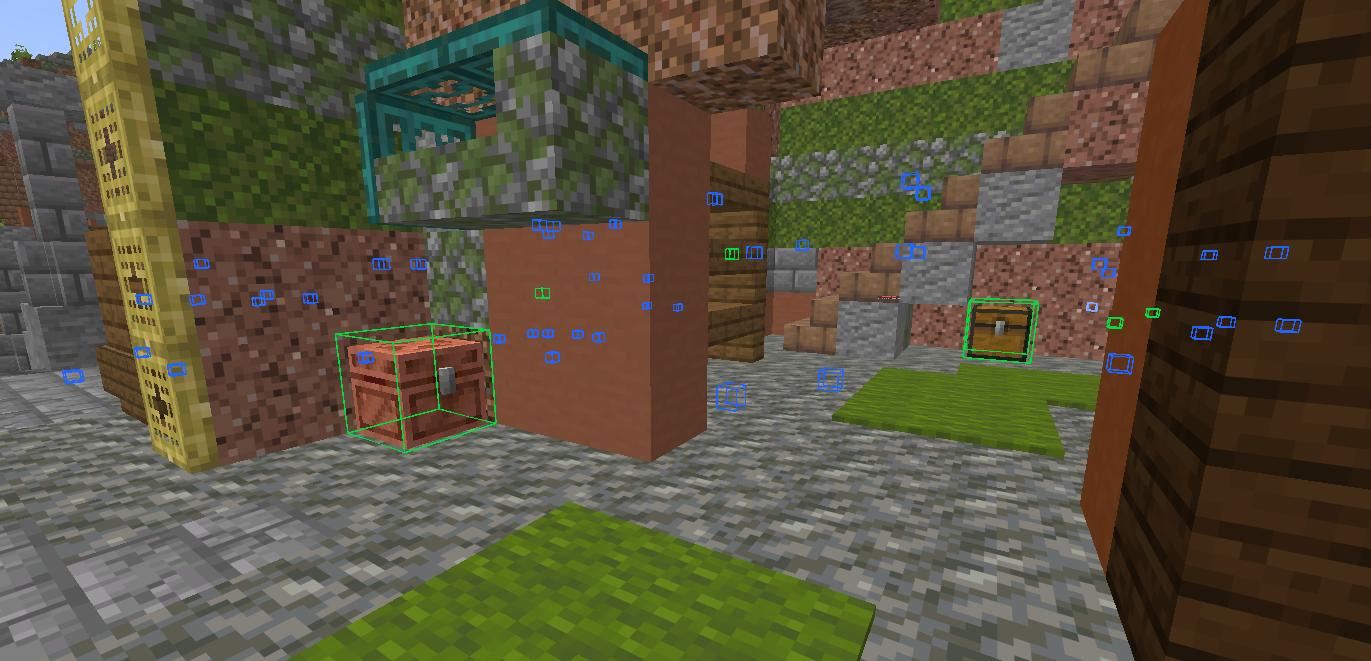
当玩家在 Extraction 世界中搜索一个宝箱时,该位置会被添加到存储在玩家配置文件文件夹中的永久列表中。在此后的所有 Extraction 回合中,该位置将以蓝色指示器高亮显示给玩家。每当一个宝箱位置被搜索后,在该次 Extraction 回合的剩余时间内,指示器将变为绿色,以帮助追踪玩家在每次回合中已经探索过的区域。随着时间的推移,随着玩家探索地图并发现所有可能的宝箱生成点,此功能可以帮助玩家清除大型地标并更有效地搜索宝箱。
改进的宝箱生成音频队列
默认情况下,每当附近生成一个宝箱时,会有一个非常微弱的音频提示,通常很难听到,几乎无法确定方向。此功能将默认声音替换为更大声且更具动态感的音频队列,允许玩家准确听到特定区域内生成的宝箱数量,以及每个宝箱相对于玩家的精确方向。
指示最近撤离区的动态航点
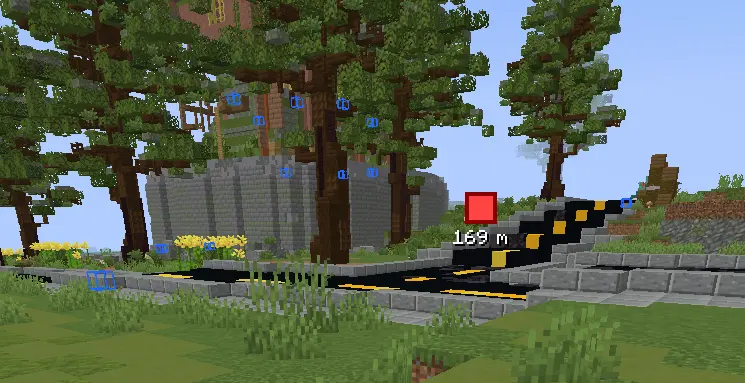
当 Extraction 计时器时间紧迫或附近有敌方玩家时,定位最近的撤离区至关重要。此功能会自动检测并永久存储 Extraction 世界中每个撤离区的位置,并在距离玩家最近的撤离区自动显示一个航点及其距离。
撤离区倒计时计时器
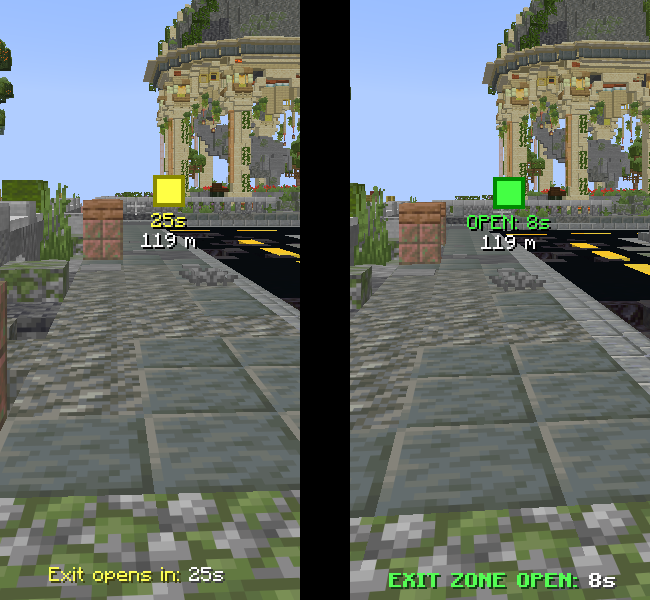
当你激活 Extraction 撤离区时,航点将变为黄色,并显示一个倒计时,指示撤离区开放前的剩余秒数。此倒计时也会显示在玩家快捷栏上方。一旦 60 秒倒计时完成且撤离区开放,航点将变为绿色,并显示一个新的 10 秒计时器。
本地玩家列表及加入/离开警报
此功能显示当前在同一本地服务器中的所有玩家列表,包括你当前 Extraction 世界中的所有玩家,以及可能在不同 Extraction 世界中的部分玩家。一旦 Extraction 计时器达到 15 分钟且不再有玩家可以进入同一个 Extraction 世界,此列表将自动停止添加新加入本地服务器的玩家,因为一旦计时器低于 15 分钟,那些玩家必须正在加入另一个 Extraction 世界。此外,每当有新玩家加入或离开 Extraction 世界时,聊天栏会出现一条警报。
已搜索宝箱追踪器
在进行 Extraction 回合时,了解你的路线效率如何非常重要,同时也能够在搜索了大量宝箱却一无所获时有所依据。因此,在 Extraction 回合期间,屏幕左上角会有一个追踪器,指示你在该次 Extraction 回合中搜索了多少个宝箱。
Extraction 冷却警报
由于 Extraction 回合之间存在冷却时间,确切知道冷却何时结束以便再次进入并进行下一轮是非常有帮助的。此功能会在你的 Extraction 冷却时间结束时发送聊天警报和音频警报。此功能能够追踪多个账号,并且在关闭并重新打开 Minecraft 后依然有效,因此即使你运行 2 或 3 个不同的副本来进行 Extraction,它仍然有用。如果你拥有用于缩短 Extraction 冷却时间的 /skill,请务必在配置中进行说明,以确保你的警报准确无误。
配置
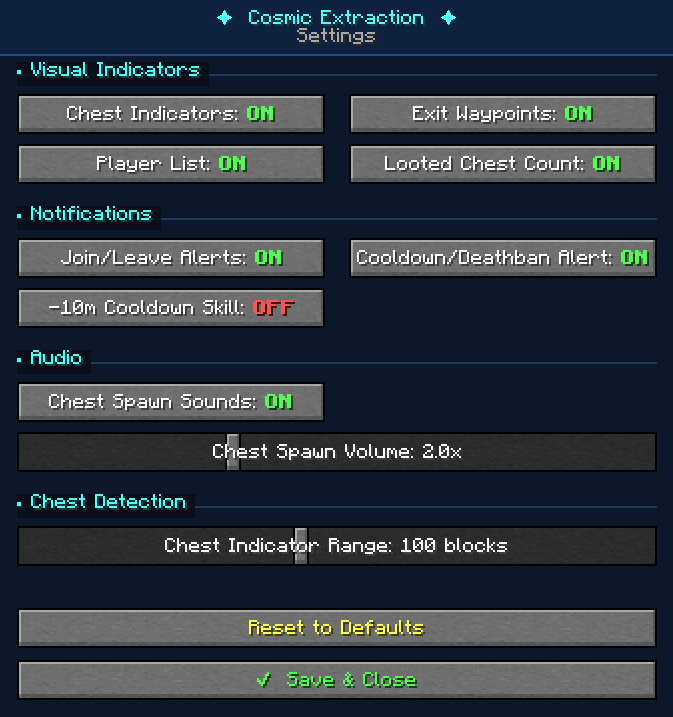
每个人都有各自的偏好,你可能希望调整或禁用模组的某些方面。在配置菜单中(默认按键为 K),玩家可以启用/禁用模组的每一个方面,以及调整某些设置,例如宝箱指示器的显示距离或附近生成宝箱时的音频音量。如果你希望使用不同的快捷键来打开配置菜单,可以使用 Minecraft 的键位绑定菜单进行调整。如果配置菜单显示异常,请尝试调整你的 GUI 缩放比例。
技术信息:
如果你想手动编辑已保存的宝箱位置列表或已保存的撤离点,你可以在以下路径找到这些文件:%appdata% -> .minecraft -> config
What is CosmicExtractions?
CosmicExtractions is a utility mod designed by Minecoin to improve the QOL and overall gameplay experience within the Extraction gamemode within CosmicSky.
All features and mechanics within this mod have been approved for use by the Cosmic Administration.
Key Features:
Visual indicators for chest spawn locations
Whenever a player loots a chest within the Extraction world, this chest location is added to a permanent list stored within the player's config folder. In all future extraction runs, this location will be highlighted for the player with a blue indicator. Whenever a chest location is looted, the indicator becomes green for the rest of that Extraction run to help track where the player has already explored during each run. Over time, as players explore the map and discover every possible chest spawn, this feature allows players to clear large landmarks and search for chests more efficiently.
Improved audio queues for chest spawns
By default, whenever a chest is generated nearby, there is a very faint audio queue that is often very difficult to hear and almost impossible to pinpoint. This feature replaces the default sound with a much louder and more dynamic audio queue, which allows players to hear exactly how many chests spawn within a given area, as well as the precise direction of each chest relative to the player.
Dynamic waypoints indicating the nearest exit zone
Whenever the Extraction timer gets low or an enemy player is nearby, it can be critical to locate the nearest exit zone. This feature automatically detects and permanently stores the locations of each exit zone within the Extraction world, and it automatically displays a waypoint at whichever exit zone is closest to the player, along with the distance.
Exit zone countdown timer
Whenever you activate an Extraction exit zone, the waypoint will turn yellow, and it will display a countdown indicating the number of seconds until the exit zone opens. This countdown is also displayed above the player's hotbar. Once the 60 second countdown is completed and the exit zone opens, the waypoint will turn green, and a new 10 second timer will be displayed.
Local player list & join/leave alerts
This feature displays a list of all players currently in the same local server, which includes all players in your current Extraction world, as well as possibly some players in a different Extraction world. Once the Extraction timer hits 15 minutes and no more players can enter the same Extraction world, this list automatically stops adding new players who join the local server, because once the timer is below 15 minutes, those players must be joining a different Extraction world. Additionally, whenever a new player joins or leaves the Extraction world, an alert appears in the chat.
Looted chest tracker
When doing an Extraction run, it's important to know how efficient your route was, and also to be able to complain if you looted a lot of chests and got nothing of value. Therefore, while in an Extraction run, there is a tracker at the top-left of the screen that indicates how many chests you have looted during that Extraction run.
Extraction cooldown alerts
Because there is a cooldown between Extraction runs, it's helpful to know exactly when this cooldown expires so you can go back in and do another run. This feature sends a chat alert, as well as an audio alert, whenever your Extraction cooldown has expired. This feature is able to track multiple accounts, and persists through closing and re-opening Minecraft, so it will still be useful even if you are running 2 or 3 different alts for Extraction. If you have the /skill for a shorter Extraction cooldown, be sure to indicate this within the config so that your alerts will be accurate.
Config
Everyone has their own preferences, and you may want to tweak or disable certain aspects of the mod. Within the config (default key is K), players can enable/disable every aspect of the mod, as well as adjust certain settings such as the distance that chest indicators appear or the volume of the audio when a chest spawns nearby. If you would prefer a different keybind to open the config, that can be adjusted using Minecraft's Key Binds menu. If the config menu looks abnormal, try adjusting your GUI scale.
Technical Info:
If you want to manually edit your list of saved chest locations or saved exit points, you can find these files in %appdata% -> .minecraft -> config


 模组

 模组
 模组

 模组
 模组
 模组
评论 0
登录后参与评分
还没有评论,来抢沙发吧