
一种全新的 Minecraft 挑战
Craft & Block Lock 通过限制 Minecraft 中最基本的两项操作,改变了你的生存方式。
每位玩家每种配方只能完成一次。可选的方块规则还允许每位玩家同时仅保留每种方块类型的单个激活放置状态。破坏被追踪的方块后,该方块类型将再次可用。
由此产生的挑战强调规划的重要性。资源、制作路线和方块放置决策都会影响你世界的其余部分。
主要功能
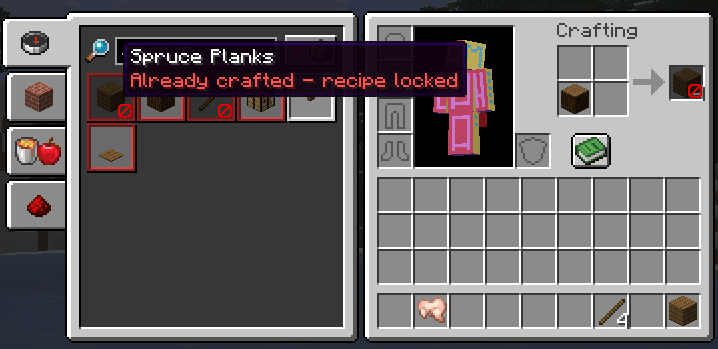
- 每位玩家每种 Minecraft 配方 ID 仅能制作一次
- 每位玩家每种方块物品类型仅能放置一个激活状态的方块
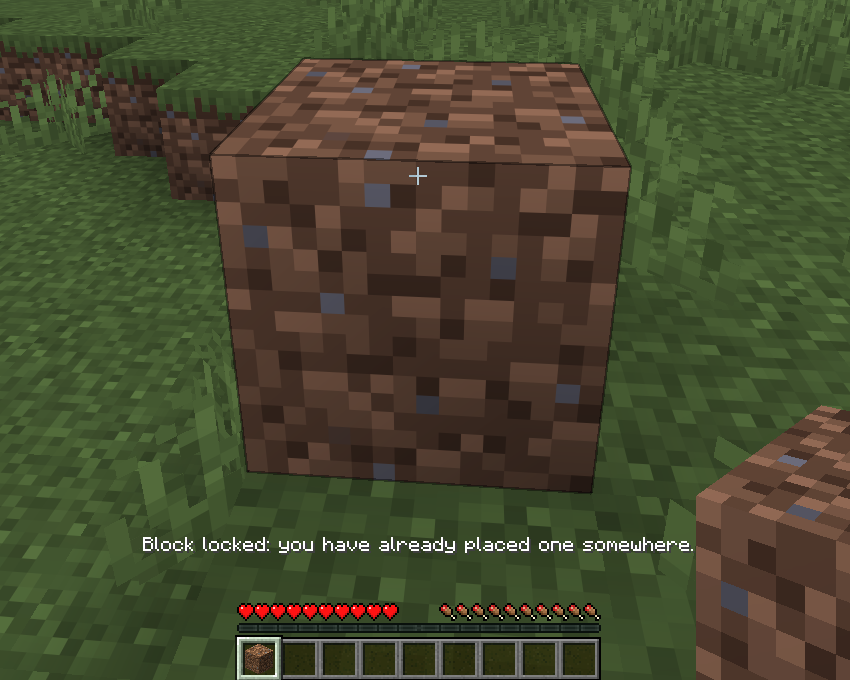
- 破坏被追踪的方块以再次放置该方块类型
- 登出和重启世界后进度保持持久
- 在合成书和结果栏中显示锁定配方的视觉效果
- 服务器端强制执行与客户端预测拦截
- 可配置的消息、音效和视觉反馈
- 配方和方块的例外列表
- 默认启用创造模式绕过
- 用于设置、进度列表和重置的命令
- 可选的 Mod Menu 配置界面
支持的配方路径
配方锁定支持:
- 玩家背包合成
- 工作台
- 熔炉
- 高炉
- 烟熏炉
- 切石机
- 锻造台
- 酿造台
- 自动合成器
- 营火和灵魂营火
- 使用相应原版处理路径兼容的模组配方
铁砧、附魔台、磨石、织布机和制图台仍可自由使用。
方块追踪
当被追踪的方块移动或改变时,方块锁定继续生效。
- 活塞会将锁定转移到方块的新位置
- 支持黏液块和蜂蜜块链条
- 下落中的方块在空中时保持锁定状态
- 锁定会转移到下落方块落地时的位置
- 方块转换会更新被追踪的方块类型
- 后台协调检查处理异常的世界变化
使用 /cbl blocks list 查看活动的方块锁定,使用 /cbl recipes list 查看锁定的配方 ID。
配置
配方规则和方块规则可以独立启用。
消息、音效、锁定配方视觉效果、创造模式绕过以及例外列表均可通过命令或可选的 Mod Menu 界面进行配置。
Blaze Powder(烈焰粉)和 Eyes of Ender(末影之眼)默认豁免,以确保正常的生存进程仍可进行。
灵感来源
配方锁定概念受 Craft Lock 模组 () 启发。由于 Craft Lock 无法在 Minecraft 26.2 中使用,我想创建一个更新且独立的实现,具有不同的行为、更广泛的工作站支持、可配置的反馈以及额外的方块放置挑战。
本项目与原 Craft Lock 开发者无关,也未获得其认可。
安装
- 为 Minecraft 26.2 安装 Fabric Loader。
- 安装 Fabric API。
- 将模组 JAR 文件放入
mods 文件夹。
- 如需可选的图形化配置界面,请安装 Mod Menu。
对于实验性多人游戏用途,请在服务器和所有连接的客户端上安装该模组。
测试状态
版本 0.9.0 是完整的、经过测试的单玩家发布版。
多人游戏支持已实现,但尚未完全测试。
请报告包含你的 Minecraft 版本、Fabric 版本以及清晰复现步骤的 bug。
A new kind of Minecraft challenge
Craft & Block Lock changes how you approach survival by limiting two of Minecraft's most basic actions.
Every recipe can only be completed once per player. The optional block rule also allows each player to have only one active placement of every block type at a time. Break the tracked block and that block type becomes available again.
The result is a challenge where planning matters. Resources, crafting routes and block placement decisions can affect the rest of your world.
Main features
- Craft each Minecraft recipe ID once per player
- Place one active block of each block item type per player
- Break a tracked block to place that block type again
- Persistent progress across logouts and world restarts
- Locked recipe visuals in the recipe book and result slot
- Server-side enforcement with client-side prediction blocking
- Configurable messages, sounds and visual feedback
- Recipe and block exception lists
- Creative mode bypass enabled by default
- Commands for settings, progress lists and resets
- Optional Mod Menu configuration screen
Supported recipe paths
Recipe locking supports:
- Player inventory crafting
- Crafting tables
- Furnaces
- Blast furnaces
- Smokers
- Stonecutters
- Smithing tables
- Brewing stands
- Crafters
- Campfires and soul campfires
- Compatible modded recipes using the corresponding vanilla processing paths
Anvils, enchanting tables, grindstones, looms and cartography tables remain freely usable.
Block tracking
Block locks continue to work when tracked blocks move or change.
- Pistons transfer the lock to the block's new position
- Slime and honey block chains are supported
- Falling blocks remain locked while airborne
- The lock transfers to the position where a falling block lands
- Block transformations update the tracked block type
- A background reconciliation check handles unusual world changes
Use /cbl blocks list to view active block locks and /cbl recipes list to view locked recipe IDs.
Configuration
The recipe rule and block rule can be enabled independently.
Messages, sounds, locked-recipe visuals, Creative mode bypass and exception lists are configurable through commands or the optional Mod Menu screen.
Blaze Powder and Eyes of Ender are exempt by default so normal survival progression remains possible.
Inspiration
The recipe-lock concept was inspired by the Craft Lock mod (). Since Craft Lock was not available for Minecraft 26.2, I wanted to create an updated and independent implementation with different behavior, broader workstation support, configurable feedback and an additional block-placement challenge.
This project is not affiliated with or endorsed by the original Craft Lock developer.
Installation
- Install Fabric Loader for Minecraft 26.2.
- Install Fabric API.
- Place the mod JAR in your
mods folder.
- Install Mod Menu if you want the optional graphical configuration screen.
For experimental multiplayer use, install the mod on the server and all connecting clients.
Testing status
Version 0.9.0 is the complete, tested single-player release.
Multiplayer support is implemented but has not yet been fully tested.
Please report bugs with your Minecraft version, Fabric versions and clear reproduction steps.


 模组

 模组

 模组
 模组

 模组
 模组

评论 0
登录后参与评分
还没有评论,来抢沙发吧