在 Minecraft 崩溃后显示一个图形用户界面(GUI),立即显示所有受影响的客户端/启动器日志、崩溃报告或 hs_err 文件。提供一键上传、复制链接并执行其他操作的功能,以便更轻松地进行报告、调试和故障排除。分析许多已知的崩溃原因日志。提供多种有用的分析工具。当可用独立显卡但 Minecraft 正在使用集成显卡运行时发出警告。包含针对许多常见问题的自动修复功能。
该模组仅适用于客户端。在服务器上使用时将不会执行任何操作。
如果您有任何问题,欢迎加入我的 Discord 服务器:
功能特性:
GUI(图形用户界面):
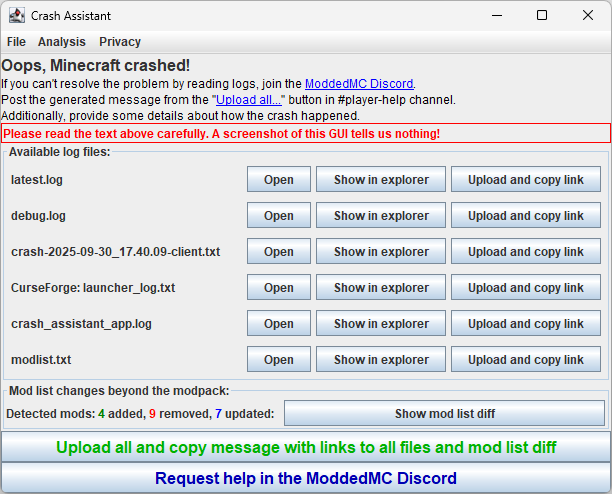
支持拖放操作。您可以直接从 GUI 中将文件移动到任意位置,或者通过从“可用日志文件:”标签处拖动来拖放所有日志。
日志分析:
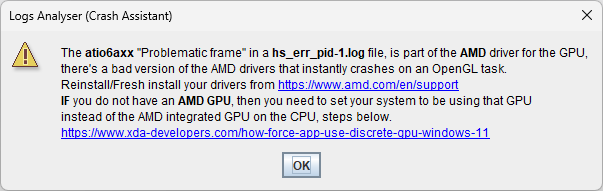
分析日志以查找许多已知的崩溃原因。如果检测到已知问题,它将显示一个包含问题描述和详细解决方案的对话框。
支持的分析类型:
hs_err (JVM 崩溃):
AlLibAlcCleanup(某些与 RAM 分配相关的诡异问题)atio6axx.dll(AMD 驱动程序问题)glfw.dll(通用 GPU 驱动程序问题)ig7icd64.dll(旧版 Intel 集成显卡驱动程序问题)InsufficientMemory(系统物理内存或交换空间不足)JavaTooHigh(例如,Spark 模组在 Java ≥ 22 时崩溃)jemalloc.dll(jemalloc 内存分配器问题)jvm.dll(潜在硬件问题或 JVM 本身的 bug)libglfw.so / libopenal.so(常见的 Linux 库问题)libGLProgrammability.dylib(macOS 上不兼容的光影包)~StubRoutines::SafeFetch32(Apple Silicon 上的 macOS 使用了错误的 JDK)nglMultiDrawElementsBaseVertex / 0x000(GPU 驱动程序问题)nvoglv64.dll(Nvidia 驱动程序问题)
log / crash-report(日志 / 崩溃报告):
ConnectorIncompatibleFabricMods(在使用 Sinytra Connector 时检测不兼容的 Fabric 模组,如 Sodium/Iris)Create6Addons(Create 版本与其附加组件之间的不兼容,提供一个按钮一键查找所有不兼容的模组)CtovWithoutLithostitched(ChoiceTheorem's Overhauled Village 模组缺少必需的依赖项)CurseForgeCorrupted(来自 CurseForge 启动器的损坏的 Minecraft/加载器安装)DiskSpaceEnded(系统磁盘空间耗尽)DuplicatedMods(安装了同一模组的多个版本)EpicFightAddons(Epic Fight 版本与其附加组件之间的不兼容,提供一个按钮一键查找所有不兼容的模组)FeatureOrderCycle(世界生成特性中的循环依赖)FerriteCoreNeighborTable(检测模组不当访问 FerriteCore 的邻居表的情况,并提供临时配置解决方案)GeckoLibOculusCompat(警告 GeckoLib Oculus Compat 模组在 Minecraft 1.20.1+ 中不再需要且会导致崩溃)GroovyModLoaderIPv6(GML 因 IPv6 问题未能下载映射,包含自动修复功能,可一键解决此问题或查找所有依赖 GML 的模组)KubeJSDataPack(使用 KubeJS 加载数据包时出错)LanguageProviderMismatch(模组需要不同版本的 Forge/NeoForge)LegacyTooManyIds(在旧版 Minecraft 版本(如 1.12.2)中超过了方块/物品 ID 限制)MixinApply(检测由 Mixin 冲突或错误引起的一系列崩溃,包括缺失类检测以及查找依赖缺失类的模组的自动修复功能)MissingEmbeddiumForOculus(安装了 Oculus 模组但未安装其必需依赖项 Embeddium)MissingIndium(某模组需要 Indium 以实现 Fabric Renderer API 兼容性,但未安装)MissingUnsupportedDependencies(Forge/NeoForge 检测到的一般性依赖冲突)ModernFixWatchDog(集成服务器死锁)NeoForgeVersion1_20_1(通知 NeoForge 1.20.1 版本已被弃用并导致大量崩溃,官方建议在该版本上切换至 Forge)ModuleFind / ModuleResolution(Java 模块系统错误,通常由依赖冲突引起,能立即识别是哪个模组导致问题,无需进行二进制搜索)Optifine(警告 OptiFine 已知会导致许多不兼容问题,并建议现代替代方案)OutOfMemoryError(Minecraft 分配的内存耗尽)ResourceLocationException(资源名称包含无效字符,通常是由于非英语系统设置引起)Rubidium(警告 Rubidium 已被弃用并会导致问题,建议换用 Embeddium)ServerConfigCorrupted(服务器端配置文件格式错误)UnsupportedClassVersion(模组使用的 Java 编译版本高于当前运行的 Java 版本)UsedByAnotherProcess(文件被其他程序锁定)Version1_21(警告 Minecraft 1.21 已过时并导致诸多问题;建议切换至 1.21.1)
win_event (Windows 事件日志):
WasClosedByWindows(游戏冻结并被操作系统终止,通常是在加载过程中由于用户输入引起)
Codex Logs Analyzer Integration(Codex 日志分析器集成):
- 上传后,每个受支持的日志都将由
mclo.gs 的 Codex 日志分析器进行分析。有时 Codex 的消息对于普通用户来说可能不清楚。在这种情况下,会显示一条带有如何修复指南的详细消息:
- Erroring block/entity(出错的方块/实体)
这显著减轻了整合包技术支持的工作量,因为很大一部分(超过 75%)的问题是常见问题且易于解决。如有需要,您可以在配置文件中屏蔽任何分析结果。
分析工具
Crash Assistant 提供了一套强大的分析工具,可通过 GUI 菜单访问:
- Create/Epic Fight 模组兼容性:扫描你的模组,查找与已安装的 Create 或 Epic Fight 版本不兼容的附加内容(addons)。
- MCreator 模组检测器:列出所有使用 MCreator 工具制作的模组。
- 包/类查找器:搜索所有模组,找出包含特定 Java 类或包的模组。
- Jdeps 依赖分析:识别哪些模组依赖于特定的类或包,有助于调试
NoClassDefFoundError 崩溃。
集成显卡检测:
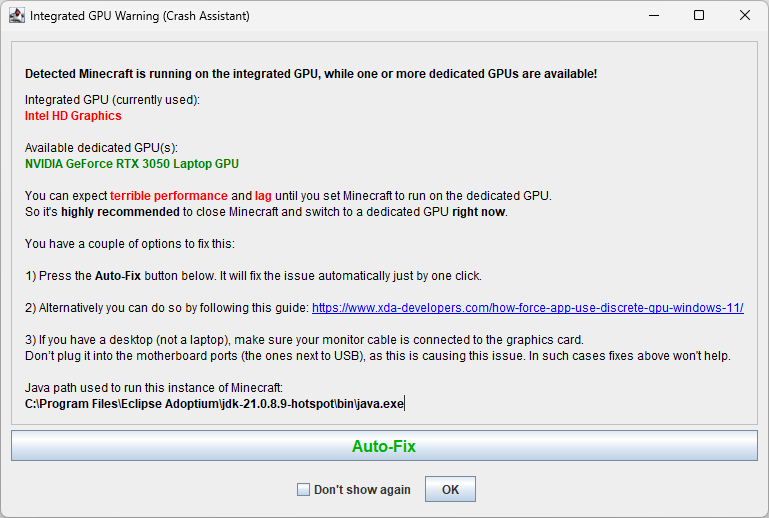
当存在性能更强的独立显卡时,检查游戏是否正在使用集成显卡运行并显示警告。包含一个一键 自动修复 按钮,可配置 Windows 让 Java 使用正确的显卡。
Intel 芯片错误警告:
检测你的 CPU 是否属于已知存在严重稳定性错误的 Intel 第 13/14 代型号。它会检查你的微码版本,并提供详细的警告和建议。
兼容性:
该模组旨在实现最大程度的兼容性和稳定性。它在一个独立进程中运行,等待 Minecraft JVM 停止。它作为 Coremod (Forge) 或 LanguageAdapter (Fabric/Quilt) 在极早期加载,从而能够捕获甚至早期的启动崩溃。
一键上传所有日志并复制链接:
你可以一键上传所有可用的日志,并获得一条格式整洁的消息,准备好粘贴到 GitHub 或 Discord。如果你是整合包作者,你将始终确保所有日志都是最新的,并且包含所有可用信息,而无需请求额外文件。
加入预配置链接的按钮:
你的整合包玩家可以通过一次点击轻松找到你的 Discord,并在崩溃后立即寻求帮助。结合日志上传的极佳便捷性,这显著提高了报告个别崩溃的可能性。对于单独下载或未配置的情况,它将引导用户前往相应加载器的 Discord 服务器。
模组列表:
每次由整合包作者启动游戏时,保存整合包的模组列表。你也可以使用 /crash_assistant modlist save 命令手动保存模组列表。它在整合包和单独下载中的工作方式不同:
整合包:
生成的消息包括最终用户相对于官方整合包列表所添加、移除或更新的模组列表。
单独下载 / 整合包作者:
跟踪自上次成功启动以来的模组列表更改,如果你点击“更新全部”按钮或添加了有问题的模组但忘记了是哪些,这将非常有用。
配置:
完全可配置:你可以启用或禁用任何功能,更改 Discord 链接,并自定义标签、按钮等的文本。
本地化:
完全本地化。目前支持的语言:
没有硬编码的字符串(日志除外)。你可以更改每个可见字符串。如需更多本地化信息,或想添加新语言,请阅读 lang README。
崩溃命令:
/crash_assistant crash 有 3 个选项:
game - 使 Minecraft 崩溃并生成崩溃报告。jvm - 使 JVM 崩溃并生成 hs_err_pid 文件。no_crash - 应用额外参数而不崩溃。
在崩溃目标之后,可以使用额外的参数:
--withThreadDump - 在日志中生成线程转储。--withHeapDump - 生成堆转储文件。--GCBeforeHeapDump - 在堆转储之前执行垃圾回收。
问题模组配置:
添加一个配置文件 problematic_mods_config.json,允许你将模组标记为与你的整合包不兼容。它有两种模式:如果检测到不兼容的模组,它可以使游戏崩溃,或者仅通知用户。添加该模组的最终用户将收到一条预配置的说明其不兼容原因的消息,并被提供一个移除它的按钮。
合作伙伴
YourKit 通过创新和智能的工具支持开源项目,用于监控和分析 Java 和 .NET 应用程序。
YourKit 是 YourKit Java Profiler、YourKit .NET Profiler 和 YourKit YouMonitor 的创建者。
隐私
日志仅在用户明确点击“上传”按钮时上传,并且直接发送到 mclo.gs,这是一个由 Aternos 运营的日志共享服务。
在发布之前,mclo.gs 会自动隐藏敏感数据——如访问令牌、IP 地址、系统用户名等——以确保粘贴内容安全可分享。
关于保留期限、谁可以访问日志以及你的 GDPR 权利的完整信息可在他们的 隐私政策 中找到。
由于 mclo.gs 的移动界面可能不太方便,Crash Assistant 默认情况下会通过 gnomebot.dev 包装返回的 URL(例如 https://mclo.gs/X → https://gnomebot.dev/paste/mclogs/X)。你可以在设置中禁用此行为。gnomebot.dev 是由 Latvian Modder 创建的开源在线日志查看器;它从 mclo.gs 获取数据,并以方便的格式向用户展示,在最后一次访问后将粘贴内容缓存在 RAM 中 五分钟,然后将其丢弃。
Crash Assistant 本身完全是客户端的——它没有服务器,也永远不会接收你日志的副本。
这是一份简要的隐私说明。完整的隐私政策可以在 Crash Assistant 中的“隐私”菜单中找到。在首次尝试上传日志时,Crash Assistant 会提示您阅读并接受我们的隐私政策。
Shows a GUI after Minecraft crashes, immediately displaying all affected game/launcher logs, crash reports, or hs_err files. Provides a one-click solution to upload them, copy the link, and perform other actions for easier reporting, debugging, and troubleshooting. Analyzes logs for many known crash reasons. Provides many useful analysis tools. Warns if Minecraft is running on an integrated GPU when a dedicated one is available. Includes auto-fixes for many common issues.
Mod is client-only. On a server, it will do nothing.
If you have any questions, feel free to join my Discord server:
Features:
GUI:
Supports drag&drop. You can move files directly from the GUI to wherever you want, or drag and drop all logs by dragging them from the “Available log files:” label.
Log Analysis:
Analyzes logs for many known reasons for crashes. If a known issue is detected, it displays a dialog with a problem description and a detailed solution.
Supported analysis:
hs_err (JVM Crash):
AlLibAlcCleanup (Some RAM allocation-related cursed issue)atio6axx.dll (AMD driver issue)glfw.dll (Generic GPU driver issue)ig7icd64.dll (Old Intel integrated GPU driver issue)InsufficientMemory (System is out of physical RAM or swap space)JavaTooHigh (e.g., Spark mod crashing on Java ≥ 22)jemalloc.dll (Issue with the jemalloc memory allocator)jvm.dll (Potential hardware issue or a bug in the JVM itself)libglfw.so / libopenal.so (Common Linux library problems)libGLProgrammability.dylib (Incompatible shader pack on macOS)~StubRoutines::SafeFetch32 (macOS on Apple Silicon with an incorrect JDK)nglMultiDrawElementsBaseVertex / 0x0000 (GPU driver issue)nvoglv64.dll (Nvidia driver issue)
log / crash-report:
ConnectorIncompatibleFabricMods (Detects incompatible Fabric mods like Sodium/Iris when using Sinytra Connector)Create6Addons (Incompatibility between Create versions and its addons, suggests one button to find all incompatible mods, just by one click)CtovWithoutLithostitched (ChoiceTheorem's Overhauled Village mod missing a required dependency)CurseForgeCorrupted (Corrupted Minecraft/Loader installation from the CurseForge launcher)DiskSpaceEnded (System has run out of disk space)DuplicatedMods (Multiple versions of the same mod are installed)EpicFightAddons (Incompatibility between Epic Fight versions and its addons, suggests one button to find all incompatible mods, just by one click)FeatureOrderCycle (Circular dependency in world generation features)FerriteCoreNeighborTable (Detects when a mod improperly accesses FerriteCore's neighbor table, provides a temporary config workaround)GeckoLibOculusCompat (Warns that GeckoLib Oculus Compat mod is no longer needed on Minecraft 1.20.1+ and causes crashes)GroovyModLoaderIPv6 (GML failed to download mappings due to IPv6 issues, includes Auto-Fix to fix the issue just by one click or to find all mods relying on GML)KubeJSDataPack (Error while loading a datapack with KubeJS)LanguageProviderMismatch (Mod requires a different version of Forge/NeoForge)LegacyTooManyIds (Exceeded the block/item ID limit on old Minecraft versions like 1.12.2)MixinApply (Detects a wide range of crashes caused by Mixin conflicts or errors, includes missing class detection and Auto-Fix to find mods relying on the missing class)MissingEmbeddiumForOculus (Oculus mod is installed without its required dependency, Embeddium)MissingIndium (A mod requires Indium for Fabric Renderer API compatibility but it's not installed)MissingUnsupportedDependencies (General dependency conflicts detected by Forge/NeoForge)ModernFixWatchDog (Integrated server has deadlocked)NeoForgeVersion1_20_1 (Notifies that Neo on 1.20.1 is abandoned and causing many crashes and switching to Forge is an official recommendation from Neo on that version.)ModuleFind / ModuleResolution (Java module system errors, often due to dependency conflicts, immediately identifies which mod is causing the issue, without our mod binary search was needed to find this)Optifine (Warns that OptiFine is known to cause many incompatibility issues and suggests modern alternatives)OutOfMemoryError (Minecraft ran out of allocated RAM)ResourceLocationException (A resource name contains invalid characters, often due to non-English system settings)Rubidium (Warns that Rubidium is abandoned and causes issues, suggests Embeddium)ServerConfigCorrupted (A server-side config file is malformed)UnsupportedClassVersion (A mod was compiled with a newer version of Java than the one being used)UsedByAnotherProcess (A file is locked by another program)Version1_21 (Warns that Minecraft 1.21 is outdated and causing manny issues; suggests switching to 1.21.1)
win_event (Windows Event Log):
WasClosedByWindows (Game froze and was terminated by the OS, often from user input during loading)
Codex Logs Analyzer Integration:
- After uploading, every supported log is analyzed by
mclo.gs's Codex logs analyzer. Sometimes Codex messages can be unclear for average users. In such cases, a detailed message with a how-to-fix guide is displayed:
This significantly reduces the load on modpack support, as a large percentage (more than 75%) of issues are common and easily solvable problems. You can blacklist any analysis in the config if desired.
Analysis Tools
Crash Assistant includes a suite of powerful analysis tools accessible from the GUI menu:
- Create/Epic Fight Addons Compatibility: Scans your mods to find addons that are incompatible with your installed version of Create or Epic Fight.
- MCreator Mod Detector: Lists all mods made with the MCreator tool.
- Package/Class Finder: Searches all mods to find which one contains a specific Java class or package.
- Jdeps Dependencies Analysis: Identifies which mods depend on a specific class or package, helping to debug
NoClassDefFoundError crashes.
Integrated GPU Detection:
Checks if the game is running on an integrated GPU when a more powerful dedicated GPU is available and displays a warning. Includes a one-click Auto-Fix button to configure Windows to use the correct GPU for Java.
Intel Chip Bug Warning:
Detects if your CPU is among the Intel 13th/14th generation models known to have a critical stability bug. It checks your microcode version and provides a detailed warning and recommendations.
Compatibility:
The mod is designed for maximum compatibility and stability. It runs in an independent process that waits for the Minecraft JVM to stop. It loads extremely early as a Coremod (Forge) or LanguageAdapter (Fabric/Quilt), allowing it to catch even early startup crashes.
Upload all logs and copy link with one click:
You can upload all available logs with one click and get a neatly formatted message ready for pasting on GitHub or Discord. If you are a modpack creator, you will always know that all logs are current and contain all available info without needing to request additional files.
Button to join pre-configured Link:
Your modpack players can easily, with one click, find your Discord and request help right after a crash. This, combined with the exceptional ease of log uploading, significantly increases the probability of reporting individual crashes. For individual downloads or if not configured, it will direct users to the appropriate modloader's Discord server.
Modlist:
Saves the modpack's modlist every time the game is launched by the modpack creator. You can also manually save the modlist using the /crash_assistant modlist save command. It works differently for modpacks and individual downloads:
Modpacks:
The generated message includes a list of mods that the end user has added, removed, or updated compared to the official modpack list.
Individual downloads / modpack authors:
Tracks modlist changes since the last successful launch, which can be extremely useful if you hit the "update all" button or added problematic mods and forgot which ones.
Configuration:
Fully configurable: you can enable or disable any feature, change the Discord link, and customize the text of labels, buttons, and more.
Localization:
Fully localized. Currently supported languages:
- English
- German
- Russian
- Chinese
- Spanish
- Italian
There are no hardcoded strings (except for logging). You can change every visible string. For more localization info, or if you want to add a new language, read the lang README.
Crash Commands:
/crash_assistant crash has 3 options:
game - crashes Minecraft with a crash report.jvm - crashes the JVM with an hs_err_pid file.no_crash - applies additional arguments without crashing.
After the crash target, you can use additional arguments:
--withThreadDump - generates a thread dump in the log.--withHeapDump - generates a heap dump file.--GCBeforeHeapDump - performs garbage collection before the heap dump.
Problematic Mods Config:
Adds a config file, problematic_mods_config.json, that lets you mark mods as incompatible with your modpack. It has two modes: it can crash the game if an incompatible mod is detected or simply notify the user. The end user who added the mod will be notified with a pre-configured message explaining why it's incompatible and will be offered a button to remove it.
Partners
YourKit supports open-source projects with innovative and intelligent tools for monitoring and profiling Java and .NET applications.
YourKit is the creator of YourKit Java Profiler, YourKit .NET Profiler, and YourKit YouMonitor.
Privacy
Logs are uploaded only when the user explicitly clicks the “Upload” button, and they are sent directly to mclo.gs, a log-sharing service operated by Aternos.
Before publication, mclo.gs automatically redacts sensitive data—such as access tokens, IP addresses, system usernames, etc—to keep the paste safe to share.
Complete information on retention periods, who can access the logs, and your GDPR rights is available in their privacy policy.
Because the mobile UI of mclo.gs can be inconvenient, Crash Assistant—by default—wraps the returned URL through gnomebot.dev (e.g. https://mclo.gs/X → https://gnomebot.dev/paste/mclogs/X). You can disable this behavior in settings. gnomebot.dev is an open-source online log viewer created by Latvian Modder; it fetches data from mclo.gs and displays it to the user with convenient formatting, caches the paste in RAM for five minutes after the last access, then discards it.
Crash Assistant itself is entirely client-side—it has no servers and never receives a copy of your logs.
This is a brief privacy description. The full privacy policy can be found in the Privacy menu within the Crash Assistant. Crash Assistant will prompt you to read and accept our privacy policy on your first log upload attempt.


 模组
 模组

 模组

 模组
 模组

 模组
评论 0
登录后参与评分
还没有评论,来抢沙发吧