
注意:CAO 即将更名!
由于 CAO 的功能日益多样化且不断扩展,将其更名为一个更通用的名称以表明它不仅仅是一个 Create 附加模组是合理的。(与 Create 的兼容性将保留!)CAO 2.0 的开发已进入尾声,我正在准备预告片及正式版本。加入 Discord 获取更多信息!
Create: Addon organizer -> Creative: Re-Tabbed

你是否曾在创造模式下安装了大量 Create 附加模组,并发现每个模组都拥有自己独立的标签页而感到烦恼?现在,无需再担心! CAO 会将所有 Create 附加模组分类整合到基础的“Create”标签页以及“Create's Building Blocks”标签页中。同时,它也会保留 Create Aeronautics 的原样不变。
更改前 vs 更改后
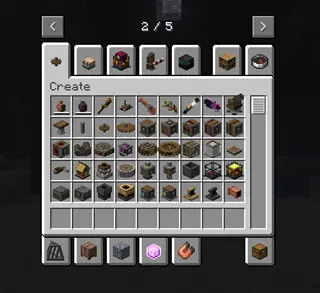
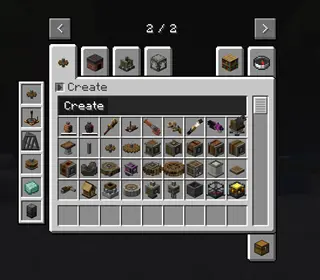
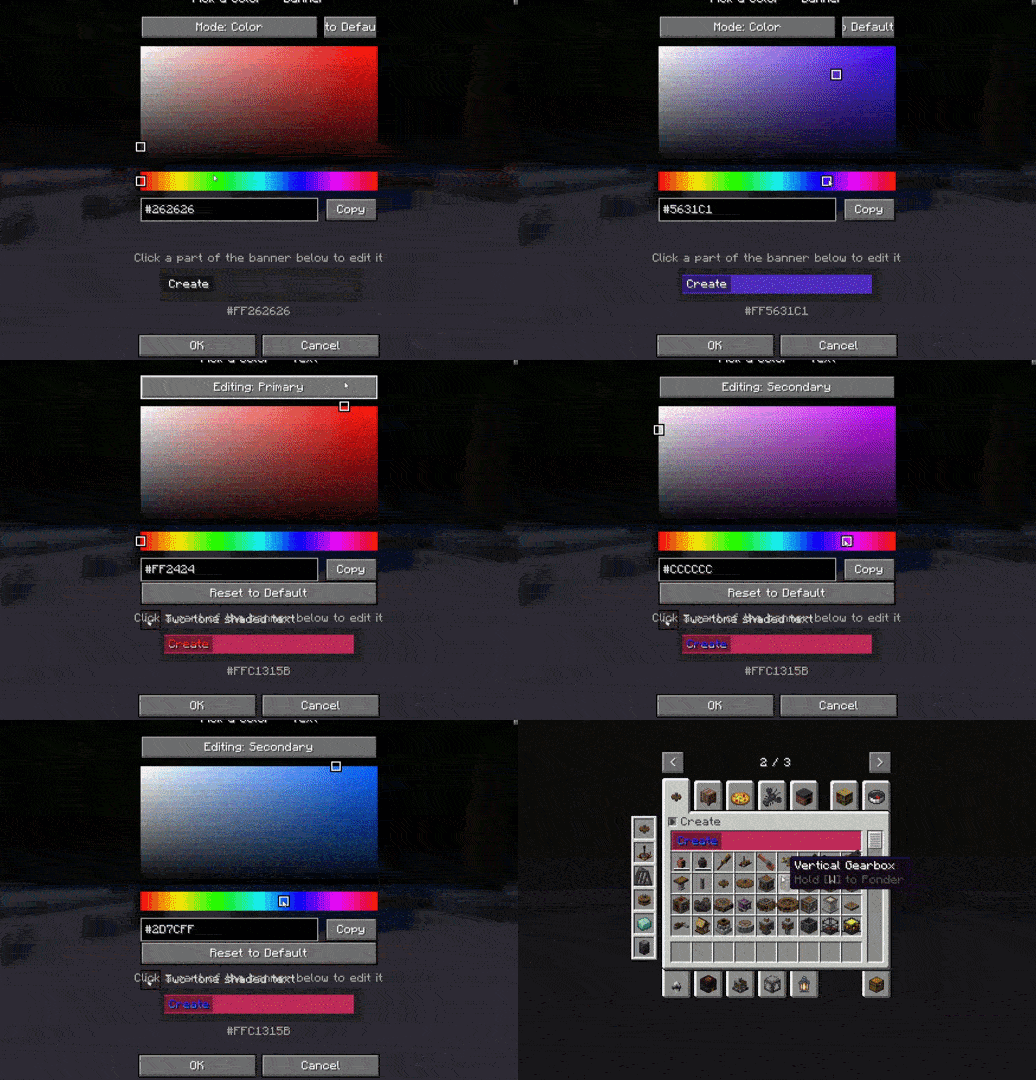
如图所示,它能极大地减少杂乱感。 不仅如此,它不仅原生外观美观,还通过模组的配置界面支持大量的自定义选项! 你可以调整
- 横幅的颜色
- 对比框的颜色及透明度
- 文字颜色
- 一种类似 Create Aeronautics 标签页的双色选项
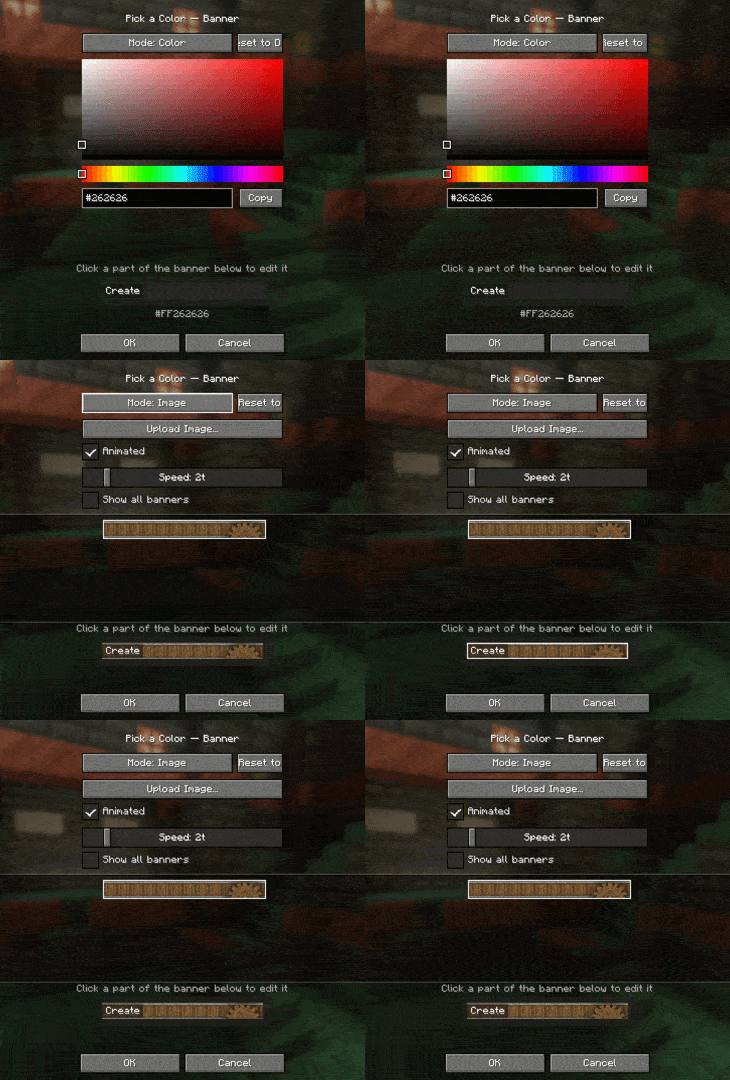
如果你不想为标签页部分使用纯色背景,还可以上传自定义图片!图片尺寸需为 160x17 像素,并且该模组完全支持原版纹理动画功能(就像 Create Aeronautics 一样!)
如果你安装了许多附加模组,内置的侧边栏可以助你快速跳转至它们!
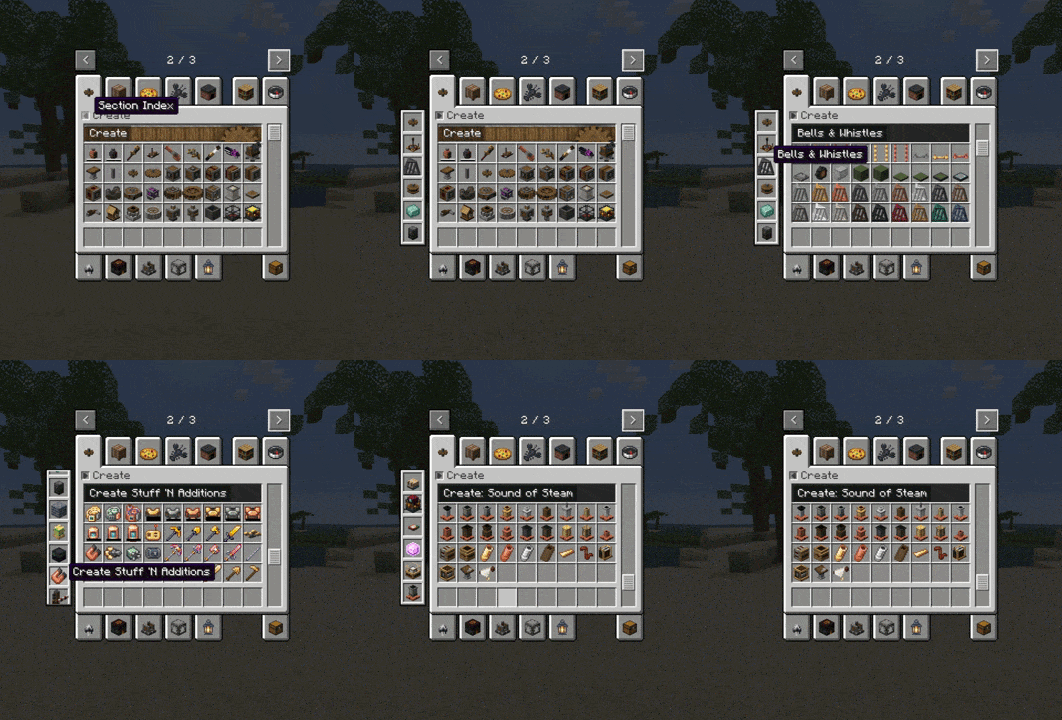
CAO 也支持多种语言!目前包括:
- English (en_us)
- Portuguese (pt_br)
- Chinese Simplified (zh_cn)
正在添加中的语言包括:
- Russian (ru_ru)
- French (fr_fr)
- Spanish (es_es)
我可以在视频或整合包中使用它吗?
当然可以! 你甚至不需要提前询问。你可以随时在整合包或视频中包含此模组。如需更详细的信息,请查看 许可证。
Notice: CAO IS GETTING A RENAME!
because the abilites of CAO is getting so diverse and expanded upon, it makes sense to rename it to a more general name to signify that it isnt JUST a create addon. (The create compatibilty stays though!) Development on CAO 2.0 is winding down and i am getting ready for a trailer and the full release. join the discord for more info!
Create: Addon organizer -> Creative: Re-Tabbed
Have you ever been in creative mode with a ton of create mod addons and found it annoying that EVERY SINGLE ONE has its own tab? well, Worry no more! CAO sorts every create addon into sections contained within the base "Create" tab, and the "Create's Building Blocks" tab. it also leaves create aeronautics untouched.
Before vs after
As you can see, it reduces the clutter a ton. But not only does it look good naitively, it supports a TON of customization via the mod's config screen! You can change
- The banner's color
- The contrast box's color & transparency
- The text color
- a 2-tone option that looks like the create aero tab
And if you dont want a color for the tab section, you can upload your own image! it has to be 160x17, and the mod also has full vanilla texture animation support (just like create aero!)
If you have a lot of addons, there is a built in sidebar that allows you to quickly jump to them!
CAO also supports a lot of languages! this includes:
- English (en_us)
- Portuguese (pt_br)
- Chineese (zh_cn)
Some being added include:
- Russian (ru_ru)
- French (fr_fr)
- Spanish (es_es)
Can i use this in my video / modpack?
Yes! you dont even have to ask. you can always include this in modpacks / videos. for more detailed info, check the license.

下载 Create: Addon Organizer
下载 Create: Addon Organizer
下载 Create: Addon Organizer
下载 Create: Addon Organizer
下载 Create: Addon Organizer
下载 Create: Addon Organizer
下载 Create: Addon Organizer
下载 Create: Addon Organizer
Create 插件管理器 1.5
- 修复了 v1.4 中的所有错误
- 添加了一些小调整和文本横幅变暗以及透明度控制
关于这个资源的讨论、问题反馈与使用心得
还没有讨论,来发第一帖吧
你是这个资源的作者?登录后可认领此资源。
相似资源
 模组

显示你正在注视的方块的信息。(适用于 Minecraft 1.16+ 的 Hwyla/Waila 分支)
 模组
使用 JavaScript 编辑配方、添加自定义物品、编写世界事件!
 模组

查看物品与配方
 模组
在游戏画面角落显示附近世界地形、玩家、生物和实体的地图。可创建路径点,帮助你找到标记过的位置。
 模组
AE2:一款流行的自动化与存储模组
 模组
那是什么?一个 Waila/Hwyla 的分支。
评论 0
登录后参与评分
还没有评论,来抢沙发吧