Build Gun: Create 的插件 [中文介绍]
新增了一种工具,可以在生存模式中打印蓝图。右键点击以打开菜单并选择蓝图。按住 Shift + 右键点击以取消选择蓝图。
此模组专为整合包制作而设计,并非开箱即用。如果不进行配置,菜单将为空。
配置
配置文件位于 <游戏目录>/BuildGunData/config.json。首次运行该模组时,会自动在此生成一个空文件。
此配置文件用于指定 Build Gun 可用的蓝图及其在菜单中显示的类别。
示例配置文件:
注意:JSON 不支持注释。这里的注释仅用于提高可读性。如果要使用此示例配置文件,请删除所有 // 注释。
{
"tabs": [ // 此条目定义两个分类
{ "id": "tab1", "name": "A类" }, // 'id' 是分类的唯一标识符;请确保它不与其他分类的 ID 重复。'name' 是菜单中显示的名称。
{ "id": "tab2", "name": "B类" }
],
"schematics": [ // 此条目定义一个蓝图
{
"id": "aaa", // 'id' 是结构的唯一标识符;不得与其他结构 ID 重复。
"name": "Schematic 1", // 'name' 是在菜单中显示的结构名称。
"file": "s1.nbt", // 'file' 是结构文件的路径,相对于 `<游戏目录>/schematics`
"tab": "tab1", // 'tab1' 表示该蓝图在菜单中所属的分类。
"config": { // 'config' 包含蓝图的设置。
"stage": 0, // 'stage' 是使用此蓝图所需的最低阶段。模组包含一个简单的阶段系统(稍后解释)。只有当当前世界的阶段等于或高于所需阶段时,蓝图才会可用。
"description": "这是一个用于测试的蓝图,其描述非常、非常、非常、非常、非常、非常、非常、非常、非常、非常、非常、非常、非常、非常、非常、非常、非常、非常、非常、非常、非常、非常、非常长。", // 'description' 是蓝图的描述,将在菜单中显示。
"cost": [ // 'cost' 定义了打印此结构图所需的物品。如果不需要任何成本,请将 'cost' 设置为空数组 []。
{
"id": "minecraft:emerald_block", // 'id' 是物品 ID。
"count": 16 // 'count' 是所需数量。
},
{
"id": "create:cogwheel",
"count": 256
}
]
}
}
]
}
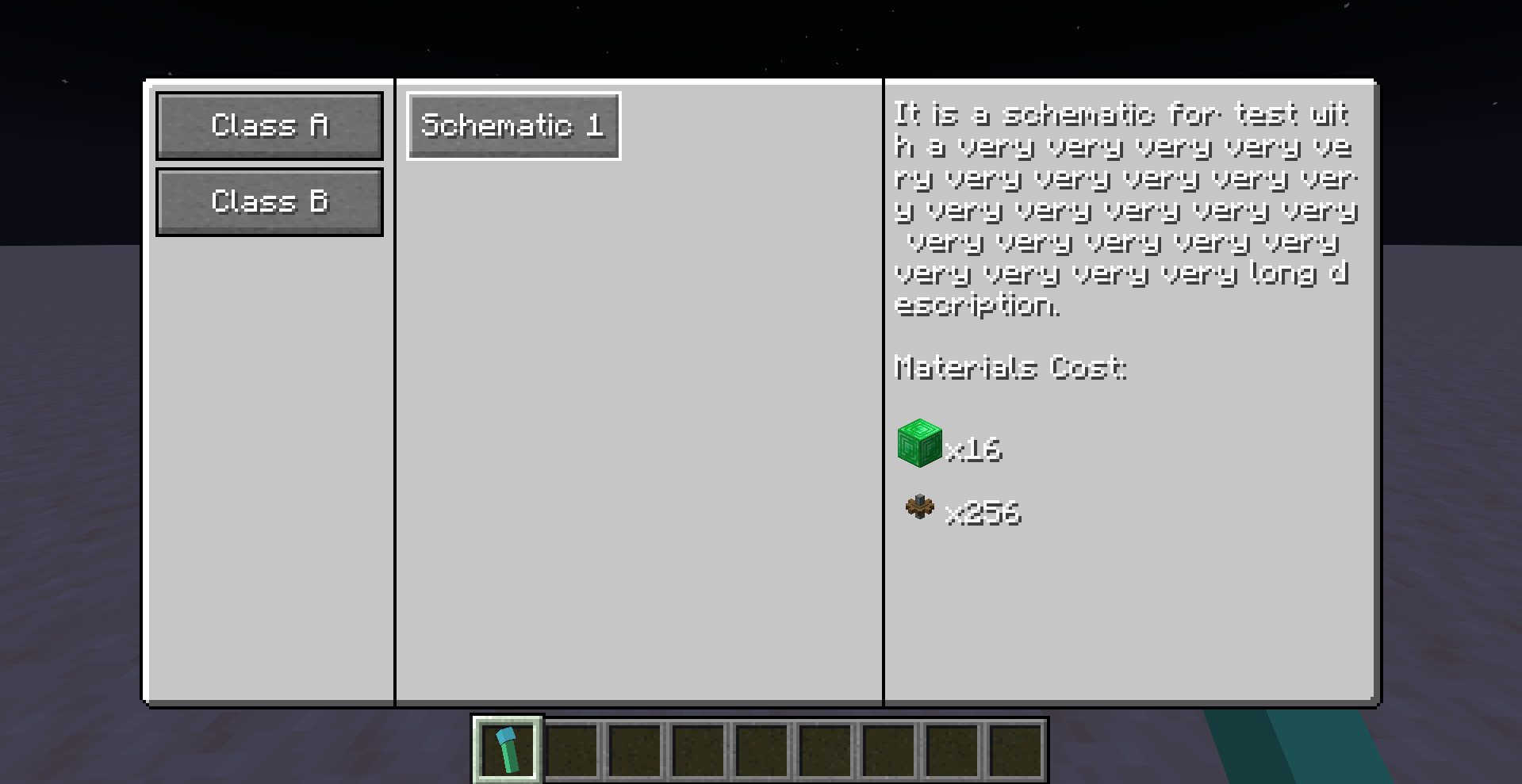
使用上述配置文件,你将获得以下菜单:
## 配置后续步骤
上述配置仅声明了菜单中显示哪些图纸。接下来,你需要将对应的图纸文件放置在 `<游戏目录>/schematics` 目录下。
Create 模组如何查找图纸?
在尝试加载名为 `s1.nbt` 的蓝图时,Create 模组会执行以下操作:
1. 在客户端加载文件 `<游戏目录>/schematics/s1.nbt` 以显示预览。
2. 在服务器端加载文件 `<游戏目录>/schematics/uploaded/<蓝图所有者名称>/s1.nbt` 以实际打印蓝图。
在此,`<schematic owner name>` 取决于上传该结构文件的玩家。然而,对于本模组中的建造枪(Build Gun),<schematic owner name> 始终为 `__BuildGun__`。
因此,你需要将结构文件同时放置在 `<game directory>/schematics/` 和 `<game directory>/schematics/uploaded/__BuildGun__/` 中。
> 如果您正在配置专用服务器,从技术上讲,该文件只需放置在后一个目录中。然而,如果您不熟悉 Minecraft 客户端与服务器的区别,建议将文件同时放置在两个位置,以避免出现问题。
正确放置后,您的目录结构应如下所示:
<游戏目录>
|_ 结构文件
|_ s1.nbt
|_ 已上传
|_ BuildGun
|_ s1.nbt
结构文件名 `s1.nbt` 对应上一节中的 `"file": "s1.nbt"`。
## 如果一切配置正确
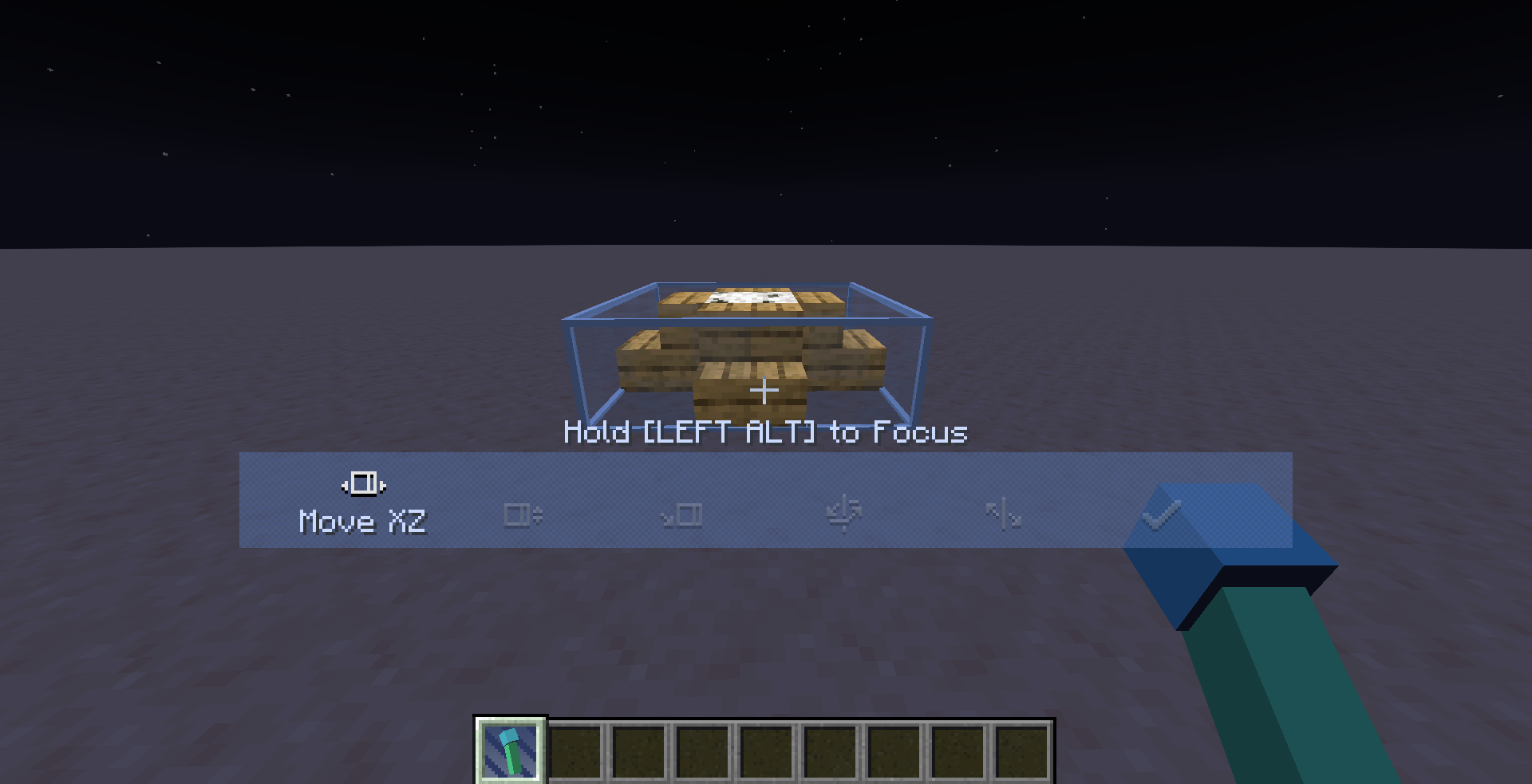
当你右键打开菜单并点击 `Schematic 1` 按钮时,你可以将建筑枪作为蓝图使用。
你可以部署、调整并打印蓝图。
## 其他提示
1. 修改配置文件后,更改不会立即生效。你需要运行 `/reload` 命令以重新加载配置。
2. 如果你使用的是专用服务器 + 客户端架构,`/reload` 仅重新加载服务器端配置。要重新加载客户端配置,请使用 F3+T。
3. 使用 `/buildgun stage get` 检查当前世界阶段。
4. 使用 `/buildgun stage set` 设置当前世界阶段。
5. “stage”系统本质上是一个整数,你可以自由定义其含义——例如,0 代表石器时代,1 代表铁器时代,2 代表工业时代等。
6. 通过在配置文件中为蓝图设置阶段要求,你可以限制玩家在达到特定阶段之前使用某些蓝图。(例如,使用 FTB Quests、Commit Quests 来设置阶段)。
7. 在配置文件中,“name”和“description”是可翻译文本。你可以将它们设置为翻译键,例如 "my.modpack.schematic1.name"。然后,通过在资源包中添加相应的翻译,即可轻松实现国际化(i18n)。
## 模棱两可的边界情况?
你可能会想知道,如果服务器和客户端配置不匹配会发生什么。
例如,如果你运行一个专用服务器,而一个不可信的玩家修改了他们的客户端配置,他们能否打印出服务器上不应该可用的蓝图?
答案是否定的。即使他们修改客户端配置,在菜单中显示未经授权的图纸,服务器在打印前仍会验证请求。服务器会检查所请求的图纸是否存在于其自身配置中、所需阶段是否满足以及必要的材料是否可用。如果任何条件未满足,打印将不会进行。
## 一种潜在漏洞
在极端情况下,不诚信的玩家可能会利用该系统来打印他们想要的任何图纸。
漏洞利用过程:
1. 使用 `__BuildGun__` 作为用户名。
2. 通过蓝图台或其他方法上传同名结构文件,覆盖服务器端位于 `<游戏目录>/schematics/uploaded/__BuildGun__/` 的结构文件。
3. 这将允许他们使用建造枪打印任何已上传的结构文件。
修复此漏洞的简单方法是禁止用户名 `__BuildGun__` 的玩家加入服务器。
## 0.0.3 版本新增功能
当在副手持有建造枪时,它会进入拆除模式,允许你通过右键点击来移除已构建的蓝图。
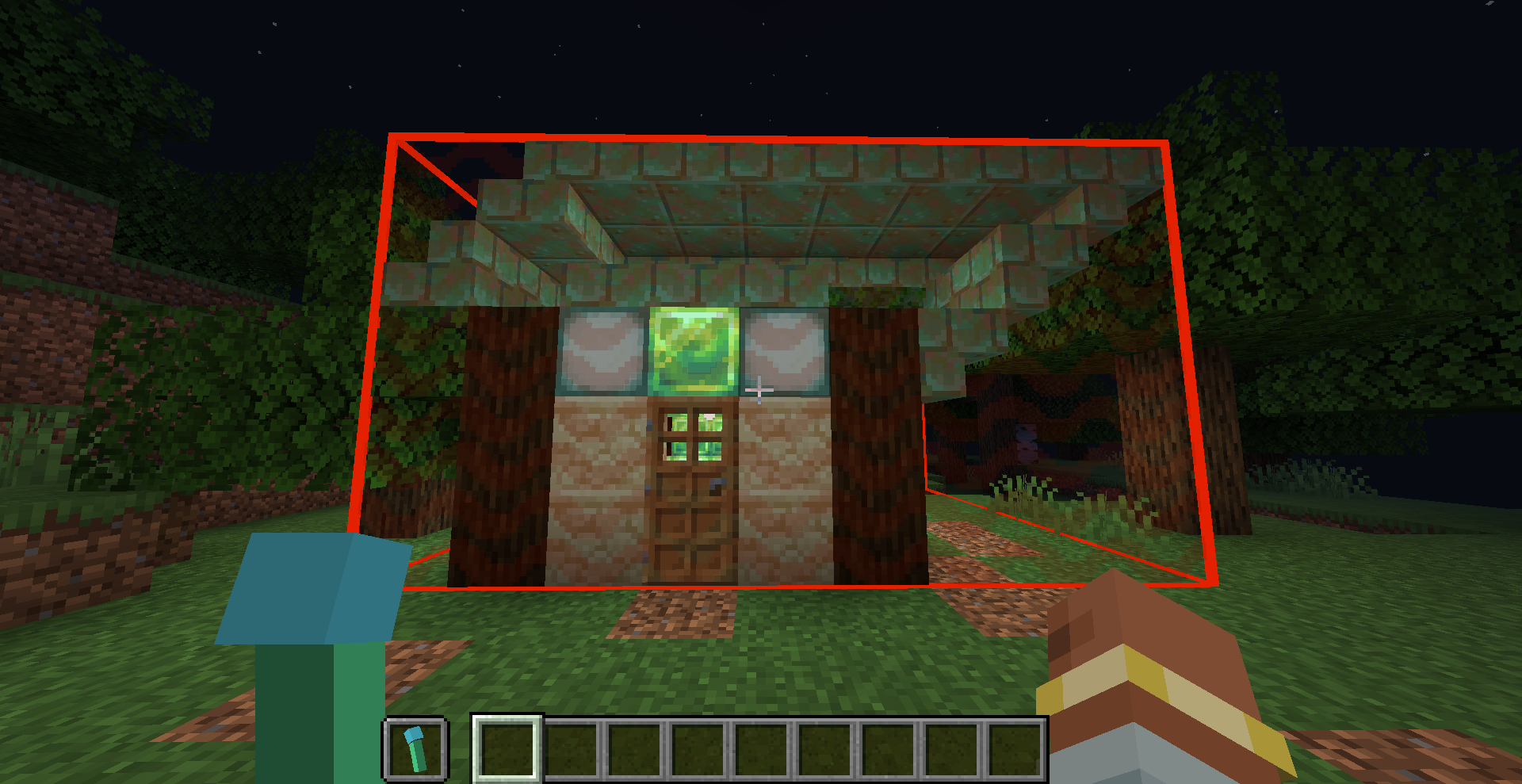
你可以在配置文件中指定某个结构图是否可被移除。
拆除逻辑会在范围内逐个检查方块是否与结构图匹配。如果匹配,则该方块会被移除;否则保持不变。
因此,任何手动添加的方块或建造后状态发生变化的方块都会被保留下来。
拆除所需的信息是在建造时生成的。因此,如果在建造过程中配置文件中未设置 `"removable": true`,之后修改配置也无法使该结构可被移除。
在此版本中,拆除建筑不会返还材料。未来版本可能会加入此功能。
## 拆除模式中的一个潜在漏洞
由于没有验证玩家与正在拆除的建筑之间的距离,不可信的玩家可能伪造数据包,从任意距离拆除建筑。
## 0.0.4 更新日志
修复了在使用旋转和镜像放置时,建筑边界框位置错误的问题。
## 0.0.5 更新日志
修复了建筑物无法被干净移除或在移除时产生额外掉落物的问题。
A tool has been added to print blueprints in survival mode. Right-click to open the menu and select a blueprint. Shift + right-click to deselect the blueprint.
This mod is intended for modpack creation and is not ready to use out of the box. If you do not configure it, the menu will be empty.
Configuration
The configuration file is located at <game directory>/BuildGunData/config.json. If you run this mod for the first time, an empty file will be automatically generated there.
This configuration file specifies which blueprints the Build Gun can use and the categories appear in the menu.
Example Configuration File:
Note: JSON does not support comments. The comments here are for readability only. If you want to use this example configuration file, remove all // comments.
{
  "tabs": [  // This entry defines two categories
    { "id": "tab1", "name": "Class A" },  // 'id' is the unique identifier for the category; make sure it does not duplicate other category IDs. 'name' is the display name in the menu.
    { "id": "tab2", "name": "Class B" }
  ],
  "schematics": [  // This entry defines a blueprint
    {
      "id": "aaa",  // 'id' is the unique identifier for the schematic; it must not duplicate other schematic IDs.
      "name": "Schematic 1",  // 'name' is the display name of the schematic in the menu.
      "file": "s1.nbt",  // 'file' is the path of the schematic file, relative to `<game directory>/schematics`
      "tab": "tab1",  // 'tab1' indicates which category this schematic belongs to in the menu.
      "config": {  // 'config' contains settings for the schematic.
        "stage": 0,  // 'stage' is the minimum required stage for using this schematic. The mod includes a simple stage system (explained later). The schematic will only be available if the current world's stage is equal to or greater than the required stage.
        "description": "It is a schematic for test with a very very very very very very very very very very very very very very very very very very very very very very very very long description.",  // 'description' is the schematic's description, which will be displayed in the menu.
        "cost": [  // 'cost' defines the items required to print this schematic. If no cost is required, set 'cost' to an empty array [].
          {
            "id": "minecraft:emerald_block",  // 'id' is the item ID.
            "count": 16  // 'count' is the quantity required.
          },
          {
            "id": "create:cogwheel",
            "count": 256
          }
        ]
      }
    }
  ]
}
With the above configuration file, you will get the following menu:

Next Steps in Configuration
The above configuration only declares which schematics appear in the menu. Next, you need to place the corresponding schematic files in the <game directory>/schematics directory.
How the Create Mod Finds Schematics?
When attempting to load a schematic named s1.nbt, the Create mod will:
- Load the file
<game directory>/schematics/s1.nbt on the client to display the preview.
- Load the file
<game directory>/schematics/uploaded/<schematic owner name>/s1.nbt on the server to actually print the schematic.
Here, <schematic owner name> depends on the player who uploaded the schematic. However, for the Build Gun in this mod, <schematic owner name> is always __BuildGun__.
Therefore, you need to place the schematic file in both <game directory>/schematics/ and <game directory>/schematics/uploaded/__BuildGun__/.
If you are configuring a dedicated server, the file technically only needs to be placed in the latter directory. However, if you are unfamiliar with the distinction between Minecraft client and server, placing it in both locations is recommended to avoid issues.
Once placed correctly, your directory structure should look like this:
<game directory>
|_ schematics
  |_ s1.nbt
  |_ uploaded
    |_ __BuildGun__
      |_ s1.nbt
The schematic filename s1.nbt corresponds to "file": "s1.nbt" in the previous section.
If Everything is Configured Correctly
When you right-click to open the menu and click the Schematic 1 button, you can use the Build Gun as a blueprint.
You can deploy, adjust, and print the blueprint.

Additional Tips
- After modifying the configuration file, changes will not take effect immediately. You need to run the /reload command to reload the configuration.
- If you are using a dedicated server + client setup, /reload only reloads the server configuration. To reload the client-side configuration, use F3+T.
- Use
/buildgun stage get to check the current world stage.
- Use
/buildgun stage set to set the current world stage.
- The "stage" system is simply an integer, and you can define its meaning freely—for example, 0 for the Stone Age, 1 for the Iron Age, 2 for the Industrial Age, etc.
- By setting stage requirements for schematics in the configuration file, you can restrict players from using certain schematics until they reach a specific stage.(e.g., use ftb quest, commit quest, set stage).
- In the configuration file, "name" and "description" are translatable text. You can set them as translation keys, such as "my.modpack.schematic1.name". Then, by adding the corresponding translations in a resource pack, you can easily implement i18n.
Ambiguous Edge Cases?
You might wonder what happens if the server and client configurations do not match.
For example, if you run a dedicated server and an untrustworthy player modifies their client configuration, could they print blueprints that should not be available on the server?
The answer is no. Even if they modify the client configuration to display unauthorized schematics in their menu, the server will still validate the request before printing. The server checks whether the requested schematic exists in its own configuration, whether the required stage is met, and whether the necessary materials are available. If any of these conditions are not met, printing will not proceed.
A Potential Exploit
In an extreme case, an untrustworthy player could exploit the system to print any schematic they want.
Exploit Process:
- Use
__BuildGun__ as their username.
- Upload a schematic with the same name using a blueprint table or other methods, overwriting the server-side schematic at
<game directory>/schematics/uploaded/__BuildGun__/.
- This would allow them to use the Build Gun to print any schematic they uploaded.
A simple fix for this exploit is to ban players with the username __BuildGun__.
New Features in Version 0.0.3
When the Build Gun is held in the off-hand, it enters demolition mode, allowing you to remove constructed blueprints by right-clicking.

You can specify in the configuration file whether a schematic can be removed.
The demolition logic checks each block within the range against the schematic. If a block matches the schematic, it is removed; otherwise, it remains.
As a result, any manually added blocks or blocks that have changed state after construction will be preserved.
The necessary information for demolition is generated at the time of construction. Therefore, if "removable": true was not set in the configuration during construction, modifying the configuration later will not allow the structure to be removed.
In this version removing buildings will not return materials. It may be added in future versions.
A Potential Exploit in Demolition Mode
Since there is no validation of the distance between the player and the structure being demolished, an untrustworthy player could forge packets to remove buildings from any distance.
0.0.4 Changelog
Fixed a bug that the building bounding box was incorrectly positioned when placed with rotation and mirroring.
0.0.5 Changelog
Fixed the issue where buildings could not be removed cleanly or would produce additional drops when removed.


 模组

 模组

 模组
 模组
 模组

 模组
评论 0
登录后参与评分
还没有评论,来抢沙发吧