Create: Hammer & Bid

一个为 Create 打造的附加模组,将实时、由玩家主持的拍卖行引入你的工厂车间。
我一直觉得,在 Create 中进行交易不应只是把物品扔进箱子然后指望有人注意到。因此,这个模组添加了一个真正的拍卖行:你陈列一件物品,设定条款,然后让大厅里的所有人通过实时倒计时竞价来争夺它。支持现场出价,失败者的资金会自动退还,而获胜的物品会通过你已有的传送带和漏斗直接运送给买家。
这是 Create 的非官方附加模组。它并非由 Create 团队或 Mojang 制作或与其有关联。
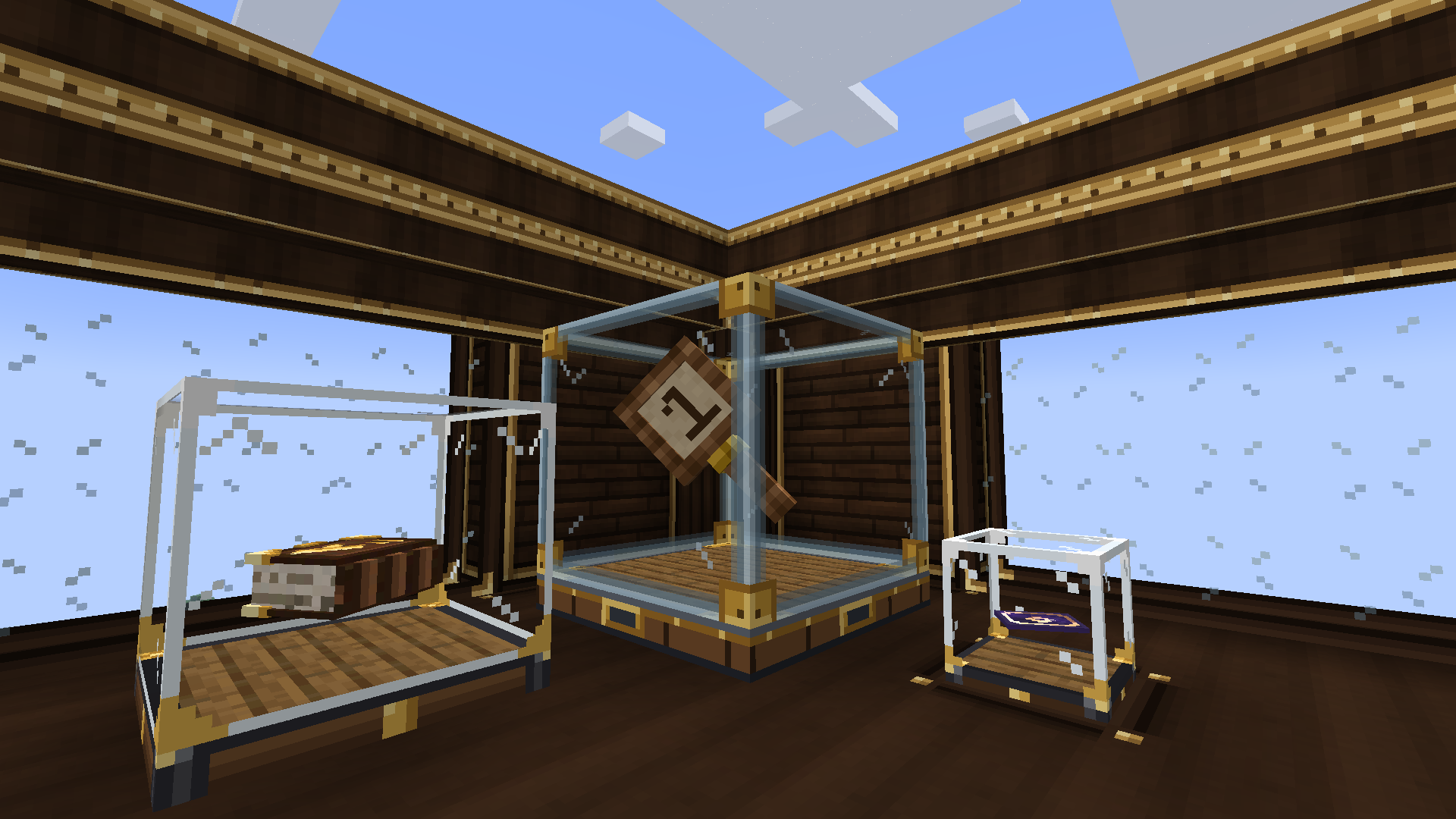
实际玩法
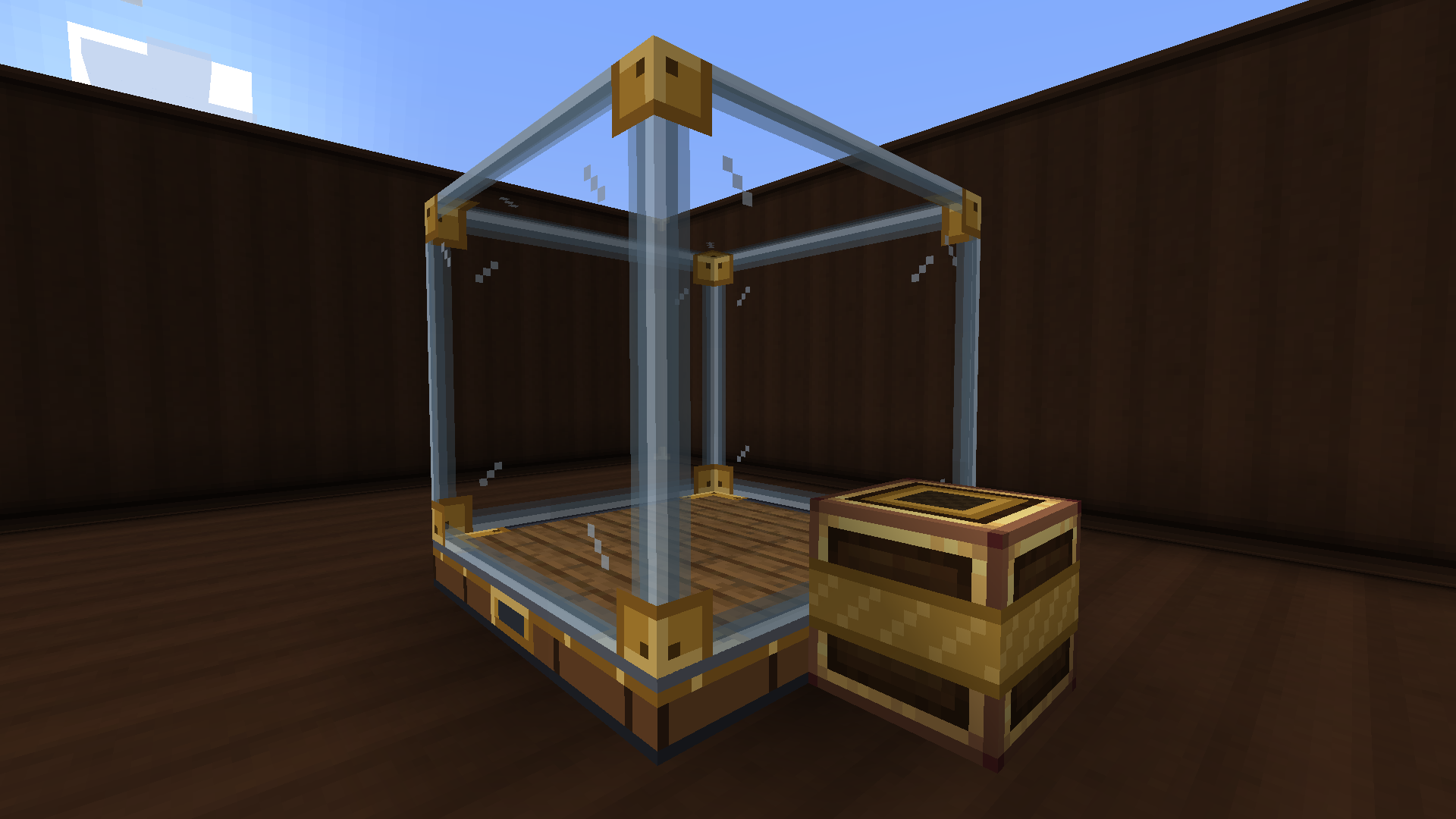
首先放置一个拍卖展示柜,并在其旁边连接一个拍卖打包站。右键点击展示柜以放入物品,然后拿出拍卖师账本并右键点击展示柜进行设置:指定作为支付物品的种类、起拍价、每次加价的最小幅度以及拍卖持续时间。如果你不想亲自管理收入,可以绑定一个物品箱作为收款账户,款项将在拍卖结束时自动存入其中。
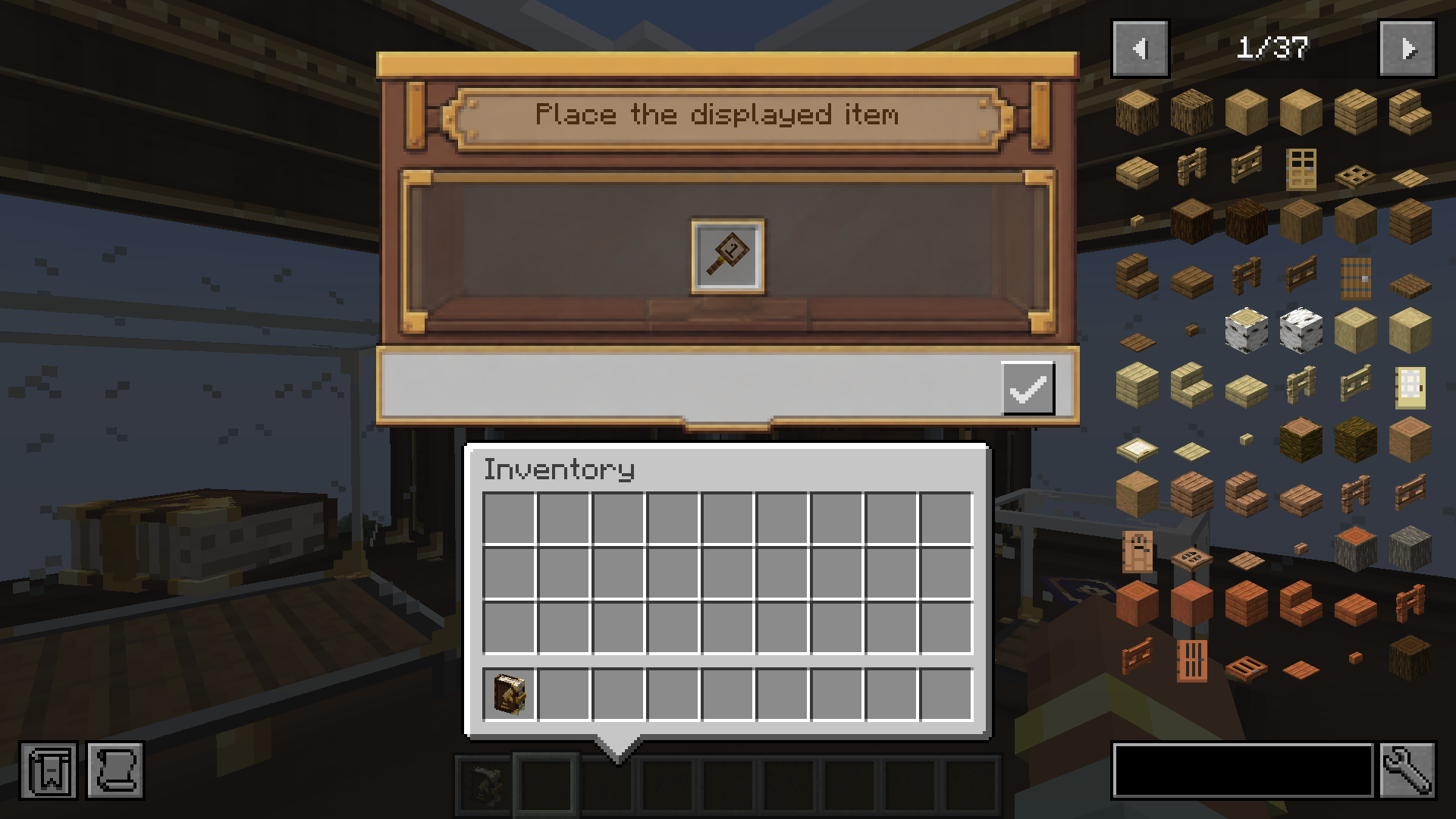
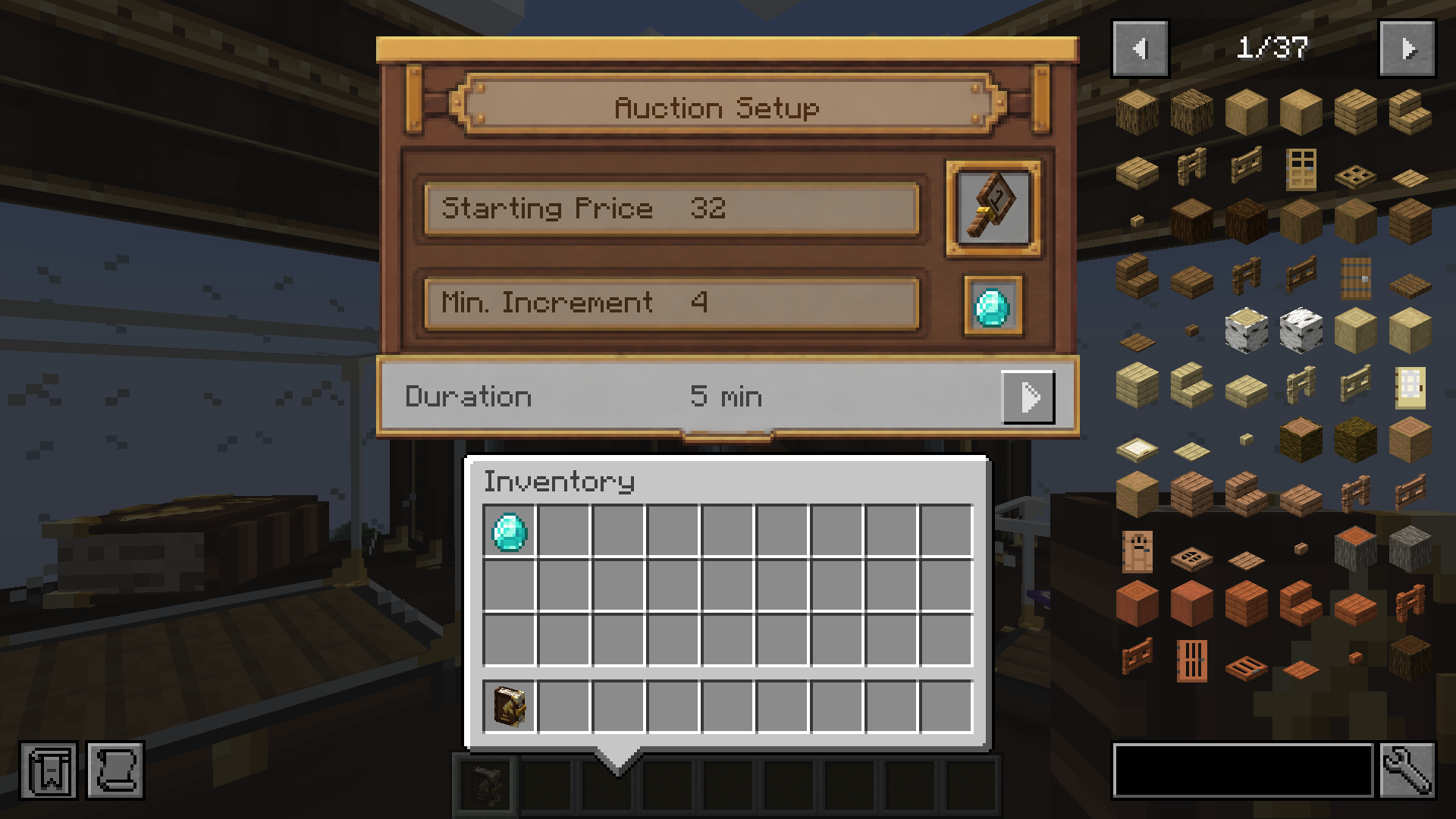
随后,任何持有竞拍槌的玩家都可以参与。每个竞拍槌都会分配一个独立的拍卖编号,出价操作非常简单:打开展示柜提高报价即可——或者在局势紧张时按住潜行键左击,以瞬间出价当前最低有效金额。需要注意的是,出价并非承诺:一旦出价,支付款项就会被提取到托管账户中。如果有人出更高的价格,你会立即收到退款。
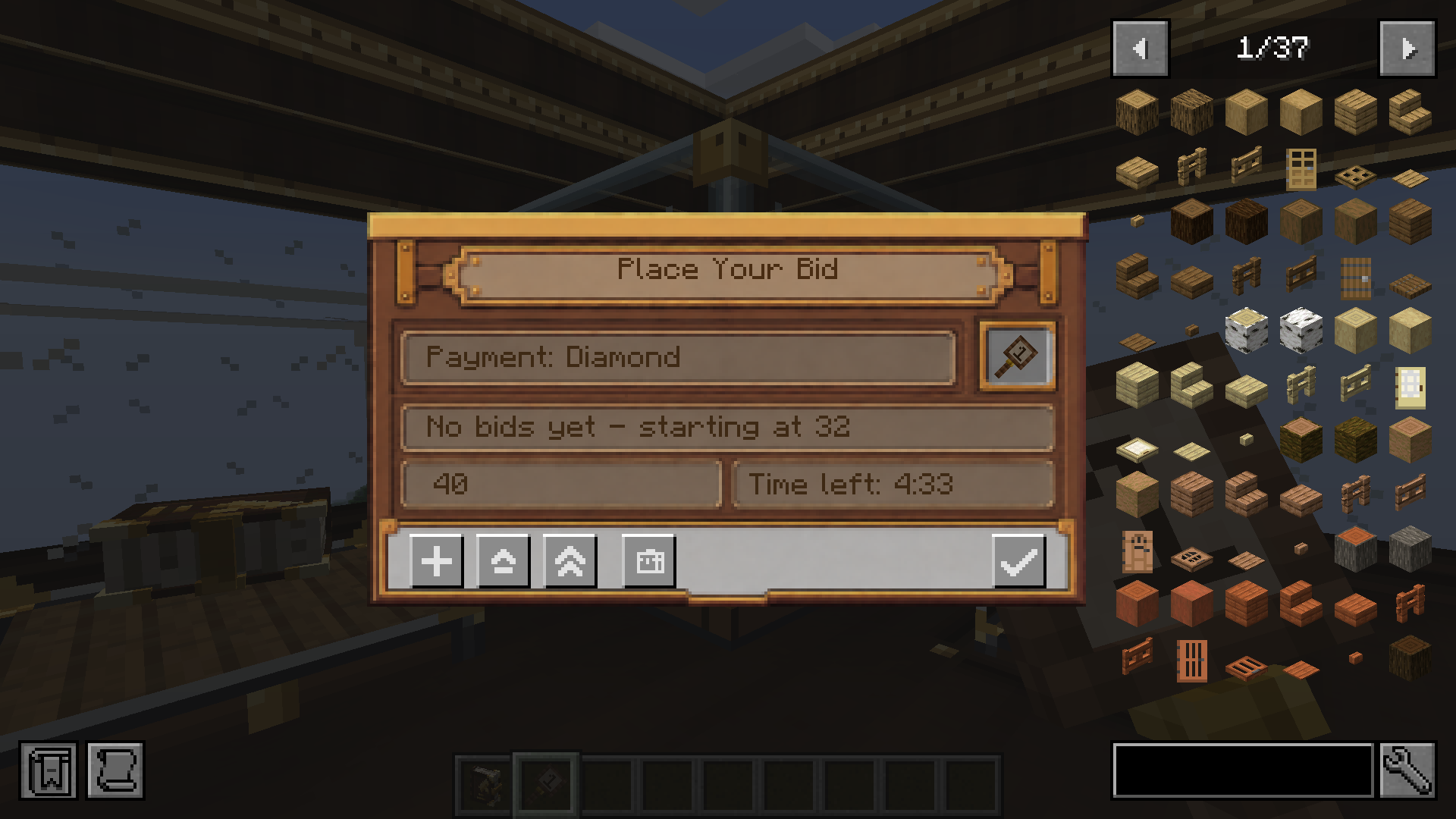
当计时器结束,最高出价者获胜。物品会在打包站内被封装成一个金色的拍卖包裹,随后你的 Create 网络接管后续流程——传送带、漏斗、溜槽、链式输送机和蛙门可以将包裹直接运送至赢家手中。只有获胜者才能打开它。卖家获得报酬,所有失败者收到退款,而获胜者则会得到一张拍卖票据作为交易凭证。
展示柜可随你扩展
单个展示柜足以独立运作,但将多个展示柜放在一起,它们会合并为一个更大的展示台——尺寸可从 1x1x1 的立方体扩展到完整的 3x3x3 ——共享同一个展示槽位和一场拍卖。当你需要出售值得更大舞台展出的物品时,这非常实用。
从物品箱支付
如果你不想随身携带成堆的支付物品,金库账户卡允许你链接一个物品箱并直接从其中出价。托管和退款会直接在绑定的物品箱中进出物品,因此你可以在储藏室中完成整个竞价生涯——只需确保该区块处于加载状态即可。
配套建筑材料
拍卖方块附带一套配套的黄铜框架建筑方块,让你的拍卖行看起来不像是由备用外壳拼凑而成的。包括黄铜框架木板、黄铜框架原木、黄铜框架装饰条、黄铜框架柱子、黄铜框架玻璃、黄铜框架楼梯和黄铜框架台阶,均拥有连接纹理,并且按照你在 Create 中预期的方式制作和切割。
需求
- Minecraft 1.21.1
- NeoForge
- Create 6.0 或更高版本
Create 自带 Ponder 和 Flywheel,因此无需安装其他依赖。
备注
支持单人游戏和专用服务器。拍卖状态随世界保存并可在重启后保留,任何欠付已离线玩家的款项(退款、 payouts、票据)将在他们下次登录时交付。所有的资金和物品处理均由服务器端运行,因此延迟峰值不会导致出价或包裹消失。
如果遇到错误或有任何建议,问题追踪器位于 GitHub。
鸣谢与许可
本模组基于 Create、Ponder 和 Flywheel 项目开发,我感谢 Create 团队及所有贡献者。本模组采用 MIT 许可证发布,源代码位于 GitHub。
如果你喜欢这个模组并希望支持更多此类工作,有一个 Ko-fi 页面。无论是否支持都完全没问题——感谢你浏览本模组。
Create: Hammer & Bid
A Create add-on that brings live, player-run auction houses to your factory floor.
I always thought trading in Create deserved more drama than dropping items in a chest and hoping someone notices. So this mod adds a proper auction house: you put an item on display, set your terms, and let everyone in the lobby fight over it in a real, ticking auction. Bids are taken on the spot, losing bidders get their money back automatically, and the winning item ships itself to the buyer through the same belts and funnels you already use.
This is an unofficial add-on for Create. It isn't made by, or affiliated with, the Create team or Mojang.
How it actually plays
You start by placing an Auction Display Case and attaching an Auction Packing Station next to it. Right-click the case to put an item inside, then pull out your Auctioneer Ledger and use it on the case to set things up: which item counts as payment, the starting price, the minimum raise per bid, and how long the auction runs. If you'd rather not babysit your earnings, you can bind an Item Vault as your receiving account and the payments will land there on their own.
From there, anyone holding a Bidder Paddle can join in. Each paddle is assigned its own number for the auction, and bidding is as simple as opening the case and raising the offer — or sneak-clicking to instantly bid the lowest valid amount when things get heated. The catch is that bids aren't promises: the moment you bid, the payment is pulled into escrow. If someone outbids you, you get refunded right away.
When the timer runs out, the highest bidder wins. The item gets sealed into a golden Auction Package inside the Packing Station, and from there your Create network takes over — belts, funnels, chutes, chain conveyors and Frogports can carry the package straight to the winner. Only the person who won can open it. The seller gets paid, everyone who lost gets refunded, and the winner walks away with an Auction Ticket as a receipt of the sale.
Display Cases grow with you
A single case works fine on its own, but place a few together and they merge into one larger showcase — anywhere from a 1x1x1 cube up to a full 3x3x3 — all sharing one display slot and one auction. Handy when you're selling something that deserves a bigger stage.
Paying from your vaults
If you don't want to carry stacks of payment items around, the Vault Account Card lets you link an Item Vault and bid straight from it. Escrow and refunds move items in and out of the bound vault directly, so you can run a whole bidding career out of your storage room — just keep that chunk loaded.
Something to build with
The auction blocks come with a matching set of Brass-Framed building blocks so your auction house doesn't look like it was bolted together out of spare casing. There's Brass-Framed Wood, Planks, Trim, Pillar, Glass, Stairs and a Slab, all with connected textures, and all crafted and cut the way you'd expect in Create.
Requirements
- Minecraft 1.21.1
- NeoForge
- Create 6.0 or newer
Create brings in Ponder and Flywheel on its own, so there's nothing else to install.
Notes
It works in singleplayer and on dedicated servers. Auction state is saved with the world and survives restarts, and anything owed to a player who logged off — a refund, a payout, a ticket — is handed over the next time they join. All of the money and item handling runs on the server, so a lag spike won't make a bid or a package vanish.
If you run into a bug or have an idea, the issue tracker is on GitHub.
Credits and license
This mod is built on top of the Create, Ponder and Flywheel projects, and I'm grateful to the Create team and everyone who contributes to them. It's released under the MIT license, and the source is on GitHub.
If you get some enjoyment out of it and feel like supporting more work like this, there's a Ko-fi page. No pressure either way — thanks for giving the mod a look.


 模组

 模组
 模组

 模组

 模组

 模组
评论 0
登录后参与评分
还没有评论,来抢沙发吧