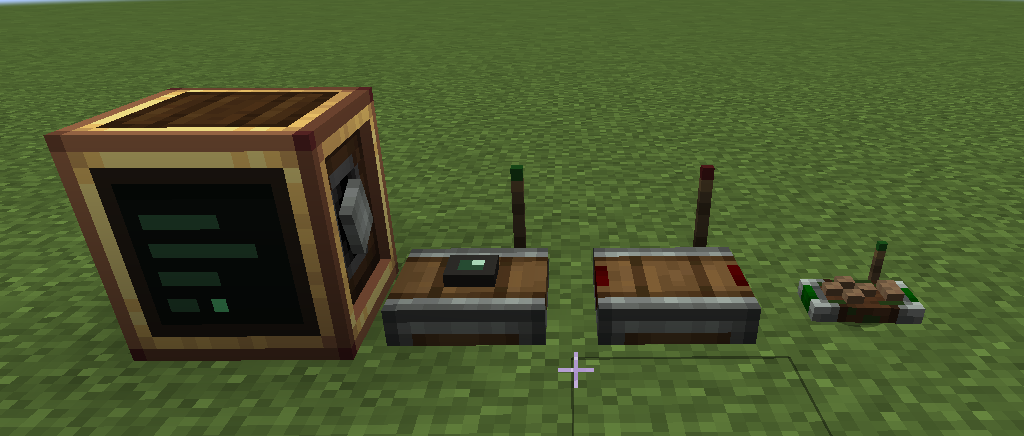
Create Microcontrollers
本模组为 Create (NeoForge 1.21.1) 添加了一个计算机方块。你可以通过旋转或 Forge 能量为其供电,打开界面编写 Lua 程序并将其烧录到方块上。只要计算机有电,程序就会持续运行。你可以用它来自动化机械装置、让机器变得更智能,或在你的基地中协调各项事务。
所有方块和物品均可在生存模式中合成,并且其进度设计旨在与 Create 自身的进度体系相辅相成。请参阅下方的 Crafting 获取合成表。
你并不一定需要懂得编程才能使用本模组。底部的文档链接中的全部内容都可以复制到 ChatGPT、Claude 或其他你选择的 LLM 中,从而赋予其对本模组的完整上下文理解。
计算机本身不直接与方块交互。由两个辅助方块来完成此工作:
- Sensor(传感器):可安装在任意方块上并读取该方块的数据:库存内容、流体储罐、能量、方块状态以及方块的完整 NBT 数据。由于它读取的是 NBT 数据,因此它可以兼容任何 Create 插件以及其他大多数模组中的方块,无需特殊支持。它会将自己看到的内容发布到一个信道(channel)上。
- Receiver(接收器):监听一个信道并输出从 0 到 15 的红石信号。这就是你的程序驱动机器、灯具、离合器等任何红石可以控制的事物的方式。
Channel(信道) 是一个命名的无线连接。传感器向其中发布数据,程序通过 channel() 和 emit() 函数读写它们,而接收器则将其转换回红石信号。信道的传输距离无限,可以承载数字、文本、布尔值和表格。此外还有一个手持式 Controller(控制器) 物品,可以将按键、鼠标按钮和滚轮绑定到信道,以便让你手动控制事物。
The computer(计算机)
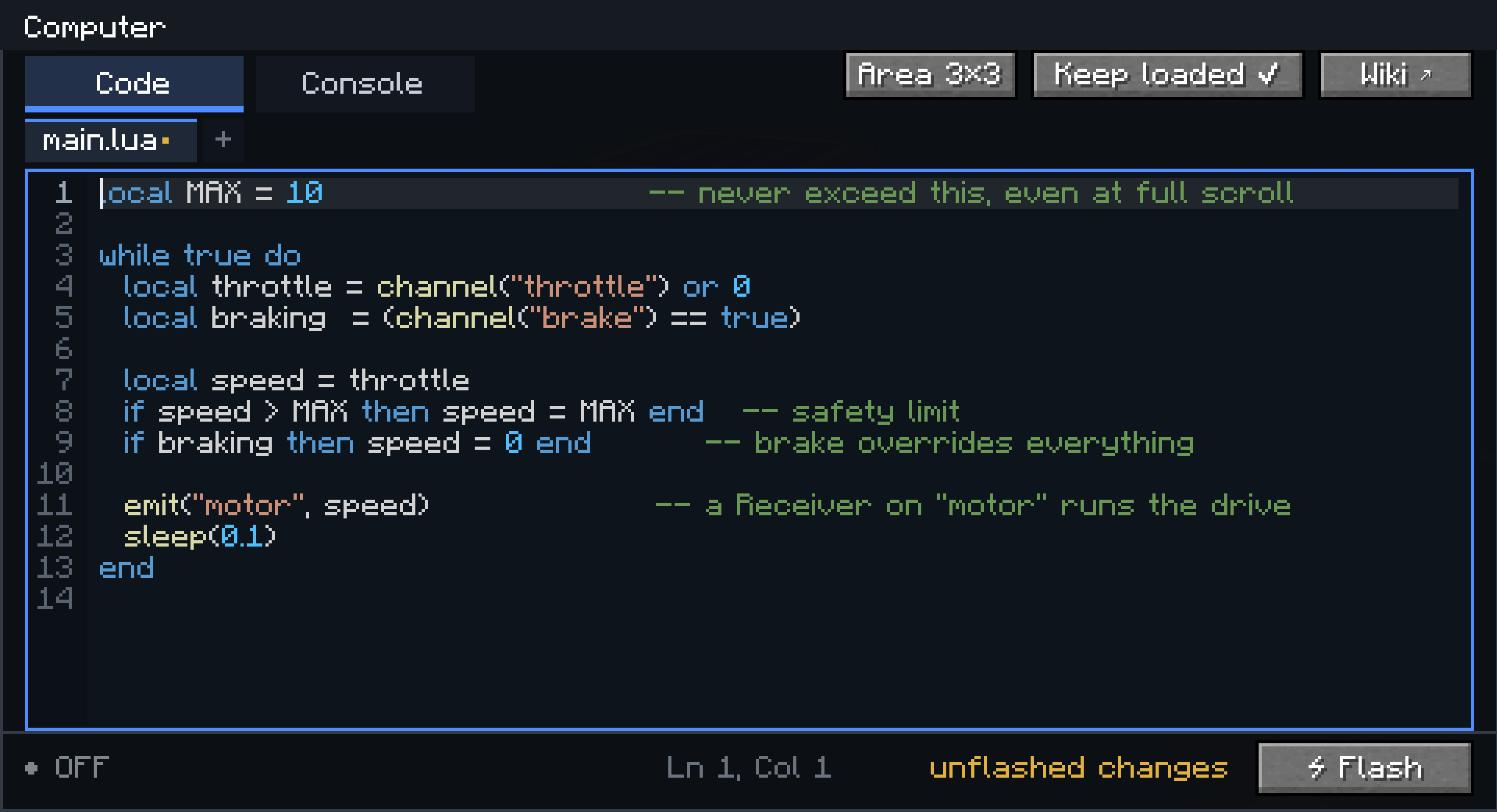
- 程序使用 Lua 5.1 编写,在方块自带的编辑器中进行(包含文件标签页、语法高亮、查找、撤销功能,以及用于打印输出和错误的控制台)。
- 程序可以拆分为多个文件:
main.lua 在启动时运行,其他文件通过 require() 加载。
- 烧录的代码存储在方块内,并在断电和世界重载后保留。变量则不会保留:断电会清除它们,就像真正的微控制器一样。该方块还拥有一个小型持久化磁盘 (
disk.set / disk.get),用于存储重启后应保留的值。
- 程序在其自己的线程上运行,并拥有指令预算上限,因此繁忙的循环不会导致服务器卡顿。
The sensor(传感器)
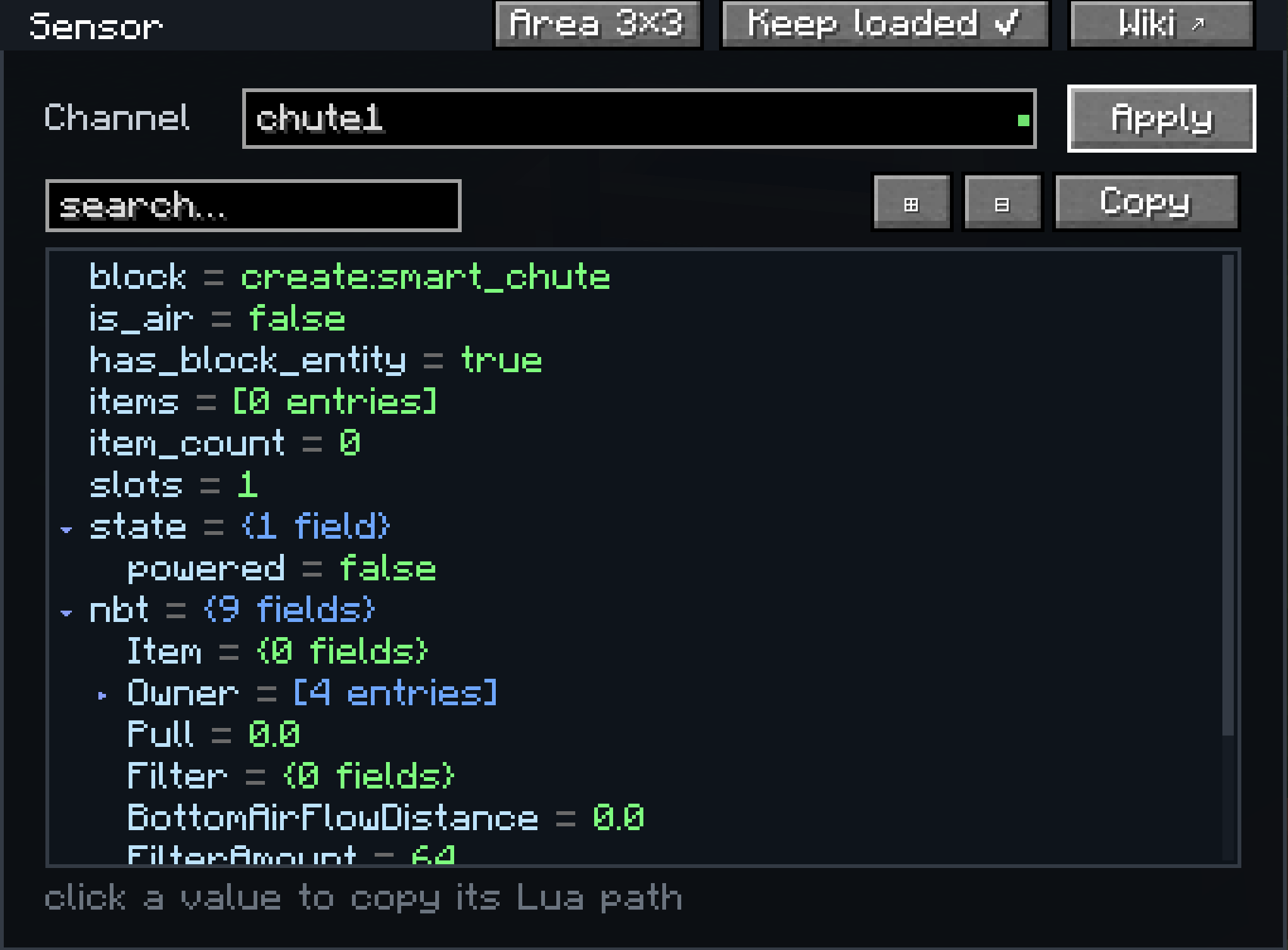
打开一个传感器,它会以一棵实时树的形式显示其当前从所安装方块读取的所有内容,这棵树支持搜索和展开。点击某个值会复制读取该值的 Lua 表达式,以便你直接将其粘贴到你的程序中。这也是了解模组化方块暴露了哪些数据的最佳方法。
The receiver(接收器)
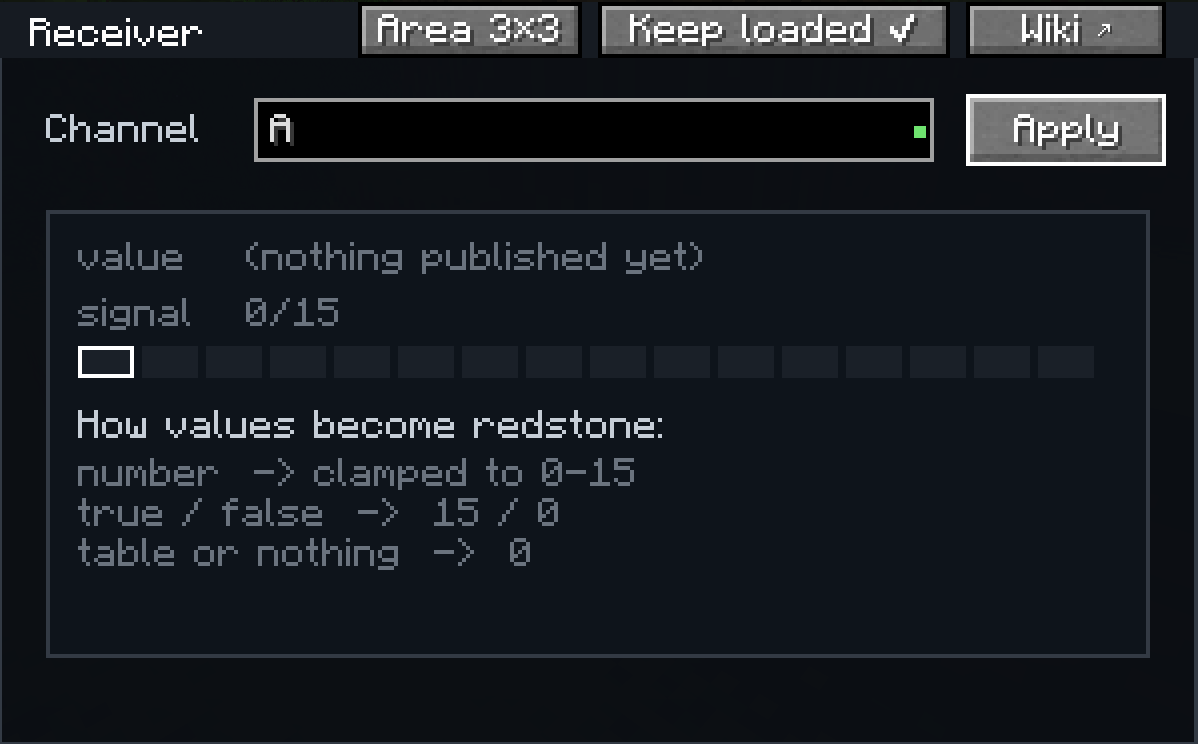
接收器是信道的另一端。打开它,输入它应该监听的信道名称,它就会将该信道的最新值转换为各个方向上的红石信号。数字会被限制在 0 到 15 的范围内,布尔值会变成 15 或 0,其他任何内容都会读作 0。屏幕会实时预览当前接收到的值,以便你在围绕它建造之前确认信道已正确连接。一个程序可以通过在不同信道上发射信号来驱动任意数量的接收器。
Displays(显示屏)

计算机也是 Create 的 Display Links(显示链接)的一个来源。用 Display Link 右键点击 Display Board(显示板)、Sign(告示牌)或 Nixie Tubes(辉光管),将链接放置在计算机上,并选择 "Computer Text"(计算机文本)作为信息类型。随后你的程序就可以向显示屏写入内容。
Crafting(合成)
Sensor(传感器) (Observer, Transmitter, Andesite Casing)

Receiver(接收器) (Andesite Casing, Transmitter, Redstone Torch)

Computer(计算机) (Electron Tube, Brass Casing, Precision Mechanism, Transmitter)

Controller(控制器) (Transmitter, Brass Plates, Redstone, Stick)

Chunk loading(区块加载)
默认情况下,计算机、传感器和接收器会保持其周围区块的加载状态,这样即使附近没有玩家,你所构建的任何内容也会继续运行。可以为每个方块单独关闭此功能,并且加载区域的大小是可调整的(1x1、3x3 或 5x5 个区块)。
Recommended setup(推荐配置)
Create 加上本模组再加上 Aeronautics 是一个很好的组合(自动飞行员、信标间的导航等)。任何其他 Create 插件也可以与本模组良好配合。它与 ANY create addon 兼容。
Documentation(文档)
完整文档位于 oliviermor.github.io/computer-mod:包含入门指南、Lua 介绍、完整的 API 参考以及经过演示的例子。在每个 GUI 中的 Wiki 按钮也可以访问同一网站。
Create Microcontrollers
This mod adds a computer block to Create (NeoForge 1.21.1). You power it with rotation or Forge
Energy, open it, write a Lua program, and flash it onto the block. The program runs as long as the
computer has power. You can use it to automate contraptions, make your machines really smart,
or coordinate things across your base.
Every block and item is craftable in survival, and it is all tuned to sit alongside Create's own
progression. See Crafting below for the recipes.
You don't necessarily need to know how to code to use this mod. The entire documentation linked at the bottom can be copied into ChatGPT, Claude, or any other LLM of your choice, giving it full context of the mod.
The computer does not interact with blocks directly. Two helper blocks do that:
- Sensor: mounts on any block and reads it: inventory contents, fluid tanks, energy, blockstate,
and the block's full NBT data. Because it reads NBT, it works with blocks from any Create addon and
most other mods, without needing special support. It publishes what it sees on a channel.
- Receiver: listens to a channel and outputs a redstone signal from 0 to 15. This is how your
program drives machines, lamps, clutches, and anything else redstone can control.
A channel is a named wireless connection. Sensors publish to them, programs read and write them
with channel() and emit(), and receivers turn them back into redstone. They have unlimited range
and can carry numbers, text, booleans, and tables. There is also a handheld Controller item that
binds keys, mouse buttons, and the scroll wheel to channels, so you can control things by hand.
The computer
- Programs are written in Lua 5.1, in the block's own editor (file tabs, syntax highlighting, find,
undo, a console for print output and errors).
- A program can be split into multiple files:
main.lua runs at boot, other files are loaded with
require().
- Flashed code is stored in the block and survives power loss and world reloads. Variables do not:
losing power wipes them, like a real microcontroller. The block also has a small persistent disk
(
disk.set / disk.get) for values that should survive a reboot.
- Programs run on their own thread with a capped instruction budget, so a busy loop cannot lag the
server.
The sensor
Open a sensor and it shows everything it currently reads from the block it is mounted on, as a live
tree you can search and expand. Clicking a value copies the Lua expression that reads it, so you can
paste it straight into your program. This is also the easiest way to find out what data a modded
block exposes.
The receiver
The receiver is the other end of a channel. Open it, type the channel name it should listen to, and
it turns that channel's latest value into a redstone signal on every side. Numbers are clamped to the
0 to 15 range, a boolean becomes 15 or 0, and anything else reads as 0. The screen shows a live
preview of the value it is currently receiving, so you can confirm a channel is wired up before you
build around it. One program can drive as many receivers as you like by emitting on different
channels.
Displays
The computer is also a source for Create's Display Links. Right-click a Display Board, sign, or Nixie Tubes with a Display Link, place the link on the computer, and pick "Computer Text" as the information type. Your program can then write to the display.
Crafting
Sensor (Observer, Transmitter, Andesite Casing)
Receiver (Andesite Casing, Transmitter, Redstone Torch)
Computer (Electron Tube, Brass Casing, Precision Mechanism, Transmitter)
Controller (Transmitter, Brass Plates, Redstone, Stick)
Chunk loading
The computer, sensor, and receiver keep their surrounding chunks loaded by default, so whatever you
build keeps running when no player is nearby. This can be turned off per block, and the loaded area
size is adjustable (1x1, 3x3, or 5x5 chunks).
Recommended setup
Create plus this mod plus Aeronautics is a good combination (autopilots, navigation between beacons, and so on). Any other Create
addon works fine with this mod too. It is compatible with ANY create addon.
Documentation
Full documentation is at oliviermor.github.io/computer-mod:
a getting started guide, a Lua introduction, the complete API reference, and worked examples. The
same site is reachable from the Wiki button in every GUI.


 模组

 模组

 模组
 模组

 模组

 模组

评论 0
登录后参与评分
还没有评论,来抢沙发吧