
Molten Vents 是一个模组,它为 Create 模组中发现的矿石块提供了一种可再生的来源,进而提供了可以从这些矿石加工出的众多资源。
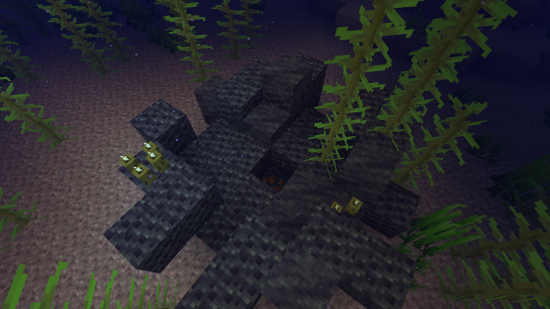
使用方法:
- 寻找喷口;喷口可以在地表任何地方找到,但在水下更容易发现。(可配置)
- 挖掘喷口内部的方块,直到找到一个看起来像喷口所用矿石块但上面带有岩浆的方块,那就是休眠矿石块。
- 以任何方式炸毁休眠矿石块。
- 观察喷口中的岩浆变得更亮,此时休眠熔岩喷口变成了活跃熔岩喷口。
- 将熔岩(最好通过自动化方法)倾倒到活跃熔岩喷口上,看着熔岩变成相应的矿石块。
- 将矿石块加工成资源,或用于建造。
默认喷口:
- Veridium 喷口
- Asurine 喷口
- Crimsite 喷口
- Ochrum 喷口
- Scorchia 喷口
- Scoria 喷口
如何添加自定义熔岩方块
只需将此列表(配置文件文件夹中生成的 .json 文件)中的方块名称添加进去即可。
{"values":["asurine","veridium","crimsite","ochrum","scorchia","scoria","exampleblock"]}
然后根据你的加载器进行操作:
Neoforge
- 复制粘贴 config/molten_vents/conductive 和 config/molten_vents/convertible 文件夹中的任意其他文件。
- 将文件重命名为自定义方块的名称。
- 更改文件内的值(Conductive 是熔岩喷口可以通过其转换方块的列表,其中必须至少包含活跃的熔岩喷口。Convertible 是熔岩喷口可以转换成新方块的列表。(例如:熔岩 -> asurine))
Forge
制作一个数据包以添加以下两个 json 文件: data/molten_vents/molten_vents/blocks/conductive/exampleblock.json (你可以在此处添加任意想要的方块,但务必包含这三个) ```json { "replace": false, "values": [ "examplemodthataddsblock:exampleblock", "molten_vents:dormant_molten_exampleblock", "molten_vents:active_molten_exampleblock" ] } ``` data/molten_vents/molten_vents/blocks/convertible/exampleblock.json (熔岩可以更改为任何其他方块,还可以添加其他方块) ```json { "replace": false, "values": [ "minecraft:lava" ] } ``` 示例数据包可在 Discord 的 #datapacks 频道中找到 ([())然后制作一个资源包,为 "molten_vents.active_molten_exampleblock" 和 "molten_vents.dormant_molten_exampleblock"(可选)添加名称翻译、方块状态、模型和纹理。
如何制作自定义熔岩喷口特性
只需在你自己的数据包内的相应目录中,重新创建基础模组中提供的已放置和配置的 feature json 文件的副本: data/yourdatapackname/worldgen/configured_feature/examplevent.json data/yourdatapackname/worldgen/placed_feature/examplevent.json 然后将你的已放置特性添加到 forge 生物群系修饰器中: data/yourdatapackname/forge/biome_modifier/add_vents.json
示例如下:
Discord:
此模组可用于任何整合包。
Molten Vents is a mod which adds a renewable source of the orestones found in the Create mod, and by extension the many resources that can be processed from them.
How to use:
- Locate a vent; Vents are found anywhere on the surface, but are more easily found underwater. (Configurable)
- Dig out the blocks inside of the vent until you find a block that looks like the orestones the vent is made of except with magma on it, that is the dormant orestone.
- Explode the dormant orestone by any means.
- Notice that the dormant molten vent is now an active molten vent by seeing the magma in it become brighter.
- Dump lava (preferrably via an automated method) on the active molten vent and watch as the lava turns into the corresponding orestone.
- Process the orestones into resources, or use them for building.
Default Vents:
- Veridium Vent
- Asurine Vent
- Crimsite Vent
- Ochrum Vent
- Scorchia Vent
- Scoria Vent
How to add a custom molten block
Just add the name of the block to this list (a .json file that generates in the config folder)
{"values":["asurine","veridium","crimsite","ochrum","scorchia","scoria","exampleblock"]}
And then depending on your modloader:
Neoforge
- Copy paste any other file in the config/molten_vents/conductive & config/molten_vents/convertible folders.
- Rename the files to the name of the custom block.
- Change values inside the files (Conductive is a list of blocks the molten vent can convert blocks through, it must contain the active molten vent at minimum. Convertible is a list of blocks the molten vent can convert into the new block. (ex. lava -> asurine))
Forge
Make a datapack that adds these two jsons: data/molten_vents/molten_vents/blocks/conductive/exampleblock.json (You can add whatever blocks you want here but definitely include these three) ```json { "replace": false, "values": [ "examplemodthataddsblock:exampleblock", "molten_vents:dormant_molten_exampleblock", "molten_vents:active_molten_exampleblock" ] } ``` data/molten_vents/molten_vents/blocks/convertible/exampleblock.json (The lava can be changed to any other block and other blocks can be additionally added) ```json { "replace": false, "values": [ "minecraft:lava" ] } ``` Example datapack can be found in the #datapacks channel in the discord ([())Then make a resourcepack that adds the name translations, blockstates, models, and textures for "molten_vents.active_molten_exampleblock" and "molten_vents.dormant_molten_exampleblock" (optional)
How to make a custom molten vent feature
Just recreate your own copy of the placed and configured feature jsons available in the base mod in the respective directories within your own datapack: data/yourdatapackname/worldgen/configured_feature/examplevent.json data/yourdatapackname/worldgen/placed_feature/examplevent.json Then add your placed feature to the forge biome modifiers: data/yourdatapackname/forge/biome_modifier/add_vents.json
Examples are here:
Discord:
This mod may be used in any modpack.

下载 Create: Molten Vents
需要联机服务器吗?
稳定流畅、一键部署,几分钟即可和朋友联机开服
最低仅需 8 元/月 即可畅快联机
下载 Create: Molten Vents
需要联机服务器吗?
稳定流畅、一键部署,几分钟即可和朋友联机开服
最低仅需 8 元/月 即可畅快联机
下载 Create: Molten Vents
需要联机服务器吗?
稳定流畅、一键部署,几分钟即可和朋友联机开服
最低仅需 8 元/月 即可畅快联机
下载 Create: Molten Vents
需要联机服务器吗?
稳定流畅、一键部署,几分钟即可和朋友联机开服
最低仅需 8 元/月 即可畅快联机
下载 Create: Molten Vents
下载 Create: Molten Vents
下载 Create: Molten Vents
下载 Create: Molten Vents
下载 Create: Molten Vents
下载 Create: Molten Vents
- 修复了活跃的熔岩方块可以通过活塞推动的问题。
关于这个资源的讨论、问题反馈与使用心得
还没有讨论,来发第一帖吧
你是这个资源的作者?登录后可认领此资源。
相似资源
 模组

一个用于收集生物掉落物的多区块模组。
 模组

原版世界生成优化模组
 模组
在游戏画面角落显示附近世界地形、玩家、生物和实体的地图。可创建路径点,帮助你找到标记过的位置。
 模组
AE2:一款流行的自动化与存储模组
 模组

新增 50+ 个独特生物群系,为你的世界增添新树木、花卉等更多元素!
 模组

一个基于构建器的 Minecraft 配置库!
评论 0
登录后参与评分
还没有评论,来抢沙发吧