

Create: Superflat Dimension 是一款简单实用的 Create 模组扩展,为 Minecraft 添加了专用的 Superflat Dimension(超平坦维度)。它专为那些希望拥有宽敞、开阔且便捷空间的玩家设计,可用于建造工厂、测试机械、设计自动化系统、实验装置,或者仅仅是在无需担忧地形的情况下享受 Create 模组的乐趣。
Superflat Dimension
Superflat Dimension 提供了一个干净且大部分平坦的环境,拥有充足的开放空间。这使得它特别适用于大规模的 Create 项目、工厂、生产线、机械系统、自动化农场以及测试设置。
无需在主世界寻找合适的位置并花费时间清理地形,你可以直接前往 Superflat Dimension 并开始建造。
Superflat Dimension

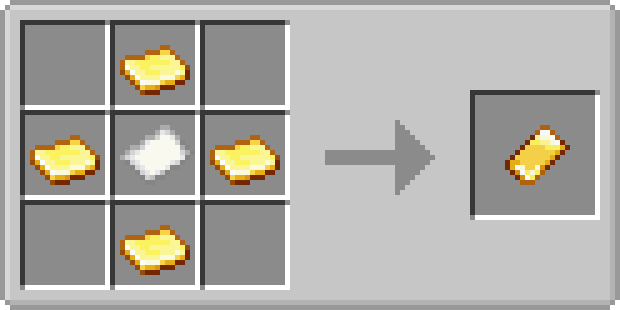
Superflat Pass
进入该维度的主要方式是通过 Superflat Pass。
通行证允许你进入 Superflat Dimension 并返回正常世界,提供了一种在主世界生存模式与专用 Create 建造区域之间切换的简便方法。
本模组保持简洁专注,仅添加使 Superflat Dimension 易于访问和使用的必要功能。
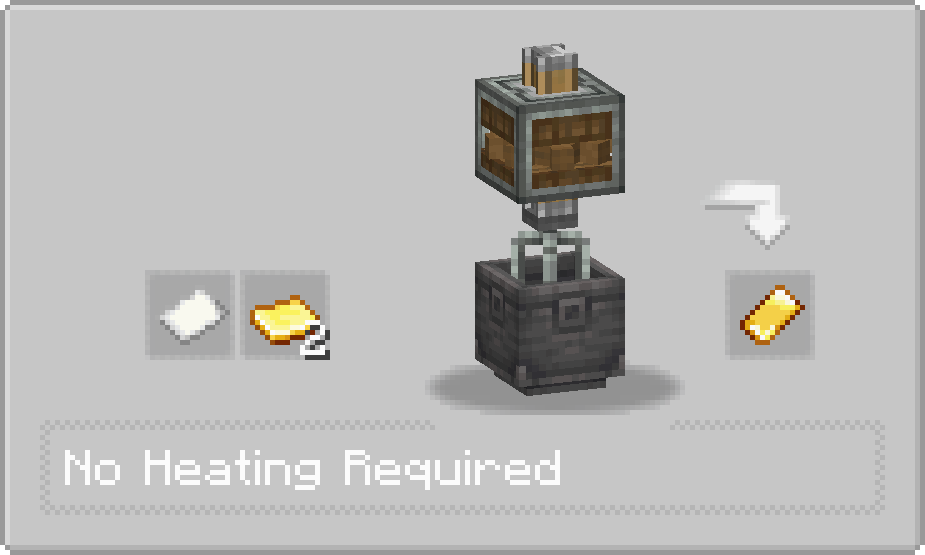
Superflat Pass Recipes
Crafting Recipe
Mechanical Mixer Recipe
Perfect for Create
Superflat Dimension 对于需要大量自由空间的 Create 玩家来说尤其有用,可用于:
- 大型工厂和生产线
- 机械装置
- 自动化系统
- 铁路和交通系统
- Redstone 和 Create 测试
- 大规模建筑项目
- 尝试新的 Create 设计
无论你是正在构建第一台机器,还是设计庞大的自动化工厂,Superflat Dimension 都能为你提供所需的空间。
Keep Your Machines Running
如果你希望在你离开 Superflat Dimension 时让 Create 机械继续运行,可以将此模组与 Create 区块加载扩展模组(如 Create: Power Loader)配合使用。
通过扩展模组中的适当区块加载方块,即使你不在 Superflat Dimension 内,也可以保持相关区块处于加载状态。这允许支持的 Create 机械和自动化系统在你在其他地方工作或探索时继续运行。
推荐模组:Create: Power Loader。一款区块加载扩展模组,可帮助你在远离 Superflat Dimension 时保持 Create 机械活跃。
A Simple Building Space for Create
Create: Superflat Dimension 为 Create 的建造、测试和实验提供了专用空间。它通过提供一个无需在主世界清理大面积区域的便捷、大致平坦的环境,使大规模建设和自动化变得更加容易。
无论你是测试小型机器、规划新工厂,还是构建大型自动化系统,Superflat Dimension 都提供了一个直观的场所供你操作。
Create: Superflat Dimension is a simple and practical addon for Create that adds a dedicated Superflat Dimension to Minecraft. It is designed for players who want a large, open, and convenient space for building factories, testing machinery, designing automation systems, experimenting with contraptions, or simply enjoying Create without worrying about terrain.
Superflat Dimension
The Superflat Dimension provides a clean and mostly flat environment with plenty of open space. This makes it especially useful for large-scale Create projects, factories, production lines, mechanical systems, automated farms, and testing setups.
Instead of searching for a suitable location in the Overworld and spending time clearing terrain, you can simply enter the Superflat Dimension and start building.
Superflat Dimension
Superflat Pass
The main way to access the dimension is through the Superflat Pass.
The pass allows you to enter the Superflat Dimension and return to the normal world, providing a simple and convenient way to switch between your regular survival world and your dedicated Create building area.
The mod keeps things simple and focused, adding only the features needed to make the Superflat Dimension easy to access and use.
Superflat Pass Recipes
Crafting Recipe
Mechanical Mixer Recipe
Perfect for Create
The Superflat Dimension is especially useful for Create players who need a large amount of free space for:
- Large factories and production lines
- Mechanical contraptions
- Automation systems
- Railway and transportation systems
- Redstone and Create testing
- Large-scale building projects
- Experimenting with new Create designs
Whether you are building your first machine or designing a huge automated factory, the Superflat Dimension gives you the space you need.
Keep Your Machines Running
If you want your Create machinery to continue operating while you are outside the Superflat Dimension, this mod can be used together with a Create chunk-loading addon, such as Create: Power Loader.
With a suitable chunk-loading block from the addon, you can keep the relevant chunks loaded even when you are not inside the Superflat Dimension. This allows supported Create machines and automation systems to continue running while you work or explore elsewhere.
Recommended Mod: Create: Power Loader. A chunk-loading addon that can help keep your Create machinery active while you are away from the Superflat Dimension.
A Simple Building Space for Create
Create: Superflat Dimension adds a dedicated space for building, testing, and experimenting with Create. It makes large-scale construction and automation easier by giving you a convenient, mostly flat environment without requiring you to clear large areas in the Overworld.
Whether you are testing a small machine, planning a new factory, or building a large automation system, the Superflat Dimension provides a straightforward place to do it.

下载 Create: Superflat Dimension
下载 Create: Superflat Dimension
下载 Create: Superflat Dimension
需要联机服务器吗?
稳定流畅、一键部署,几分钟即可和朋友联机开服
最低仅需 8 元/月 即可畅快联机
下载 Create: Superflat Dimension
下载 Create: Superflat Dimension
下载 Create: Superflat Dimension
需要联机服务器吗?
稳定流畅、一键部署,几分钟即可和朋友联机开服
最低仅需 8 元/月 即可畅快联机
下载 Create: Superflat Dimension
下载 Create: Superflat Dimension
下载 Create: Superflat Dimension
需要联机服务器吗?
稳定流畅、一键部署,几分钟即可和朋友联机开服
最低仅需 8 元/月 即可畅快联机
下载 Create: Superflat Dimension
新增
私人维度重置
- 在高级私人超平坦终端中添加了私人维度重置功能,允许将私人维度恢复到初始状态。
更改
恢复私人超平坦终端功能
- 在使用高级私人超平坦终端时,恢复了私人超平坦终端的邀请及其他功能,使其能够正常运行。
改进
权限状态变更
- 改进了权限状态处理逻辑。当玩家的状态变更为黑名单或无权限时,如果该玩家仍身处对应的私人维度内,将被立即传送离开。
访客限制
- 进一步加强了对访客的限制。除了无法破坏或放置方块外,访客现在也无法攻击生物或其他玩家。
新增
高级私人超平坦终端
- 新增了高级私人超平坦终端,相比普通私人超平坦终端提供了更全面的权限管理功能。
- 白名单: 玩家可以进入私人超平坦维度,并自由放置和破坏方块。
- 访客: 玩家可以进入该维度,但无法放置或破坏方块。
- 黑名单: 玩家无法进入该维度,并且在主人的相关玩家列表中隐藏。
- 无: 默认情况下玩家无法进入该维度,但主人可以邀请他们,并且他们仍然可以提交进入请求。
改进
- 改进了私人超平坦终端的用户界面。
修复
- 修复了当玩家离开并重新加入游戏时,其在私人超平坦维度中的位置未能正确保存和恢复的问题。
Minecraft 1.20.1 (Forge & Fabric)
- 修复了导致“Drop In”和“A Visitor Arrives”成就无法正确触发的问题。
关于这个资源的讨论、问题反馈与使用心得
还没有讨论,来发第一帖吧
你是这个资源的作者?登录后可认领此资源。
相似资源
 模组

一个用于收集生物掉落物的多区块模组。
 模组

显示你正在注视的方块的信息。(适用于 Minecraft 1.16+ 的 Hwyla/Waila 分支)
 模组

查看物品与配方
 模组

原版世界生成优化模组
 模组
在游戏画面角落显示附近世界地形、玩家、生物和实体的地图。可创建路径点,帮助你找到标记过的位置。
 模组
使用 JavaScript 编辑配方、添加自定义物品、编写世界事件!
评论 0
登录后参与评分
还没有评论,来抢沙发吧